Topaz Video is the best video restoration software overall, combining specialized AI models for denoising, sharpening, and upscaling with a 4.7/5 G2 rating and a $299/yr regular annual license (on sale at $254/yr). For repair of damaged files or one-time desktop licenses, Wondershare Repairit and AVCLabs Video Enhancer AI fit distinct workflows.
How we make this list: we compare pricing pages, product documentation and public user reviews, then re-check every price before each update. No product paid for a place. Disclosure.
#2 Best for repair
UniFab Video Upscaler AI
AI video upscaler with yearly and lifetime options
Topaz Video leads local restoration with a 4.7/5 G2 score and a $299/yr regular plan ($254/yr on sale).
Wondershare Repairit holds a 4.7/5 Trustpilot rating across 970 reviews for fixing corrupted files from $139.95/yr.
AVCLabs Video Enhancer AI offers colorization and face enhancement with a $95.96/yr plan and a $299.90 regular lifetime price ($199.90 on sale).
UniFab Video Upscaler AI lists a $99.99/yr plan and a $129.99 single-PC lifetime option with a 4.9/5 rating across 1,624 reviews.
DaVinci Resolve pairs a free editor with a $295 one-time Studio license (recently discounted to $236) and 4.7/5 G2 rating across 200 reviews.
How do you choose the best video restoration software?
Video restoration covers two distinct problems: enhancing noisy or low-resolution footage and repairing damaged container files. Blending those two tasks without checking what a tool actually fixes leads to wasted spend.
Hardware capacity shapes every desktop restoration workflow. Local AI upscaling and frame interpolation lean heavily on modern GPUs and VRAM, while cloud credit systems trade local speed for server queues and usage limits.
Licensing models vary sharply across vendors in 2026. Some tools charge recurring annual subscriptions or monthly cloud credits, whereas others sell one-time perpetual licenses that avoid ongoing renewals.
Preview tools protect your budget before committing to long renders. Checking watermark limits, trial clip caps, and sample-file repair previews helps confirm results on real source footage.
Topaz Video is a desktop and cloud video enhancement tool built around specialized AI models for denoising, sharpening, and upscaling. Its Video plan lists a $299/yr regular price (currently on sale at $254/yr) or $29/mo, with a free trial for evaluation.
The trade off is hardware demand and recurring cost at $299/yr for the standard annual plan. It suits creators and editors with capable GPUs who restore footage regularly.
What we like
Dedicated AI models for sharpening, noise reduction, and upscaling
Supports both local rendering and cloud credit workflows
Integrates into video editing and post-production pipelines
Watch out for
Heavy GPU requirements can slow long video renders
Annual subscription cost adds up compared to one-time tools
Paid plans add full-length exports, monthly cloud video credits, and commercial licensing tiers.Visit topazlabs.com
02
UniFab Video Upscaler AI
4.9/5on Vendor reviews (1,624 reviews, checked Nov 2026)
Starts at$99.99/yr
Best for flexible yearly or one-time desktop upscaling
DeploymentDesktop + Cloud
Yearly plan$99.99/yr
Lifetime license$129.99 one-time
Rating4.9/5 (1,624)
unifab.ai
UniFab Video Upscaler AI homepage, captured Nov 2026.
UniFab Video Upscaler AI is an AI video upscaling tool available with local GPU processing and optional cloud credits, backed by a 30-day free trial. Its yearly plan lists at $99.99/yr, with a single-computer lifetime option at $129.99.
The trade off is single-computer per-platform licensing and separate add-ons or credit usage depending on model and cloud mode at $99.99/yr. It suits home editors and archivists who want a lower-cost yearly or one-time upscaler.
What we like
Offers both a $99.99/yr subscription and a $129.99 one-time license
Includes a 30-day trial to test footage before buying
Supports local processing alongside optional cloud credits
Watch out for
Single-computer license ties activation to one machine and OS
Cloud processing and certain specialized tools require extra credits or add-ons
Paid licenses unlock full local rendering and model access beyond the 30-day trial limits.Visit unifab.ai
03
AVCLabs Video Enhancer AI
3.9/5on Trustpilot (556 reviews, checked Nov 2026)
Starts at$95.96/yr
Best for archival enhancement, colorization, and face refinement
DeploymentWindows & Mac
Yearly plan$95.96/yr
Perpetual regular$299.90 one-time
Rating3.9/5 (Trustpilot)
avclabs.com
AVCLabs Video Enhancer AI homepage, captured Nov 2026.
AVCLabs Video Enhancer AI is a desktop AI enhancer for upscaling, denoising, colorizing old footage, and refining faces, with a free trial limited to 30-second watermarked exports. Its yearly plan lists at $95.96/yr, while the perpetual license has a $299.90 regular price (recently discounted to $199.90).
The trade off is slow processing on non-NVIDIA hardware and a 3.9/5 Trustpilot score across 556 reviews at $95.96/yr. It suits users restoring old or black-and-white clips on an NVIDIA-equipped PC.
What we like
Combines upscaling, noise removal, colorization, and face enhancement
Runs locally on Windows and Mac without uploading footage
Offers a one-time perpetual license option in addition to yearly billing
Watch out for
Trial exports are capped at 30 seconds with a watermark
Performance depends heavily on an NVIDIA GPU for practical render times
Paid plans remove the 30-second export cap and watermark and unlock full batch processing.Visit avclabs.com
04
Wondershare Repairit
4.7/5on Trustpilot (970 reviews, checked Nov 2026)
Starts at$139.95/yr
Best for repairing corrupted and unplayable video files
FocusCorrupted file repair
Starting price$139.95/yr
Free tierPreview trial
Rating4.7/5 (Trustpilot)
repairit.wondershare.com
Wondershare Repairit homepage, captured Nov 2026.
Wondershare Repairit is a file repair application built to fix broken, truncated, or unplayable video files across camera and device formats, with a free preview trial before saving. Its starting plan is listed at $139.95/yr.
The trade off is that it repairs damaged file structures rather than acting as a full AI upscaler at $139.95/yr. It suits videographers and everyday users recovering corrupted footage from cards or transfers.
What we like
Strong 4.7/5 Trustpilot rating across 970 reviews for file recovery
Supports sample-file rebuilding for severely damaged video files
Lets you preview repaired results before paying to save
Watch out for
Not designed for deep AI resolution upscaling or creative look grading
Some severely corrupted files still fail repair depending on damage
4.1/5on Trustpilot (1,342 reviews, checked Nov 2026)
Paid from$180/yr
Best for browser-based restoration without heavy local hardware
DeploymentBrowser / Cloud
Starting price$180/yr
Free planStarter credits
Rating4.1/5 (Trustpilot)
vanceai.com
VanceAI homepage, captured Nov 2026.
VanceAI is a browser-based suite of AI enhancement and restoration tools that runs on cloud servers, starting with free trial credits on sign-up. Its Starter annual plan starts at $180/yr.
The trade off is credit consumption per task and upload times for larger videos at $180/yr. It suits users on laptops or shared machines who prefer cloud processing over local GPU rendering.
What we like
Runs in the browser with no local GPU installation required
Includes free trial credits to test tools before subscribing
Covers multiple enhancement and restoration tasks under one account
Watch out for
Credit usage limits how much video you can process per cycle
Uploading large video files takes longer than local rendering
Paid plans add larger credit allowances for ongoing cloud enhancement and restoration.Visit vanceai.com
06
DaVinci Resolve
4.7/5on G2 (200 reviews, checked Nov 2026)
Paid from$295 one-time
Best for color, stabilization, and cleanup inside a full NLE
DeploymentWin, Mac, Linux
Regular Studio$295 one-time
Free versionAvailable
Rating4.7/5 (G2)
blackmagicdesign.com
DaVinci Resolve homepage, captured Nov 2026.
DaVinci Resolve is a full editing, color grading, and post-production suite with a capable free version for color correction, stabilization, and basic cleanup. DaVinci Resolve Studio lists at a $295 one-time regular price (recently discounted to $236).
The trade off is a steeper learning curve and fewer dedicated AI upscaling models than specialized enhancers at $295 one-time for Studio. It suits editors who want color, stabilization, and finishing in one workspace.
What we like
Generous free edition with no recurring subscription fee
One-time $295 regular Studio license instead of ongoing rental fees
Combines color grading, motion tracking, stabilization, and editing
Watch out for
Steep learning curve compared to single-purpose restoration tools
Certain advanced neural features require the paid Studio edition
DaVinci Resolve Studio adds additional neural processing features, higher resolution support, and extra post-production tools.Visit blackmagicdesign.com
07
EaseUS Fixo
4.9/5on Trustpilot (40,000 reviews, checked Nov 2026)
Starts at$49.95/yr
Best low-cost toolkit for fixing corrupted video files
FocusVideo & file repair
Starting price$49.95/yr
PlatformsWindows & Mac
Rating4.9/5 (Trustpilot)
repair.easeus.com
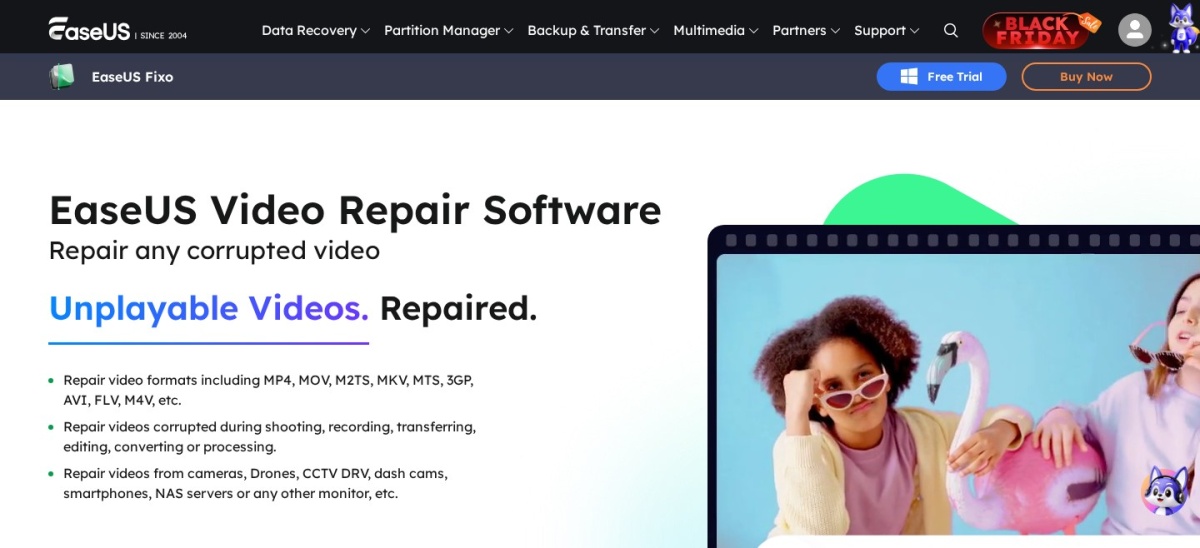
EaseUS Fixo homepage, captured Nov 2026.
EaseUS Fixo is a file repair utility for fixing unplayable, jerky, or corrupted video files across common formats on Windows and Mac. Its entry plan starts at $49.95/yr.
The trade off is limited depth on severe corruption and no dedicated AI upscaling suite at $49.95/yr. It suits budget-minded users who need a straightforward fix for damaged video files.
What we like
Low entry price starting at $49.95/yr
Supports quick repair and sample-based repair on Windows and Mac
Includes a preview step before saving repaired files
Watch out for
Does not replace dedicated AI video upscalers for low-res footage
Severely damaged files may still fail to reconstruct cleanly
Paid plans unlock full saving and batch repair across damaged video and media files.Visit repair.easeus.com
Should you choose AI enhancement or file repair?
AI enhancement tools like Topaz Video, UniFab Video Upscaler AI, and AVCLabs Video Enhancer AI reconstruct pixels, reduce grain, and upscale resolution on playable clips. File repair tools like Wondershare Repairit and EaseUS Fixo fix broken headers or corrupted streams so unplayable videos open again.
Buying a file repair tool will not turn 480p footage into crisp 4K video, and an AI upscaler cannot open a corrupted file with a missing index. Match the software to whether your file fails to play or simply looks degraded.
How we chose
We selected established video restoration and repair tools across desktop, cloud, and post-production workflows based on public product documentation, pricing pages, and user review platforms.
All prices, review ratings, and review counts were checked on 29 Nov 2026 across official vendor pricing pages, G2, and Trustpilot.
We excluded tools without verifiable public pricing or clear review data at check time, and we noted active promotional discounts alongside regular list prices. No vendor paid for a place, and we do not claim testing for this list.
How to pick the right restoration tool in 4 steps
Follow these four checks before buying a license.
Identify whether the file is corrupted or low-quality. Use a repair tool for broken or unplayable files, and an AI enhancer for noisy, blurry, or low-resolution footage.
Check your GPU and storage capacity. Local AI rendering needs strong graphics hardware and disk space, while cloud tools rely on uploads and credits.
Compare yearly billing against one-time licenses. Calculate total cost over one to two years rather than focusing only on a monthly or promotional rate.
Test a short clip or preview first. Verify how the software handles faces, motion, and audio sync on your actual footage before committing.
FAQ
What is the best video restoration software in 2026?
Topaz Video is the best overall pick for AI video enhancement and restoration, holding a 4.7/5 G2 rating with a $299/yr regular plan ($254/yr on sale). Wondershare Repairit is the top choice when a video file is corrupted and will not play.
How much does video restoration software usually cost?
Prices range from $49.95/yr for entry file repair like EaseUS Fixo up to $299/yr for Topaz Video, or $295 one-time for DaVinci Resolve Studio. Promotional discounts are common, so check regular list prices alongside sales.
Is there a free option for restoring or fixing videos?
Yes. DaVinci Resolve offers a free edition with color and stabilization tools, while tools like VanceAI, UniFab Video Upscaler AI, Topaz Video, AVCLabs Video Enhancer AI, and Wondershare Repairit offer free tiers or trials with limits.
Which tool is better for beginners or occasional projects?
UniFab Video Upscaler AI and EaseUS Fixo keep setup straightforward for occasional tasks at lower annual prices. If you only need occasional cloud upscaling without local GPU requirements, VanceAI offers a browser-based workflow.
Topaz Video vs. AVCLabs Video Enhancer AI: which should you pick?
Pick Topaz Video if you want dedicated AI upscaling and enhancement models with a 4.7/5 G2 rating and a $299/yr regular plan. Pick AVCLabs Video Enhancer AI if you want built-in colorization and face enhancement with a $95.96/yr plan or a perpetual license option.
SaaS SEO and WordPress specialist with about 8 years of experience. Rakib compares WordPress plugins, themes, hosting and software using public pricing, documentation and user reviews. See how we rank.