Affinity is the best value creative design software in 2026, offering pro-grade vector, photo, and layout tools for $0 with a 4.5 out of 5 G2 rating. Canva suits marketers needing fast templates at $144/yr, while Figma fits collaborative UI teams from $192/yr per full seat.
How we make this list: we compare pricing pages, product documentation and public user reviews, then re-check every price before each update. No product paid for a place. Disclosure.
Affinity delivers full vector, pixel, and page layout studios for $0, locking only Canva AI tools behind a $144/yr Canva Pro plan.
Canva Pro costs $144/yr billed annually ($18/mo monthly) for one person, while multi-seat teams pay $250/yr per user on Canva Business.
Pixlr Plus starts at $1.99/mo billed yearly ($23.88/yr) for ad-free editing and 80 monthly AI credits, making it the lowest-cost paid browser editor.
Photopea removes ads and unlocks 5 GB cloud storage plus generative fill for $50/yr, and Inkscape remains $0 with 416 G2 reviews at 4.4/5.
Adobe Creative Cloud Single App plans cost $22.99/mo ($275.88/yr), while CorelDRAW Graphics Suite runs $439/yr regular price ($263/yr on sale).
How do you measure the best value creative design software?
Sticker price alone does not define value in creative software—what matters is whether the free or entry tier finishes client-ready work without forcing a seat or credit upgrade.
In 2026, two major shifts reshaped design budgets: Canva made the unified Affinity desktop and iPad suite completely free for individuals, and browser editors like Photopea and Pixlr kept entry subscriptions under $50/yr.
Traditional desktop suites still carry recurring annual fees. Adobe charges $275.88/yr for a single app like Photoshop or Illustrator, and CorelDRAW lists a regular $439/yr subscription or $859 one-time license.
Choosing well comes down to separating daily production tasks—social templates, UI prototyping, vector logos, or RAW photo retouching—from occasional AI generation that drains monthly credit pools.
Affinity is an all-in-one desktop and iPad design suite combining Pixel, Vector, and Layout studios for $0. Individuals get non-destructive photo editing, precision vector drawing, CMYK print export, and PSD, AI, and INDD file import with no time limits or watermarks.
The trade off is that server-side AI tools like Generative Fill, Generative Expand, and Layer to 3D require a paid Canva Pro plan at $144/yr ($18/mo monthly), and you need a free Canva account to activate the license. It suits solo designers and illustrators avoiding recurring software bills.
What we like
Full vector, raster, and multi-page layout tools included for $0
Supports CMYK print output plus PSD, AI, and InDesign file imports
Works offline after initial license activation on Mac, Windows, and iPad
4.5 out of 5 G2 rating across 452 verified reviews
Watch out for
Server-side AI features require a $144/yr Canva Pro subscription
No real-time multi-user cloud co-editing like Figma
Requires signing in with a free Canva account to download and activate
Canva Pro ($144/yr) unlocks up to 200 monthly premium AI uses inside Affinity.Visit affinity.studio
02
Canva
4.7/5on G2 (7,970 reviews, checked Nov 2026)
Paid from$144/yr
Best for fast marketing templates and social graphics
PlatformsWeb, Windows, Mac, iOS, Android
Free storage5 GB + 1 Brand Kit
Pro storage100 GB + 5 Brand Kits
Team pricing$250/yr per seat (Business)
canva.com
Canva homepage, captured Nov 2026.
Canva is a browser-based graphic design and short-form video platform built around ready-made templates and drag-and-drop editing. Its free forever plan includes 5 GB of cloud storage, one Brand Kit with three colors, and basic editing tools with no credit card required.
The trade off is that one-click resizing, background removal, and premium stock assets sit behind Canva Pro at $144/yr ($12/mo billed annually or $18/mo monthly) for one person, while adding a second editor jumps to $250/yr per seat on Business. It suits solo marketers and small businesses producing daily social and print collateral.
What we like
Fast template-driven workflow with minimal learning curve
Includes 100 GB storage, 5 Brand Kits, and social scheduling on Pro
Highest G2 rating on this list at 4.7 out of 5 from 7,970 reviews
Available across browser, desktop, and mobile apps
Watch out for
Pro is strictly single-user; teams must pay $250/yr per person on Business
Lacks fine-grained vector node control and native CMYK print workflows
Extra AI generation beyond monthly allowances costs $100/mo for AI Pass
Canva Pro ($144/yr) adds background remover, Magic Resize, 5 Brand Kits, and 100 GB storage.Visit canva.com
03
Figma
4.7/5on G2 (1,603 reviews, checked Nov 2026)
Paid from$16/mo
Best for collaborative UI/UX and web design
PlatformsWeb, Windows, macOS
Free planStarter ($0) with free View seats
Paid seats$16/mo Full, $12 Dev, $3 Collab
G2 rating4.7/5 (1,603 reviews)
figma.com
Figma homepage, captured Nov 2026.
Figma is a browser-first interface design and prototyping platform built for real-time multiplayer collaboration. Its free Starter plan gives solo creators and small projects vector editing, component libraries, interactive prototyping, and unlimited free View seats for stakeholders.
The trade off is per-seat billing once teams scale—a Full seat on the Professional plan costs $16/mo ($192/yr) per editor, rising to $55/mo per Full seat on Organization—and Figma lacks CMYK support for print production. It suits web designers, product teams, and agencies sharing live design systems.
What we like
Real-time multiplayer editing, commenting, and developer inspection
Lower-cost Dev ($12/mo) and Collab ($3/mo) seats reduce team bills
Generous free Starter tier for individual UI/UX projects
4.7 out of 5 rating from 1,603 G2 reviews
Watch out for
No CMYK color mode for commercial print design
Full editor seats escalate to $55/mo on Organization and $90/mo on Enterprise
Requires manual seat audits so inactive editors do not incur monthly charges
Professional Full seats ($16/mo) unlock unlimited team files, shared libraries, and version history.Visit figma.com
04
Pixlr
4.4/5on G2 (749 reviews, checked Nov 2026)
Paid from$1.99/mo
Best budget browser photo editor with AI credits
PlatformsWeb, Windows, Mac, iOS, Android
Plus plan$1.99/mo yearly ($2.49/mo monthly)
Premium plan$7.99/mo yearly ($9.99/mo monthly)
AI credits80/mo on Plus, 1,000/mo on Premium
pixlr.com
Pixlr homepage, captured Nov 2026.
Pixlr is a browser-based photo editor and graphic design suite offering both quick-edit (Pixlr Express) and layer-based (Pixlr Editor) workspaces. A free tier lets users make basic edits in the browser without installing desktop software.
The trade off is ad-supported limits on the free tier and tight monthly AI quotas on entry plans—Pixlr Plus costs $1.99/mo billed annually ($23.88/yr, or $2.49/mo monthly) for ad-free editing, unlimited saves, and 80 monthly AI credits, while Premium runs $7.99/mo billed yearly ($95.88/yr) for 1,000 credits. It suits social creators needing fast cutouts and batch product edits on a tight budget.
What we like
Lowest-cost paid subscription on this list at $1.99/mo billed yearly
Runs immediately in any browser with zero installation
Includes 1,000 monthly AI credits and private AI mode on $7.99/mo Premium
Watch out for
Free version includes ads and daily save restrictions
80 monthly AI credits on Plus run out quickly with Generative Expand
Lacks RAW camera editing and deep print typography controls
Pixlr Plus ($1.99/mo yearly) removes ads, unlocks unlimited saves, and adds 80 monthly AI credits.Visit pixlr.com
05
Photopea
4.6/5on G2 (21 reviews, checked Nov 2026)
Paid from$50/yr
Best browser-based Photoshop PSD alternative
PlatformsWeb browser (any OS)
Free plan$0 with ads + 0.5 GB PeaDrive
Premium pass$50/yr or $5/mo (no auto-renewal)
FormatsPSD, AI, XD, Sketch, XCF, RAW
photopea.com
Photopea homepage, captured Nov 2026.
Photopea is a browser-based raster and vector editor that opens and saves Adobe Photoshop PSD, Illustrator AI, Sketch, XD, XCF, and RAW files without requiring an account or download. The free tier includes the full editing toolset and 0.5 GB of PeaDrive storage supported by sidebar ads.
The trade off is persistent banner ads and a smaller undo history on the free tier—upgrading to Premium costs $50/yr or $5/mo as a one-time pass (no auto-renewal) to remove ads, expand PeaDrive to 5 GB, and unlock generative AI fill. It suits freelancers and students who need Photoshop-compatible layer editing on any computer.
What we like
Full layer, mask, smart object, and PSD support at $0 with no sign-up
Premium passes ($50/yr or $5/mo) do not auto-renew
Works smoothly on Chromebooks, Linux, Windows, and macOS
Watch out for
Sidebar ads take up screen space on the free version
Large multi-layer files rely on browser memory rather than native GPU caching
Smaller template library than Canva or Kittl
Photopea Premium ($50/yr) removes ads, increases PeaDrive storage to 5 GB, and adds generative fill.Visit photopea.com
06
Kittl
4.7/5on G2 (43 reviews, checked Nov 2026)
Paid from$12/mo
Best for typography, merch, and AI-assisted branding
PlatformsWeb browser
Pro plan$12/mo billed annually ($144/yr)
Higher tiersExpert $26/mo, Max $65/mo yearly
G2 rating4.7/5 (43 reviews)
kittl.com
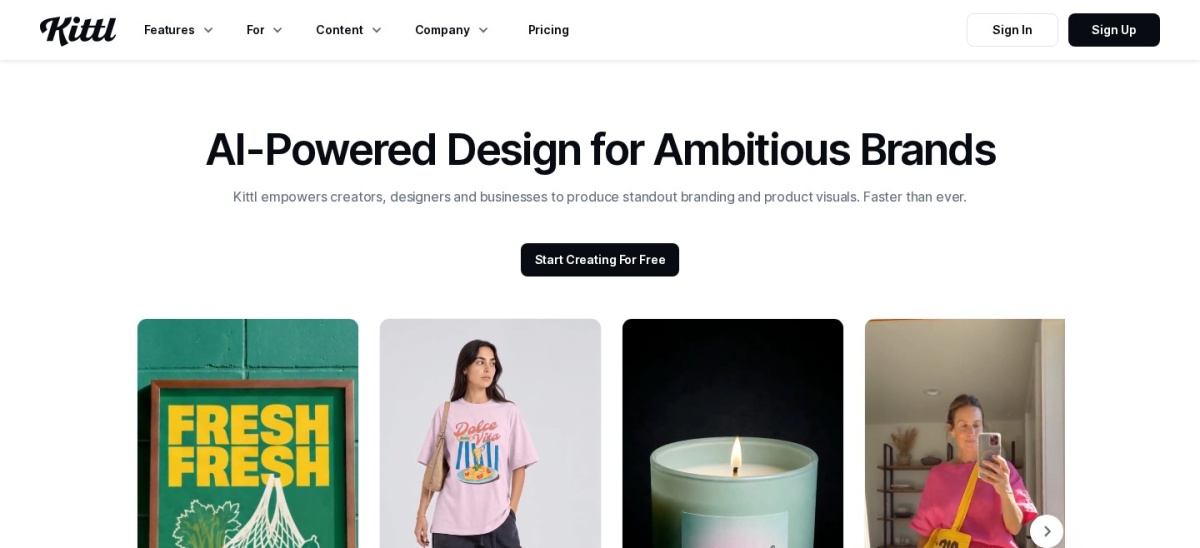
Kittl homepage, captured Nov 2026.
Kittl is a browser-based graphic design platform specializing in advanced typography, warped text effects, vector badges, and integrated AI image and vector generation. A free starter tier lets users test templates, fonts, and layout tools before committing to a paid subscription.
The trade off is that commercial export rights, full vector downloads, and higher AI credit pools require a paid seat starting at $12/mo billed annually ($144/yr) on Pro, scaling to $26/mo on Expert and $65/mo on Max. It suits print-on-demand sellers, brand designers, and merch creators who rely heavily on custom type.
What we like
Standout text transformation, shading, and vintage badge tools
Combines vector editing with multiple built-in AI image models
4.7 out of 5 rating across 43 G2 reviews
Watch out for
Free plan restricts export resolution and commercial licensing
Heavy AI image generation quickly consumes entry-tier credits
Kittl Pro ($12/mo billed annually) unlocks commercial license rights, vector exports, and monthly AI credits.Visit kittl.com
07
Inkscape
4.4/5on G2 (416 reviews, checked Nov 2026)
PriceFree
Best 100% open-source vector editor with no paywalls
PlatformsWindows, macOS, Linux
LicenseFree & open source (GPL)
Native formatW3C standard SVG
G2 rating4.4/5 (416 reviews)
inkscape.org
Inkscape homepage, captured Nov 2026.
Inkscape is a free, open-source vector graphics editor built natively around the SVG standard for Windows, macOS, and Linux. Every tool—including bezier node editing, bitmap tracing, boolean path operations, and calligraphy brushes—is unlocked at $0 with no accounts, subscriptions, or feature gates.
The trade off is a dated interface compared to commercial apps and weaker native CMYK print workflows without third-party plugins. It suits technical illustrators, Linux users, logo designers, and vinyl or laser-cutting makers who want permanent $0 vector software.
What we like
Completely free and open source with zero paid tiers or account lock-in
Native Linux support alongside Windows and macOS
Clean SVG output and precise bitmap-to-vector tracing
4.4 out of 5 G2 rating backed by 416 reviews
Watch out for
No native commercial CMYK prepress workflow out of the box
Interface feels less polished and slower on complex files than Affinity
No built-in generative AI tools or cloud collaboration
No paid plan exists; all features and updates are free forever.Visit inkscape.org
08
CorelDRAW
4.3/5on G2 (557 reviews, checked Nov 2026)
Starts at$439/yr
Best for signage, packaging, and perpetual licensing
PlatformsWindows, macOS, Web
Annual plan$439/yr regular ($263/yr on sale)
Buy-once option$859 regular ($515 on sale)
AI credits2,000/mo on subscription
coreldraw.com
CorelDRAW homepage, captured Nov 2026.
CorelDRAW Graphics Suite is a professional vector illustration, page layout, and photo-editing package built for signage, apparel, vehicle wraps, and packaging workflows. Unlike Adobe Creative Cloud, Corel offers both an annual subscription and a perpetual one-time license, plus a 15-day free trial.
The trade off is a steep regular entry price of $439/yr ($55/mo billed monthly, or $859 one-time; seasonal sales temporarily drop the first year to $263/yr) with no permanent free tier. It suits sign shops, print houses, and Windows-based studios needing variable data tools and perpetual licensing.
Industry favorite for large-format signage, screen printing, and CAD imports
Includes 2,000 monthly AI credits and 1,000+ fonts on subscription
Watch out for
No free plan—only a 15-day trial
Regular $439/yr price is higher than Affinity, Canva, or single Adobe apps
One-time license includes only 2,000 one-time AI credits rather than monthly refreshes
Annual subscription ($439/yr regular) includes CorelDRAW, PHOTO-PAINT, web access, and 2,000 monthly AI credits.Visit coreldraw.com
Why Adobe Creative Cloud missed our value podium
Adobe Photoshop and Adobe Illustrator remain industry benchmarks, but their regular pricing starts at $22.99/mo ($275.88/yr) per single app on an annual commitment, while Creative Cloud Standard costs $54.99/mo ($659.88/yr) and Creative Cloud Pro runs $69.99/mo ($839.88/yr) regular price.
For freelancers and small teams, Affinity now covers vector, raster, and multi-page layout in one $0 application, while Adobe Express Premium ($9.99/mo, or $119.88/yr) serves users who specifically want Adobe Fonts and Creative Cloud library sync.
How we chose
We built this list by comparing actively maintained creative design applications across vector illustration, raster photo editing, page layout, and template-driven marketing workflows.
Every rating, review count, and regular subscription or perpetual price was verified on 29 Nov 2026 directly from official vendor pricing pages and G2 review listings.
We excluded discontinued apps, tools with fewer than 20 verified reviews, and high-cost enterprise suites where entry pricing exceeds $500/yr without a free or budget tier. No vendor paid for a place, and we do not claim testing for this list.
How to pick the right creative design software for your budget
Follow four checks before paying for a design subscription or license.
Match the tool to your primary output. Pick Affinity or Inkscape for scalable vector logos and print layouts, Figma for interactive web and app interfaces, and Canva or Kittl for fast social media and merch templates.
Check whether the free tier blocks commercial exports. Affinity, Inkscape, and Photopea allow full-resolution commercial exports at $0, whereas Kittl and Canva gate vector downloads, brand kits, and background removal behind paid plans.
Count active editors before choosing a team plan. Canva Pro ($144/yr) covers one user only, while adding a second editor shifts you to Canva Business at $250/yr per seat; Figma lets stakeholders review on free View seats while editors pay $16/mo.
Separate core editing from monthly AI credit caps. Tools like Pixlr Plus ($23.88/yr) include 80 AI credits per month, while heavy generative fill or image creation can push bills higher than the base subscription.
FAQ
What is the best value creative design software in 2026?
Affinity is the best value creative design software in 2026 because its unified vector, photo, and layout desktop and iPad suite costs $0 for individuals. You only pay ($144/yr for Canva Pro) if you want server-side Canva AI tools inside the app.
Is there a completely free alternative to Adobe Creative Cloud?
Yes. Pairing Affinity ($0 for vector, photo editing, and layout) with Inkscape ($0 open-source SVG editor) and Photopea ($0 browser PSD editor) replaces Illustrator, Photoshop, and InDesign for most solo creators without recurring fees.
Which cheap design software is best for non-designers?
Canva and Pixlr are easiest for beginners. Canva offers a generous free tier and $144/yr Pro plan packed with social and print templates, while Pixlr Plus starts at $1.99/mo billed yearly ($23.88/yr) for quick browser photo edits.
How do Affinity and Canva compare on price and features?
Affinity is a $0 professional desktop and iPad suite for precision vector drawing, RAW photo editing, and CMYK print layout. Canva is a browser-first template and social graphics hub that is free for basic use or $144/yr for Canva Pro.
Can you still buy creative design software with a one-time payment?
Yes, CorelDRAW Graphics Suite sells a perpetual one-time license for $859 regular price ($515 during seasonal sales) alongside its $439/yr subscription, while Affinity and Inkscape require no purchase at all at $0.
How much does Figma cost for a small team in 2026?
Figma's Starter plan is free for basic projects, while the Professional plan charges $16/mo ($192/yr) per Full editor seat, $12/mo per Dev seat, and $3/mo per Collab seat, with unlimited free View seats for reviewers.
SaaS SEO and WordPress specialist with about 8 years of experience. Rakib compares WordPress plugins, themes, hosting and software using public pricing, documentation and user reviews. See how we rank.