Scribe is the best AI software documentation tool for most teams, turning screen recordings into step-by-step guides automatically. GitBook suits product docs with Git sync, while Document360 fits large help centers that need approval workflows.
How we make this list: we compare pricing pages, product documentation and public user reviews, then re-check every price before each update. No product paid for a place. Disclosure.
Scribe has the highest G2 rating in this list and turns recordings into step-by-step guides with screenshots.
GitBook pairs a visual editor with two-way Git sync, priced at 65 dollars per site plus 12 dollars per user.
Document360 is the help-center pick, with approval workflows and AI search, but it sells by quote.
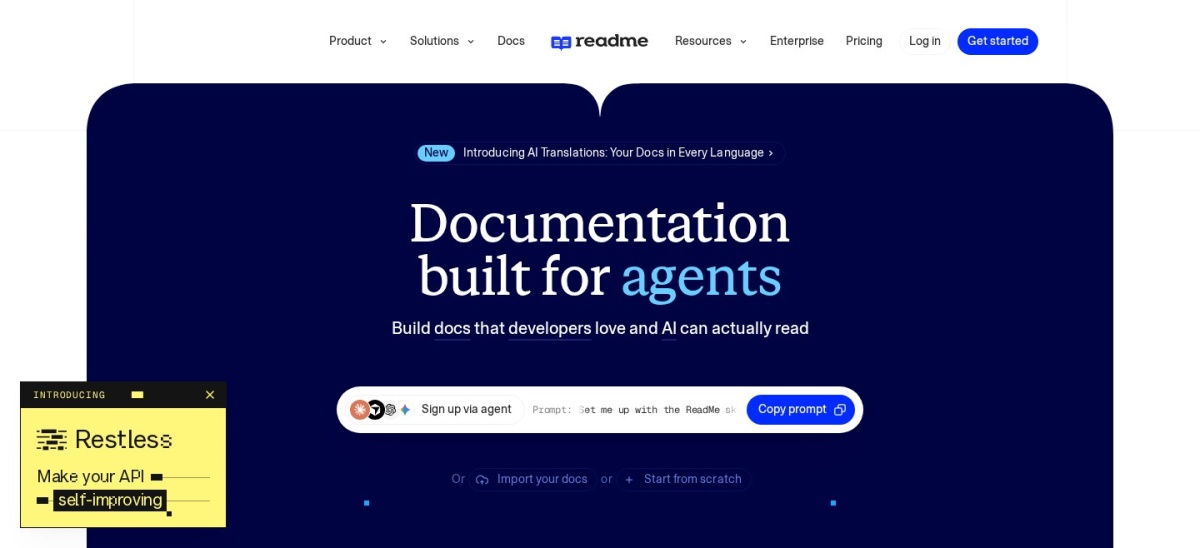
Mintlify Pro costs 450 dollars a month, while Starter is 150 dollars, with docs built for AI agents to read.
Notion Plus costs 10 dollars per user per month and suits teams that already live in Notion.
Confluence Standard is the cheapest paid tier here at 6 dollars 40 cents per user per month.
What AI documentation software should cover
Software documentation now splits into two jobs. Developer docs need API references, Git sync and versioning, while internal docs need a friendly editor, search and AI answers, and few tools do both well.
AI features differ sharply across this list. Scribe writes guides from recordings, Mintlify generates docs from code and serves them to AI agents, and GitBook and Confluence add AI search and drafting on paid tiers.
Pricing models are the trap. GitBook charges per site plus per user, ReadMe charges per admin, Mintlify charges per month regardless of seats, and Document360 and Archbee sell by quote, so compare the bill for your team size.
Open source is the free escape hatch. Docusaurus costs nothing to self-host, but it has no G2 rating and needs an engineer to run, so it sits outside this rated list.
Scribe is an AI documentation tool that records a workflow once and turns it into a step-by-step guide with screenshots, text and links. Basic is free, and Pro Team costs 13 dollars per seat per month billed annually, with 17 dollars month to month.
The trade off is scope. Scribe writes how-to guides, not API references or large knowledge bases, so developer docs still need another tool. It suits support, operations and training teams that document repeated processes.
GitBook is a documentation platform with a visual block editor and two-way Git sync, so technical writers and developers work on the same docs. Essential costs 65 dollars per site per month billed annually, plus 12 dollars per user per month, and includes an AI assistant for readers.
The trade off is the bill. A 10-person team on one site pays far more than the 65 dollar headline, and AI answers are metered on higher tiers. It suits cross-functional teams that value a friendly editor and version control together.
Document360 is a knowledge base platform for customer-facing help centers, with approval workflows, permissions, versioning and AI search. It holds 4.7 out of 5 on G2 from 541 reviews, and reviewers praise its support and governance features for large teams.
The trade off is price. Document360 publishes no prices and sells by quote, so a team cannot budget without a sales conversation. It suits support and documentation teams that need workflow control at scale.
Mintlify is a docs-as-code platform for API-first startups, generating polished docs from code with minimal setup. Starter costs 150 dollars a month on annual billing and Pro costs 450 dollars, with unlimited editor seats, 10,000 AI credits a month and agent traffic analytics on Pro.
The trade off is cost. Mintlify is expensive once AI usage grows, and the 19 G2 reviews are the smallest base in this list. It suits developer-tools startups that want docs AI agents can read, with llms.txt generated automatically.
Notion is a connected workspace where teams create docs, take notes and organise work in one place, with AI search and AI agents built in. Plus costs 10 dollars per user per month billed annually, and the homepage claims 100 million users, with more than half of YC companies on board.
The trade off is focus. Notion is a flexible workspace, not a dedicated docs platform, so API references and versioned publishing need workarounds. It suits teams that already run on Notion and want docs in the same system of record.
Archbee is a documentation portal for developer-facing docs, with API references, code blocks, versioned content and AI features. It holds 4.6 out of 5 on G2 from 118 reviews, and reviewers praise its ease of use, setup and value for money.
The trade off is pricing clarity. Archbee publishes mixed per-user figures and a Contact Sales path, while secondaries quote 50 to 80 dollars a month, so the real starting price is unclear. It suits small developer teams that want a clean docs portal without enterprise cost.
ReadMe is an interactive API hub where developers try endpoints live from the docs, with authentication handling, code samples and OpenAPI sync. Pro costs 250 dollars a month billed annually, and a free Starter plan covers small teams.
The trade off is price and scope. Pro is expensive for a hobby project, AI features are a paid add-on, and granular roles are limited below Enterprise. It suits API companies that want docs, changelog, recipes and usage logs in one hub.
Confluence is Atlassian's wiki and AI workspace, with live docs, whiteboards, databases and Rovo AI for drafting, summarising and finding answers. Standard costs 6 dollars 40 cents per user per month, and the free plan covers up to 10 users with unlimited pages and spaces.
The trade off is usability. Confluence holds the lowest G2 rating in this list at 4.1 out of 5, and reviewers rate it below rivals on ease of use, even though Capterra users rate it higher. It suits teams that already run Jira and want docs linked to issues.
Scribe, GitBook, Notion, ReadMe, Mintlify and Confluence all offer a free plan or tier, but the free tiers cap editors, sites or AI credits, so a growing team pays quickly.
Docusaurus is fully free and open source, with no subscription at all. It has no G2 rating, so it is not ranked here, but engineering teams that write docs as code should compare it before paying.
Redocly Pro costs 249 dollars a month billed annually and Fern is free for up to 10 members, but both carry thin G2 bases of one review each, so neither made this list.
How we chose
We started from documentation platforms named in 2026 buying guides, then kept those with a verifiable G2 rating and a real review base, favouring tools with AI drafting, search or generation.
Prices come from each vendor pricing page and from guides that read them, checked on 26 November 2026. Ratings and review counts come from G2 on the same day. Where a vendor publishes no price, the list shows Custom.
We left out tools with only one or two G2 reviews and open source projects with no rating. No vendor paid for a place, and we do not claim hands-on testing for this list.
How to choose AI software documentation
Start with who writes the docs and who reads them, then price the team, not the headline.
Decide who writes and who reads. Developers need Git sync and API references, while support teams need a friendly editor and approvals. Pick the tool that fits the writers first.
Price your real team size. GitBook adds 12 dollars per user on top of 65 dollars per site, and ReadMe charges per admin, so multiply the headline by seats before comparing.
Test the AI on your own docs. Drafting, search and agent answers vary by content type, so run a trial with real pages before committing to a paid tier.
Check the export and migration path. Docs live for years, so confirm you can export Markdown and leave without losing version history.
FAQ
What is the best AI software documentation tool?
Scribe is the best pick for most teams. It records a workflow once and turns it into a step-by-step guide with screenshots, and it holds the highest G2 rating in this list at 4.8 out of 5 from 760 reviews.
How much does AI documentation software cost?
Published prices start at 6 dollars 40 cents per user per month for Confluence Standard, 10 dollars for Notion Plus and 13 dollars per seat for Scribe Pro Team. GitBook starts at 65 dollars per site, and Document360 sells by quote.
What is the difference between GitBook and ReadMe?
GitBook is a visual editor with two-way Git sync for product and developer docs, priced per site plus per user. ReadMe is an interactive API hub where developers try endpoints live, priced from 250 dollars a month on Pro.
Is Mintlify good for API documentation?
Yes, for API-first startups. Mintlify generates polished docs from code with minimal setup, serves agent-readable docs with llms.txt, and Pro costs 450 dollars a month, with Starter at 150 dollars a month.
Is there a free AI documentation tool?
Yes. Scribe Basic, GitBook, Notion, ReadMe Starter, Mintlify Starter and Confluence all have free tiers for up to 10 users or limited editors. Docusaurus is fully free and open source for teams that self-host.
Which documentation tool is best for a help center?
Document360 is the best fit for a customer-facing help center at scale, with approval workflows, permissions and AI search. It sells by quote, so budget for a sales conversation and an implementation.
SaaS SEO and WordPress specialist with about 8 years of experience. Rakib compares WordPress plugins, themes, hosting and software using public pricing, documentation and user reviews. See how we rank.