Canva is the best photo editing software for beginners, with templates, one-click fixes and background removal in a free plan that covers most first edits. Pixlr is the cheapest paid step up for browser editing, and Fotor is the easiest for one-click AI enhancement.
How we make this list: we compare pricing pages, product documentation and public user reviews, then re-check every price before each update. No product paid for a place. Disclosure.
Canva Pro costs $120 a year, but the free plan covers most first edits with templates and one-click fixes.
Pixlr Plus is the cheapest paid plan here at $23.88 a year, and it runs in the browser with layers.
Fotor Pro costs $39.99 a year and is the easiest route to one-click AI enhancement and batch edits.
Photoshop Elements costs $99.99 once for a 3-year licence and teaches each edit with guided steps.
GIMP is free and fully featured, but it has the steepest learning curve of the nine.
What a beginner photo editor should do
A beginner editor should make the first edit fast. Crop, brightness, a filter and a straight horizon cover most photos, so the best tools put those controls on the first screen.
Templates and guided edits matter more than raw power. Canva and Picsart turn a photo into a finished post, while Photoshop Elements walks through each step with a guide.
Free plans are genuinely useful here. Canva, Pixlr, Fotor, Picsart and BeFunky all edit free, so try the workflow before paying. Our guide to the best AI image editing software compares the same tools for AI features.
Subscription versus one-time payment is the other split. Lightroom, Canva and Picsart charge monthly or yearly, while Luminar Neo and Photoshop Elements sell a licence you pay for once.
The 9 best photo editing software tools for beginners
01
Canva
4.7/5on G2 (8,283 reviews, checked Nov 2026)
Paid from$120/yr
Best photo editor for beginners overall
Free planYes, 5 GB storage
Paid planPro, $120/yr
Templates250,000+
RAW editingNo
canva.com
Canva homepage, captured Nov 2026.
Canva is the easiest starting point for a beginner who edits photos to post them. Crop, filter and adjust a photo, remove the background, then drop it into a social post, flyer or presentation from more than 250,000 templates. The free plan covers basic edits and 5 GB of storage.
The trade off is depth. Canva is a design tool first, so it lacks the RAW workflow and fine retouching of Lightroom or Luminar Neo, and the best AI tools sit behind Pro at $120 a year. It suits beginners who want a finished post, not a photography workflow.
What we like
Easiest route from photo to finished post
Free plan covers most first edits
250,000-plus templates included
Watch out for
No RAW workflow
Best AI tools need Pro
Pro adds background removal, Magic Edit and 1 TB storageVisit canva.com
02
Pixlr
4.4/5on G2 (749 reviews, checked Nov 2026)
Paid from$23.88/yr
Best for quick browser edits on a budget
Free planYes, with ads
Paid planPlus, $23.88/yr
LayersYes, in Editor
Install neededNo, browser
pixlr.com
Pixlr homepage, captured Nov 2026.
Pixlr is a browser editor that runs on any computer with no install. The free tier covers crop, filters, background removal and generative fill, while the Editor adds layers and masks for users who want more. Plus is the cheapest paid plan here at $23.88 a year.
The trade off is polish. The interface packs many tools into small panels, and ads appear on the free tier. It suits beginners who want quick fixes from any computer and the lowest paid price.
Fotor is the friendliest option for one-click fixes. Its AI enhancer, background remover and portrait tools handle the most common edits, and batch editing helps when a folder of similar shots needs the same treatment. The free plan lets you test the workflow before paying.
The trade off is the credit system. Advanced AI tools draw on credits, and Pro at $39.99 a year is needed for the full set. It suits casual editors who want better photos without learning editing theory.
Picsart is a phone-first creative app that pairs photo editing with templates, stickers and AI tools. Pro adds advanced background removal, bulk editing of up to 50 images and 100 GB of storage, with 500 AI credits a month. The free plan covers casual edits with ads.
The trade off is the phone focus. The desktop experience is thinner than the app, and in-app prices differ from the website, so check where you buy. Pro costs $126 a year. It suits creators who edit mainly on a phone for social posts.
Adobe Lightroom is the default catalog editor for photographers, and the Lightroom plan costs $11.99 a month with 1 TB of cloud storage. Presets, AI masking, generative remove and denoise keep large photo sets consistent, and edits sync across desktop, phone and tablet.
The trade off is the subscription and the learning curve. There is no free plan beyond a 7-day trial, and the catalog workflow takes longer to learn than Canva or Fotor. It suits beginners who shoot regularly and want their photos to look consistent.
Adobe Photoshop Elements homepage, captured Nov 2026.
Adobe Photoshop Elements is a desktop editor that teaches as it works. Guided edits walk a beginner through each step, from fixing exposure to removing objects, with layers and selection tools underneath. The 2026 licence costs $99.99 once and covers three years.
The trade off is the licence term. The $99.99 price covers three years, not life, and there is no free plan beyond a 7-day trial. It suits beginners who want a desktop editor with guidance and no monthly bill.
Luminar Neo is built for photographers who want AI to do the heavy lifting. Sky replacement, relighting and portrait tools work with sliders rather than masks, and the desktop licence costs $119 once, with AI tools included for the first year.
The trade off is the AI clock. Generative tools work for the first year only, and the catalogue is thinner than Lightroom. It suits hobby photographers who want fast AI edits without a monthly subscription.
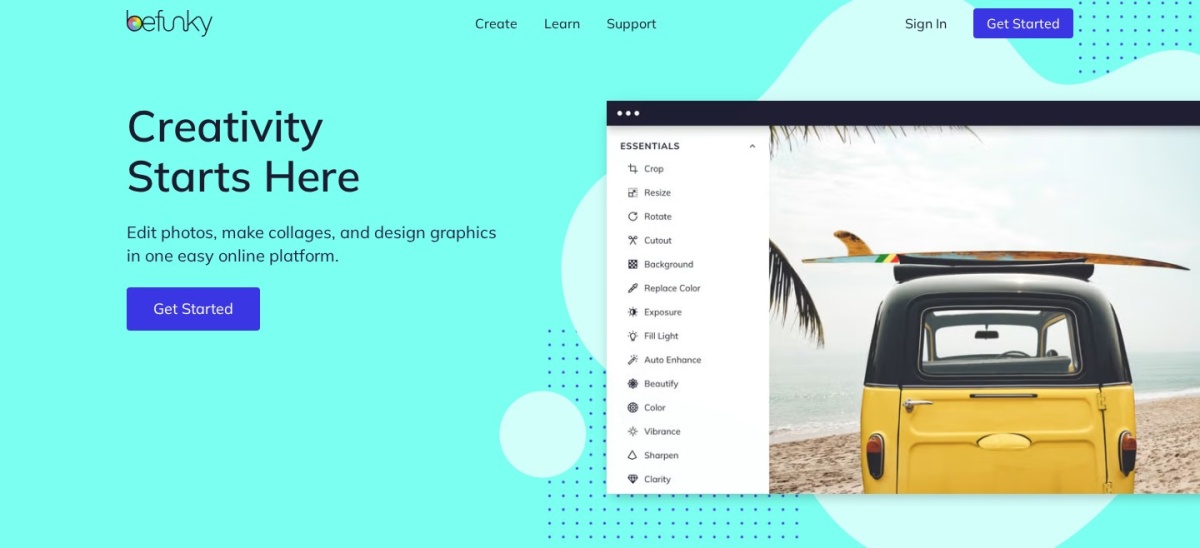
BeFunky is a browser editor, collage maker and design tool with AI background removal, object erase and batch editing. The free plan covers basic edits and collages, while Plus at $83.88 a year adds 1,000 monthly AI credits and batch tools.
The trade off is depth. BeFunky is weaker than Lightroom or Luminar Neo for RAW photos and fine retouching. It suits casual editors who want quick edits and collages in the browser.
GIMP is a free, open-source editor with layers, masks and a deep plugin library. It handles retouching, compositing and format conversion with no cost and no account, on Windows, Mac and Linux. It is the only fully free full editor here.
The trade off is the learning curve. GIMP has the steepest start of the nine, with no built-in RAW editor and an interface that feels dated. It suits patient beginners who want professional power for free.
Monthly plans suit editors who want the newest AI tools. Lightroom, Canva and Picsart update constantly, and the subscription covers cloud storage too.
One-time licences suit editors who dislike bills. Photoshop Elements costs $99.99 for three years and Luminar Neo $119 once, which beats three years of any subscription here.
Free plans suit everyone else. GIMP is fully free, and Canva, Pixlr and Fotor cover most first edits without paying at all.
How we chose
We started from the photo editors beginners actually use, with a public G2 rating and a published price, then kept the nine that suit a first-time editor.
Prices come from each vendor's pricing page, checked on 26 November 2026. Ratings come from G2 on the same day. Where a vendor shows a sale, the list shows the regular price.
We left out tools with no verified public rating. No vendor paid for a place, and we do not claim hands-on testing for this list.
How to choose a photo editor as a beginner
Start free, match the tool to the job, and only pay when the free limits bite.
Start with the free plan. Try Canva, Pixlr or Fotor free first; the workflow you enjoy matters more than the feature list.
Match the tool to the job. Pick Canva or Picsart for social posts, Lightroom for large photo sets, and Elements for guided desktop edits.
Check the price shape. Subscriptions suit constant use, while a one-time licence from Luminar Neo or Elements suits occasional editing.
Keep the originals. Edit a copy and keep the original file, so a filter or crop you regret can be undone.
FAQ
What is the best photo editing software for beginners?
Canva is the best pick for most beginners. Its free plan covers crop, filters and background removal, and templates turn a photo into a finished post in minutes. Pixlr is the cheapest paid step up, and Fotor is the easiest for one-click AI fixes.
Is there a free photo editor for beginners?
Yes. GIMP is fully free with professional tools, and Canva, Pixlr, Fotor, Picsart and BeFunky all offer free plans. The free tiers cover crop, filters, background removal and collages, which is enough for most first edits.
Canva vs Pixlr: which is better for beginners?
Canva is better for turning photos into posts, with templates and design tools in one place. Pixlr is better for pure photo fixes in the browser, with layers and masks at the lowest paid price here. Try both free and keep the one you enjoy.
Do I need Lightroom as a beginner?
Not at first. Lightroom suits beginners who shoot regularly and want consistent edits across many photos, with presets and a catalog. For occasional edits, Canva or Fotor is faster to learn and cheaper, with free plans to start.
Is Photoshop Elements still worth buying?
Yes, for beginners who want a desktop editor with guidance. Guided edits walk through each step, and the $99.99 licence covers three years with no monthly bill. The trade-off is the fixed term and the lack of a free plan.
What is the cheapest paid photo editor for beginners?
Pixlr Plus is the cheapest paid plan here at $23.88 a year, billed annually. Fotor Pro follows at $39.99 a year. Both run in the browser with free tiers, so try them free before paying anything.
SaaS SEO and WordPress specialist with about 8 years of experience. Rakib compares WordPress plugins, themes, hosting and software using public pricing, documentation and user reviews. See how we rank.