Best PDF Software for Small Business in 2026: 7 Tools Compared
WLWPLegible EditorsLast verified 22 Nov 2026How we rank6 min read
★ Short answer
Adobe Acrobat Pro leads for small businesses that need reliable PDF editing, e-signatures, and broad client compatibility across desktop, web, and mobile at $19.99/mo billed annually. Foxit PDF Editor suits teams wanting lower annual pricing with admin controls, while PDFgear works well for zero-cost desktop and browser edits.
How we make this list: we compare pricing pages, product documentation and public user reviews, then re-check every price before each update. No product paid for a place. Disclosure.
Adobe Acrobat Pro starts at $19.99/mo on an annual plan ($239.88/yr) and holds a 4.5 rating across 5,788 G2 reviews.
Foxit PDF Editor starts at $129.99/yr per user and holds a 4.6 rating across 3,784 G2 reviews.
Nitro PDF Standard starts at $15/user/mo ($180/yr billed annually) and holds a 4.4 rating across 444 G2 reviews.
UPDF offers a free tier with limits and paid plans starting at $49.99/yr or $79.99 one-time, backed by a 4.5 rating across 510 G2 reviews.
PDFgear offers core editing and conversion for free across Windows, macOS, iOS, and Android, holding a 4.8 rating across 186 G2 reviews.
What small businesses should look for in PDF software
Small businesses rarely use PDFs for simple viewing alone. Most teams need to update invoices, merge proposals, fill client forms, collect signatures, or turn scanned receipts into searchable text without losing layout formatting.
Platform coverage matters as much as editing tools. A desktop app that only runs on Windows creates friction if part of your team uses macOS or works from phones, while web-only tools can slow down large multi-page files.
Check whether a tool charges per seat, requires an annual commitment, or caps e-signature envelopes and OCR pages. A low headline rate can add up quickly once you add multiple staff members or recurring client agreements.
Decide early whether you prefer a subscription with ongoing cloud and security updates or a one-time license. Both models work for small teams, provided the software still matches your operating system and workflow.
For browser-first teams doing quick conversions and compression
$108/yr
Free plan
4.5/5
Price ladder: cheapest paid plan per year
List prices, USD, checked Nov 2026
PDFgearFree
UPDFFREE$50
Sejda PDFFREE$63
SmallpdfFREE$108
Foxit PDF$130
Nitro PDF$180
Acrobat Pro$240
The 7 best pdf software for small business
01
Adobe Acrobat Pro
4.5/5on G2 (5,788 reviews, checked Nov 2026)
Starts at$19.99/mo
Best for cross-platform compatibility and full PDF workflows
Entry plan$19.99/mo (annual commitment)
PlatformsWindows, macOS, Web, iOS, Android
Key toolsEdit, OCR, e-sign, redact, compare
G2 rating4.5/5 (5,788 reviews)
adobe.com
Adobe Acrobat Pro homepage, captured Nov 2026.
Adobe Acrobat Pro is a full-featured PDF editor built to create, edit, convert, organize, protect, and sign business documents across desktop, web, and mobile. It offers a 7-day free trial and includes tools to export PDFs to Word or Excel, collect signatures, and turn scans into editable files.
The trade off is the ongoing cost at $19.99/mo on an annual commitment ($239.88/yr), with early cancellation fees or no refund after 14 days. It suits small businesses that exchange complex forms or contracts with external clients and want broad file compatibility.
What we like
Strong text, image, page, and form editing across desktop, web, and mobile
Built-in e-signature collection, password protection, and redaction tools
Widely recognized format behavior when sharing files with clients and vendors
Watch out for
Higher recurring cost than several competitors for smaller teams
Annual commitment terms penalize early cancellation after the trial window
Some AI features require separate add-ons or higher-tier plans
Paid plans unlock full editing, OCR, e-signatures, and multi-device access.Visit adobe.com
02
Foxit PDF Editor
4.6/5on G2 (3,784 reviews, checked Nov 2026)
Starts at$129.99/yr
Best for teams wanting lower annual pricing and admin controls
Entry plan$129.99/user/year
PlatformsWindows, macOS, Web
Key toolsEdit, OCR, merge, compare, forms
G2 rating4.6/5 (3,784 reviews)
foxit.com
Foxit PDF Editor homepage, captured Nov 2026.
Foxit PDF Editor is a desktop and web PDF editing suite designed for everyday office editing, page organization, OCR, and document review with a familiar Office-style ribbon. Foxit also offers a free Foxit PDF Reader for viewing and annotating, plus a 14-day free trial of the editor.
The trade off is paying $129.99/user/year up front and stepping up to higher tiers for mobile apps, AI Smart Redact, or eSign envelopes. It suits small businesses standardizing on a fast desktop editor without paying Adobe list prices.
What we like
Lower annual starting price than Adobe Acrobat Pro for core editing
Supports Windows, macOS, and web workflows with OCR and form creation
High user satisfaction for speed and everyday document markup
Watch out for
Entry plan omits mobile apps, AI Smart Redact, and bundled eSign envelopes
Some advanced review and redaction options sit in higher-priced editions
Multi-seat license management takes a brief learning curve
Paid plans add full text/image editing, OCR, batch conversion, and team management.Visit foxit.com
03
Nitro PDF
4.4/5on G2 (444 reviews, checked Nov 2026)
Starts at$15/mo
Best for Office-heavy teams moving away from Adobe
Entry plan$15/user/mo ($180/yr billed annually)
PlatformsWindows, macOS, Web, iOS
Key toolsEdit, convert, OCR, sign, share
G2 rating4.4/5 (444 reviews)
gonitro.com
Nitro PDF homepage, captured Nov 2026.
Nitro PDF is a business document platform combining PDF editing, file conversion, OCR, and signing tools with an interface modeled on Microsoft Office. It offers a 14-day free trial so small teams can test conversions and signing workflows before buying.
The trade off is an entry rate of $15/user/month ($180/year billed annually) and occasional formatting shifts on complex conversions. It suits small businesses whose staff already live in Microsoft Office and want a straightforward alternative.
What we like
Intuitive Office-style toolbar reduces training time for non-technical staff
Covers editing, conversion, OCR, and electronic signatures in one vendor stack
Strong option for teams leaving Adobe without losing standard business tools
Watch out for
Annual per-user cost ($180/yr) is higher than several budget editors
Complex layouts or large files can occasionally slow down or shift formatting
No ongoing free editing tier after the trial period
Paid plans include ongoing updates, editing, conversion, and document signing.Visit gonitro.com
04
UPDF
4.5/5on G2 (510 reviews, checked Nov 2026)
Paid from$49.99/yr
Best budget pick for multi-device or one-time buyers
Entry plan$49.99/yr (or $79.99 one-time)
PlatformsWindows, macOS, iOS, Android
Key toolsEdit, annotate, convert, sign, cloud
G2 rating4.5/5 (510 reviews)
updf.com
UPDF homepage, captured Nov 2026.
UPDF is a cross-platform PDF editor for Windows, macOS, iOS, and Android covering text and image edits, annotations, page organization, and document signing. Its free tier lets you test the app, while adding watermarks on saved files and capping daily conversions.
The trade off is starting at $49.99/yr (or $79.99 one-time) to remove watermarks and usage limits, with optional add-ons for heavier AI or sign needs. It suits budget-conscious freelancers and small teams working across desktop and mobile.
What we like
Low entry pricing at $49.99/yr and a one-time license option at $79.99
Runs across Windows, macOS, iOS, and Android with cloud syncing
Clean interface that handles everyday edits, splitting, and signing quickly
Watch out for
Free version applies watermarks on save and limits daily conversions
Some advanced AI and signing capabilities sit outside the base editor
Less established enterprise footprint than Adobe or Foxit
Paid plans remove watermarks and daily conversion limits across supported devices.Visit updf.com
05
PDFgear
4.8/5on G2 (186 reviews, checked Nov 2026)
PriceFree
Best completely free PDF editor for small offices
Entry planFree (no paid core plan)
PlatformsWindows, macOS, iOS, Android, Web
Key toolsEdit, merge, convert, OCR, sign
G2 rating4.8/5 (186 reviews)
pdfgear.com
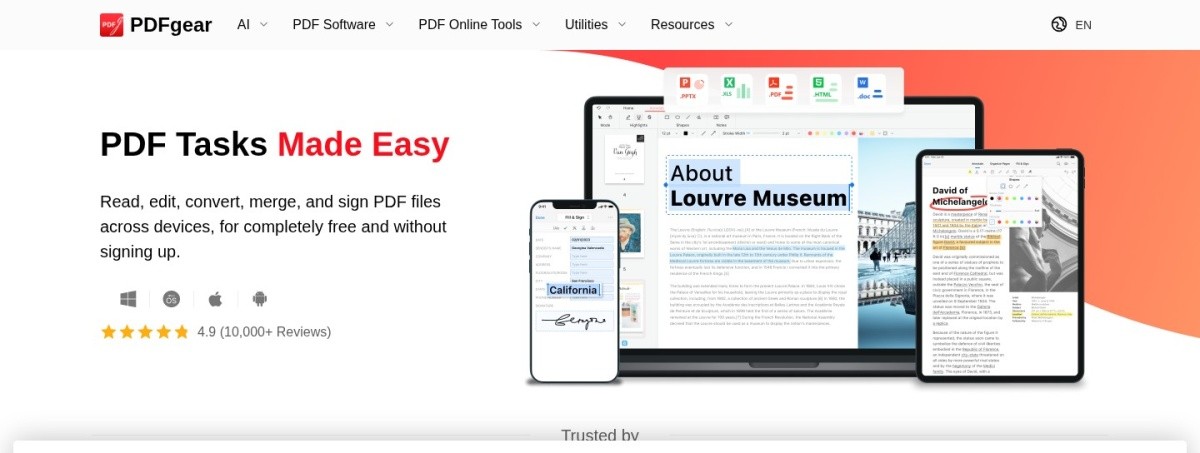
PDFgear homepage, captured Nov 2026.
PDFgear is a free PDF reader, editor, and converter available on Windows, macOS, iOS, Android, and the web with no forced account sign-up or watermarks on edits. It supports editing text, merging files, converting formats, and running OCR across more than 30 languages.
The trade off is having no paid core subscription tier with formal enterprise SLA guarantees, alongside occasional limits on complex or heavy tasks. It suits small offices and solo founders who want zero-cost PDF editing without watermarks.
What we like
Core editing, conversion, and OCR are free with no watermarks or sign-up required
Available on Windows, macOS, iOS, Android, and web browsers
High rating among small-business users for simplicity and value
Watch out for
Lacks formal enterprise admin and support contracts typical of paid suites
Very complex document layouts can occasionally push past light editing needs
Dedicated e-signature workflows are separated into eSignGear
Core PDF editing and conversion remain free; separate tools handle specialized workflows like eSignGear.Visit pdfgear.com
06
Sejda
4.5/5on G2 (41 reviews, checked Nov 2026)
Paid from$63/yr
Best for short-term web passes and flexible team seat discounts
Entry plan$63/yr Desktop+Web (or $5 7-day pass)
PlatformsWeb, Windows, macOS, Linux
Key toolsEdit text, merge, split, compress, OCR
G2 rating4.5/5 (41 reviews)
sejda.com
Sejda homepage, captured Nov 2026.
Sejda provides browser-based and desktop PDF tools for editing text, merging, splitting, compressing, signing, and running OCR on Windows, macOS, and Linux. Its free tier allows up to 3 tasks per day with page and file-size caps, while a one-time $5 Web Week Pass covers short bursts.
The trade off is $63/yr for full Desktop+Web access and strict task, page, and file-size limits on the free tier. It suits small teams with occasional PDF projects or short-term document sprints.
What we like
Offers a $5 one-time 7-day web pass alongside annual Desktop+Web plans
Desktop app supports Windows, macOS, and Linux with volume discounts from 2 users
Free tier works right away with up to 3 daily tasks
Watch out for
Free tier caps tasks at 3 per day and restricts file sizes, page counts, and OCR pages
The $5 week pass only covers Sejda Web and excludes Sejda Desktop
Smaller review footprint than major enterprise PDF suites
Paid plans remove hourly, page, and file-size caps and raise OCR limits up to 100 pages.Visit sejda.com
07
Smallpdf
4.5/5on G2 (310 reviews, checked Nov 2026)
Paid from$108/yr
Best for browser-first teams doing quick conversions and compression
Entry plan$108/yr (or $15/mo)
PlatformsWeb, Mobile, Desktop
Key toolsCompress, convert, merge, edit, AI
G2 rating4.5/5 (310 reviews)
smallpdf.com
Smallpdf homepage, captured Nov 2026.
Smallpdf is a browser-centered PDF toolkit offering 30+ utilities for compressing, converting, merging, editing, protecting, and summarizing PDFs with AI. Its free version lets you test basic tools with daily download and task limits.
The trade off is $108/yr (or $15/mo) for unlimited access and daily limits on free downloads and AI tools. It suits remote small teams that want fast browser-based compression and conversions without heavy desktop installs.
What we like
Clean web interface with 30+ compression, conversion, and organization tools
Includes built-in AI tools for summarizing, translating, and chatting with PDFs
Free tier available with a 7-day free trial option for Pro
Watch out for
Free plan enforces daily download and AI usage limits
Costs more per year than budget desktop editors like UPDF or Sejda
Browser uploads may not fit offline-only document policies
Paid plans remove daily download caps and unlock full editing, OCR, and unlimited AI tools.Visit smallpdf.com
Desktop vs. browser PDF tools for small teams
Browser-based tools like Smallpdf and Sejda Web are fast to open on any computer and require no local installation, making them convenient for quick merges, conversions, and compression. However, uploading sensitive client contracts or large multi-hundred-page files to a browser can be slower or conflict with internal privacy rules.
Desktop applications like Adobe Acrobat Pro, Foxit PDF Editor, Nitro PDF, and PDFgear handle local files directly and usually offer deeper layout control, batch processing, and offline reliability. Many small businesses pair a free desktop editor with an occasional browser tool only when needed.
How we chose
We selected established PDF software options commonly used by small businesses for editing, converting, compressing, signing, and organizing documents across desktop and web workflows.
All pricing and G2 ratings in this guide were checked on 22 Nov 2026 from each product's official site and public G2 review pages, using regular entry pricing rather than temporary discounts.
We excluded simple view-only readers without editing tools, tools with unclear public entry pricing, and products with minimal verified review coverage.
No vendor paid for a place, and we do not claim testing for this list.
How to pick the right PDF tool for your business
Follow four practical checks before paying for a PDF subscription or license:
Map your top three PDF tasks first. If you mostly merge invoices or compress attachments, a free or browser tool may be enough; if you edit existing text, run OCR on scans, or collect signatures, prioritize a full editor.
Match the software to your team's devices. Check whether everyone uses Windows, macOS, mobile devices, or browsers so nobody gets stuck without the editor they need.
Compare recurring subscriptions against one-time licenses. Multiply per-user monthly or annual rates across your team size and compare them against one-time options like UPDF's $79.99 license or free tools like PDFgear.
Test real files during a free tier or trial. Open a messy scanned PDF or multi-page contract first to check font preservation, export accuracy, and usage limits before committing.
FAQ
What is the best overall PDF software for a small business?
Adobe Acrobat Pro is a strong overall choice when your team needs reliable editing, OCR, e-signatures, and broad compatibility across desktop, web, and mobile. If you want lower annual pricing or a free starting point, Foxit PDF Editor and PDFgear are solid alternatives.
Is there good free PDF software for small businesses?
Yes. PDFgear offers core editing, conversion, and OCR for free on Windows, macOS, iOS, Android, and the web without watermarks or forced sign-ups. Sejda and Smallpdf also offer free tiers, though they cap daily tasks or downloads.
Do small businesses need a subscription or a one-time license?
A subscription fits teams that want ongoing updates, cloud tools, or e-signature workflows, while a one-time license can save money over time if your core editing needs stay steady. UPDF offers a $79.99 one-time option alongside its $49.99/yr plan.
Why do some PDF tools charge extra for OCR or e-signatures?
Optical character recognition and legally tracked e-signatures require extra processing, compliance, or cloud infrastructure beyond basic viewing and annotating. Lower-priced or entry plans sometimes limit OCR pages or place e-signature envelopes on higher tiers.
Are browser-based PDF editors safe for business documents?
Browser tools are convenient for quick edits and conversions, but uploading files to a web service is not identical to local desktop processing. Review each vendor's security and retention policies and keep sensitive or regulated files on approved tools.
Can small teams start on a free trial before buying?
Yes, several vendors offer free trials or free tiers so you can test workflows on real documents first. Check trial lengths and auto-renewal or cancellation terms before entering payment details.