Best Kanban App for Small Business in 2026: 8 Tools Compared
WLWPLegible EditorsLast verified 23 Nov 2026How we rank12 min read
★ Short answer
Trello is the best kanban app for small business teams that want pure simplicity. It is free for up to 10 collaborators and 10 boards, and Standard costs $5 per user a month billed annually. Pick ClickUp for the most features per dollar, or monday.com for the most visual boards.
How we make this list: we compare pricing pages, product documentation and public user reviews, then re-check every price before each update. No product paid for a place. Disclosure.
Trello is free for 10 collaborators and 10 boards, and Standard costs $5 per user a month billed annually, the joint-lowest paid price here.
ClickUp has the highest G2 rating among the big tools at 4.6 out of 5 and the most generous free plan, with unlimited members and tasks.
monday.com has the highest G2 rating in this list at 4.7 out of 5 from 17,182 reviews, with Basic at $9 per seat a month billed annually.
Asana is the best pick when a team needs timelines and dependencies alongside the board, with Starter at $10.99 per user a month billed annually.
Kanban Tool has the highest G2 rating here at 4.8 out of 5, but from only 41 reviews, and it costs $6 per user a month.
What a kanban app should cover for a small business
A kanban app shows work as cards moving across columns, from To do to Doing to Done. For a small business, that picture is the whole point: anyone can see what is in progress, what is stuck and what is finished without opening a report.
The features that matter most are WIP limits, which stop a team from starting more work than it can finish, swimlanes for splitting work by type or person, and a free plan that covers the whole team before any payment.
Most tools in this list include a free plan, so a team of two to ten people can run real work on a board for months before deciding whether to pay. The paid plans mostly add more boards, automations, views and reporting.
Small teams should watch the per-user price closely. A $5 difference per user a month becomes $600 a year for a ten-person team, and some tools sell seats in blocks, so adding one person can mean paying for five.
Trello is the kanban original: boards, lists and cards that anyone can learn in minutes. The free plan covers up to 10 collaborators and 10 boards per Workspace, and Standard costs $5 per user a month billed annually for unlimited boards and collaborators, custom fields, advanced checklists and 1,000 automation runs a month.
The trade off is depth. Trello has no built-in timelines, dependencies or workload views, and those arrive only on Premium at $10 per user a month. It suits small teams that want a board and nothing else.
What we like
Simplest board to learn, free for 10 collaborators
Lowest paid price here at $5 a month
Large integration library through Power-Ups
Watch out for
No built-in dependencies or timelines
Free plan caps at 10 boards and 10 collaborators
Reporting is basic even on paid plans
Premium adds Calendar, Timeline and Dashboard views; Enterprise adds admin controlsVisit trello.com
02
ClickUp
4.6/5on G2 (15,674 reviews, checked Nov 2026)
Paid from$9/mo
Best value for a small team
Free planYes, unlimited members
WIP limitsYes
Automations1,000 actions/mo on Core
Paid planCore, $9/user/mo
clickup.com
ClickUp homepage, captured Nov 2026.
ClickUp is the all-in-one workspace with kanban boards beside docs, goals, whiteboards and chat. The free plan covers unlimited members and tasks, and Core costs $9 per user a month billed yearly for unlimited storage, Gantt charts, custom fields and 1,000 automation actions a month.
The trade off is complexity. ClickUp packs in so many features that new users can take one to three weeks to set it up well. It suits small teams that want one subscription instead of three or four separate tools.
What we like
Most features per dollar in this list
Free plan with unlimited members and tasks
WIP limits built in, which matters for real kanban
Watch out for
Can overwhelm new users with options
Setup takes one to three weeks to get right
Free plan storage is limited to 60 MB
Business adds time tracking and workload views; Enterprise adds advanced permissionsVisit clickup.com
03
monday.com
4.7/5on G2 (17,182 reviews, checked Nov 2026)
Paid from$9/mo
Best visual boards
Free planYes, 2 seats, 3 boards
WIP limitsWith automations on higher plans
AutomationsNone on Basic, 250/mo on Standard
Paid planBasic, $9/seat/mo
monday.com
monday.com homepage, captured Nov 2026.
monday.com is the most visual tool in this list, with color-coded status columns, automations and dashboards that make the state of work obvious at a glance. The free plan covers up to 2 seats and 3 boards, and Basic costs $9 per seat a month billed annually for unlimited boards and items.
The trade off is automations. Basic has none at all, and the Standard plan at $12 per seat a month billed annually is the one most small teams actually need. It suits non-technical teams that want a board everyone understands at a glance.
What we like
Highest G2 rating among the large tools at 4.7 out of 5
Boards need almost no training to use
Strong dashboards and status columns
Watch out for
No automations on the Basic plan
Free plan limited to 2 seats and 3 boards
Costs climb quickly as the team grows
Standard adds timelines, Gantt and 250 automation actions; Pro adds time trackingVisit monday.com
04
Asana
4.4/5on G2 (14,129 reviews, checked Nov 2026)
Paid from$10.99/mo
Best for structure plus kanban
Free planYes, 2 users
WIP limitsWith rules on paid plans
Timeline and GanttYes, on Starter
Paid planStarter, $10.99/user/mo
asana.com
Asana homepage, captured Nov 2026.
Asana treats kanban as one view among several: the same project shows as a board, a list, a timeline or a calendar. The Personal plan is free for up to 2 users, and Starter costs $10.99 per user a month billed annually for Timeline and Gantt, dashboards, forms, custom fields and unlimited automations.
The trade off is price and setup. Starter is the most expensive entry plan in this list, and key features such as portfolios and approvals need the Advanced plan at $24.99. It suits teams that need real project structure alongside their boards.
What we like
Board, timeline, list and calendar in one project
Timelines and dependencies included from Starter
Scales from a handful of users to hundreds
Watch out for
Most expensive entry plan here at $10.99 a month
Key features need the Advanced plan
Setup takes a few days for larger teams
Advanced adds portfolios and approvals; Enterprise adds advanced securityVisit asana.com
05
Jira
4.3/5on G2 (8,081 reviews, checked Nov 2026)
Paid from$8.48/mo
Best for software teams
Free planYes, up to 10 users
WIP limitsYes
Sprint boardsYes
Paid planStandard, $8.48/user/mo
atlassian.com
Jira homepage, captured Nov 2026.
Jira is Atlassian's tracker for software teams, with kanban boards, backlogs, sprints and advanced reporting. The free plan covers up to 10 users, and Standard costs $8.48 per user a month for more storage, user roles and audit logs.
The trade off is the learning curve. Jira is the deepest tool in this list, and small non-technical teams often find it heavy. It suits small software teams that need WIP limits, flow diagrams and sprint boards beside their kanban.
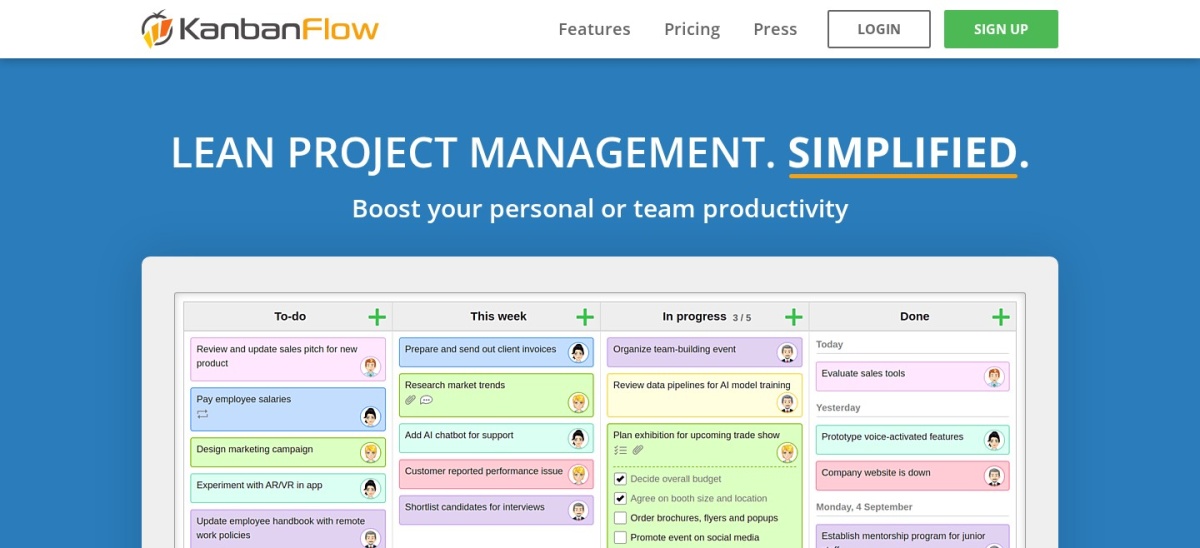
KanbanFlow is a lean kanban tool built around one idea: a simple board with a Pomodoro timer for focused work. The free plan has no time limit and includes WIP limits, swimlanes and time tracking, and Premium costs $5 per user a month for more features and reports.
The trade off is scale. KanbanFlow has a small review base, 4.3 out of 5 from 32 G2 reviews, and no Gantt, docs or chat. It suits individuals and tiny teams that want a focused board with time tracking built in.
What we like
Built-in Pomodoro timer for focused work
WIP limits and swimlanes on the free plan
Joint-lowest paid price here at $5 a month
Watch out for
Small review base of 32 G2 reviews
No Gantt, docs or team chat
Limited integrations next to bigger tools
Premium adds more reports and features; yearly billing is 10% offVisit kanbanflow.com
07
Wrike
4.2/5on G2 (4,540 reviews, checked Nov 2026)
Paid from$10/mo
Best for agency and enterprise features
Free planYes
WIP limitsWith rules on paid plans
Gantt chartsYes, on Team
Paid planTeam, $10/user/mo
wrike.com
Wrike homepage, captured Nov 2026.
Wrike is a work management platform with kanban boards beside Gantt, reporting and approvals. The free plan covers small teams, and Team costs $10 per user a month for Gantt charts, dependencies and portfolios.
The trade off is complexity and cost. Business costs $25 per user a month for workload, request forms and proofing, and Wrike can feel heavy for very small teams. It suits agencies and growing teams that juggle client work across many projects.
What we like
Gantt, dependencies and portfolios from Team
Request forms and approvals on higher plans
Strong workload management for agencies
Watch out for
Business plan at $25 a month is a big jump
Complicated for very small teams
AI features need higher tiers
Business adds workload and proofing; Enterprise adds advanced securityVisit wrike.com
08
Kanban Tool
4.8/5on G2 (41 reviews, checked Nov 2026)
Paid from$6/mo
Best for swimlanes and time tracking
Free planYes, 2 users, 2 boards
WIP limitsYes
SwimlanesYes
Paid planTeam, $6/user/mo
kanbantool.com
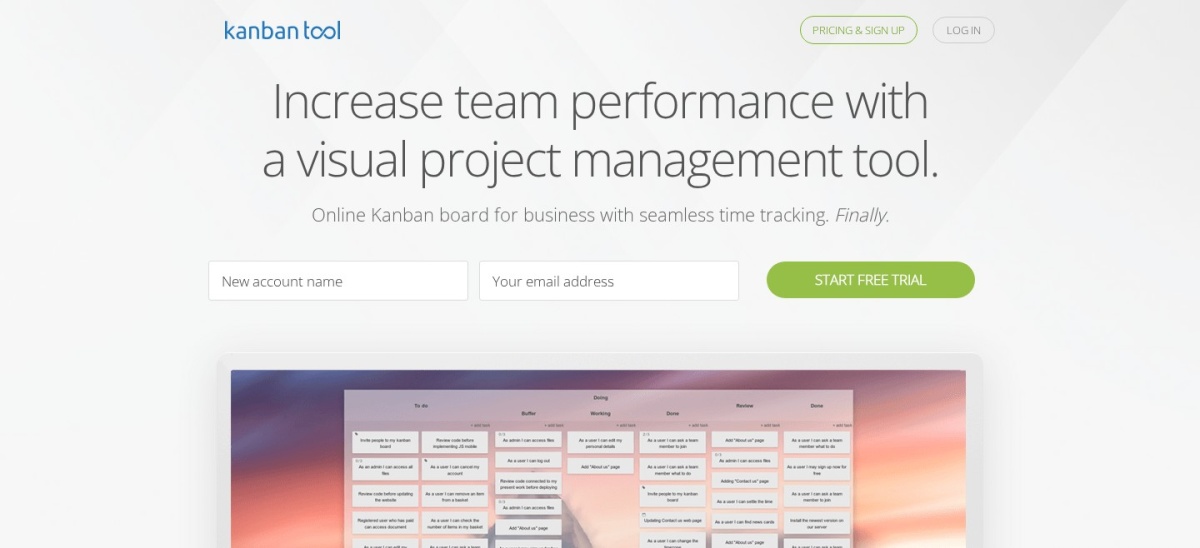
Kanban Tool homepage, captured Nov 2026.
Kanban Tool is a lightweight board with swimlanes, WIP limits and built-in time tracking. The free plan covers 2 users and 2 boards, and Team costs $6 per user a month for more boards and users.
The trade off is the small review base. G2 shows 4.8 out of 5, the highest rating in this list, but from only 41 reviews. It suits small teams that want a focused kanban board with time tracking and no extra workspace features.
What we like
Highest G2 rating in this list at 4.8 out of 5
Swimlanes and WIP limits without an enterprise plan
Free plans in this list cover a small team well. Trello gives 10 boards and 10 collaborators, ClickUp gives unlimited members and tasks, and Jira is free for up to 10 users.
Paid plans mostly add scale and structure. You get unlimited boards, automations, extra views such as timeline and Gantt, and reporting as you climb the tiers.
The most common gap is automation. Trello caps free automations at 250 runs a month, and monday.com has no automations at all on its Basic plan, so check whether your board needs rules before choosing the entry tier.
Count seats carefully. Most tools charge per user, and some sell seats in blocks, so a team that grows from five to six people can see a bigger jump than one extra seat price.
How we chose
We started from the kanban apps most often listed on G2 and Capterra for small teams, then kept those with a published price or a free plan and a real kanban board.
Prices come from each vendor's pricing page and from comparison pages that checked those pages in November 2026. Ratings and review counts come from G2 on the same day. Where a vendor shows a sale, the list shows the regular price.
We left out tools with no G2 rating and no published price. No vendor paid for a place, and this list is based on pricing, docs and reviews, not on using the tools ourselves.
How to choose a kanban app for a small business
Start with your team size and how much structure you need, then match the board to that.
Count your team and your boards. Free plans cap boards or collaborators. Trello allows 10 of each, ClickUp has no member cap, and Jira is free for up to 10 users.
Decide whether you need WIP limits. Real kanban needs a cap on work in progress. Trello, ClickUp, Jira, KanbanFlow and Kanban Tool all offer them, while Asana and monday.com lean on other views.
Check what the paid plan adds. Automations, extra views and reporting are usually paid. Trello Standard adds custom fields and 1,000 automation runs a month, and monday.com Basic has no automations at all.
Try the free plan first. Set up one board with three columns, add your real tasks, and see whether the whole team opens it every morning before you pay for seats.
FAQ
What is the best kanban app for small business?
Trello is the best pick for most small teams. It is the simplest pure kanban board, free for up to 10 collaborators and 10 boards, with Standard at $5 per user a month billed annually.
Is there a free kanban app for small business?
Yes. Trello, ClickUp, monday.com, Asana, Jira, KanbanFlow, Wrike and Kanban Tool all have free plans. ClickUp has the most generous free plan, with unlimited members and tasks.
What is a WIP limit?
A WIP limit caps how many cards can sit in one column at a time, so a team cannot start new work while older work is still unfinished. Trello, ClickUp, Jira, KanbanFlow and Kanban Tool all support WIP limits.
How much does a kanban app cost?
Entry plans run from $5 to $10.99 per user a month billed annually. A ten-person team therefore pays roughly $600 to $1,319 a year on entry plans, before add-ons.
Is Trello or Asana better for kanban?
Trello is better for pure kanban: boards, lists and cards with almost no setup. Asana is better when the team also needs timelines, dependencies and reporting alongside the board.
Which kanban app has the best ratings?
Kanban Tool has the highest G2 rating in this list at 4.8 out of 5, but from only 41 reviews. monday.com has the highest rating among the large tools at 4.7 from 17,182 reviews.