NextGEN Gallery Alternatives in 2026: 7 Best Tools Compared
WLWPLegible EditorsLast verified 22 Nov 2026How we rank13 min read
★ Short answer
FooGallery is the best NextGEN Gallery alternative for most WordPress sites, with 100,000+ active installs, seven free layouts, unlimited albums and a built-in lightbox. Envira Gallery is better for photographers needing client-focused upgrades, while Visual Portfolio suits creative portfolios and filterable displays.
How we make this list: we compare pricing pages, product documentation and public user reviews, then re-check every price before each update. No product paid for a place. Disclosure.
FooGallery has a 4.8/5 WordPress.org rating from 1,000 reviews, with seven free layouts and a $59.99 regular Starter price.
Envira Gallery has 100,000+ active installs and a 4.7/5 rating from 1,600 reviews; Basic renews at $79/year.
Visual Portfolio offers a 4.8/5 rating from 343 reviews and a $49/year Pro plan for one website.
Robo Gallery starts at $30 one-time for Pro, with 12 layouts, unlimited albums and six months of updates and support.
Photo Gallery by 10Web has 100,000+ active installs, 1,581 reviews and a $30 Basic license with six months of updates.
Supsystic Gallery includes unlimited free galleries and images, while its single-site Pro plan costs $49/year.
What to look for in a NextGEN Gallery alternative
NextGEN Gallery is built around photo collections, albums and photographer workflows. If you are switching, the right replacement depends on whether you need attractive image grids, image management, video galleries, client proofing or the ability to sell photographs.
Start with gallery layouts and albums. Some plugins offer masonry, justified grids and responsive galleries for free, while others reserve filtering, carousels, advanced pagination and album controls for paid licenses.
Look at how each plugin handles your existing WordPress Media Library. A gallery that uses regular media attachments may be easier to manage alongside other plugins, but it might not reproduce NextGEN's separate image organization system.
Finally, consider your long-term costs. Paid licenses can be annual, one-time or limited to a support period. Check whether watermarks, image downloads, video galleries and ecommerce tools are included in the cheapest plan before committing.
4.8/5on WordPress.org (1,000 reviews, checked Nov 2026)
Paid from$59.99/yr
Best NextGEN Gallery alternative overall
Free layouts7
Free albumsUnlimited
Built-in lightboxYes
Paid entryPRO Starter, 1 site
fooplugins.com
FooGallery homepage, captured Nov 2026.
FooGallery is a WordPress photo gallery plugin with 100,000+ active installations and a 4.8/5 WordPress.org rating. Its free version includes seven gallery layouts, unlimited galleries and albums, a built-in lightbox, responsive images, lazy loading, shortcodes and block editor support.
The trade off is that advanced video galleries, filtering, search and image selling are reserved for higher paid tiers. PRO Starter has a regular price of $59.99/year, although a $49.99 offer is displayed. It suits photographers, bloggers and businesses wanting flexible galleries without paying for basic album organization.
What we like
Seven free responsive gallery layouts
Unlimited free galleries and albums
Built-in lightbox and lazy loading
Advanced customization options
Optional video, filtering and commerce upgrades
Watch out for
Video galleries require PRO Expert
Photo selling requires PRO Commerce
Client proofing is a separate add-on
PRO Starter adds six premium layouts, hover effects and mobile-specific gallery settings.Visit fooplugins.com
02
Envira Gallery
4.7/5on WordPress.org (1,600 reviews, checked Nov 2026)
Paid from$79/yr
Best for professional photographers
Free gallery builderDrag and drop
Free lightboxYes
Basic license1 site
Paid entryBasic, $79/yr
enviragallery.com
Envira Gallery homepage, captured Nov 2026.
Envira Gallery is a WordPress image gallery plugin with 100,000+ active installations and a 4.7/5 rating from 1,600 reviews. The free version provides a drag-and-drop gallery builder, responsive image layouts and lightbox viewing, while premium plans add features such as albums, video, watermarking and client-oriented workflows.
The trade off is that many photographer features are unavailable in the cheapest plan. Basic normally costs $79/year, compared with an advertised $39.50 introductory price, and higher tiers are needed for advanced extensions. It suits photographers who want a simple starting point with room to expand.
What we like
Easy-to-use drag-and-drop builder
Responsive galleries and lightbox
Large established WordPress user base
Premium options for client workflows
Multiple paid plans for different needs
Watch out for
Albums are not part of the free core
Advanced photo features require higher plans
Regular renewal costs more than introductory pricing
Basic adds premium gallery functionality, annual updates and support for one website.Visit enviragallery.com
03
Visual Portfolio
4.8/5on WordPress.org (343 reviews, checked Nov 2026)
Paid from$49/yr
Best for design and creative portfolios
Gallery editorGutenberg blocks
Gallery layouts6 styles
Portfolio supportYes
Paid entryPersonal, 1 site
visualportfolio.com
Visual Portfolio homepage, captured Nov 2026.
Visual Portfolio is a gallery and portfolio plugin with 50,000+ active installations and a 4.8/5 WordPress.org rating. It provides Gutenberg gallery blocks, responsive layouts, masonry and justified grids, image galleries, video galleries and portfolio displays. Its visual editor lets site owners preview gallery changes before publishing.
The trade off is that advanced features such as photo proofing, additional protection controls and specialized gallery options require Pro. The Personal license costs $49/year for one website, with all Pro features included. It suits designers, agencies and creative professionals displaying visual projects alongside standard image galleries.
What we like
Built around the WordPress block editor
Good fit for portfolios and project showcases
Multiple responsive gallery layouts
Pro features included in the entry paid tier
Supports image and video presentation
Watch out for
Less focused on photographer order management
Advanced controls require Pro
Premium updates require an active license
Personal unlocks Pro gallery controls, advanced layouts, protection features and support.Visit visualportfolio.com
04
Robo Gallery
4.3/5on WordPress.org (406 reviews, checked Nov 2026)
Paid from$30 one-time
Best for affordable one-time licensing
Free albums3
Free layouts6
Pro layouts12
Pro license1 site, one-time
robogallery.co
Robo Gallery homepage, captured Nov 2026.
Robo Gallery is a WordPress image gallery plugin with 40,000+ active installations and a 4.3/5 WordPress.org rating. Its free version supports three albums, six layouts, 11 themes, eight hover effects, more than 50 lightbox options and a basic YouTube gallery.
The trade off is that unlimited albums, nested album structures and additional video options require Pro. The regular Pro price is $30 one-time for one website, with six months of updates and support. It suits site owners who prefer a fixed purchase over another annual gallery subscription.
What we like
Affordable one-time Pro license
Six free gallery layouts
Unlimited and nested albums in Pro
Extensive lightbox customization
Supports YouTube content
Watch out for
Free version limits album quantity
Entry license includes limited update coverage
Lower average rating than leading alternatives
Pro adds unlimited albums, 12 layouts, 55 themes and expanded video galleries.Visit robogallery.co
05
Photo Gallery by 10Web
4.5/5on WordPress.org (1,581 reviews, checked Nov 2026)
Paid from$30/site
Best for traditional gallery and album management
Free gallery views9
Premium gallery views10
Lightbox effects15
Basic license1 site, 6 months updates
10web.io
Photo Gallery by 10Web homepage, captured Nov 2026.
Photo Gallery by 10Web is a WordPress photo gallery plugin with 100,000+ active installations and a 4.5/5 rating from 1,581 reviews. The free edition includes nine gallery and album views, configurable lightboxes, themes, image organization, watermarking and social sharing controls.
The trade off is an older compatibility target: WordPress.org warns that the plugin has not been tested with the latest three major WordPress releases, despite a recent update. Basic costs $30 for one website with six months of updates and support. It suits established gallery sites that need configurable albums and are prepared to check compatibility.
What we like
Nine free gallery and album views
Extensive lightbox configuration
Supports image organization and albums
Watermarking options available
Large public review history
Watch out for
WordPress.org displays a compatibility warning
Premium update coverage lasts six months
Configuration can feel complex for small galleries
Basic adds an extra gallery view, premium customization and six months of updates and support.Visit 10web.io
06
Supsystic Gallery
4.6/5on WordPress.org (498 reviews, checked Nov 2026)
Paid from$49/yr
Best for galleries, sliders and carousels
Free galleriesUnlimited
Free formatsGallery, carousel, slider
Pro capabilities64 advertised
Paid licensePersonal, 1 site
supsystic.com
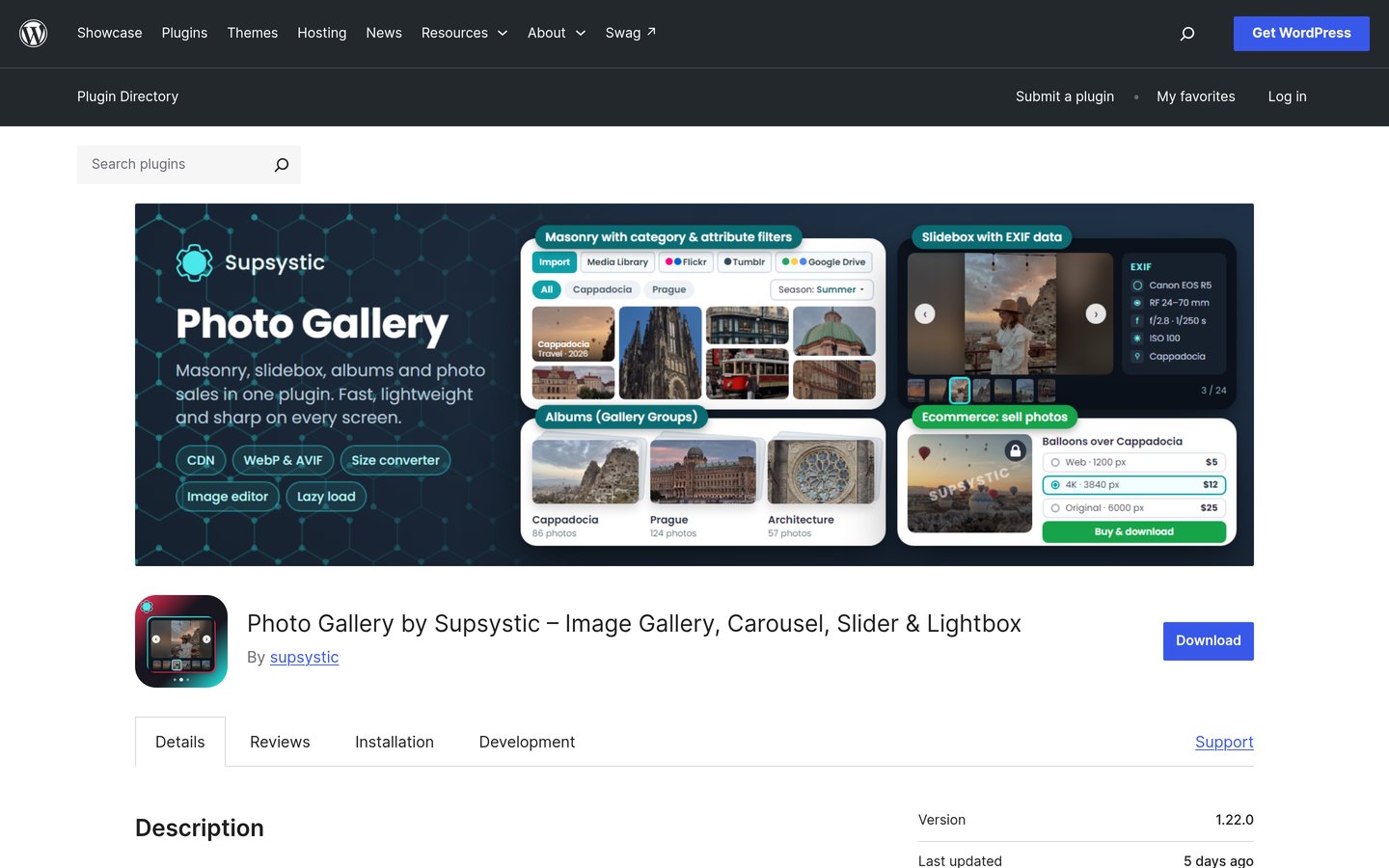
Supsystic Gallery homepage, captured Nov 2026.
Supsystic Gallery is a WordPress gallery, carousel and slider plugin with 20,000+ active installations and a 4.6/5 WordPress.org rating. Its free edition supports unlimited galleries and images, responsive layouts, image carousels, sliders, lightboxes and a visual creation workflow for WordPress pages.
The trade off is that advanced gallery filtering, watermarking, paid image access and specialized slider effects require Pro. The regular single-site Personal license costs $49/year and includes the advertised 64 Pro capabilities. It suits businesses that want photo galleries, product carousels and promotional sliders managed through one plugin.
What we like
Unlimited galleries and images for free
Free carousel and slider features
Responsive masonry and justified layouts
Premium filtering and image protection
Annual and lifetime license options
Watch out for
Advanced gallery features require Pro
Large feature set adds interface complexity
Photo proofing is not its primary focus
Pro adds advanced filtering, watermarks, video, image selling and premium slider effects.Visit supsystic.com
07
Photo Gallery by Ays
4.8/5on WordPress.org (19 reviews, checked Nov 2026)
Paid from$75 one-time
Best for customizable lightbox effects
Free image galleriesUnlimited
Pro gallery views30+
Pro transitions20+
Business license5 sites, one-time
ays-pro.com
Photo Gallery by Ays homepage, captured Nov 2026.
Photo Gallery by Ays is a WordPress image gallery plugin with 1,000+ active installations and a 4.8/5 rating from 19 reviews. Its free edition supports unlimited galleries and images, grid, masonry and mosaic layouts, responsive lightboxes, hover effects and media library integration.
The trade off is a smaller review base and fewer established third-party integrations than the leading gallery plugins. Its Business license normally costs $75 one-time, with a $39 promotional price displayed, covering five websites and twelve months of updates and support. It suits sites that prioritize layout customization and animated image viewing.
What we like
Unlimited free galleries and images
Multiple responsive gallery layouts
Extensive premium transition effects
One-time Business license
Business license supports five sites
Watch out for
Smaller user and review base
Advanced views require the paid edition
Premium updates have a limited support period
Business adds 30+ views, advanced lightbox controls and premium transitions.Visit ays-pro.com
What happens to your images when you leave NextGEN Gallery?
NextGEN uses its own gallery organization and image management workflows. Replacing its display plugin does not automatically recreate galleries, albums, image metadata or storefront settings in another gallery plugin.
Before migrating, back up your WordPress database and image files. Check whether the replacement can import NextGEN galleries directly or whether the files must first be added to the standard WordPress Media Library.
Preserve image titles, captions, alternative text and album relationships wherever possible. If published gallery URLs change, prepare redirects to protect visitors from broken links.
For photographers using NextGEN's selling or proofing features, review any outstanding customer orders, private galleries and download permissions before disabling the old plugin.
Which NextGEN replacement fits your gallery workflow?
For everyday galleries and photo albums, FooGallery is a sensible starting point because its free version includes several layouts and unlimited album organization.
Professional photographers should compare Envira Gallery's higher-tier functionality with FooGallery's commerce and client proofing options. An inexpensive entry plan may not include the workflow features needed for paid photography projects.
For creative portfolios, Visual Portfolio offers layouts designed for images and visual projects. Robo Gallery provides another approach when nested albums and a one-time paid license matter more than extensive commerce features.
Photo Gallery by 10Web and Supsystic Gallery are useful when traditional albums, numerous presentation options or slider functionality are priorities. Check compatibility and required Pro features before moving an established collection.
How we chose
We selected established gallery plugins that provide practical alternatives to NextGEN's photo and album presentation features. We compared gallery layouts, free functionality, lightboxes, album organization, WordPress integration, photo management and optional professional features.
Prices and ratings were checked on 22 Nov 2026 using official vendor pricing pages and WordPress.org listings. We used regular paid prices instead of promotional offers and distinguished yearly subscriptions from one-time purchases and licenses with limited update periods.
We excluded products with unverifiable paid pricing and plugins without recent maintenance. Modula and other candidates were considered, but omitted where the required regular USD entry price could not be confirmed directly. We retained Photo Gallery by 10Web with its compatibility warning explicitly disclosed. No vendor paid for a place, and we do not claim testing for this list.
How to choose a NextGEN Gallery alternative
Identify the gallery features your website depends on, compare available upgrades and confirm that your existing image collection can move safely.
List the gallery features you actually use. Identify whether you rely on albums, slideshows, custom layouts, image metadata, video, private galleries or ecommerce. Choose a plugin that supports the essential features without requiring unnecessary extensions.
Compare free layouts and paid upgrades. Start by checking responsive grids, masonry, justified layouts and lightboxes. If you need filtering, video, image protection or client proofing, confirm the exact plan that includes those features.
Check image organization and migration. Determine whether the replacement uses the WordPress Media Library or a separate image system. Preserve existing images, captions, alternative text, gallery relationships and published URLs during migration.
Calculate long-term licensing costs. Compare regular renewal prices, site limits and included updates. A one-time purchase can reduce recurring fees, but ongoing support and security updates may require a later payment.
FAQ
What is the best alternative to NextGEN Gallery?
FooGallery is our top choice for most WordPress websites. Its free version includes seven gallery layouts, unlimited galleries and albums, responsive images and a built-in lightbox. Envira Gallery is an alternative for photographers who anticipate needing premium client features, while Visual Portfolio is suited to creative project galleries.
Is there a free alternative to NextGEN Gallery?
Yes. FooGallery, Envira Gallery, Visual Portfolio, Robo Gallery, Photo Gallery by 10Web and Supsystic Gallery all offer free WordPress plugins. FooGallery is particularly useful because unlimited galleries and albums are included without purchasing a premium license.
Is FooGallery better than NextGEN Gallery?
FooGallery may be a better fit if you want a modern gallery builder, free album organization and responsive layouts without a complicated setup. NextGEN remains relevant for dedicated photography workflows and specialized image management. The right choice depends on your existing galleries, selling requirements and preferred editing interface.
Can I migrate NextGEN Gallery images to another plugin?
Yes, but the migration process depends on the replacement. NextGEN can organize images differently from the standard WordPress Media Library, so albums, captions and gallery relationships may need special handling. Back up everything and verify the migrated galleries on a staging site before removing NextGEN.
Which NextGEN alternative is best for photographers?
Envira Gallery and FooGallery are both suitable for photographers. Envira offers premium options for albums and client workflows, while FooGallery provides a useful free foundation and higher plans for video and commerce. Compare proofing, downloads and photo selling features separately from basic gallery creation.
Which gallery plugin has the cheapest paid upgrade?
Robo Gallery offers a $30 one-time Pro license, and Photo Gallery by 10Web lists a $30 Basic license with six months of updates. Visual Portfolio starts at $49/year. The cheapest option is not necessarily the best value if you require additional ecommerce or photographer-specific features.
Can I sell photographs using these NextGEN alternatives?
Yes, but selling features differ. FooGallery PRO Commerce adds WooCommerce image selling functionality, while Supsystic Gallery Pro includes paid gallery and photo access. Envira also offers premium photography workflows. Check payment gateways, download delivery and customer permissions before choosing a selling solution.
Do gallery plugins slow down WordPress?
A photo gallery can affect page speed when it loads oversized images, unnecessary scripts or too many thumbnails at once. Look for responsive images, lazy loading and pagination. Optimize image files before uploading and check how the gallery behaves with your theme and caching setup.
Do I need a paid gallery plugin for a portfolio?
Not necessarily. FooGallery and Visual Portfolio offer useful free layouts for showcasing creative work. Paying becomes more relevant when you need advanced filtering, specialized presentation controls, private client galleries, watermarking or sales functionality. Start with the free features and upgrade only for a specific requirement.