Envira Gallery Alternatives in 2026: 7 Best Tools Compared
WLWPLegible EditorsLast verified 22 Nov 2026How we rank12 min read
★ Short answer
FooGallery is our top Envira Gallery alternative, with 100,000+ active installs, seven free gallery layouts and Pro Starter regularly priced at $59.99/year. Modula is better for custom image grids at $78/year, while NextGEN Gallery suits photographers managing extensive collections and client galleries.
How we make this list: we compare pricing pages, product documentation and public user reviews, then re-check every price before each update. No product paid for a place. Disclosure.
FooGallery has 100K+ active installs and a 4.8/5 rating from 1,000 WordPress.org ratings. Pro Starter normally costs $59.99/year.
Modula has 100K+ active installs and a 4.7/5 rating from 619 ratings. Starter normally costs $78/year, with a 65% seasonal discount.
NextGEN Gallery has 300K+ active installs and 4,343 ratings. Its Imagely Starter upgrade regularly costs $139/year.
Photo Gallery by 10Web has 100K+ active installs and a 4.5/5 rating from 1,581 ratings. Basic costs $30 for one website.
Visual Portfolio has 50K+ active installs and a 4.8/5 rating from 343 ratings. Personal costs $49/year.
Meow Gallery Pro costs $29/year, while Robo Gallery Pro is a $30 one-time purchase with six months of updates and support.
What to look for in an Envira Gallery alternative
Envira Gallery helps WordPress users create responsive photo galleries, albums and visual portfolios. Its premium features extend into video galleries, image protection, client workflows and ecommerce. A good replacement should cover the features your website actually uses.
Start with gallery layouts. Responsive grids, masonry, justified rows, carousels and lightboxes serve different purposes. Photographers may prioritize full-screen previews, while business websites often need compact grids with clear captions.
Next, consider album organization and filtering. Large photography collections benefit from nested albums, searchable galleries, category filters and pagination. Check whether these features are free or require a higher paid plan.
Image selling and client proofing deserve separate attention. A plugin that displays photographs may not support payment collection, client approvals or automated print fulfillment. NextGEN Gallery and higher FooGallery plans provide more specialized photographer workflows.
Finally, compare regular prices, license periods and updates. Some products charge annual subscriptions, while others offer one-time purchases with time-limited support. A cheaper license is not always the least expensive long-term option.
4.8/5on WordPress.org (1,000 reviews, checked Nov 2026)
Paid from$59.99/yr
Best Envira Gallery alternative overall
Free layouts7
Free albumsIncluded
Video galleriesPro Expert
Starter license1 site
fooplugins.com
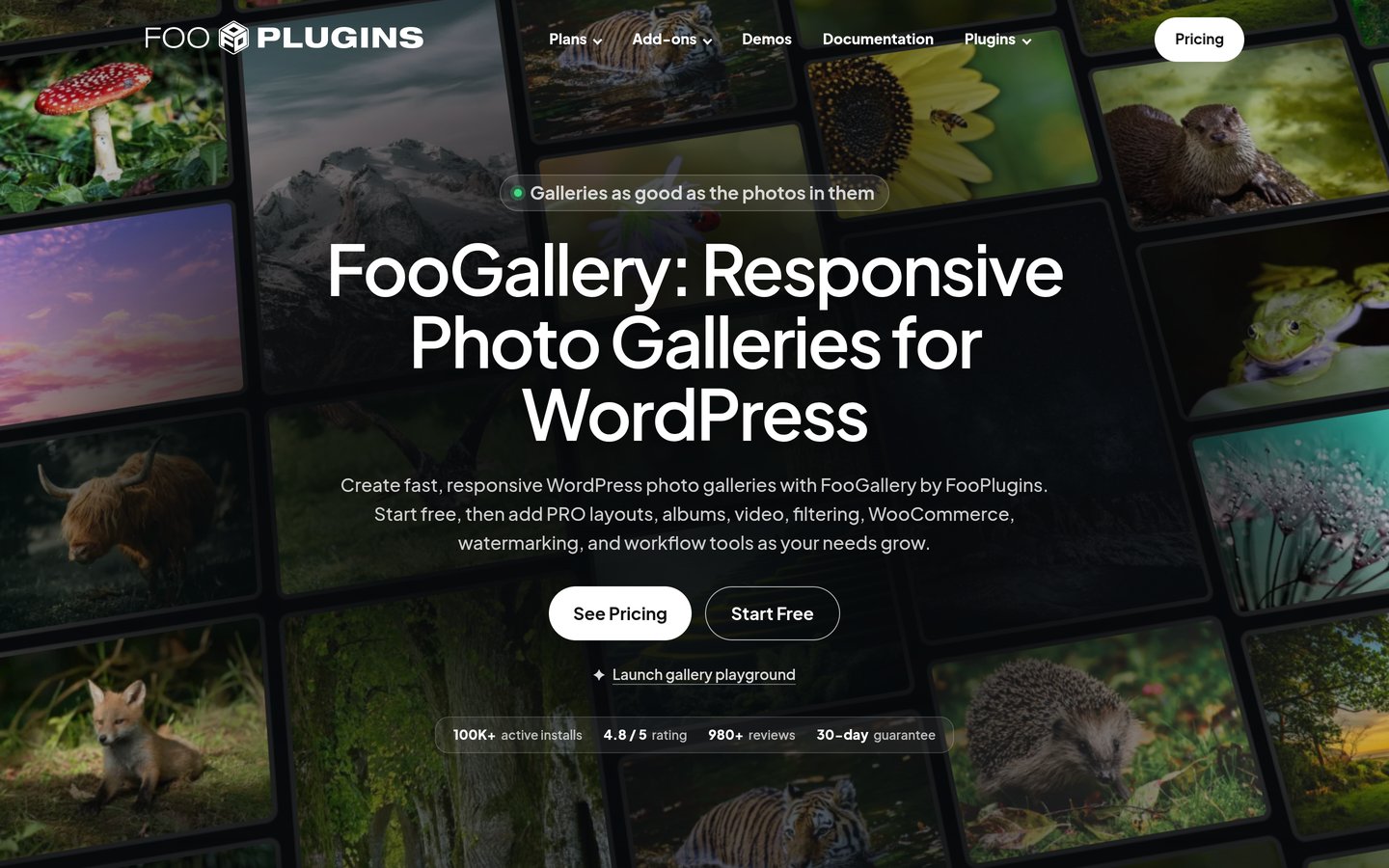
FooGallery homepage, captured Nov 2026.
FooGallery is a WordPress gallery plugin with 100,000+ active installs and a 4.8/5 rating from 1,000 ratings. Its free version provides seven responsive layouts, albums, a built-in lightbox, drag-and-drop gallery management and Gutenberg support.
The trade off is that video galleries, advanced filtering and image selling require higher paid tiers. Pro Starter regularly costs $59.99/year for one site, currently advertised at $49.99 before additional seasonal offers. It suits bloggers, photographers and businesses wanting useful free galleries with room to expand.
What we like
Seven gallery layouts in the free version
Free albums and built-in lightbox
Responsive layouts with Gutenberg support
Pro Starter adds premium design controls
Higher plans support video and WooCommerce
Watch out for
Video galleries require Pro Expert
Advanced filtering and search require higher tiers
Photo selling requires Pro Commerce
Specialized client workflows may require add-ons
Pro Starter adds premium layouts, hover effects, color controls and mobile gallery settings.Visit fooplugins.com
02
Modula
4.7/5on WordPress.org (619 reviews, checked Nov 2026)
Paid from$78/yr
Best for custom photo grids
EditorCustom grid builder
Free layoutsResponsive galleries
Starter license1 site
Video galleriesStarter included
wp-modula.com
Modula homepage, captured Nov 2026.
Modula is a WordPress gallery plugin with 100,000+ active installs and a 4.7/5 rating from 619 ratings. Its free version includes a visual gallery editor, custom grid layouts, responsive image galleries and lightbox presentation, with Modula 3.0 introducing a redesigned editing interface.
The trade off is that advanced features such as albums, image optimization, protection and dynamic galleries require higher plans. Starter normally costs $78/year for one site, currently discounted to $27.30 during a seasonal promotion. It suits photographers and designers who want direct control over image arrangement.
What we like
Custom image grid design
Responsive galleries and lightboxes
Starter includes video galleries
Category filtering and sorting in Starter
Higher plans add image CDN and optimization
Watch out for
Albums require a higher plan
Image protection is not included in Starter
Advanced optimization costs extra
Complex custom grids take additional setup
Starter adds video galleries, slideshows, category filtering and image sorting.Visit wp-modula.com
03
NextGEN Gallery
4.3/5on WordPress.org (4,343 reviews, checked Nov 2026)
Paid from$139/yr
Best for professional photography collections
Free gallery managementGalleries and albums
Starter license1 site
Client proofingHigher plans
Print salesPro and above
imagely.com
NextGEN Gallery homepage, captured Nov 2026.
NextGEN Gallery is a WordPress photography plugin with 300,000+ active installs and a 4.3/5 rating from 4,343 ratings. Its free version includes gallery and album management, image uploading, thumbnail galleries, slideshows and tools for organizing larger photo collections.
The trade off is that professional ecommerce, proofing and Lightroom integration require more expensive plans. Imagely Starter normally costs $139/year for one website, currently discounted to $69.50, while Pro adds photography commerce features. It suits photographers needing structured collections and a path toward selling images.
What we like
Established photography gallery management
Free galleries and albums
Supports large image collections
Higher plans provide client proofing
Pro supports digital downloads and print sales
Watch out for
More complex than simple gallery plugins
Professional selling tools require Pro
Starter does not include the complete photography toolkit
Higher regular prices than most alternatives
Starter adds premium gallery presentation, private galleries, support and updates.Visit imagely.com
04
Photo Gallery by 10Web
4.5/5on WordPress.org (1,581 reviews, checked Nov 2026)
Paid from$30/site
Best for feature-rich free galleries
Free gallery views9
Lightbox effects15
Basic license1 site
Included support6 months
10web.io
Photo Gallery by 10Web homepage, captured Nov 2026.
Photo Gallery by 10Web is a WordPress gallery plugin with 100,000+ active installs and a 4.5/5 rating from 1,581 ratings. Its free version includes nine gallery and album views, 15 lightbox effects, watermarking, social sharing, image comments and gallery import and export.
The trade off is that its plugin listing warns about compatibility testing with recent WordPress releases, and paid support is time-limited. Basic costs $30 for one website with six months of updates and support. It suits publishers wanting numerous presentation features without purchasing an expensive gallery subscription.
What we like
Nine free gallery and album views
Watermarking and social sharing in the free version
Image commenting and rating
Gallery export and import tools
Affordable Basic license
Watch out for
WordPress.org shows a compatibility-testing warning
Basic includes only six months of updates and support
Interface may require more configuration
Advanced functionality differs between editions
Basic adds another gallery view, expanded widgets, and six months of premium updates and support.Visit 10web.io
05
Visual Portfolio
4.8/5on WordPress.org (343 reviews, checked Nov 2026)
Paid from$49/yr
Best for portfolio and project galleries
EditorGutenberg gallery block
Layout stylesGrid, masonry, slider
AJAX filteringFree
Personal license1 site
visualportfolio.com
Visual Portfolio homepage, captured Nov 2026.
Visual Portfolio is a WordPress gallery and portfolio plugin with 50,000+ active installs and a 4.8/5 rating from 343 ratings. Its free version supports image galleries, portfolio grids, masonry layouts, sliders, post galleries, AJAX filtering, pagination and Gutenberg integration.
The trade off is that advanced media previews, social feeds, albums, image protection and specialized proofing tools require Pro. Personal costs $49/year for one site and includes all Pro features. It suits creative agencies, designers and photographers who display projects alongside ordinary image collections.
What we like
Free AJAX filtering and pagination
Gutenberg and Elementor compatibility
Portfolio and post-query galleries
Multiple responsive layouts
Pro includes advanced media and protection features
Watch out for
Advanced albums and proofing require Pro
Some gallery workflows require configuration
Not a complete photography ecommerce system
Personal adds albums, social feeds, advanced media previews, image protection and proofing tools.Visit visualportfolio.com
06
Meow Gallery
4.9/5on WordPress.org (204 reviews, checked Nov 2026)
Paid from$29/yr
Best for lightweight Gutenberg galleries
EditorGutenberg and shortcode
Free layoutsResponsive image grids
Pro extrasCarousel and maps
Starter license1 site
meowapps.com
Meow Gallery homepage, captured Nov 2026.
Meow Gallery is a lightweight WordPress gallery plugin with 10,000+ active installs and a 4.9/5 rating from 204 ratings. Its free version integrates with Gutenberg, supports shortcodes and can replace the standard WordPress gallery presentation with responsive, retina-friendly layouts.
The trade off is its smaller feature set compared with photographer-focused gallery platforms. Starter costs $29/year for one website and adds premium layouts, carousels, photo maps, infinite loading and animation options. It suits bloggers and photographers who prefer straightforward image galleries over extensive plugin settings.
4.3/5on WordPress.org (406 reviews, checked Nov 2026)
Paid from$30 one-time
Best for low-cost one-time licensing
Free gallery layouts6
Free albums3
Pro layouts12
Pro support6 months
robogallery.co
Robo Gallery homepage, captured Nov 2026.
Robo Gallery is a WordPress image gallery plugin with 40,000+ active installs and a 4.3/5 rating from 406 ratings. Its free edition includes six layouts, three albums, 11 themes, basic YouTube galleries, hover effects and responsive lightboxes.
The trade off is that unlimited albums, advanced layouts and expanded video features require Pro. The one-site Pro license costs $30 one-time with six months of updates and support; continued updates may require renewal. It suits budget-conscious businesses and photographers wanting configurable galleries without a recurring mandatory subscription.
What we like
Free responsive gallery layouts
Basic YouTube gallery support
One-time premium purchase
Pro supports unlimited and nested albums
Expanded lightbox and hover customization
Watch out for
Pro includes limited initial update coverage
Premium features are less extensive than dedicated photography suites
Free album count is restricted
Ongoing updates may involve further spending
Pro adds unlimited albums, 12 layouts, 55 themes, advanced video support and expanded lightboxes.Visit robogallery.co
Image galleries, albums and photo selling: what is different?
An image gallery displays photographs using a layout such as masonry, grid or justified rows. A lightbox opens individual images for closer viewing, often with navigation, captions or a slideshow.
Albums organize multiple galleries into collections. This becomes useful for photographers managing events, projects or client sessions. FooGallery includes albums in its free edition, while Modula reserves advanced album management for a higher paid plan.
Client proofing is a separate workflow. Clients may need private access, photo selections and approval tools rather than simply viewing pictures. NextGEN Gallery and Visual Portfolio offer specialized features through paid plans.
Selling photographs adds checkout, downloadable files, image licensing or print fulfillment. NextGEN Gallery Pro and FooGallery Commerce target these requirements, but their entry plans do not include every selling feature.
Choose the simplest plugin that supports your actual image workflow. A portfolio site rarely needs the same features as a photography business fulfilling print orders.
How to migrate from Envira Gallery to another plugin
Create a complete WordPress backup before changing gallery plugins. Inventory your Envira galleries, albums, shortcodes, image metadata, protection settings and any ecommerce features.
Check whether your chosen replacement supports gallery imports. Even when image files remain in the WordPress Media Library, gallery layouts and configuration settings may not transfer automatically.
Rebuild a representative gallery first. Confirm image ordering, thumbnail sizes, captions, alt text, lightboxes and mobile layouts before replacing every gallery on the website.
Update embedded shortcodes or blocks and verify that gallery pages still work. If you sell photographs, check pricing, payment processing, private access and download permissions before disabling Envira.
How we chose
We selected established WordPress gallery plugins that offer practical alternatives to Envira Gallery for responsive image grids, lightboxes, portfolios, albums and photography workflows. The shortlist balances free gallery features with premium customization and professional options.
We opened WordPress.org listings and official vendor pricing pages on 22 Nov 2026. We compared ratings, rating counts, active installations, update activity and the cheapest verifiable regular paid price. Seasonal promotional prices were not used as the standard price.
We excluded outdated or closed plugins, products without verifiable premium pricing and smaller tools with insufficient installation or review evidence. We also distinguished simple image presentation from client proofing and photography commerce.
How to choose the best Envira Gallery alternative
Match your gallery plugin to the images you publish, the visitor experience you want and the features required to maintain your collections.
Choose the gallery layouts you need. Compare grids, masonry, sliders, carousels and lightboxes. FooGallery and Modula offer flexible image layouts, while Meow Gallery is worth considering for simpler WordPress-native presentation.
Decide how to organize your images. Check whether you need albums, nested collections, search, category filtering or pagination. Large photography archives benefit from specialized organizational features that may require higher premium tiers.
Compare the complete paid feature set. Review the regular subscription price, license limits, video support, image protection and ecommerce options. Verify whether advanced features are included in the entry plan or require additional upgrades.
Plan the switch before removing Envira. Back up gallery settings and image files, rebuild a sample gallery and verify responsive behavior. Update gallery shortcodes, test lightboxes and confirm any client or payment workflows before switching production pages.
FAQ
What is the best alternative to Envira Gallery?
FooGallery is our top alternative for most WordPress users because its free version includes seven gallery layouts, albums and a built-in lightbox. It has 100,000+ active installs, and Pro Starter normally costs $59.99/year. Modula is another strong option for custom grid layouts.
Is there a free alternative to Envira Gallery?
Yes. FooGallery, Modula, NextGEN Gallery, Photo Gallery by 10Web, Visual Portfolio, Meow Gallery and Robo Gallery all offer free WordPress plugins. Their free features differ, especially for albums, video galleries, filtering and image protection.
Is FooGallery better than Envira Gallery?
FooGallery may be preferable if you want free albums, several responsive layouts and a built-in lightbox. Envira remains suitable for users who prefer its editing workflow and existing extensions. Compare the premium tiers carefully because advanced features such as video and selling photographs may cost more.
Which Envira Gallery alternative is best for photographers?
NextGEN Gallery is a strong option for professional photographers managing extensive collections or selling images. Its higher plans include client proofing, Lightroom integration and ecommerce features. FooGallery Commerce is another option for WooCommerce-based image selling.
Which Envira Gallery alternative is best for video galleries?
Modula Starter supports video galleries at a regular $78/year. FooGallery provides video galleries in Pro Expert, while Robo Gallery includes basic YouTube support for free and broader video options in Pro. Compare supported video sources before choosing.
What is the cheapest paid Envira Gallery alternative?
Meow Gallery has the lowest regular annual subscription in this comparison at $29/year for one website. Robo Gallery Pro costs $30 as a one-time purchase, although its included updates and support last six months. Compare ongoing maintenance costs as well as purchase prices.
Can I migrate galleries from Envira to FooGallery?
Your image files can remain in the WordPress Media Library, but Envira-specific layouts, albums and settings may require conversion or rebuilding. Check available import tools, create a staging copy and verify image order, captions, lightboxes and embedded gallery references.
Do gallery plugins affect WordPress website speed?
They can. Gallery layouts may load numerous images, scripts and styles, particularly when pages include sliders, lightboxes or video content. Choose appropriately sized images, enable lazy loading where supported and compare actual page loading behavior after configuring the plugin.
Which gallery plugin is best for a portfolio website?
Visual Portfolio is particularly suitable for designers and agencies because it combines image galleries with post-based portfolios, layouts, filtering and pagination. Its free version supports Gutenberg and Elementor, while Personal costs $49/year and adds more advanced gallery features.