Best WordPress Spam Plugins in 2026: 7 Tools Compared
WLWPLegible EditorsLast verified 22 Nov 2026How we rank12 min read
★ Short answer
WP Armour is our top WordPress spam plugin for most sites, with 400,000+ active installations and free honeypot protection for comments, registrations, and popular contact forms. CleanTalk offers broader cloud-based filtering for $12/year, while Antispam Bee is a completely free alternative for WordPress comment spam.
How we make this list: we compare pricing pages, product documentation and public user reviews, then re-check every price before each update. No product paid for a place. Disclosure.
WP Armour has 400,000+ active installations and a 5/5 rating from 1,484 reviews. Its free honeypot protection requires no CAPTCHA, while Extended costs $19.99/year.
CleanTalk has 200,000+ active installations and a 4.8/5 rating from 3,230 reviews. Its cloud anti-spam subscription costs $12/year after a 7-day trial.
Antispam Bee protects WordPress comments without external spam-checking services. It has 700,000+ active installations and no paid plan.
Akismet has 5M+ active installations and a 4.7/5 rating from 1,186 reviews. Commercial Pro pricing starts at $9.95/month, billed yearly.
Simple Cloudflare Turnstile has 200,000+ active installations and supports WordPress, WooCommerce, and popular forms without a paid plugin upgrade.
Zero Spam offers free local protection and an optional Essentials API plan at $78/year, while Disable Comments can eliminate comment submissions entirely.
What to look for in a WordPress spam plugin
WordPress spam arrives through comments, contact forms, user registrations, checkout pages, and other public submission areas. A plugin that protects comments alone may not prevent unwanted contact messages or fake accounts.
The main protection methods include honeypot fields, cloud reputation checks, CAPTCHA alternatives, and local behavior-based filtering. Honeypots can stop simple bots without asking visitors to complete a challenge. Cloud services compare submissions against broader spam databases.
Check compatibility with the forms and plugins your website uses. WPForms, Contact Form 7, Elementor, WooCommerce, and registration plugins may require different integrations. A WordPress comment filter does not automatically cover every third-party form.
Visitor experience matters. Invisible protection avoids interrupting legitimate submissions, while interactive verification may add friction. Also check whether submissions are processed locally or sent to an external service.
Compare regular pricing and usage restrictions. Some plugins are permanently free, while others require an active subscription after a trial. Commercial licensing, spam-check allowances, and advanced integration support can affect long-term costs.
5/5on WordPress.org (1,484 reviews, checked Nov 2026)
Paid from$19.99/yr
Best WordPress spam plugin overall
Protection methodHoneypot
Free integrationsComments and forms
CAPTCHA requiredNo
Paid planPersonal, 1 site
wp-armour.com
WP Armour homepage, captured Nov 2026.
WP Armour is a honeypot anti-spam plugin with 400,000+ active installations and a 5/5 WordPress.org rating from 1,484 reviews. Its free version protects WordPress comments, registrations, and popular form builders including Contact Form 7, WPForms, Elementor Forms, and Fluent Forms. Protection starts automatically without CAPTCHA challenges or external API keys.
The trade off is that spam submission logging, IP blocking, and additional integrations require Extended at $19.99/year for one site. Honeypots also cannot identify every manually submitted spam message. It suits blogs and business websites that want inexpensive spam protection without interrupting legitimate visitors.
What we like
Free protection for popular WordPress form builders
No CAPTCHA or external service required
Automatic setup after activation
High rating across a large review base
Affordable premium extension
Watch out for
Advanced spam logging requires Extended
Some WooCommerce and membership integrations require payment
Extended adds spam logs, IP blocking, more integrations, and premium support.Visit wp-armour.com
02
CleanTalk
4.8/5on WordPress.org (3,230 reviews, checked Nov 2026)
Starts at$12/yr
Best for comprehensive cloud spam filtering
Protection methodCloud filtering
Free trial7 days
API requestsUnlimited
Paid plan1 Website
cleantalk.org
CleanTalk homepage, captured Nov 2026.
CleanTalk is a cloud-based WordPress anti-spam service with 200,000+ active installations and a 4.8/5 rating from 3,230 reviews. It filters comments, contact forms, registrations, WooCommerce orders, and booking submissions. Its Spam FireWall, email validation, and anti-spam logs help identify automated submissions without displaying CAPTCHA challenges.
The trade off is that the service requires a paid subscription after its 7-day free trial. The regular single-site price is $12/year, with unlimited anti-spam checks included. It suits business sites, membership platforms, and WooCommerce stores that need protection across several submission types.
What we like
Protects comments, forms, registrations, and checkout
Cloud reputation checks identify known spam sources
Includes spam logs and email validation
No visible CAPTCHA required
Low annual subscription price
Watch out for
No permanent free service plan
Requires a connection to CleanTalk servers
False positives may require reviewing spam logs
The subscription continues cloud filtering, spam logs, and unlimited API checks.Visit cleantalk.org
03
Antispam Bee
4.8/5on WordPress.org (227 reviews, checked Nov 2026)
PriceFree
Best completely free plugin for comment spam
Protection methodLocal filtering
Comment filteringIncluded
External APINot required
Paid planNone
pluginkollektiv.org
Antispam Bee homepage, captured Nov 2026.
Antispam Bee is a free WordPress comment spam plugin with 700,000+ active installations and a 4.8/5 rating from 227 reviews. It filters comments and trackbacks using submission timing, language rules, existing spam records, and other configurable checks. It does not require CAPTCHA challenges or send personal information to external spam-checking services.
The trade off is limited coverage: Antispam Bee does not protect most contact forms, registration systems, or WooCommerce checkout submissions. The entire plugin is free, with no premium subscription. It suits blogs and editorial websites that mainly need comment moderation and prefer local filtering.
4.7/5on WordPress.org (1,186 reviews, checked Nov 2026)
Paid from$9.95/mo
Best established cloud filter for comments
Protection methodCloud API
Personal planPay what you can
Pro spam checks500/month base allowance
Paid planPro, 1 site
akismet.com
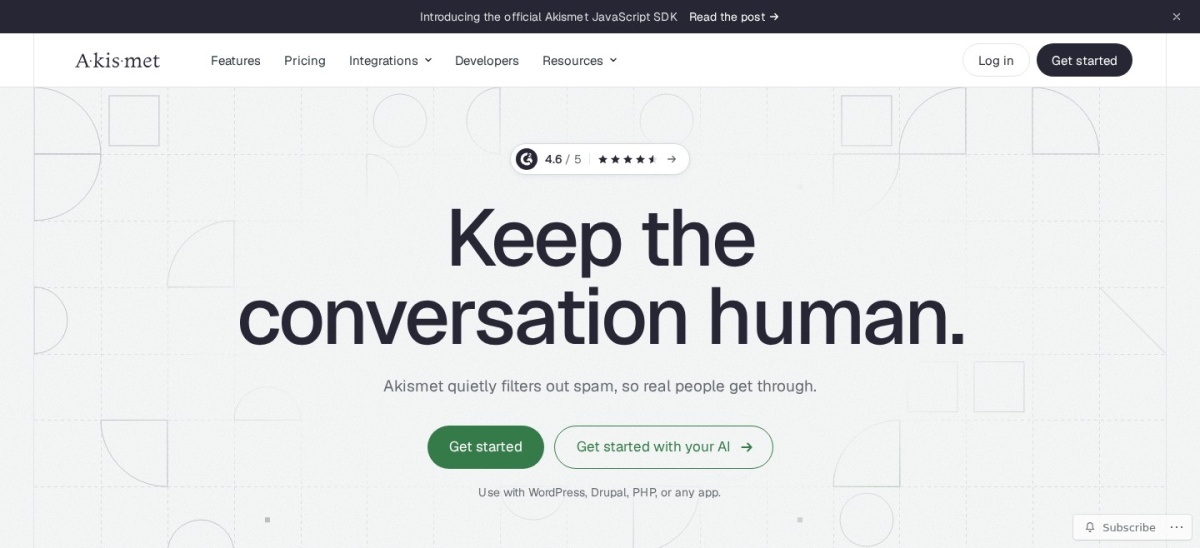
Akismet homepage, captured Nov 2026.
Akismet is Automattic's cloud-based WordPress spam filter with 5M+ active installations and a 4.7/5 rating from 1,186 reviews. It checks comments and supported contact form submissions against a shared spam database. The Personal plan uses flexible pricing for noncommercial websites, while commercial customers need a paid license.
The trade off is commercial pricing and usage allowances. Pro starts at the regular price of $9.95/month billed yearly, equivalent to $119.40/year, with a base allowance of 500 spam checks per month. It suits established blogs and business websites that want automated comment filtering and moderation history.
What we like
Large WordPress installation base
Automated comment filtering
Integrations with popular contact forms
Comment status history helps moderation
Personal pricing available for eligible sites
Watch out for
Commercial sites require paid licensing
Requires an API key and cloud connection
Pro includes spam-check allowances
Not a complete firewall or malware scanner
Pro permits commercial use and adds email support with defined spam-check allowances.Visit akismet.com
05
Simple Turnstile
4.7/5on WordPress.org (265 reviews, checked Nov 2026)
PriceFree
Best free CAPTCHA alternative for WordPress forms
Protection methodCloudflare Turnstile
WooCommerceSupported
Form integrationsMultiple
Paid planNone
wordpress.org
Simple Turnstile homepage, captured Nov 2026.
Simple Turnstile is a free WordPress plugin for adding Cloudflare Turnstile verification to forms, with 200,000+ active installations and a 4.7/5 rating from 265 reviews. It supports WordPress comments, login, registration, WooCommerce checkout, WPForms, Contact Form 7, Gravity Forms, and other popular form systems.
The trade off is that it requires Cloudflare Turnstile site and secret keys, and visitor verification depends on Cloudflare's service. The WordPress plugin itself has no paid upgrade. It suits websites that want broad form protection without a plugin subscription or traditional image-based CAPTCHA puzzles.
What we like
Completely free WordPress plugin
Supports numerous form integrations
Protects WooCommerce checkout and registrations
No paid extension required
Works with WordPress Multisite
Watch out for
Requires Cloudflare Turnstile configuration
Depends on an external verification service
Does not provide detailed content-based spam moderation
There is no paid plugin plan; all available integrations are included.Visit wordpress.org
06
Zero Spam
4.1/5on WordPress.org (143 reviews, checked Nov 2026)
Paid from$78/yr
Best for invisible filtering and spam activity logs
Protection methodLocal and API checks
CAPTCHA requiredNo
Activity logsIncluded
Paid planEssentials API
zerospam.org
Zero Spam homepage, captured Nov 2026.
Zero Spam is a WordPress anti-spam plugin with 20,000+ active installations and a 4.1/5 rating from 143 reviews. Its free version protects comments, registrations, logins, and supported forms through invisible checks. It includes activity logs, bot blocking, and optional reputation-based filtering without requiring visitors to solve CAPTCHA challenges.
The trade off is that advanced reputation intelligence uses a separate API service, and the latest plugin requires WordPress 6.9 or higher. The cheapest paid Essentials API plan costs $78/year for 10,000 requests per month. It suits administrators who want detailed filtering logs and optional reputation checks.
What we like
Free local anti-spam protection
No visible CAPTCHA challenges
Activity logs and filtering reports
Protects multiple submission types
Optional external reputation intelligence
Watch out for
Lower WordPress.org rating than leading alternatives
Advanced reputation checks require API licensing
Latest release has relatively strict WordPress and PHP requirements
Essentials API adds reputation intelligence and 10,000 monthly requests.Visit zerospam.org
07
Disable Comments
4.7/5on WordPress.org (282 reviews, checked Nov 2026)
PriceFree
Best for eliminating unwanted comments entirely
Protection methodDisable submissions
Post type controlsIncluded
Multisite supportIncluded
Paid planNone
wpdeveloper.com
Disable Comments homepage, captured Nov 2026.
Disable Comments is a free WordPress plugin with 1M+ active installations and a 4.7/5 rating from 282 reviews. It prevents comment spam by disabling comments on selected content types or across an entire website. Its settings also cover comment-related dashboard elements, REST API submissions, XML-RPC, and multisite installations.
The trade off is that it removes comment functionality rather than distinguishing genuine messages from spam. There is no premium plan or subscription. It suits business websites, landing pages, and informational sites that do not need public comments or community discussions.
What we like
Free with no premium upgrade
Stops comment submissions at their source
Supports post-type and sitewide controls
Multisite compatibility
Can remove existing comments
Watch out for
Prevents legitimate comments when disabled
Does not protect contact forms or registrations
Not suitable for websites that rely on active discussions
Honeypot vs cloud filtering: which stops more spam?
Honeypot plugins add fields or checks that ordinary visitors do not interact with. Automated bots may fill hidden fields or fail expected browser checks, allowing the plugin to reject their submissions. WP Armour uses this approach without relying on a remote spam database.
Cloud filtering services evaluate submitted information against external reputation systems. CleanTalk and Akismet use shared information to identify suspicious submissions, including spam that may bypass basic form traps.
Neither approach guarantees complete protection. Honeypots may miss manually submitted spam, while cloud systems can occasionally classify legitimate messages incorrectly. Choose based on the spam you receive, the integrations you need, and your privacy requirements.
How to prevent WordPress spam without CAPTCHA puzzles
Visible CAPTCHA challenges are not the only way to stop automated submissions. Honeypots, local behavior checks, submission timing, and cloud reputation filtering can identify suspicious activity without asking visitors to solve puzzles.
WP Armour and Antispam Bee offer local approaches for their supported submission types. CleanTalk and Akismet use external filtering systems, while Zero Spam combines local checks with optional reputation intelligence.
Check whether your forms already include anti-spam protection before installing another plugin. Overlapping checks can cause legitimate submissions to fail. After changing protection settings, submit a genuine test message and confirm it reaches its destination.
How we chose
We reviewed maintained WordPress.org plugins covering comment filtering, contact form protection, registration spam, WooCommerce submissions, and CAPTCHA alternatives. The shortlist prioritizes established products with substantial adoption, documented functionality, and clear information about free and paid features.
We checked WordPress.org ratings, review counts, active installation figures, plugin update dates, and official vendor pages on 22 Nov 2026. Prices represent the cheapest regular paid plans where applicable, including annual billing options. Plugins without paid upgrades are identified separately from subscription services offering only trials.
We excluded closed and outdated plugins, products without confirmed pricing, and legacy options that developers recommend replacing. We also distinguished comment-disabling tools from actual spam classifiers because they solve different problems. No vendor paid for a place, and this comparison relies on published documentation and public reviews rather than direct product testing.
How to choose the best WordPress spam plugin
Identify where unwanted submissions enter your website, then compare coverage, visitor experience, and costs.
**Identify your main spam sources.** Determine whether unwanted messages arrive through comments, contact forms, registrations, checkout pages, or several channels. Choose a plugin that explicitly protects those submission types rather than assuming comment filtering covers everything.
**Choose a filtering method.** Use honeypot protection for simple invisible bot blocking, cloud filtering for reputation-based detection, or Turnstile verification for supported forms. If your website never needs comments, disabling them may be simpler than filtering submissions.
**Check privacy and compatibility requirements.** Review whether submission data leaves your server and whether the plugin works with your existing forms. Confirm supported integrations and check the plugin's current WordPress compatibility before changing production settings.
**Compare regular prices and monitor false positives.** Separate permanent free plans from limited trials. Check API allowances, license coverage, and renewal costs. After installation, review blocked submissions and activity logs to confirm legitimate visitors can still contact or register with your website.
FAQ
What is the best WordPress spam plugin?
WP Armour is our top overall choice because its free version protects comments, registrations, and several popular contact form plugins without CAPTCHA challenges. CleanTalk is better suited to broader cloud-based filtering, while Antispam Bee is a good option for free WordPress comment protection.
What is the best free anti-spam plugin for WordPress?
Antispam Bee is an excellent free choice for blogs focused on comment spam. WP Armour provides broader form protection at no cost, while Simple Cloudflare Turnstile adds free verification to supported forms. The right choice depends on which submission areas need protection.
Can I stop WordPress spam without CAPTCHA?
Yes. WP Armour uses honeypot fields, Antispam Bee applies comment filtering rules, and CleanTalk evaluates submissions through its cloud service. These approaches can reduce spam without requiring visitors to solve traditional CAPTCHA puzzles, although none guarantees that every unwanted message will be blocked.
Does Akismet have a free plan?
Akismet offers a pay-what-you-can Personal plan for eligible noncommercial websites. Commercial websites need a paid subscription, with Pro starting at $9.95 per month when billed annually. Check commercial-use requirements before using a Personal license on a business website.
Which WordPress spam plugin works with Contact Form 7?
WP Armour, CleanTalk, Akismet, and Simple Cloudflare Turnstile support Contact Form 7 through their documented integrations. WP Armour offers free honeypot protection, while CleanTalk uses cloud filtering. Choose according to whether you need local checks, reputation filtering, or verification challenges.
How do I stop fake registrations in WordPress?
Use an anti-spam plugin that explicitly covers registration forms, such as WP Armour, CleanTalk, or Zero Spam. Confirm compatibility with any membership or ecommerce registration plugin you use. Review blocked registration attempts and consider email verification when account abuse continues.
Can WordPress anti-spam plugins block WooCommerce spam?
Yes. CleanTalk covers WooCommerce registrations, reviews, and suspicious orders. Simple Cloudflare Turnstile supports WooCommerce checkout and account forms. WP Armour offers additional WooCommerce protection through its Extended version. Check checkout compatibility carefully because blocked submissions can affect genuine purchases.
Will an anti-spam plugin slow down WordPress?
Performance depends on how the plugin evaluates submissions. Local honeypot checks are generally lightweight, while cloud services require network requests when checking content. Most anti-spam checks occur during form submissions rather than every page view. Review server resource usage after enabling additional filtering.
Can I use multiple WordPress anti-spam plugins together?
Sometimes, but overlapping protections can cause false positives or prevent valid submissions. For example, a comment filter and a form-specific protection plugin may serve separate purposes. Start with one primary solution, add another only when necessary, and verify each affected form after configuration changes.