GitHub is the best version control software for most teams, holding a 4.7 out of 5 rating across 2,443 G2 reviews and starting at $4 per user per month. Choose GitLab for built-in CI/CD pipelines or Bitbucket for Jira-centered teams.
How we make this list: we compare pricing pages, product documentation and public user reviews, then re-check every price before each update. No product paid for a place. Disclosure.
GitHub leads with a 4.7/5 G2 rating across 2,443 reviews and paid Team plans from $4/user/month.
GitLab combines Git hosting and CI/CD pipelines, rated 4.5/5 from 905 G2 reviews with paid plans from $29/user/month.
Bitbucket offers a free tier for up to 5 users and paid plans starting at $2/user/month, rated 4.4/5 across 1,017 G2 reviews.
Desktop GUIs like Git Tower ($69/yr) and SourceTree (free) simplify branching and merges without CLI commands.
Centralized and asset-focused platforms like P4 and Plastic SCM serve large binary files and game teams.
What to look for in version control software
Most modern software projects rely on distributed version control, where every developer keeps a full local copy of the repository history. That model makes branching, offline commits, and fast diffs routine across distributed teams.
Hosting choice affects daily speed and maintenance. Cloud platforms cut server upkeep, while self-hosted options give teams direct control over access rules, storage, and compliance boundaries.
Review and automation features matter just as much as raw commit history. Pull or merge requests, branch rules, and built-in pipelines catch broken changes before code reaches production.
Large binary assets and media files often stress standard Git workflows. Studios working with heavy game or design files frequently look at centralized or asset-aware tools with file locking and scalable storage.
GitHub is a code hosting and collaboration platform built around Git repositories and pull requests. Its free plan includes unlimited public and private repositories, unlimited collaborators, 2,000 Actions minutes per month, and 500MB of GitHub Packages storage.
The trade off is that required reviewers, protected branches, and SAML single sign-on sit on paid tiers starting at $4 per user per month. It suits open-source projects, small teams, and organizations wanting broad third-party integrations.
What we like
Unlimited public and private repositories on the free tier
4.7/5 rating from 2,443 G2 reviews
Tight integration with GitHub Actions and pull requests
Entry Team tier starts at $4 per user per month
Watch out for
Actions minutes can run out quickly on active private repos
Enterprise features like SAML SSO cost $21 per user per month
Large binary assets need careful LFS tracking
Team at $4/user/mo adds protected branches, code owners, and 3,000 Actions minutesVisit github.com
02
GitLab
4.5/5on G2 (905 reviews, checked Nov 2026)
Paid from$29/mo
Best for built-in CI/CD
Paid entry$29/user/mo
Free tierFree plan & self-managed
G2 rating4.5/5 (905 reviews)
ModelSaaS & self-managed
about.gitlab.com
GitLab homepage, captured Nov 2026.
GitLab is a DevOps platform that pairs Git repository management with issue tracking, merge requests, and built-in CI/CD pipelines. It offers a free tier with core repository and pipeline tools alongside a self-managed option.
The trade off is a higher entry price than basic repo hosts, with Premium starting at $29 per user per month billed annually. It suits teams that want source control, pipelines, and security checks in one place.
What we like
Combines repositories, merge requests, and CI/CD in one platform
4.5/5 rating across 905 G2 reviews
Supports both cloud hosting and self-managed deployments
Watch out for
Paid tiers start higher than several competing hosts
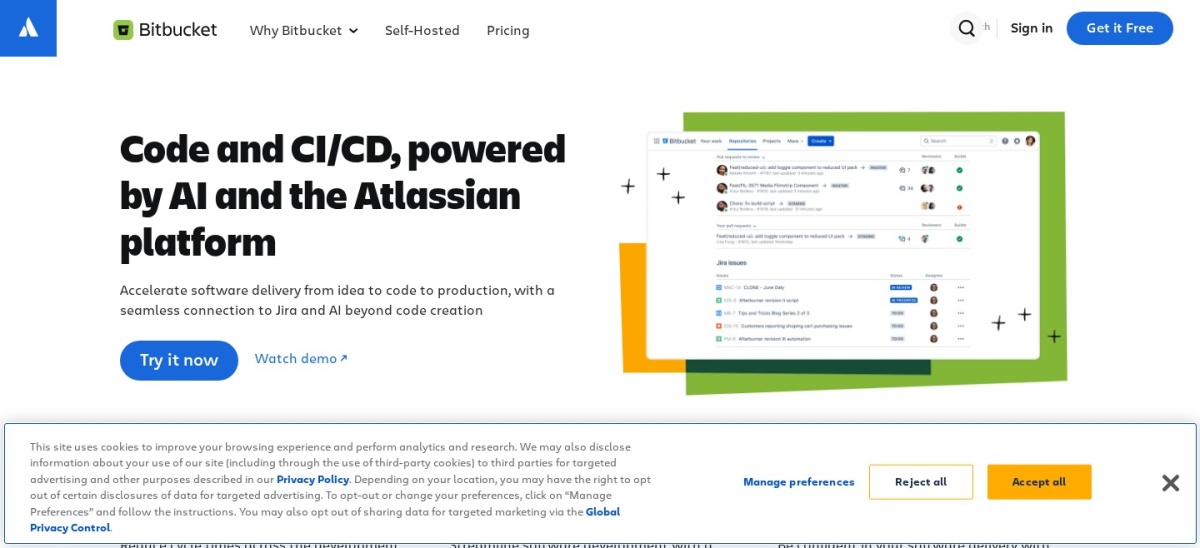
Bitbucket is a Git code management platform from Atlassian built to link commits and pull requests directly to Jira issues. Its free plan covers up to 5 users with unlimited private repositories and 1GB per month of Git LFS storage.
The trade off is that pull request views and pipeline minutes feel tighter on very large repos, with Standard starting at $2 per user per month. It suits teams already running Jira and Confluence for issue tracking.
What we like
Free for up to 5 users with unlimited private repositories
Low entry paid pricing starting at $2 per user per month
4.4/5 rating across 1,017 G2 reviews
Direct links to Jira tickets and Confluence pages
Watch out for
Can feel sluggish on large repositories or big diffs
Free pipeline build minutes are limited to 50 per month
Standard at $2/user/mo expands team access and collaboration controlsVisit bitbucket.org
04
Git Tower
4.7/5on G2 (193 reviews, checked Nov 2026)
Starts at$69/yr
Best visual Git client
Paid entry$69/user/yr
Free tierFree trial (no free tier)
G2 rating4.7/5 (193 reviews)
PlatformsmacOS & Windows
git-tower.com
Git Tower homepage, captured Nov 2026.
Git Tower is a desktop Git client for macOS and Windows that turns branching, rebasing, and merge conflict resolution into visual workflows. Its Basic plan starts at $69 per user per year for individual developers.
The trade off is that there is no permanent free plan and no native Linux client, while Pro costs $129 per user per year. It suits developers who prefer a visual interface over terminal commands.
What we like
4.7/5 rating across 193 G2 reviews
Visual commit history, rebasing, and conflict tools
Affordable Basic tier at $69 per user per year
Watch out for
No permanent free tier beyond a trial
Does not offer a native Linux desktop app
Basic at $69/yr covers 1 user on macOS and Windows with pull request toolsVisit git-tower.com
05
Sourcetree
4.3/5on G2 (376 reviews, checked Nov 2026)
PriceFree
Best free desktop GUI
Paid entryFree (no paid plan)
Free tierFree desktop client
G2 rating4.3/5 (376 reviews)
ReposGit & Mercurial
sourcetreeapp.com
Sourcetree homepage, captured Nov 2026.
Sourcetree is a free desktop client from Atlassian that gives developers a visual view of Git and Mercurial repositories. It includes branch graphs, Git-flow support, hunk staging, and interactive rebasing at no cost.
The trade off is occasional slowdowns on large repositories and fewer modern AI or multi-repo workspace extras than paid clients. It suits developers who want a free graphical Git client without licensing fees.
P4 is a centralized version control platform from Perforce built for large codebases and heavy binary assets. Its free tier covers up to 5 users with 20 workspaces and 3 Git repos.
The trade off is a steeper learning curve and higher per-user cost, with P4 Cloud starting at $39 per user per month. It suits game studios, hardware teams, and media pipelines handling large files.
What we like
Free tier for up to 5 users with 20 workspaces
Handles large binary assets and big repositories well
4.2/5 rating across 95 G2 reviews
Watch out for
Steeper learning curve for developers used to Git
Higher per-seat cost on paid cloud plans
P4 Cloud at $39/user/mo supports hosted collaboration beyond the free starter tierVisit perforce.com
07
Plastic SCM
4.2/5on G2 (36 reviews, checked Nov 2026)
Starts at$9.95/mo
Best for game & media teams
Paid entry$9.95/user/mo
Free tierFree trial (no free tier)
G2 rating4.2/5 (36 reviews)
VendorUnity
plasticscm.com
Plastic SCM homepage, captured Nov 2026.
Plastic SCM is a version control system from Unity that supports branching, merging, and large binary file workflows. Its Team plan starts at $9.95 per user per month with Unity3D plugin support.
The trade off is a smaller review footprint and a jump to $279 per user per month on Enterprise. It suits game and interactive media teams managing large scenes, art assets, and code together.
What we like
Built with large binary files and game workflows in mind
Team plan starts at $9.95 per user per month
4.2/5 rating across 36 G2 reviews
Watch out for
Smaller user review count than GitHub or GitLab
Enterprise tier jumps to $279 per user per month
Team at $9.95/user/mo includes Unity3D integration and Team Engine supportVisit plasticscm.com
Repository hosting vs desktop Git client
Repository hosts such as GitHub, GitLab, and Bitbucket store code remotely, run pull or merge requests, and manage permissions or CI/CD jobs. Most developers still pair them with a terminal, editor extension, or desktop client.
Desktop clients such as Git Tower and Sourcetree run locally on your computer to visualize branches, stage line changes, and resolve conflicts. You can use a desktop client alongside almost any Git hosting service.
How we chose
We started from widely used version control platforms and desktop clients active in software and asset workflows, including findings from the JetBrains Developer Ecosystem Report 2026.
Pricing tiers and G2 user ratings were checked on 22 November 2026 using listed regular plans without promotional discounts.
We excluded unmaintained tools and products where current pricing could not be confirmed from opened pages. No vendor paid for a place, and we do not claim testing for this list.
How to choose version control software
Match the platform to your team size, workflow needs, and file types.
Check your collaboration and CI/CD needs first. Pick GitHub for broad ecosystem support, GitLab for integrated pipelines, or Bitbucket if your team lives in Jira.
Decide whether you want a visual desktop client. Add Sourcetree for a free GUI or Git Tower if you want visual rebasing and conflict tools on macOS or Windows.
Account for large binary files early. Evaluate P4 or Plastic SCM when large media or game assets create friction in standard Git workflows.
Estimate per-seat costs as your team grows. Compare free limits and entry per-user rates against future headcount so seat upgrades do not surprise your budget.
FAQ
What is the best version control software overall?
GitHub is the strongest overall choice for most teams. It holds a 4.7 out of 5 rating across 2,443 G2 reviews, offers unlimited public and private repositories on its free plan, and starts at $4 per user per month on Team.
Which version control tool is best for teams using Jira?
Bitbucket fits Jira-centered teams well because it links code commits and pull requests directly to Jira issues. It is free for up to 5 users and starts at $2 per user per month on Standard.
Do I need a desktop Git client if I use GitHub or GitLab?
No, you can work from a terminal, code editor, or web interface. Desktop clients like Git Tower or Sourcetree help if you prefer visual branch graphs and conflict tools.
When should a team choose P4 or Plastic SCM over Git?
Teams managing large binary files, game assets, or heavy media projects often prefer P4 or Plastic SCM. Both support large asset workflows alongside structured branching and team collaboration.
How do free plans usually limit version control tools?
Free plans often cap team seats, build or CI/CD minutes, storage, or advanced security and branch rules. Paid tiers unlock team governance, extra automation minutes, and higher limits.
Can a team switch Git hosts later without losing history?
Yes, Git repositories are distributed, so you can push branches and commit history to another Git host. You will still need to recreate platform-specific pull requests, issues, and CI/CD pipelines.
SaaS SEO and WordPress specialist with about 8 years of experience. Rakib compares WordPress plugins, themes, hosting and software using public pricing, documentation and user reviews. See how we rank.