Adobe Illustrator is the best sublimation software for scalable designs, with precise vector editing and a regular subscription of $22.99 per month. Choose Adobe Photoshop for photographic transfers and detailed image editing, or Adobe Express for beginner-friendly templates and personalized gifts.
How we make this list: we compare pricing pages, product documentation and public user reviews, then re-check every price before each update. No product paid for a place. Disclosure.
Adobe Illustrator earns 4.8/5 from 8,659 Capterra reviews and costs $275.88 per year.
Adobe Photoshop is available through the Photography plan for $239.88 per year.
Adobe Express Premium costs $9.99 per month without an annual commitment.
Inkscape and GIMP provide free vector and raster editing without mandatory subscriptions.
Photopea offers browser-based image editing with a published Premium price of $5 per month.
How do you choose the best sublimation software?
Good sublimation software starts with accurate artwork dimensions. Whether you print mugs, shirts or tumblers, your design must fit the printable area of the product without unwanted stretching, cropping or empty spaces.
Vector graphics are particularly useful for personalized merchandise. Names, logos, geometric patterns and lettering remain sharp when resized, making Illustrator and Inkscape suitable for artwork reused across different product sizes.
Photographic sublimation requires a different editing workflow. Raster editors such as Photoshop, GIMP and Photopea give you more control over image adjustments, background removal, masks and photographic details.
Design software and printer management software serve different purposes. The applications below primarily create artwork, while printer drivers and compatible printing utilities manage tasks such as ink settings, color profiles, mirroring and output.
4.8/5on Capterra (8,659 reviews, checked Nov 2026)
Starts at$22.99/mo
Best for professional vector sublimation designs
Design typeVector graphics
Export formatsPDF, SVG, PNG, EPS
Free trial7 days
Cloud storage100 GB
adobe.com
Adobe Illustrator homepage, captured Nov 2026.
Adobe Illustrator is a vector design application for creating scalable lettering, logos, patterns and custom merchandise artwork. Its individual subscription includes 100 GB of cloud storage, access to Adobe Express Premium and professional illustration tools for preparing designs at different physical sizes.
The trade off is the recurring subscription of $22.99 per month with an annual commitment, along with the time required to learn vector drawing. It suits sublimation businesses producing personalized merchandise, coordinated product collections and detailed typography that must remain sharp at different print dimensions.
What we like
Scalable vector graphics retain sharp edges
Precise control over artwork dimensions
Professional typography and drawing tools
Supports common production file formats
Adobe Express Premium included
Watch out for
No permanent free plan
Annual subscription commitment
More difficult for beginners than template editors
The individual subscription includes Illustrator and Adobe Express Premium.Visit adobe.com
02
Adobe Photoshop
4.7/5on Capterra (9,706 reviews, checked Nov 2026)
Starts at$19.99/mo
Best for photographic sublimation transfers
Design typeRaster graphics
Entry planPhotography
Cloud storage1 TB
Free trial7 days
adobe.com
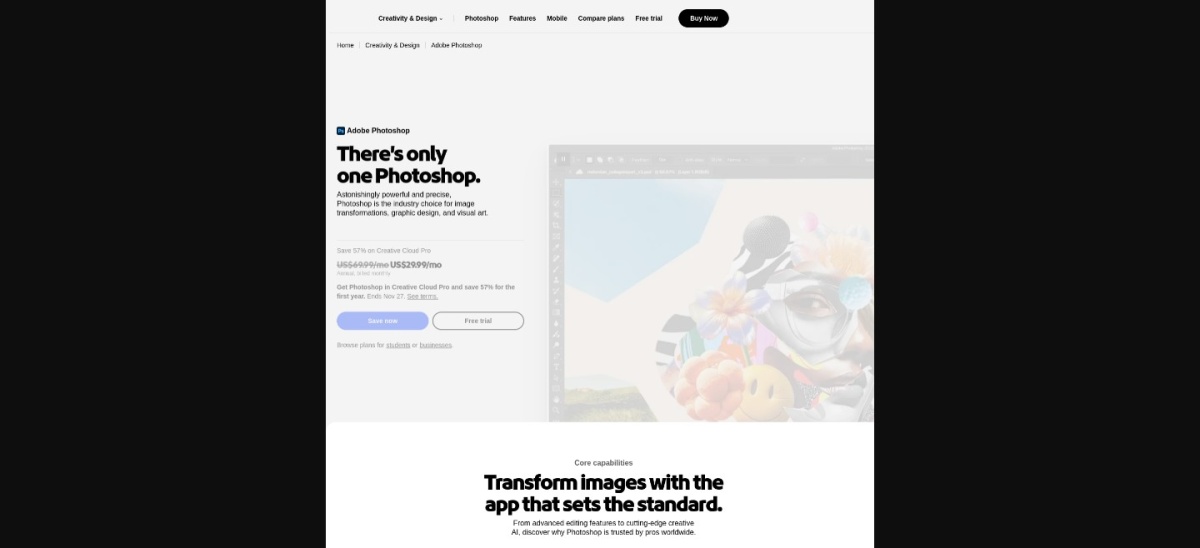
Adobe Photoshop homepage, captured Nov 2026.
Adobe Photoshop is an image editing application for photographic merchandise, detailed compositions and personalized sublimation artwork. The Photography subscription includes Photoshop, Lightroom, Lightroom Classic and 1 TB of cloud storage, making it useful for businesses that regularly work with customer photographs.
The trade off is the $19.99 monthly Photography subscription, billed under an annual commitment, and a more complicated interface than browser-based editors. It suits photographers and merchandise sellers who need detailed image corrections, layered compositions, controlled resizing and photographic background editing.
What we like
Detailed photographic adjustments
Flexible layer and masking tools
Supports color-managed image editing
Suitable for complex image compositions
Photography plan includes Lightroom
Watch out for
No permanent free desktop plan
Raster artwork can lose detail when enlarged
Complex editing tools require practice
The Photography plan includes Photoshop, Lightroom and 1 TB of storage.Visit adobe.com
03
Adobe Express
4.5/5on Capterra (1,497 reviews, checked Nov 2026)
Paid from$9.99/mo
Best for beginners making personalized gifts
Design typeTemplate-based graphics
PlatformsBrowser and mobile
Premium storage100 GB
Billing commitmentMonthly
adobe.com
Adobe Express homepage, captured Nov 2026.
Adobe Express is a template-based design application for creating personalized messages, decorative graphics and simple merchandise artwork. Its free plan provides basic design features, while Premium includes 100 GB of storage, additional creative assets, brand management and automatic resizing.
The trade off is limited technical control over print preparation compared with Illustrator or Photoshop. Premium costs $9.99 per month without an annual commitment. It suits beginners and occasional sublimation sellers who want to personalize products without learning advanced illustration or photographic editing.
What we like
Permanent free design plan
Accessible template-based interface
Works through browsers and mobile devices
Monthly Premium subscription
Brand assets for consistent merchandise designs
Watch out for
Limited advanced vector editing
Some assets and resizing features require Premium
Printer color management requires separate software
Premium adds brand kits, additional assets and automated resizing.Visit adobe.com
04
Inkscape
4.4/5on Capterra (518 reviews, checked Nov 2026)
PriceFree
Best for free vector sublimation design
Design typeVector graphics
Native formatSVG
PlatformsWindows, macOS, Linux
LicenseOpen source
inkscape.org
Inkscape homepage, captured Nov 2026.
Inkscape is an open-source vector graphics editor for creating scalable sublimation artwork without subscription fees. It supports SVG-based drawing, text manipulation, path editing, shape construction and export options suitable for preparing personalized lettering and decorative merchandise patterns.
The trade off is that some print-production tasks require more manual preparation than commercial illustration software, although Inkscape costs $0 and has no paid plan. It suits budget-conscious craft businesses, hobbyists and designers who primarily work with logos, names and geometric graphics.
What we like
No software subscription
Scalable SVG artwork
Detailed path and node editing
Supports multiple desktop operating systems
Useful for customized lettering
Watch out for
More complex than template-based editors
Some commercial print workflows require conversion
Community-based support
All core editing features are available without a paid upgrade.Visit inkscape.org
05
Photopea
4.5/5on Capterra (114 reviews, checked Nov 2026)
Paid from$5/mo
Best for browser-based sublimation photo editing
Design typeLayered raster graphics
PlatformWeb browser
PSD supportYes
File processingLocal device
photopea.com
Photopea homepage, captured Nov 2026.
Photopea is a browser-based graphics editor for modifying photographs, layered PSD templates and custom sublimation designs without installing desktop software. Its free editor provides masking, blending, resizing and layer management, with files processed using the device's own computing resources.
The trade off is browser performance and advertising on the free version. The vendor's published Premium announcement lists $5 per month, although that announcement is older and buyers should confirm the current checkout price. It suits occasional sellers who need Photoshop-style editing without a full desktop subscription.
What we like
Free access to layered image editing
Opens Photoshop PSD files
No desktop installation required
Processes artwork on the local device
Low published Premium price
Watch out for
Advertising on the free version
Large artwork can strain browser resources
Current checkout pricing requires confirmation
Premium removes advertising; confirm the current upgrade price inside the editor.Visit photopea.com
06
GIMP
4.4/5on Capterra (3,500 reviews, checked Nov 2026)
PriceFree
Best for free desktop photo editing
Design typeRaster graphics
PlatformsWindows, macOS, Linux
Color managementICC profile support
LicenseOpen source
gimp.org
GIMP homepage, captured Nov 2026.
GIMP is a free desktop image editor for adjusting photographs, preparing artwork and combining visual elements for sublimation transfers. It provides image manipulation, layers, selection tools, masks and extensibility through plugins, with continued development confirmed by the official release announcements.
The trade off is a less approachable editing workflow for beginners and limited native vector design capabilities. GIMP costs $0 without a paid subscription. It suits hobbyists and small merchandise businesses that need detailed photographic adjustments but cannot justify ongoing commercial software fees.
What we like
Free and open-source software
Detailed image manipulation tools
Supports ICC color profiles
Extensible through plugins
Desktop editing without a cloud subscription
Watch out for
Steeper learning curve than template editors
Not a dedicated vector illustration application
Some commercial workflows require additional tools
The complete image editor is available without paid upgrades.Visit gimp.org
07
Canva
4.7/5on Capterra (13,469 reviews, checked Nov 2026)
PricingCustom pricing
Best for repeatable merchandise templates
Design typeTemplate-based graphics
Free templates1.6M+
Export formatsPDF, JPG, PNG
Paid planCanva Pro
canva.com
Canva homepage, captured Nov 2026.
Canva is a visual design platform for creating personalized mugs, apparel graphics, gift artwork and reusable merchandise layouts. Its official comparison page lists more than 1.6 million templates on the free plan, alongside customizable dimensions and common image export formats.
The trade off is limited specialist print control and variable subscription pricing. The official pricing page displays a promotional offer, but a regular subscription amount could not be independently confirmed during this check, so paid pricing requires checkout confirmation. It suits sellers who prioritize templates and quick personalization.
What we like
Large free template collection
Accessible drag-and-drop editing
Custom artwork dimensions
Useful for reusable product layouts
Common image and document exports
Watch out for
Limited advanced color management
Some assets and export options require payment
Regular paid price requires checkout confirmation
Canva Pro adds premium assets, expanded templates and advanced design features.Visit canva.com
Why color management matters in sublimation printing
Accurate sublimation colors depend on the complete production setup. Printer hardware, ink, transfer paper, substrate coatings and heat press settings all influence the finished appearance, regardless of which design application creates the artwork.
An ICC profile describes how a particular device or printing configuration reproduces colors. Compatible profiles can help your editing and printing applications interpret color values more consistently.
Avoid automatically converting every design to CMYK. Some sublimation printer workflows expect RGB artwork and handle color conversion through their drivers or dedicated print utilities. Follow the instructions provided for your specific printer and ink configuration.
Confirm whether your printer software automatically mirrors artwork before sending a design to production. Mirroring in both the design application and the printer driver can produce an incorrectly oriented transfer.
Should you use vector or raster graphics for sublimation?
Vector graphics work particularly well for lettering, logos, monograms and decorative patterns. Because the artwork uses mathematical paths rather than fixed pixels, designers can resize it across different product dimensions without sacrificing edge clarity.
Raster graphics are usually the better choice for photographs and detailed painted artwork. Their quality depends on the original image resolution and final print size, so enlarging a small image may produce visible softness.
Many merchandise businesses benefit from combining both approaches. A personalized gift might contain a customer photograph prepared in Photoshop alongside scalable lettering created in Illustrator or Inkscape.
How we chose
We selected graphic design applications suited to sublimation artwork using official product documentation, printing workflow guidance and public software reviews. The comparison covers vector illustration, photographic editing, reusable templates, supported file formats and suitability for small merchandise businesses.
We opened official product pages and Capterra review listings on 29 Nov 2026. Adobe subscription prices use published regular rates rather than temporary discounts. Canva's regular price could not be confirmed, and Photopea's published Premium price comes from an older vendor announcement that requires checkout confirmation.
We excluded applications that primarily manage unrelated printing processes, products without usable public review information and design services that do not provide sufficient artwork editing capabilities. The rankings prioritize design flexibility and suitability for sublimation preparation. No vendor paid for a place, and we do not claim testing for this list.
How to choose sublimation software for your business
Compare your artwork requirements, printer workflow, design experience and recurring software costs before committing to a sublimation design application.
**Identify the artwork you produce most often.** Choose vector software for logos, names, monograms and decorative patterns. Choose a raster editor for photographic transfers, detailed image compositions and artwork that requires precise photo adjustments.
**Check compatibility with your printing workflow.** Confirm that your design application exports the file formats accepted by your sublimation printing utility. Check color profile compatibility, artwork dimensions, resolution settings and whether the printer driver handles mirroring.
**Compare regular annual software costs.** Illustrator costs $275.88 per year, while Photoshop through the Photography plan costs $239.88. Inkscape and GIMP have no subscription fees, making them practical choices for businesses with limited starting budgets.
**Match the editor to your design experience.** Start with Adobe Express or Canva if most orders involve simple personalization. Consider Illustrator, Photoshop, Inkscape or GIMP when you need more control over original artwork and production files.
FAQ
What is the best sublimation software in 2026?
Adobe Illustrator is the best sublimation software for businesses producing scalable lettering, patterns and professional merchandise graphics. Its regular subscription costs $22.99 per month. Adobe Photoshop is preferable for photographic transfers, while Adobe Express is more approachable for beginners.
What is the best free software for sublimation printing?
Inkscape is the best free sublimation design software for vector artwork, while GIMP is a suitable free alternative for photographic editing. Both are open-source desktop applications without mandatory subscriptions. Their editing capabilities cover many common merchandise design requirements.
Is Canva good for sublimation designs?
Yes, Canva is suitable for simple sublimation designs, including personalized lettering, decorative patterns and gift artwork. Its templates help beginners create layouts quickly. However, advanced color management, detailed illustration and specialist printing controls may require additional applications.
How much does sublimation design software cost?
Sublimation design software ranges from completely free applications such as Inkscape and GIMP to Adobe Illustrator at $275.88 annually. Adobe Express Premium costs $119.88 annually at its regular monthly rate. Printer utilities and commercial artwork licenses may add separate expenses.
Is Illustrator or Photoshop better for sublimation?
Illustrator is better for scalable logos, lettering and patterns, while Photoshop is better for photographs and detailed raster artwork. Businesses producing several merchandise categories may benefit from both applications, particularly when designs combine customer photographs with personalized typography.
What sublimation software is easiest for beginners?
Adobe Express is an accessible starting point for beginners because it provides customizable templates and basic editing tools without requiring a paid subscription. Canva offers a similar visual workflow. Both are suitable for straightforward personalized gifts and simple apparel designs.
Do I need separate software for my sublimation printer?
Yes, you generally need a compatible printer driver or printing utility in addition to design software. Graphic editors create and export artwork, while printer software manages output settings. The exact requirements depend on the printer model, ink configuration and supported printing workflow.
Can I start a sublimation business using free software?
Yes, you can start a sublimation business using Inkscape for vector artwork and GIMP for photographs. These applications eliminate recurring design software expenses. You still need compatible printing equipment, transfer materials and commercially licensed artwork when using third-party creative assets.
SaaS SEO and WordPress specialist with about 8 years of experience. Rakib compares WordPress plugins, themes, hosting and software using public pricing, documentation and user reviews. See how we rank.