Obsidian is the best notes software for most users, keeping Markdown files locally for free with optional Sync from $4 a month billed yearly and a 4.5/5 G2 rating. Pick Notion for team databases and Joplin for open-source sync from EUR 2.40 a month yearly.
How we make this list: we compare pricing pages, product documentation and public user reviews, then re-check every price before each update. No product paid for a place. Disclosure.
Obsidian keeps notes as plain local Markdown files for free, with optional paid Sync starting at $4 a month billed yearly.
Notion combines notes, tasks and relational databases, starting free for individuals and at $10 per member per month for Plus.
Joplin offers open-source Markdown notes with optional Joplin Cloud sync starting at EUR 2.40 a month (about $2.63) billed yearly.
Standard Notes focuses on end-to-end encryption, with a free plain-text tier and Productivity starting at $90 a year.
Evernote provides strong web clipping and search, starting with a 50-note free tier and Starter at $99 a year.
Craft and Bear suit clean writing and Apple workflows, with paid plans starting at $8 a month (regular yearly rate) and $29.99 a year.
What to look for in notes software
Good notes software lets you capture thoughts fast and find them later without locking your text inside a hard-to-export format. Plain Markdown or clean exports protect your archive over time.
Sync and storage limits shape long-term costs. Some apps sync across devices for free, while others charge for cloud sync, version history or extra storage.
Decide whether you work mostly alone or with a team. Shared workspaces, permissions and databases matter for groups, whereas local files and encryption often matter more for solo writers.
Watch out for promotional pricing when comparing tiers. Always check the standard renewal or regular annual rate alongside monthly billing.
Obsidian is a local-first notes app that stores your notes as plain Markdown files on your device. The core app is free with no sign-up required, and optional Obsidian Sync starts at $4 per user per month billed yearly ($5 monthly).
The trade off is setup and paid add-ons. Multi-device sync through Obsidian Sync and web hosting via Publish cost extra, and plugins take time to configure. It suits writers, researchers and technical users who want full ownership of local files.
What we like
Free core app with local Markdown file storage
Bidirectional links, graph view and plugin support
Affordable paid Sync at $4 a month billed yearly
Watch out for
Official multi-device sync is not free
Customizing plugins can take time
Sync adds encrypted cross-device sync and version historyVisit obsidian.md
02
Notion
4.6/5on G2 (14,021 reviews, checked Nov 2026)
Paid from$10/mo
Best for team workspaces and databases
Free tierYes, individuals
CollaborationShared workspaces
Paid planPlus, $10/seat/mo
G2 rating4.6/5 (14,021)
notion.com
Notion homepage, captured Nov 2026.
Notion is a connected workspace that combines notes, wikis, tasks and databases in one place. Its Free plan costs $0 per member per month for individuals with up to 10 external guests and 7 days of page history.
The trade off is per-seat pricing and complexity. Plus starts at $10 per member per month ($12 monthly) with 30 days of version history, and large workspaces can feel slow. It suits teams and organized planners who want notes tied to projects and tables.
Joplin is an open-source note-taking app for desktop and mobile that supports Markdown, to-dos and end-to-end encryption. The apps are free, while Joplin Cloud Basic starts at EUR 2.40 per month billed yearly (about $2.63, or EUR 28.69/year; EUR 2.99 monthly).
The trade off is basic built-in polish compared with commercial rivals. Basic cloud sync includes 2 GB of storage and 10 MB per attachment, while notebook sharing needs higher tiers. It suits privacy-minded users who want open-source software on a low budget.
What we like
Free open-source apps across desktop and mobile
Low-cost Joplin Cloud sync starting around $2.63/mo yearly
Supports end-to-end encryption and Markdown
Watch out for
Basic plan caps storage at 2 GB and 10 MB files
Interface feels more utilitarian than design-led apps
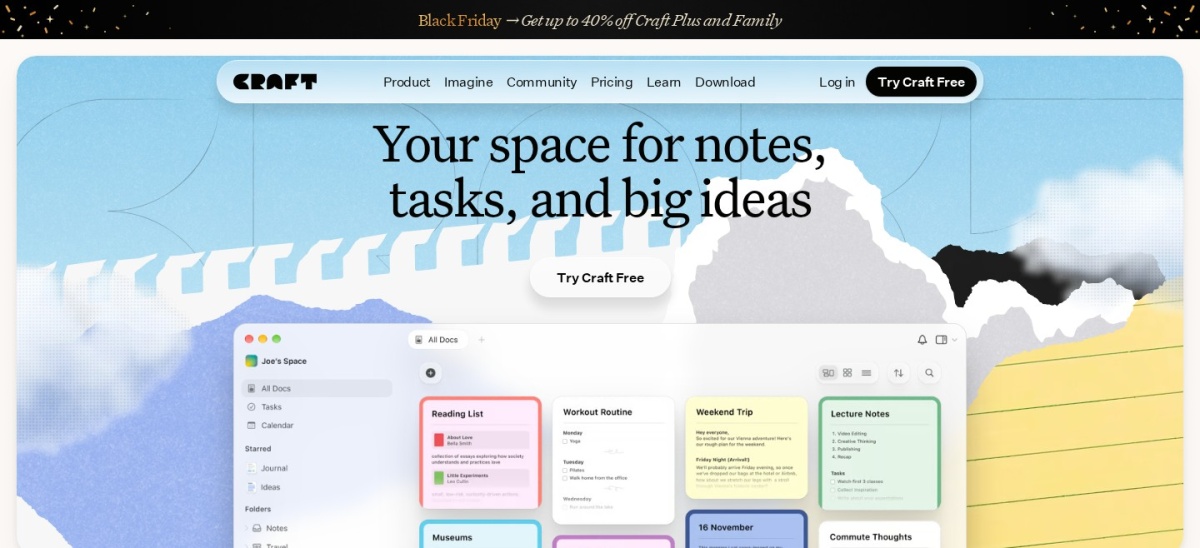
Craft is a block-based notes and document app built for clean layouts, daily notes and easy sharing. Its Free Starter plan includes up to 1,500 blocks total, 1 GB of storage and 1 personal space.
The trade off is block limits on the free plan and higher regular pricing. Plus has a regular price of $8 per month billed yearly ($9 monthly, with occasional seasonal promos), and tables are lighter than in spreadsheets. It suits writers and consultants who share structured notes.
What we like
Polished layouts, daily notes and one-click web sharing
Exports to Markdown, PDF and Word documents
Regular Plus rate stays under $100 a year
Watch out for
Free plan caps total content at 1,500 blocks
Tables lack advanced spreadsheet features
Plus removes block limits and adds 30-day version historyVisit craft.do
05
Standard Notes
4.5/5on Capterra (14 reviews, checked Nov 2026)
Paid from$90/yr
Best for audited end-to-end encryption
Free tierPlain text, syncs
EncryptionEnd-to-end by default
Paid planProductivity, $90/yr
Capterra rating4.5/5 (14)
standardnotes.com
Standard Notes homepage, captured Nov 2026.
Standard Notes is an encrypted note-taking app with end-to-end encryption and multi-device sync included on its free plan. Free users get plain-text notes, while Productivity starts at $90 per year.
The trade off is limited rich editing on the free tier and no team workspaces. Rich editors, folders and extended history require a paid plan, and the interface stays minimal. It suits security-focused individuals who want strong encryption over flashy tools.
Evernote is a long-running notes app known for its web clipper, search across images and PDFs, tasks and calendar tools. Its Free plan allows up to 50 notes, 1 notebook and 1 connected device.
The trade off is tight free limits and a note cap on Starter. Starter costs $99 per year ($14.99 monthly) for up to 1,000 notes and 3 devices, while unlimited notes require Advanced at $249.99 per year. It suits people who clip articles and receipts and want one searchable archive.
What we like
Strong web clipper and search inside PDFs and images
Built-in tasks, calendar and AI tools
Starter plan at $99/yr fits under $100/yr
Watch out for
Free plan restricts you to 50 notes and 1 device
Starter caps notes at 1,000; unlimited costs $249.99/yr
Starter raises limits to 1,000 notes, 20 notebooks and 3 devicesVisit evernote.com
07
Bear
4.5/5on Capterra (11 reviews, checked Nov 2026)
Paid from$29.99/yr
Best for calm Markdown writing on Apple devices
Free tierSingle-device writing
PlatformsMac, iPhone, iPad
Paid planPro, $29.99/yr
Capterra rating4.5/5 (11)
bear.app
Bear homepage, captured Nov 2026.
Bear is a Markdown note-taking app for Mac, iPhone and iPad that uses nested tags and clean typography. The free version lets you write and tag notes on a single device without sync or extra exports.
The trade off is Apple-only support and paid syncing. Bear Pro costs $29.99 per year ($2.99 monthly) to unlock iCloud sync, note encryption and full exports. It suits writers on iPhone and Mac who want a fast, low-cost Markdown app.
What we like
Low regular Pro price at $29.99 a year
Fast Markdown editor with nested tags and themes
Supports note encryption and OCR search on Pro
Watch out for
No Windows, Android or web version
iCloud sync requires Bear Pro
Bear Pro adds iCloud sync, encryption, themes and extra exportsVisit bear.app
Free vs paid: when to upgrade
Free plans work well if you keep notes on one device or store files locally. Obsidian, Joplin and Standard Notes give you useful starting points without immediate paywalls.
Upgrades usually pay off for multi-device sync, higher storage or team sharing. Evernote and Craft have tight free caps, so heavy users hit limits quickly.
Compare annual billing against monthly rates before subscribing. Yearly plans often lower the monthly cost, as long as you stay with the tool all year.
How we chose
We selected 7 established notes apps across local Markdown, team workspaces, encrypted notes and Apple-focused writing.
Pricing and plan terms were checked on each vendor's official pricing page in November 2026, showing regular rates rather than discounts, with ratings from G2 and Capterra. Where a vendor showed a sale, the list shows the regular price.
We excluded unmaintained tools and apps without clear, verifiable pricing. No vendor paid for a place, and we do not claim testing for this list.
How to choose notes software
Start with your devices and how you organize notes, then check sync costs.
Check which devices you use every day. Pick cross-platform tools like Obsidian, Notion or Joplin if you mix Windows, Linux, Android and Apple devices, or Bear if you stay on Apple.
Decide between local files, databases or simple lists. Choose Markdown and local folders for long-term control, or Notion if you want shared pages and linked databases.
Check free limits before building a large library. Watch for note caps, block limits or paid sync so you do not get stuck moving hundreds of notes later.
Confirm regular renewal prices. Look at the standard annual or monthly rate rather than short-term promos before committing.
FAQ
What is the best notes software overall?
Obsidian is a strong default choice for most people because the core app is free, stores notes as plain Markdown files locally and offers optional paid Sync starting at $4 a month billed yearly.
Which notes app is best for teams?
Notion is built for shared workspaces, team permissions, wikis and databases. It offers a free tier for individuals and a Plus plan starting at $10 per member per month.
Is there a good free notes app with encryption?
Standard Notes includes end-to-end encryption and multi-device sync on its free plain-text tier, while Joplin supports end-to-end encryption across its free open-source apps.
Why do some notes apps charge for syncing?
Hosting cloud servers, keeping version history and encrypting synced data cost money to run. Apps like Obsidian and Bear keep the basic editor free and charge separately for sync.
Which notes software is best for Apple users?
Bear is a focused Markdown option for Mac, iPhone and iPad with nested tags and Pro priced at $29.99 a year, while Craft also offers clean styling and web sharing.
Should I choose Markdown or a block editor?
Markdown works well for plain text, portability and fast typing, while block editors like Notion and Craft make rich layouts, embeds and shared pages easier to manage.
SaaS SEO and WordPress specialist with about 8 years of experience. Rakib compares WordPress plugins, themes, hosting and software using public pricing, documentation and user reviews. See how we rank.