Canva is the best easy photo editing software for most people, with a free plan covering core editing and more than 250,000 templates. Pixlr is the best free browser editor, and GIMP is completely free with full layered editing.
How we make this list: we compare pricing pages, product documentation and public user reviews, then re-check every price before each update. No product paid for a place. Disclosure.
Canva leads at 4.7 out of 5 on G2 from 7,678 reviews, with the easiest editor for beginners.
Pixlr is the cheapest paid plan here at $1.99 a month billed yearly, with real layered editing free.
GIMP is completely free with full layered editing, but it has the steepest learning curve here.
Canva Pro's yearly price has been reported at $120, $144 and $180, so check the checkout price.
Photopea's 4.6 out of 5 on G2 rests on only 21 reviews, so treat that score with care.
What to look for in easy photo editing software
Easy photo editing means one-click fixes, filters and crops without learning layers, masks or colour theory, and most of the tools here run in a browser with no install.
The market splits into design-led editors such as Canva and Adobe Express, browser editors such as Pixlr and Photopea, and mobile-first editors such as Picsart.
Watch the AI credit model. Many editors now charge by monthly AI credits, so a heavy AI user can run out of credits before the month ends, and free AI exports often carry a watermark.
Our guide to AI photo editing software covers the AI-first editors that go further than the easy tools here.
Canva is the easiest photo editor for most people, because editing a photo is one step inside making a finished post, flyer or ad. The free plan covers core editing and more than 250,000 templates, and Pro at $15 a month billed monthly adds the background remover, Magic Resize and a Brand Kit.
The trade off is the paywall and the moving yearly price. Premium assets, Magic Studio tools and transparent PNG export need Pro, and the yearly total has been reported at $120, $144 and $180 in different months. It suits creators who edit photos as part of designing posts and ads.
What we like
Easiest editor in this list for beginners
Free plan covers core editing and templates
Turns an edited photo into a finished design in one place
Adobe Express is Adobe's quick design tool, pairing one-click photo fixes with templates and Adobe Stock assets for branded graphics. The free plan covers core editing, and Premium at $9.99 a month billed monthly adds generative fill, premium templates and the full Stock library.
The trade off is depth. Express is built for speed, not layered editing, so a photographer who needs precise control will outgrow it fast. It suits small businesses that want branded social graphics with light photo editing.
Pixlr is a free browser photo editor with a real editor behind it: Pixlr X for quick fixes, Pixlr E for layered editing, and Express for fast crops and filters. The free plan covers core editing with ads, and Plus costs $1.99 a month billed yearly for ad-free editing and 80 AI credits a month.
The trade off is the free plan's ads and the AI credit limit. Heavy AI use eats the 80-credit allowance, and the interface is busier than Canva's. It suits anyone who wants a free, no-install editor with real layers.
What we like
Closest thing to free Photoshop in a browser
Cheapest paid plan here at $1.99 a month
No install and no account needed to start
Watch out for
Free plan shows ads
AI credits cap at 80 a month on Plus
Interface is busier than Canva
Plus adds ad-free editing and 80 AI credits a monthVisit pixlr.com
04
Picsart
4.5/5on G2 (700 reviews, checked Nov 2026)
Paid from$10.50/mo
Best mobile-first photo editor
Cheapest paid planPro, $10.50/mo annual
Free planYes
PlatformMobile-first, web too
AI toolsBackground remover, AI effects
picsart.com
Picsart homepage, captured Nov 2026.
Picsart is the mobile-first photo editor in this list, combining filters, retouching, background tools, stickers and AI effects in one phone app. The free app covers basic editing, and Pro at $10.50 a month billed yearly adds premium filters, fonts and AI tools.
The trade off is the subscription and the credit model. Pro costs $10.50 a month on the web plan, while the App Store sells it from $13.99 a month, so compare before you subscribe. It suits creators who edit on their phone every day.
Photopea is a free browser editor that works like Photoshop: layers, masks, blend modes and support for PSD, XCF, Sketch and RAW files, with no install and no account. The free plan covers full editing with ads, and Premium at $5 a month removes ads and adds more history steps.
The trade off is the thin review base. Its 4.6 out of 5 on G2 rests on only 21 reviews, and the interface assumes you already know Photoshop. It suits editors who want layered editing free, in a browser, without a subscription.
Fotor is the quick-enhancement editor in this list, with a one-click AI enhancer, background remover, portrait retouching and a batch editor for a whole album at once. The free plan covers basic editing, and Pro costs $3.33 a month billed yearly with 100 AI credits a month.
The trade off is the credit budget. Free AI credits are limited, and deep layered editing trails Photopea, so heavy AI use eats the allowance fast. It suits social creators who want one-click fixes and batch edits.
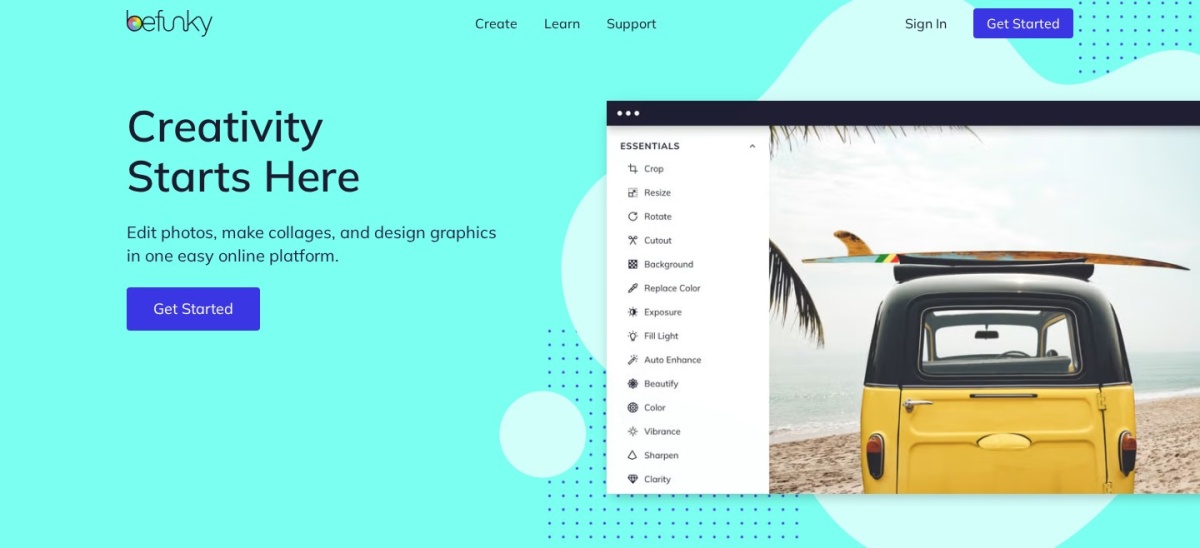
BeFunky is a browser app that combines a photo editor, collage maker, graphic designer and AI editing tools, with batch workflows for resizing and retouching a whole set at once. The free plan covers basic editing, and Plus costs $14.99 a month billed monthly.
The trade off is the price gap. Plus is $14.99 a month billed monthly, but $83.88 a year has been reported on annual billing, so check the checkout price before you subscribe. It suits casual creators who want collages and batch edits in one tab.
What we like
Collage maker, editor and designer in one tab
Batch resizing and retouching
Easy for complete beginners
Watch out for
Monthly price is steep for a casual editor
Annual price reported at $83.88 conflicts with the monthly rate
GIMP is a free, open-source photo editor with full layered editing, masks, filters and plug-ins, and it costs nothing, forever, with no subscription, no ads and no account. It runs on Windows, Mac and Linux, and its plug-in library covers most professional workflows.
The trade off is the learning curve and the interface. GIMP is powerful but its menus and workflow feel dated next to Canva or Pixlr, and it has no cloud sync or AI tools built in. It suits editors who want a free, full-featured editor and do not mind learning it.
Free vs paid: what the free plans actually give you
Every tool in this list has a free plan, and for basic crops, filters and fixes the free plan is enough.
Paid plans mostly remove ads and watermarks, add AI credits and unlock premium templates and background removal. Pixlr Plus at $1.99 a month and Fotor Pro at $3.33 a month are the cheapest upgrades.
If you edit photos daily for work, a paid plan pays for itself in saved time. If you edit a few photos a month, GIMP or a free plan is the honest pick.
How we chose
We started from the established tools in this category, then kept those with a verifiable rating on G2, Capterra or Trustpilot and a published price or a clear quote-only model.
Prices come from each vendor's pricing page or a published price list, checked on 25 November 2026. Ratings and review counts come from G2, Capterra or Trustpilot on the same day. Where a vendor shows a sale, the list shows the regular price.
We left out tools we could not verify a rating or a price for. No vendor paid for a place, and we do not claim hands-on testing for this list.
How to choose easy photo editing software
Start with the job the tool has to do every week, then check the price and the limits before you sign up.
List the features you need every week. Write down the three tasks the tool must handle, then check each shortlisted tool covers them on its entry plan.
Check the price on the vendor's own page. Compare the regular monthly or yearly price, not a first-year discount, and note any per-user, per-seat or per-gigabyte charge.
Read the limits on the cheapest plan. Caps on users, projects, products or data volume are the usual reason buyers upgrade within months.
Try the free plan or trial first. A short trial shows whether the interface fits your team before you commit to a yearly bill.
FAQ
What is the easiest photo editing software for beginners?
Canva is the easiest photo editing software for most beginners. It is rated 4.7 out of 5 on G2 from 7,678 reviews, and its free plan covers core editing and more than 250,000 templates. BeFunky and Fotor are also built for beginners, with one-click fixes and collages.
Is there a free photo editor as good as Photoshop?
Photopea is the closest free option, with layers, masks and PSD support in a browser at no cost. GIMP is the full free alternative, with layered editing and plug-ins on Windows, Mac and Linux. Both need more learning than Canva or Pixlr.
How much does Canva Pro cost?
Canva Pro costs $15 a month billed monthly. The yearly total has been reported at $120, $144 and $180 in different months of 2026, so the monthly figure is the safer one to quote and the annual total should be checked at checkout.
What is the cheapest easy photo editor?
Pixlr Plus is the cheapest paid plan here at $1.99 a month billed yearly, and GIMP is completely free. Fotor Pro is $3.33 a month billed yearly. All three have free plans, so you can try them before paying anything.
Can I edit photos without installing software?
Yes. Canva, Pixlr, Photopea, Fotor and BeFunky all run in a browser with no install, and Picsart runs on your phone. Only GIMP needs a desktop install, and it is the only tool here with no browser version.
Do free photo editors add watermarks?
Some do. Fotor's free AI exports carry a watermark, and Pixlr's free plan shows ads. Canva's free plan exports without a watermark on free assets, and GIMP and Photopea add no watermark at all.
SaaS SEO and WordPress specialist with about 8 years of experience. Rakib compares WordPress plugins, themes, hosting and software using public pricing, documentation and user reviews. See how we rank.