Best Compression Software in 2026: 7 Tools Compared
WLWPLegible EditorsLast verified 22 Nov 2026How we rank12 min read
★ Short answer
7-Zip is the best compression software for most users because it is completely free, supports AES-256 encryption, and creates high-compression 7z archives. PeaZip is better for cross-platform archive management and extracting more than 200 file types, while Bandizip offers a modern interface and a $30 permanent Professional license.
How we make this list: we compare pricing pages, product documentation and public user reviews, then re-check every price before each update. No product paid for a place. Disclosure.
7-Zip is completely free, supports AES-256 encryption, and holds a 4.5/5 Capterra rating from 42 reviews.
PeaZip opens more than 200 file types without a paid license and has a 4.6/5 SourceForge rating from 115 reviews.
Bandizip offers a free edition and a $30 one-time Professional license with password management and archive repair.
WinRAR offers a perpetual license with RAR creation, AES-256 encryption, and a 4.8/5 Capterra rating.
PowerArchiver Business starts at $22.95 per license and supports extraction from more than 60 archive formats.
Keka is a free Mac archiver with an optional $6.49 App Store purchase and a 4.6/5 MacUpdate rating from 102 reviews.
What matters when choosing compression software
Compression software reduces the space files occupy and packages folders into archives that are easier to store, transfer, or back up. Common archive formats include ZIP, 7z, RAR, TAR, and GZIP.
The first consideration is format compatibility. ZIP is widely supported, while 7z can achieve smaller archives with suitable data. RAR creation requires compatible software, although many free applications can extract RAR files.
Security is another consideration. Look for AES-256 encryption when protecting sensitive archives, and check whether the software supports encrypted filenames, password management, or archive integrity testing.
Price alone does not determine value. Free tools such as 7-Zip, PeaZip, and Keka already provide substantial compression functionality, while paid products may add archive repair, backup integration, cloud workflows, commercial support, or easier interfaces.
Compression ratios depend on file contents. Text, documents, and uncompressed datasets often shrink considerably, while already compressed video, images, and encrypted files may show little improvement.
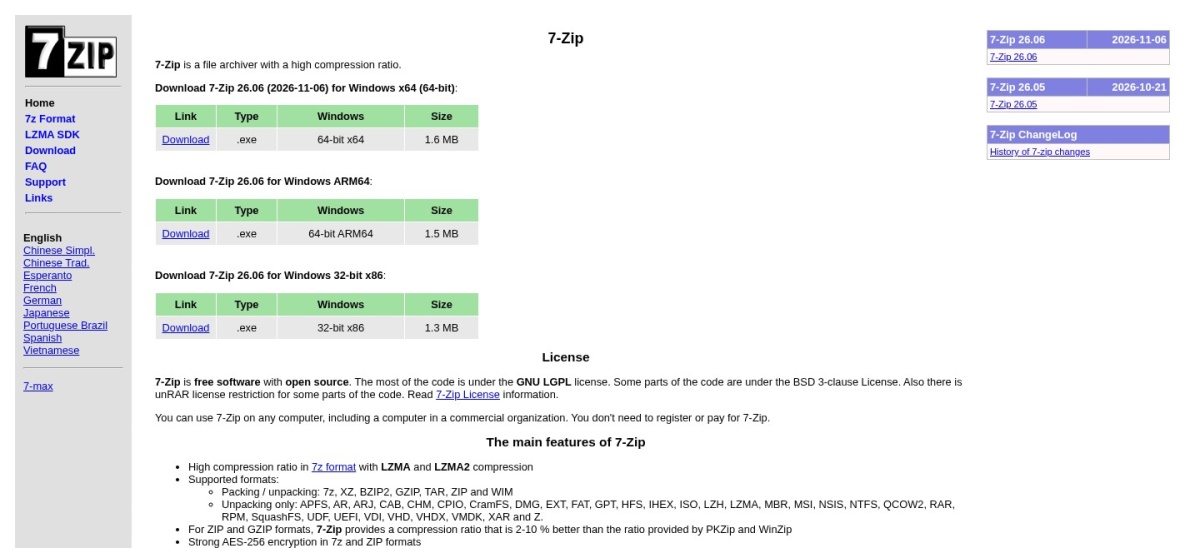
7-Zip is a free, open-source file archiver that creates 7z, ZIP, TAR, GZIP, and other archives. It supports LZMA2 compression, AES-256 encryption, self-extracting 7z archives, Windows shell integration, and command-line operations. Version 26.06 was released in November 2026, and the software can be used commercially without purchasing a license.
The trade off is its traditional interface and limited official desktop platform support compared with cross-platform competitors. There is no paid upgrade, so its software cost remains $0. It suits developers, IT teams, and everyday users who prioritize compression capability over interface design.
What we like
Completely free for personal and commercial use
High-compression 7z format with LZMA2
AES-256 encryption for ZIP and 7z archives
Command-line tools for automated workflows
Extracts many additional archive formats
Watch out for
Interface looks dated compared with newer alternatives
Official desktop application primarily targets Windows
Cannot create proprietary RAR archives
No paid plan; all supported compression features are freeVisit 7-zip.org
02
PeaZip
4.6/5on SourceForge (115 reviews, checked Nov 2026)
PriceFree
Best free cross-platform archive manager
Archive extraction200+ file types
PlatformsWindows, Linux, macOS, BSD
SecurityEncrypted archives and password manager
InstallationInstalled or portable
peazip.github.io
PeaZip homepage, captured Nov 2026.
PeaZip is an open-source archive manager that opens more than 200 file types and supports Windows, Linux, macOS, and BSD. Its free application combines 7z, ZIP, TAR, Zstandard, and other compression technologies with archive conversion, file splitting, password management, and secure deletion. Portable packages can run without a conventional installation.
The trade off is interface complexity, as its many compression settings and file management functions can overwhelm casual users. All core capabilities are free, without a commercial paid tier. It suits technical users who frequently work with unfamiliar archive formats across different desktop systems.
What we like
Supports more than 200 archive file types
Free and open source across major desktop platforms
Portable versions require no conventional installation
Integrated archive conversion and integrity checks
3.6/5on AlternativeTo (27 reviews, checked Nov 2026)
Paid from$30 one-time
Best for fast compression with a simple interface
Free editionStandard
Paid editionProfessional, $30
Compression threads16 free; 64 Professional
LicensePermanent
bandisoft.com
Bandizip homepage, captured Nov 2026.
Bandizip is a desktop compression and extraction application with a free Standard edition and a $30 Professional license. Standard supports commercial use and up to 16 compression threads, while Professional increases that limit to 64. Its interface includes archive testing, common-format extraction, and Windows Explorer integration.
The trade off is that the free edition includes advertising and reserves password management, archive repair, and image previews for paid users. Professional costs $30 as a one-time purchase. It suits users who want straightforward archive handling and prefer a permanent license instead of a subscription.
What we like
Free Standard edition permits commercial use
Simple interface with familiar extraction controls
Permanent Professional license
Paid edition includes archive repair
Multi-core compression support
Watch out for
Advertisements in the free edition
Password recovery and repair require Professional
Professional registration requires internet access
Professional removes ads and adds repair, previews, and password toolsVisit bandisoft.com
04
WinRAR
4.8/5on Capterra (359 reviews, checked Nov 2026)
Starts at$33.35 one-time
Best for creating and managing RAR archives
Archive creationRAR and ZIP
EncryptionAES-256
Evaluation40 days
LicensePerpetual
win-rar.com
WinRAR homepage, captured Nov 2026.
WinRAR is a commercial archive manager specializing in creating RAR and ZIP files while extracting other common archive formats. It provides AES-256 encryption, archive splitting, recovery records, and self-extracting archive options. A 40-day evaluation period lets users assess the software before purchasing a license.
The trade off is that WinRAR is not freeware, and its interface is less modern than some alternatives. A vendor notification displays a $33.35 regular license price and a discounted introductory offer, although the distributor may display different checkout pricing. It suits users who specifically need RAR creation or recovery features.
What we like
Creates proprietary RAR archives
Recovery records help protect against archive damage
AES-256 encryption support
Perpetual license rather than a recurring subscription
Strong public review history
Watch out for
Requires a license after the evaluation period
Free alternatives cover many everyday ZIP tasks
License prices vary between official sales channels
A paid license authorizes continued use after evaluationVisit win-rar.com
05
PowerArchiver
4/5on Capterra (1 reviews, checked Nov 2026)
Starts at$22.95 one-time
Best for IT teams handling multiple archive formats
Archive extraction60+ formats
Entry licenseBusiness, $22.95
Advanced editionProfessional, $34.95
LicensingPerpetual per seat
powerarchiver.com
PowerArchiver homepage, captured Nov 2026.
PowerArchiver is a commercial archive manager that extracts more than 60 formats, including RAR, ZIP, ZIPX, 7Z, and ISO. Its Business edition starts at $22.95 per seat and includes commercial licensing and deployment options. Professional adds backup, encryption, cloud functionality, and office integration.
The trade off is that advanced backup and encryption workflows require higher editions, with Professional priced at $34.95 and Enterprise at $59.95 per seat. It suits business users who process many archive formats and need deployment controls or a path toward managed organizational licensing.
What we like
Extracts more than 60 archive formats
Commercial Business license starts at $22.95
Volume licensing for organizations
Professional edition adds backup and cloud features
Enterprise options support centralized IT administration
Watch out for
Advanced features require higher editions
Broader interface than basic file archivers
Very limited independent review sample on Capterra
4.5/5on Ashampoo customer reviews (1,528 reviews, checked Nov 2026)
Starts at$40 one-time
Best for desktop compression and backup features
Current editionZIP Pro 4
LicenseDownload purchase
Customer rating4.5/5
Purchase price$40
ashampoo.com
Ashampoo ZIP Pro homepage, captured Nov 2026.
Ashampoo ZIP Pro is a Windows compression suite that combines archive creation, extraction, encryption, and backup functions. ZIP Pro 4 is available as a $40 download purchase and has a 4.5/5 customer rating from 1,528 verified reviews. Its feature set targets users who want archive management and additional file-handling utilities in one application.
The trade off is the $40 purchase price when free archivers already handle ordinary compression and extraction. The additional utilities can also be unnecessary for users who only create ZIP files occasionally. It suits desktop users who prefer a packaged interface for compression, encryption, and backup-related tasks.
What we like
Compression, extraction, encryption, and backup features
Perpetual-style download purchase
Substantial verified customer review history
Dedicated desktop interface
Additional file management functions
Watch out for
More expensive than several capable alternatives
Windows-focused desktop application
Extra utilities may be unnecessary for basic ZIP use
The paid suite includes its compression, encryption, and backup toolsVisit ashampoo.com
07
Keka
4.6/5on MacUpdate (102 reviews, checked Nov 2026)
Paid from$6.49 one-time
Best compression software for Mac users
PlatformsmacOS
Paid versionMac App Store, $6.49
Archive creation7z, ZIP, TAR, ZSTD and more
EncryptionPassword-protected archives
keka.io
Keka homepage, captured Nov 2026.
Keka is a Mac file archiver that creates ZIP, 7z, TAR, GZIP, Zstandard, and other compressed archives while extracting RAR and many additional formats. Its developer provides a free direct download, while the Mac App Store version costs $6.49 as a one-time purchase. Keka also supports password-protected archives, file splitting, drag-and-drop compression, and Finder integration.
The trade off is that Keka is limited to macOS and focuses on archiving rather than the backup and cloud management functions of larger paid suites. The optional $6.49 App Store purchase supports development and provides automatic updates instead of unlocking a separate feature tier. It suits Mac users seeking straightforward compression without recurring payments.
What we like
Free download directly from the developer
Rated 4.6/5 from 102 MacUpdate reviews
Supports ZIP, 7z, TAR, Zstandard, and other formats
Extracts RAR and many additional archive types
Optional one-time App Store purchase
Watch out for
Available only for macOS
Does not include extensive backup or cloud management tools
Does not offer the same archive inspection interface as some paid Mac archivers
App Store purchase adds convenient automatic updates and supports developmentVisit keka.io
ZIP vs 7z vs RAR: which compression format should you use?
ZIP is the safest format for routine file sharing because it is recognized by common operating systems and archive utilities. Its broad compatibility makes it a practical choice for documents, downloads, and email attachments.
7z supports advanced compression methods including LZMA2 and can produce smaller archives than standard ZIP for compressible content. It also supports AES-256 encryption, making it useful for storing large collections of source code, logs, and documents.
RAR is useful when recovery records, archive splitting, or compatibility with existing RAR workflows matter. WinRAR creates RAR archives, while 7-Zip, PeaZip, Keka, and other extractors can read them.
The right choice depends on who will receive the files. Choose ZIP for general compatibility, 7z for advanced compression, and RAR when the workflow specifically requires it.
Do you really need paid compression software?
For most personal and technical tasks, free compression software is sufficient. 7-Zip offers archive creation, extraction, encryption, and command-line operations without charging a license fee.
PeaZip extends that free approach with a cross-platform interface, portable packages, archive conversion, and support for more than 200 file types. Mac users can also download Keka directly from its developer for free.
Paid applications become more relevant when specialized features matter. WinRAR supports native RAR creation and recovery records, Bandizip Professional adds archive repair and password management, and PowerArchiver provides business-oriented deployment and backup options.
Before paying, identify a specific limitation in your current application. If the free tool already creates, encrypts, and extracts every format you use, purchasing another archiver may deliver little practical benefit.
How we chose
We built this shortlist from established desktop compression applications, official developer websites, public software directories, and customer review platforms. We prioritized file archivers with recognizable maintenance histories, broad archive compatibility, practical encryption features, and clear licensing information.
Prices, license conditions, product capabilities, and available ratings were checked against publicly accessible sources for 22 Nov 2026. We used official vendor information for prices and Capterra, SourceForge, AlternativeTo, MacUpdate, or published vendor customer reviews for ratings. Keka replaces Express Zip because MacUpdate provides a numeric 4.6/5 rating from 102 reviews, and its Mac App Store listing confirms the $6.49 purchase price.
We excluded unrelated image-only compressors, abandoned utilities, products without sufficiently clear current pricing, and tools that did not fit general file archiving needs. We also distinguished permanently free applications from paid software offering evaluations or optional purchases. No vendor paid for a place, and we do not claim testing for this list.
How to choose the right compression software
Start with the archive formats you regularly create and open, then compare platform support, encryption, and licensing before installing another application.
Match the formats to your workflow. Check whether you need to create ZIP, 7z, or RAR files rather than simply extract them. If native RAR creation is required, WinRAR is a direct option. If extracting many formats matters more, PeaZip supports more than 200 file types.
Check your operating system and automation needs. 7-Zip is a practical Windows choice with command-line support. PeaZip provides desktop packages for Windows, Linux, macOS, and BSD, while Keka is designed for Mac users. Teams should also consider portable deployment, command-line integration, and administrative controls.
Choose appropriate encryption and recovery features. Look for AES-256 encryption when protecting sensitive archives. Check whether the application can encrypt filenames, test archive integrity, split large archives, or repair damaged files. These capabilities differ between free and paid editions.
Compare lifetime costs rather than introductory discounts. Separate permanently free software from optional purchases and paid licenses. Keka's optional App Store version costs $6.49, while Bandizip Professional costs $30 once. Choose paid software only when its additional features or purchasing convenience justify the expense.
FAQ
What is the best compression software in 2026?
7-Zip is our top overall recommendation because it is free for personal and commercial use, supports high-compression 7z archives, and includes AES-256 encryption. PeaZip is a strong alternative for cross-platform users, while WinRAR is useful when creating proprietary RAR archives is essential.
Is 7-Zip better than WinRAR?
7-Zip is better for users who want free ZIP and 7z compression without licensing restrictions. WinRAR is better for workflows requiring native RAR creation and recovery records. Both support encrypted archives, but they differ in supported creation formats, interface design, and licensing.
Which free compression software supports the most formats?
PeaZip is a leading choice for broad compatibility, supporting extraction from more than 200 file types. It also creates archives using common formats such as ZIP, 7z, TAR, and Zstandard. However, supporting extraction from a format does not necessarily mean the application can create it.
Does compression software reduce file size without losing quality?
Archive formats such as ZIP, 7z, and RAR use lossless compression. Extracted files retain their original contents, unlike lossy image or video encoding. The reduction depends on the original data, and files already compressed with efficient codecs may become only slightly smaller.
Which compression software is best for large files?
7-Zip is a practical option for large collections of compressible files because it supports LZMA2 compression, archive splitting, and command-line automation. PeaZip offers similar capabilities with additional file management functions. Available memory, compression settings, and file contents influence processing time and archive size.
Is paid compression software worth buying?
Paid compression software can be worthwhile when you need specialized features that a free application does not provide. Examples include RAR creation in WinRAR, archive repair in Bandizip Professional, and business deployment options in PowerArchiver. For occasional ZIP extraction and file packaging, free software is generally sufficient.
Can compression software encrypt files?
Yes. Applications including 7-Zip and WinRAR support AES-256 encryption for compatible archive formats. Encryption protects archive contents from unauthorized access when configured with a strong password. Verify the selected archive format and encryption settings because older ZIP encryption methods do not provide equivalent protection.
What is the difference between ZIP compression and 7z compression?
ZIP prioritizes compatibility and is widely supported by operating systems and common applications. The 7z format supports compression methods such as LZMA2 and can produce smaller archives for suitable data. However, recipients may need a compatible extraction utility to open 7z files.
What is the best compression software for Mac?
Keka is a strong option for Mac users because it creates ZIP, 7z, TAR, Zstandard, and other archives while extracting RAR files. The developer offers a free direct download, and the Mac App Store version costs $6.49. PeaZip is another option for users who need cross-platform archive management.