Best Accounting Software for Accounting Firms in 2026: 8 Tools Compared
WLWPLegible EditorsLast verified 22 Nov 2026How we rank13 min read
★ Short answer
Karbon is the top practice management software for accounting firms in 2026, rated 4.7 out of 5 across 239 Capterra reviews for shared email triage and workflow templates. Financial Cents has the lowest entry price at $19 per month, while TaxDome bundles client portals and billing at $1,500 per year.
How we make this list: we compare pricing pages, product documentation and public user reviews, then re-check every price before each update. No product paid for a place. Disclosure.
Karbon starts at $59 per user per month billed annually ($708/yr) and scores 4.7/5 across 239 Capterra reviews.
Financial Cents offers the cheapest solo tier at $19 per month billed annually ($228/yr) with a 4.8/5 Capterra rating.
TaxDome switches from per-seat to client-based pricing starting at $1,500/yr for 150 active clients and 20 staff seats.
Xero includes unlimited user seats on every tier starting at $27/mo ($324/yr) on its Early plan, serving 5.1 million customers.
Double (formerly Keeper) prices per connected client at $10/client/mo ($120/yr per client) with direct QuickBooks Online and Xero ledger sync.
What accounting firms actually need in practice and ledger software
Accounting firms juggle two distinct software layers: core general ledger platforms that hold client books, and practice management systems that coordinate staff deadlines, client document collection, and billing. Choosing the right stack depends on whether your bottleneck is closing books faster or keeping a growing team aligned across tax and bookkeeping engagements.
Pricing models vary sharply across the category. Per-user tools like Karbon, Financial Cents, Canopy, and Jetpack Workflow charge for every staff member who logs in, which stays predictable for small teams but climbs quickly as you hire seasonal preparers. Client-based platforms like TaxDome and Double price by active or connected client accounts, letting you add staff seats without raising your software bill.
Client experience is the other major dividing line. Some tools rely on magic links sent via email so clients can upload files without remembering passwords, while others provide a full branded portal and mobile app for tax organizers, e-signatures, and invoice payments.
General ledger for US small-business standardization
$38/mo
No free plan
4.3/5
Price ladder: cheapest paid plan per year
List prices, USD, checked Nov 2026
Fin. Cents$228
Uku$228
Xero$324
QuickBooks$456
Jetpack$480
Karbon$708
Canopy$888
TaxDome$1,500
The 8 best accounting software for accounting firms
01
Karbon
4.7/5on Capterra (239 reviews, checked Nov 2026)
Starts at$59/mo
Best for collaborative team workflows and email triage
Pricing modelPer user, billed annually
Entry planTeam ($59/user/mo)
Client accessMagic-link client tasks
Uptime SLA99.9% uptime
karbonhq.com
Karbon homepage, captured Nov 2026.
Karbon is a practice management platform that unifies shared email triage, recurring task templates, time tracking, and billing into one workspace. Its entry Team plan starts at $59 per user per month billed annually ($708 per year), covering 40 work templates, client management, document storage, and integrated invoicing with ACH and card payments.
The trade off is cost and client portal structure at $708 per user per year, plus monthly billing requires at least four users at $79 per seat and automatic client reminders sit on the $89 Business tier. It suits multi-staff accounting and advisory firms that coordinate heavy client email volume.
What we like
Shared email triage turns client messages into assigned tasks
Capacity planning and budget-versus-actual reporting included
Built-in proposals, engagement letters, and payment collection
Watch out for
No traditional password-protected client login portal
Automatic client reminders require upgrading to the $89/mo Business tier
Monthly billing is restricted to teams of 4 or more users
Business ($89/user/mo annual) adds automatic client reminders, task automation, and unlimited templates.Visit karbonhq.com
02
Financial Cents
4.8/5on Capterra (275 reviews, checked Nov 2026)
Starts at$19/mo
Best for solo practitioners and budget-conscious teams
Pricing modelPer user, 12-month term
Entry planSolo ($19/mo annual)
Client portalPasswordless magic link
Free trial14 days, no card
financial-cents.com
Financial Cents homepage, captured Nov 2026.
Financial Cents is an accounting workflow and client management platform built for quick setup without enterprise complexity. Its Solo plan costs $19 per month billed annually ($228 per year) for a single user, including unlimited clients, recurring work templates, time tracking, e-signatures, and a passwordless client portal.
The trade off is that Solo is strictly capped at one seat at $228 per year, so adding a second teammate moves you to the $49 per user Team plan, and automated client follow-ups require the $69 Scale tier. It suits solo bookkeepers and small firms wanting fast onboarding.
What we like
Lowest entry price in practice management at $19/mo for solo users
Unlimited clients and document storage on every plan
Automated client reminders are gated behind the $69/user Scale plan
Monthly billing requires a 5-user minimum
Team ($49/user/mo annual) unlocks multi-user collaboration and QuickBooks Online time sync.Visit financial-cents.com
03
TaxDome
4.7/5on Capterra (3,630 reviews, checked Nov 2026)
Starts at$1,500/yr
Best for all-in-one tax and accounting client portals
Pricing modelPer active client, annual
Entry plan150 active clients ($1,500/yr)
Included seats20 staff seats included
Client mobile appiOS and Android
taxdome.com
TaxDome homepage, captured Nov 2026.
TaxDome is an all-in-one practice management suite combining CRM, multi-stage workflow pipelines, tax organizers, e-signatures, invoicing, and a dedicated client mobile app. Its standard plan starts at $1,500 per year for up to 150 active clients and includes 20 staff seats with every core feature unlocked.
The trade off is the $1,500 annual upfront minimum even if you manage fewer than 150 active clients, plus optional add-ons like AI tools ($200/mo) and Managed Client Care ($100/mo) add to the bill. It suits tax and accounting firms with high seasonal staff counts.
What we like
Includes 20 staff seats in the $1,500/yr base tier with no per-seat fees
Dedicated iOS and Android mobile app for client document uploads
Bundles proposals, engagement letters, e-signatures, and payments
Watch out for
$1,500 annual minimum applies even below 150 active clients
Complex pipeline automations take time to configure
Each separate tax or entity account counts as an active client
Scaling above 150 active clients adds tiered per-client volume rates starting at $15 per client.Visit taxdome.com
04
Canopy
4.5/5on Capterra (298 reviews, checked Nov 2026)
Starts at$74/mo
Best for tax resolution and modular practice scaling
Pricing modelPer user + optional modules
Entry planStandard ($74/user/mo)
ComplianceSOC 2 Type II
KBA credits5 included, $1.25 extra
getcanopy.com
Canopy homepage, captured Nov 2026.
Canopy is a cloud practice management system that pairs client CRM, document storage, time billing, and a branded client portal with specialized IRS transcript and tax resolution tools. Its Standard plan costs $74 per user per month billed annually ($888 per year) and includes Canopy Coworker AI, unlimited document storage, and recurring workflows.
The trade off is modular add-on pricing on top of the $888 per user annual base, as Tax Workflow Automation ($34/client/yr) and Close Automation ($10/client/mo) cost extra. It suits firms of 2 to 15 staff handling IRS notices alongside ongoing accounting.
What we like
Clean interface with unlimited document storage on the base plan
Built-in IRS transcript and tax resolution modules
Supports monthly billing without a multi-user minimum
Watch out for
Higher per-seat base rate at $74/user/mo billed annually
Tax automation and month-end close tools require paid add-ons
Self-guided setup carries a $199 fee unless milestones are met in 60 days
Plus ($109/user/mo annual) adds capacity planning, custom user roles, and time budgets.Visit getcanopy.com
05
Uku
4.8/5on Capterra (274 reviews, checked Nov 2026)
Starts at$19/mo
Best for flexible automated client billing
Pricing modelPer member, annual or monthly
Entry planSolo ($19/mo annual)
Client cap (Solo)20 active clients
Free trial14 days full Elite access
getuku.com
Uku homepage, captured Nov 2026.
Uku is a practice management platform focused on recurring task automation, time tracking, and flexible price-list billing for bookkeeping and accounting firms. Its Solo plan starts at $19 per month billed annually ($228 per year) for one user and up to 20 active clients, while the Team plan unlocks unlimited clients at $38 per member per month.
The trade off is that Solo caps your roster at 20 active clients at $228 per year, and cloud storage integrations like Google Drive or SharePoint sit on the $48 per member Elite plan. It suits firms billing clients via mixed fixed-fee and volume-based contracts.
What we like
Flexible billing engine handles fixed, hourly, and item-count pricing
Every plan includes a 14-day trial of the full Elite tier
Built-in stopwatch, manual time entry, and browser timer
Watch out for
Solo plan is strictly limited to 1 user and 20 active clients
External storage integrations require the $48/user/mo Elite plan
Assisted onboarding packages cost $700 to $2,000 extra
Team ($38/user/mo annual) removes the 20-client limit and adds multi-staff collaboration.Visit getuku.com
06
Jetpack Workflow
4.8/5on Capterra (56 reviews, checked Nov 2026)
Starts at$40/mo
Best for internal recurring deadline tracking
Pricing modelPer seat, annual or monthly
Entry planStarter ($40/seat/mo annual)
Client limitUnlimited clients and projects
Onboarding4 free setup sessions
jetpackworkflow.com
Jetpack Workflow homepage, captured Nov 2026.
Jetpack Workflow is an internal workflow and deadline tracker built specifically for recurring accounting, bookkeeping, and tax engagements. Its Starter plan costs $40 per seat per month billed annually ($480 per year) and includes unlimited clients, unlimited projects, recurring job templates, and four free onboarding sessions.
The trade off is its intentionally narrow scope at $480 per seat per year, as it lacks a client portal, built-in invoicing, and native e-signatures, and document storage costs $5 per 100 GB extra. It suits firms that already have a portal and want pure internal deadline control.
What we like
Includes 4 free onboarding sessions on every plan
Unlimited clients and recurring job templates on the base tier
High customer service score of 4.9/5 on Capterra
Watch out for
No client-facing portal, native invoicing, or e-signatures
Time tracking and capacity management require the $50/seat Premium plan
Document storage is a separate $5/mo per 100 GB add-on
Premium ($50/seat/mo annual) adds time logs, budget-versus-actual reports, and capacity planning.Visit jetpackworkflow.com
07
Xero
4.4/5on Capterra (3,343 reviews, checked Nov 2026)
Starts at$27/mo
Best core general ledger with unlimited users
Pricing modelPer organization, unlimited users
Entry planEarly ($27/mo regular)
User limitUnlimited users on all plans
App ecosystem1,000+ integrations
xero.com
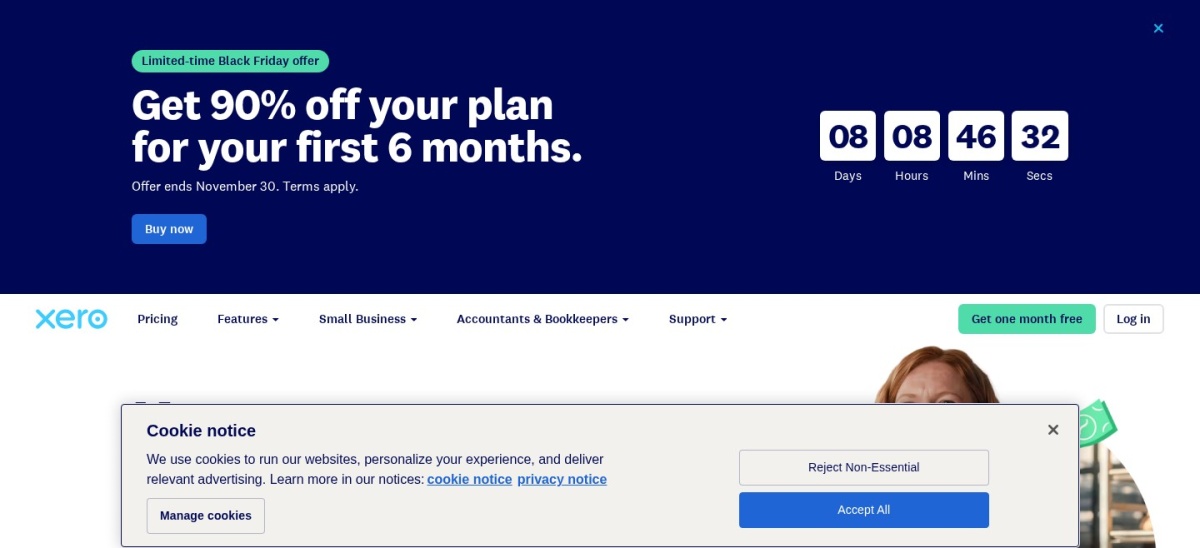
Xero homepage, captured Nov 2026.
Xero is a cloud general ledger platform used by accounting firms to manage client bookkeeping, bank reconciliations, invoicing, and financial reporting. Its Early plan is regularly priced at $27 per month ($324 per year) with introductory discounts for new organizations, supporting unlimited user seats, 20 monthly invoices, 5 bills, and bank reconciliation.
The trade off is strict transaction caps on the $324 per year Early tier and multi-currency support being locked behind the $97 per month Established plan, alongside email-only support without inbound phone lines. It suits firms managing multi-staff access across client ledgers.
What we like
Unlimited user seats included on every subscription tier
Strong multi-currency and international reporting on Established
Connects to over 1,000 third-party accounting and close apps
Watch out for
Early plan caps monthly activity at 20 invoices and 5 bills
No inbound phone support line on standard plans
Payroll requires a separate Gusto-powered add-on ($36/mo + $6/person)
Growing ($59/mo regular) removes invoice and bill caps and includes automatic reconciliation.Visit xero.com
08
QuickBooks Online
4.3/5on Capterra (8,498 reviews, checked Nov 2026)
Starts at$38/mo
Best general ledger for US small-business standardization
Pricing modelPer company, tiered user caps
Entry planSimple Start ($38/mo regular)
Accountant seats2 accountant users included
IntegrationsLargest US app ecosystem
quickbooks.intuit.com
QuickBooks Online homepage, captured Nov 2026.
QuickBooks Online is the standard cloud general ledger for US small-business accounting, connecting directly with nearly every tax, payroll, and month-end close tool. Its Simple Start plan carries a regular list price of $38 per month ($456 per year) with 50% introductory discounts for three months, covering one business user plus two accountant seats.
The trade off is strict user caps that force plan upgrades at $456 per year and beyond, jumping from $85 per month on Essentials (3 users) to $140 on Plus (5 users) and $340 on Advanced. It suits US accounting firms standardizing client bookkeeping.
What we like
Includes 2 dedicated accountant seats on Simple Start, Essentials, and Plus
Broadest native integration support across US tax and close software
User seat limits force expensive tier jumps as teams grow
Multi-entity management requires separate company subscriptions
Payroll adds $50 to $134/mo plus per-employee fees
Essentials ($85/mo regular) expands access to 3 users plus 2 accountants and adds bill management.Visit quickbooks.intuit.com
How per-user vs. per-client pricing affects a 5-person firm
Comparing headline monthly rates can be misleading because vendors bill on completely different units. On a per-user model, a five-person firm pays $2,400 per year on Jetpack Workflow Starter ($40/user/mo), $2,940 per year on Financial Cents Team ($49/user/mo), $3,540 per year on Karbon Team ($59/user/mo), or $4,440 per year on Canopy Standard ($74/user/mo).
By contrast, TaxDome charges by active client count rather than headcount, covering up to 150 active clients and 20 staff seats for $1,500 per year, or $4,125 per year for 400 active clients. If your firm relies on seasonal preparers, administrative assistants, or contractors, client-based pricing avoids paying for idle seats outside tax season.
How we chose
We built this list by evaluating the two core software categories accounting firms rely on daily: dedicated practice management platforms and cloud general ledger systems. We prioritized tools with verifiable public pricing, active product updates in 2026, and substantial review volume from practicing accountants and bookkeepers.
All prices, plan limits, Capterra ratings, and review counts were verified directly from vendor pricing pages and public review listings on 22 Nov 2026. Where vendors advertise temporary promotional discounts—such as Xero and QuickBooks Online introductory offers—we listed the regular ongoing monthly rate annualized to 12 months.
We excluded enterprise suites without published pricing such as CCH Axcess Practice and NetSuite, as well as tools with fewer than 50 verified reviews on major software directories. No vendor paid for a place, and we do not claim testing for this list.
How to choose accounting software for your firm
Follow four practical steps to match your firm's staffing model and client workflow to the right platform.
Separate practice management from client ledgers. Decide first whether you are standardizing the general ledger clients run on (like Xero or QuickBooks Online) or buying an internal workflow and portal hub (like Karbon, Financial Cents, or TaxDome) to manage deadlines across all client books.
Model your 12-month cost using total seats and active clients. Multiply per-user annual rates by your full team—including seasonal staff—and compare that total against client-tiered plans like TaxDome's $1,500/yr base for 150 active clients.
Check how clients upload documents and sign returns. Verify whether your clients prefer passwordless magic links via email (Karbon, Financial Cents) or a full login portal and mobile app with tax organizers and KBA e-signatures (TaxDome, Canopy).
Audit add-on fees before signing an annual contract. Factor in extra charges for Knowledge-Based Authentication (KBA) signatures, month-end close modules, extra storage, or paid onboarding packages so your renewal invoice holds no surprises.
FAQ
What is the difference between accounting software and practice management software?
Accounting software like QuickBooks Online and Xero manages a business's general ledger, bank feeds, invoices, and financial statements. Practice management software like Karbon, TaxDome, and Financial Cents runs the accounting firm itself, tracking staff deadlines, client document requests, engagement letters, and firm billing.
Which accounting firm software is cheapest for a solo practitioner?
Financial Cents and Uku both offer dedicated solo plans at $19 per month billed annually ($228 per year). Financial Cents includes unlimited clients on its Solo tier, while Uku caps its Solo plan at 20 active clients.
Do Xero and QuickBooks Online charge per user for accounting firms?
Xero includes unlimited user seats on every subscription tier starting at $27 per month regular price. QuickBooks Online caps business users by tier—1 user on Simple Start, 3 on Essentials, and 5 on Plus—but includes 2 dedicated accountant seats on each of those plans.
Which practice management software works best for large seasonal tax teams?
TaxDome is built for fluctuating team sizes because its base $1,500 per year plan includes 20 staff seats and prices by active client count rather than per user, avoiding extra seat fees when hiring seasonal preparers.
Does Karbon include a client portal?
Karbon does not use a traditional password-protected client login portal. Instead, it sends automated email requests with secure magic links so clients can upload documents and complete tasks directly in their browser without creating an account.