Best Software for Running a Small Business in 2026: 7 Tools Compared
WLWPLegible EditorsLast verified 22 Nov 2026How we rank12 min read
★ Short answer
ClickUp is our top pick for organizing small business operations, offering unlimited tasks and free members, with paid Core pricing published at a regular $12 per user monthly on annual billing. monday.com is better for visual workflows, while Google Workspace covers business email, documents and meetings.
How we make this list: we compare pricing pages, product documentation and public user reviews, then re-check every price before each update. No product paid for a place. Disclosure.
ClickUp Free Forever includes unlimited tasks and members; Core has a published regular price of $12 per user monthly on annual billing.
monday.com Free supports 2 seats and 3 boards, while Basic has a published USD list price of $9 per seat monthly with annual billing.
Google Workspace Business Starter costs $7 per user monthly with an annual commitment and provides 30 GB of pooled storage per user.
Notion Plus costs $10 per seat monthly with annual billing and adds unlimited collaborative blocks and file uploads up to 5 GB each.
Asana Starter costs $10.99 per user monthly with annual billing and includes unlimited automations, forms and Gantt views.
Trello Standard costs $5 per user monthly with annual billing, while Slack Pro costs $7.25 per user monthly on annual billing.
What small business software should help you manage
Running a small business involves coordinating customer work, assigning tasks, sharing files, communicating with employees and keeping operations organized. Software can bring these activities into manageable workflows instead of spreading information across disconnected messages and spreadsheets.
Start with task and project management. Look for assignments, deadlines, status tracking and shared dashboards. These features help teams understand who owns each activity and what needs attention next.
Communication and document management are equally important. Business email, meetings, searchable conversations and shared files help employees collaborate without losing decisions or project information.
Consider how easily the software adapts to your processes. A service business may need client project tracking, while a small agency may prioritize approvals, workload visibility and reusable templates.
Finally, compare the full subscription cost. Some platforms charge per employee or workspace member, while others have minimum seat requirements, storage limits or optional AI charges. A low advertised price may not reflect your actual team expense.
The 7 best software tools for running a small business
01
ClickUp
4.6/5on G2 (15,553 reviews, checked Nov 2026)
Paid from$12/mo
Best small business software overall
Free membersUnlimited
Free storage60 MB
Core automations1,000/month
Paid planCore, regular $12/user/mo annually
clickup.com
ClickUp homepage, captured Nov 2026.
ClickUp is a work management platform combining tasks, projects, documents, calendars and team communication. Free Forever includes unlimited tasks, unlimited members, 60 MB of storage, Kanban boards, time tracking and collaborative documents. Core adds unlimited storage, Gantt charts, custom fields, forms, goals and 1,000 monthly automations.
The trade off is that its extensive features require configuration, and paid upgrades apply across workspace members. Core shows a regular price of $12 per user monthly on annual billing, or $144 yearly, with a discounted $9 rate currently advertised. It suits small businesses coordinating projects and daily operations.
What we like
Unlimited tasks and free members
Documents, project boards and calendars
Built-in time tracking and collaboration
Core includes unlimited storage and Gantt charts
Flexible custom workflows and automations
Watch out for
Many features can overwhelm new users
Free storage allowance is limited
Workspace-wide paid upgrades increase costs
Advanced AI functionality may require extra charges
monday.com is a visual work management platform for organizing business projects, processes and team responsibilities. Its free plan supports 2 seats, 3 boards and more than 200 templates. Businesses can build workflows for customer projects, marketing calendars, hiring and operational tasks using customizable boards and status columns.
The trade off is that advanced automations, integrations and timeline views require higher tiers. The vendor's published USD Basic list price is $9 per seat monthly with annual billing, equivalent to $108 yearly per seat, although live checkout pricing may vary. It suits businesses wanting visual oversight of shared work.
What we like
Customizable boards for business operations
Free plan for small teams
Large collection of workflow templates
Visual project and status tracking
Expandable ecosystem for business processes
Watch out for
Basic lacks advanced automation features
Seat bundles can affect total pricing
Advanced reporting requires higher plans
Live pricing varies with billing settings
Basic adds unlimited items and expanded collaboration; Standard adds automations and integrations.Visit monday.com
03
Google Workspace
4.6/5on G2 (48,325 reviews, checked Nov 2026)
Starts at$7/mo
Best for business email and collaboration
Business emailCustom domain
Starter storage30 GB/user pooled
Trial14 days
Paid planBusiness Starter, $7/user/mo annually
workspace.google.com
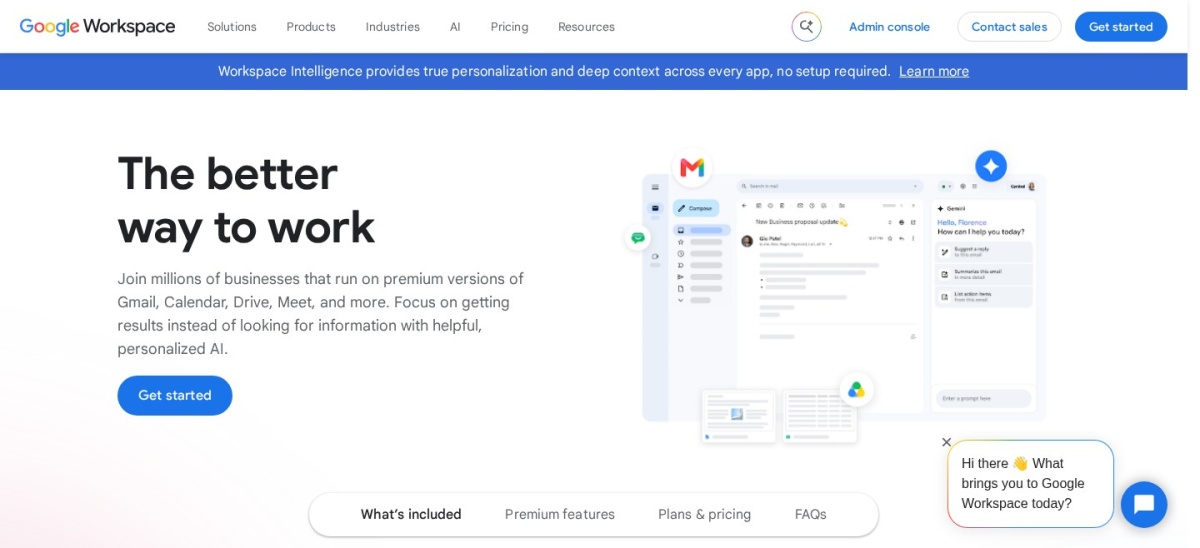
Google Workspace homepage, captured Nov 2026.
Google Workspace is a business productivity suite combining Gmail, Drive, Docs, Sheets, Calendar and Meet. Business Starter provides custom business email, 30 GB of pooled storage per user, shared document editing and video meetings. It also includes Gemini assistance in Gmail for supported tasks.
The trade off is that dedicated project management, CRM and accounting workflows require other applications. Business Starter costs $7 per user monthly with an annual commitment, or $84 yearly, excluding introductory discounts. It suits small businesses that need dependable email, file sharing and everyday team collaboration.
What we like
Professional business email
Shared documents and spreadsheets
Cloud storage and file permissions
Calendar and video meeting integration
Large third-party integration ecosystem
Watch out for
Not a dedicated project management platform
Starter storage may be insufficient for large files
Advanced administration requires higher tiers
Separate applications may be needed for CRM and finance
Business Standard increases storage to 2 TB per user and expands collaboration and AI features.Visit workspace.google.com
04
Notion
4.6/5on G2 (14,021 reviews, checked Nov 2026)
Paid from$10/mo
Best for organizing business knowledge
Free file uploads5 MB/file
Plus file uploads5 GB/file
Plus page history30 days
Paid planPlus, $10/seat/mo annually
notion.com
Notion homepage, captured Nov 2026.
Notion is a connected workspace for organizing documents, projects, meeting notes, knowledge bases and business processes. Its free plan provides pages, databases and collaboration features with limitations for multi-member workspaces. Plus adds unlimited collaborative blocks, larger file uploads and 30 days of page history.
The trade off is that building customized systems takes planning, and specialized financial or customer management features are limited. Plus costs $10 per seat monthly with annual billing, equivalent to $120 yearly, while AI agent usage can carry extra charges. It suits small businesses maintaining shared documentation and internal workflows.
What we like
Flexible documents and databases
Useful for SOPs and company knowledge
Free plan for initial setup
Project templates and collaboration
Customizable pages and connected information
Watch out for
Initial workspace design takes time
Limited dedicated CRM and accounting functionality
Advanced AI agents have usage-based charges
Complex databases require ongoing maintenance
Plus adds unlimited collaborative blocks, larger file uploads and longer page history.Visit notion.com
05
Asana
4.4/5on G2 (14,143 reviews, checked Nov 2026)
Paid from$10.99/mo
Best for project planning and accountability
Free users2
Free tasksUnlimited
Starter automationsUnlimited
Paid planStarter, $10.99/user/mo annually
asana.com
Asana homepage, captured Nov 2026.
Asana is a work management platform for planning projects, assigning responsibilities and monitoring deadlines. Personal supports 2 users with unlimited tasks and projects, list, board and calendar views. Starter adds timeline and Gantt views, reporting dashboards, custom fields, forms and unlimited automations.
The trade off is that resource management, approvals and advanced planning require higher subscriptions. Starter costs $10.99 per user monthly with annual billing, equivalent to $131.88 yearly, or $13.49 with monthly billing. It suits service businesses and teams managing deadlines across multiple client or internal projects.
Trello is a visual task management platform that organizes work through boards, lists and cards. Its free plan supports up to 10 collaborators and 10 boards per workspace, with unlimited cards, basic automation and mobile apps. Standard adds unlimited boards, custom fields, advanced checklists and 1,000 monthly automation runs.
The trade off is that more detailed reporting, dashboards and timeline views require Premium. Standard costs $5 per user monthly with annual billing, equivalent to $60 yearly, or $6 monthly without an annual commitment. It suits small businesses that want accessible task tracking without complex project administration.
What we like
Easy-to-understand Kanban boards
Free collaboration for small teams
Unlimited cards on the free plan
Affordable Standard subscription
Integrations through Power-Ups
Watch out for
Advanced reporting requires Premium
Large projects can become difficult to organize
Less suited to complex resource management
Some third-party integrations cost extra
Standard adds unlimited boards, custom fields, card mirroring and expanded automation.Visit trello.com
07
Slack
4.5/5on G2 (40,598 reviews, checked Nov 2026)
Paid from$7.25/mo
Best for business team communication
Free message history90 days searchable
Free integrationsUp to 10 apps
Pro integrationsUnlimited
Paid planPro, $7.25/user/mo annually
slack.com
Slack homepage, captured Nov 2026.
Slack is a business communication platform combining team channels, direct messages, meetings and application integrations. Its free plan includes 90 days of searchable message history, up to 10 app integrations and one-to-one huddles. Pro adds unlimited message history, unlimited integrations and group meetings.
The trade off is that Slack does not replace structured project management, accounting or CRM software. Pro costs $7.25 per user monthly with annual billing, equivalent to $87 yearly, compared with $8.75 on monthly billing. It suits distributed teams needing faster communication across projects and departments.
What we like
Organized channels for business communication
Free plan available
Extensive application integration directory
Group meetings on Pro
Searchable messages and shared files
Watch out for
Free message search is restricted to recent history
Frequent notifications can interrupt work
Does not replace dedicated project tracking
Per-user costs rise with team growth
Pro adds unlimited message history, unlimited integrations and group huddles.Visit slack.com
Which software categories does a small business actually need?
Project management software helps businesses coordinate responsibilities, deadlines and service delivery. ClickUp, monday.com, Asana and Trello offer different levels of structure, from simple task boards to customizable workflows.
Communication software keeps employees connected. Slack emphasizes searchable discussions and channels, while Google Workspace combines business email, calendars, meetings and shared files.
Knowledge management software helps teams document procedures, customer handoff instructions, training materials and internal policies. Notion is particularly relevant for building a searchable company knowledge base.
Accounting, CRM, payroll and inventory tools may also be necessary, depending on the business. The products in this list primarily address work and productivity rather than replacing specialized financial or sales systems.
Start with tools that solve your most frequent operational problems. Adding multiple overlapping platforms can increase subscription costs and create unnecessary administrative work.
How to calculate the real cost of small business software
The advertised subscription price is usually a starting point. Most products in this comparison charge per user or seat, so the number of employees requiring access directly affects the annual expense.
Billing arrangements also matter. Trello, Asana, Slack and Google Workspace publish lower rates with annual billing, while monthly subscriptions provide additional flexibility.
Check minimum seat requirements, storage allowances, automation usage and optional AI charges. A subscription that appears inexpensive for one person may have a different effective cost for a larger team.
Avoid paying for overlapping capabilities without a clear need. For example, using several project management systems can duplicate tasks and reporting, while a collaboration suite may already include document sharing and meetings.
Before purchasing, calculate the cost for your actual team and identify which paid features will replace manual work. Reevaluate subscriptions as employees, customer volume and operational requirements change.
How we chose
We selected established business productivity platforms relevant to small company operations. The shortlist covers project management, task tracking, documents, business email, communication and knowledge management. Products were compared using official feature descriptions, published subscription plans and independent user feedback.
We opened official vendor pricing pages and G2 review pages on 24 November 2026 for this article dated 22 November 2026. We compared published prices, free-plan allowances, collaboration features and review counts. For dynamically displayed pricing, we used available published USD rates rather than converting localized currencies.
We excluded products without sufficient independent reviews or confirmable published pricing. We also excluded accounting-only, payroll-only and industry-specific systems that did not match the productivity focus. No vendor paid for a place, and we do not claim testing for this list.
How to choose the best software for running a small business
Identify the daily activities slowing your business down, then compare features, integrations, usability and total costs.
Map your essential business workflows. List how your team manages tasks, customer projects, documents and communication. Choose a platform that addresses the largest gaps rather than subscribing to software based only on its feature list.
Match the software to your team. A small team may only need Trello or Notion, while businesses managing complex projects could benefit from ClickUp, monday.com or Asana. Check how many employees need editing access and whether guest collaboration is supported.
Check integrations and information sharing. Review how the software connects with email, cloud storage, accounting platforms and other applications. Google Workspace and Slack support everyday communication, while project management integrations can reduce duplicate updates across systems.
Compare regular annual costs before upgrading. Calculate charges for all required users, minimum seats and add-ons. Review free-plan limits, automation capacity, storage and AI usage. Choose the simplest combination of tools that supports your business without duplicating subscriptions.
FAQ
What is the best software for running a small business?
ClickUp is our overall choice for coordinating small business operations because it combines tasks, projects, documents and collaboration. Its free plan includes unlimited tasks and members. monday.com is a strong alternative for visual processes, while Google Workspace covers business email and shared documents.
What software does every small business need?
Most small businesses need communication, document storage, task management and financial recordkeeping. Additional needs may include customer relationship management, payroll and appointment scheduling. Start with essential workflows, then choose specialized applications based on your industry and team structure.
What is the best free software for small business management?
ClickUp, Trello, Notion, Asana, monday.com and Slack provide free plans. ClickUp supports unlimited free members and tasks, while Trello allows up to 10 collaborators per workspace. The right choice depends on whether you prioritize task tracking, documents, team messaging or customized workflows.
Is ClickUp better than monday.com for small businesses?
ClickUp offers a broad combination of tasks, documents, time tracking and project management features. monday.com emphasizes customizable visual boards and business workflows. ClickUp may suit teams consolidating multiple work tools, while monday.com is attractive when process visibility and workflow customization are priorities.
Can one software platform manage an entire small business?
Some platforms combine multiple operational functions, but few meet every requirement equally well. ClickUp and monday.com cover work management, while Google Workspace handles communication and documents. Accounting, payroll, inventory and specialized customer management may still require separate applications.
How much does small business software cost?
Pricing depends on the number of users and required capabilities. Trello Standard costs $5 per user monthly with annual billing, Google Workspace Business Starter costs $7, and Asana Starter costs $10.99. Subscription costs increase as you add seats, advanced features and optional services.
Which software is best for managing employees and tasks?
Asana, ClickUp and monday.com are suitable for assigning tasks, monitoring deadlines and coordinating teams. Trello offers simpler Kanban boards. Businesses needing payroll, employee records or leave management should evaluate dedicated HR software rather than relying exclusively on a project management platform.
Is Google Workspace enough to run a small business?
Google Workspace provides business email, document editing, cloud storage, meetings and calendars. These cover many everyday collaboration needs. However, businesses requiring detailed project tracking, accounting, CRM or industry-specific operations may need additional applications connected to the workspace.
How can small businesses avoid paying for too many software tools?
Audit your existing subscriptions and identify overlapping features. Select a primary task management system, a communication platform and any essential specialized applications. Compare free-plan allowances, per-user costs and integration capabilities before purchasing additional software.