Best Free Project Manager Software in 2026: 7 Tools Compared
WLWPLegible EditorsLast verified 22 Nov 2026How we rank12 min read
★ Short answer
ClickUp is the best free project manager software for most teams, offering unlimited tasks, unlimited free members, and 60 MB of storage. Trello is simpler for Kanban-based projects with up to 10 collaborators per workspace, while Freedcamp offers unlimited free projects, users, and storage under its fair-use policy.
How we make this list: we compare pricing pages, product documentation and public user reviews, then re-check every price before each update. No product paid for a place. Disclosure.
ClickUp Free Forever includes unlimited tasks and members, although storage is limited to 60 MB; its G2 rating is 4.6/5 from 15,880 reviews.
Trello allows up to 10 collaborators and 10 boards per free workspace, with a 4.4/5 G2 rating from 14,078 reviews.
Freedcamp provides unlimited free projects, tasks, users, and storage under fair-use rules; Pro costs $1.49 per user monthly with annual billing.
Asana Personal supports 2 users and unlimited projects, while Starter costs $10.99 per user monthly with annual billing.
Zoho Projects Free supports 5 users, 3 projects, and 5 GB of storage; Premium starts at $4 per user monthly with annual billing.
Wrike Team costs $10 per user monthly, while Teamwork Basics starts at $9.99 per user monthly with annual billing.
What to look for in free project management software
Free project management software helps individuals and teams organize tasks, assign responsibilities, track deadlines, and share progress without committing to a paid subscription. The strongest free plans cover everyday work without forcing an upgrade immediately.
Start by checking user limits, project limits, and storage allowances. Some free tools support unlimited tasks but restrict collaborators, boards, or attached files. Others allow larger teams but reserve advanced planning features for paid subscriptions.
Different project views serve different workflows. Kanban boards are useful for tracking task stages, lists work well for detailed assignments, and calendars help teams visualize deadlines. Gantt charts and workload planning are often restricted to paid plans.
Collaboration features also matter. Comments, file attachments, notifications, shared documents, and mobile access help teams coordinate without relying on separate communication tools.
Consider the cost of upgrading before choosing a free application. A generous free plan may become expensive when you need automations, reporting dashboards, permissions, or additional users.
ClickUp is a work management platform combining tasks, projects, documents, calendars, Kanban boards, and team collaboration. Its Free Forever plan includes unlimited tasks, subtasks, and members, along with 60 MB of storage, time tracking, collaborative documents, and one form.
The trade off is that the free plan has limited storage and restricts advanced customization, automations, and Gantt chart usage. Core has a regular listed price of $12 per user monthly, with a promotional annual-billing rate of $9 currently displayed. It suits teams wanting extensive free task management with room to expand.
What we like
Unlimited free tasks and members
Multiple project views and collaborative documents
Built-in time tracking
Free calendar, Kanban, and sprint tools
Extensive customization options
Watch out for
Free storage limited to 60 MB
Advanced automations require a paid plan
Feature-heavy interface takes time to learn
Paid AI capabilities have usage restrictions
Core adds unlimited storage, custom fields, Gantt charts, and more automationsVisit clickup.com
02
Trello
4.4/5on G2 (14,078 reviews, checked Nov 2026)
Paid from$6/mo
Best for simple Kanban project management
Free collaborators10 per workspace
Free boards10 per workspace
Automation250 command runs/month
Paid entryStandard, $6/user/mo monthly
trello.com
Trello homepage, captured Nov 2026.
Trello is a visual project management application built around Kanban boards, lists, and cards. Its free plan supports up to 10 collaborators per workspace, 10 boards, unlimited cards, unlimited Power-Ups per board, and 250 automation command runs monthly.
The trade off is limited advanced project planning, reporting, and board capacity on the free plan. Standard costs $6 per user monthly, or $5 with annual billing, and adds unlimited boards, custom fields, advanced checklists, and more automation. It suits individuals and teams who value straightforward task tracking.
What we like
Easy-to-understand Kanban interface
Unlimited cards on the free plan
Useful automation allowance
Unlimited Power-Ups per board
Mobile apps and task notifications
Watch out for
Free workspace limited to 10 collaborators
Free workspace limited to 10 boards
Timeline and dashboard views require Premium
Complex project dependencies need additional tools
Standard adds unlimited boards, custom fields, larger attachments, and more automationVisit trello.com
03
Freedcamp
4.5/5on G2 (159 reviews, checked Nov 2026)
Paid from$2.49/mo
Best for unlimited free projects and users
Free usersUnlimited
Free projectsUnlimited
Free storageUnlimited, fair-use policy
Paid entryPro, $2.49/user/mo monthly
freedcamp.com
Freedcamp homepage, captured Nov 2026.
Freedcamp is a project collaboration platform offering tasks, discussions, files, calendars, milestones, and time tracking. Its free plan supports unlimited projects, tasks, users, and storage under a fair-use policy, with individual file uploads limited to 10 MB.
The trade off is that advanced task management features, recurring tasks, larger attachments, and additional cloud integrations require Pro. The regular monthly price is $2.49 per user, while annual billing reduces it to $1.49. It suits small businesses, volunteer groups, and growing teams prioritizing generous free collaboration.
What we like
Unlimited projects and tasks
Unlimited free users
Unlimited storage subject to fair use
Free API and Zapier integration
Low-cost paid upgrade
Watch out for
Free individual uploads limited to 10 MB
Advanced subtasks and recurring tasks require Pro
Interface offers less visual polish than some competitors
Advanced reporting requires higher plans
Pro adds recurring tasks, advanced subtasks, table view, cloud integrations, and email-inVisit freedcamp.com
04
Asana
4.4/5on G2 (14,143 reviews, checked Nov 2026)
Paid from$13.49/mo
Best for individual planning and small collaborations
Free users2
Free projectsUnlimited
Free file uploads100 MB per file
Paid entryStarter, $13.49/user/mo monthly
asana.com
Asana homepage, captured Nov 2026.
Asana is a project management application for organizing tasks, assignments, deadlines, and team responsibilities. Its free Personal plan supports 2 users, unlimited tasks and projects, list, board, and calendar views, and unlimited storage with a 100 MB limit per file.
The trade off is the strict free-user limit and lack of advanced timelines, Gantt charts, and reporting dashboards. Starter costs $13.49 per user monthly, or $10.99 with annual billing, and removes the free-user restriction. It suits individuals and small partnerships that want organized project tracking without complicated setup.
What we like
Unlimited free tasks and projects
Clear task assignments and deadlines
List, board, and calendar views
Large integration ecosystem
Organized interface for recurring work
Watch out for
Free plan limited to 2 users
Gantt charts require Starter
Advanced reporting and automation are paid features
Paid subscriptions can be expensive for larger teams
Best for small teams needing structured project planning
Free users5
Free projects3
Free storage5 GB
Paid entryPremium, $4/user/mo annually
zoho.com
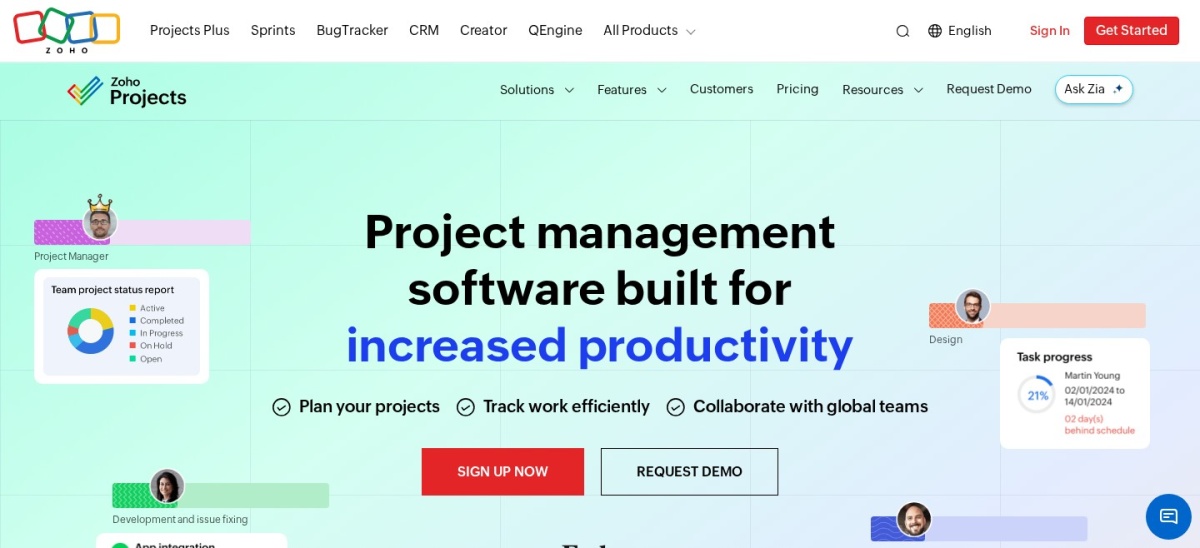
Zoho Projects homepage, captured Nov 2026.
Zoho Projects is a project management platform for tasks, subtasks, dependencies, collaboration, and project tracking. Its free edition supports 5 users, 3 projects, and 5 GB of storage, alongside mobile apps, a whiteboard, and 50 workflow executions monthly.
The trade off is the free plan's project limit and restricted time tracking, reporting, and customization. Premium starts at $4 per user monthly with annual billing, adding unlimited projects, timesheets, budgeting, and 5,000 workflow executions monthly. It suits small businesses needing more structured project controls without a large subscription commitment.
What we like
Free plan supports 5 users
Includes task dependencies
5 GB of free storage
Premium offers advanced features at a low price
Integrates with other Zoho applications
Watch out for
Free edition limited to 3 projects
Time tracking and budgeting require Premium
Advanced reports are restricted
Interface takes time to configure
Premium adds unlimited projects, timesheets, budgeting, and expanded automationVisit zoho.com
06
Wrike
4.2/5on G2 (4,648 reviews, checked Nov 2026)
Paid from$10/mo
Best for teams planning more advanced workflows
Free planTask and project management
Free viewsBoard and table
Paid entryTeam, $10/user/mo
Team size2–15 users
wrike.com
Wrike homepage, captured Nov 2026.
Wrike is a collaborative work management platform offering project folders, tasks, subtasks, comments, attachments, and team activity tracking. Its free edition includes board and table views, shared project management, and desktop and mobile applications.
The trade off is that advanced scheduling, customization, and project visibility require a paid subscription. Team costs $10 per user monthly and supports teams of 2–15 users, while Business costs $25 per user monthly. It suits organizations starting with free task management but expecting more structured workflows later.
What we like
Free task and project management
Board and table views included
Desktop and mobile applications
Suitable upgrade path for growing teams
Broad project collaboration features
Watch out for
Advanced reporting requires paid plans
Team plan has minimum user requirements
More complex than basic Kanban tools
Higher tiers increase per-user costs
Team adds Gantt charts, dashboards, custom fields, and expanded project controlsVisit wrike.com
07
Teamwork
4.4/5on G2 (1,226 reviews, checked Nov 2026)
Paid from$9.99/mo
Best for freelancers and client project management
Free planAvailable
Paid entryBasics, $9.99/user/mo annually
Basics projectsUp to 300
Basics automation5,000 automations
teamwork.com
Teamwork homepage, captured Nov 2026.
Teamwork is a project management platform designed around client delivery, task assignments, deadlines, and project collaboration. Its free plan provides basic project and task management, while Basics costs $9.99 per user monthly with annual billing and adds billable time tracking, custom fields, and management of up to 300 projects.
The trade off is that resource planning, advanced budgeting, and broader automation require higher subscriptions. Accelerate costs $24.99 per user monthly with annual billing and expands client delivery capabilities. It suits freelancers, agencies, and service teams that need project tracking connected to billable client work.
Free plan has fewer capabilities than paid editions
AI credits have usage limits
Paid costs increase with team size
Basics adds billable time, custom fields, portfolio health, and automationVisit teamwork.com
What limits should you expect from free project management software?
Free project management plans typically restrict users, storage, projects, automation, or advanced reporting. These restrictions are more important than the number of features advertised on the product homepage.
ClickUp offers unlimited tasks and members, but free storage is limited to 60 MB. Trello supports 10 boards and 10 collaborators per workspace, while Asana Personal supports only 2 users.
Freedcamp is comparatively generous, offering unlimited free projects, tasks, users, and storage under a fair-use policy. Zoho Projects provides 5 GB of storage but limits free accounts to 3 projects.
Advanced project planning is another common restriction. Features such as Gantt charts, custom fields, workload management, reporting dashboards, and sophisticated automations often require an upgrade.
Before moving important projects into a free account, check whether its limits match your expected team size, file attachments, active project count, and reporting requirements.
When is paid project management software worth it?
A free project management plan can be sufficient when a team primarily needs assigned tasks, deadlines, comments, and basic project views. Paying becomes more useful when manual coordination consumes significant time or important features are restricted.
Automation is a common reason to upgrade. Paid plans can assign tasks automatically, update statuses, trigger notifications, and connect workflows across applications.
Project visibility also matters. Managers handling multiple concurrent projects may need Gantt charts, dashboards, custom reports, and workload planning that are not included in free subscriptions.
Freedcamp Pro starts at $1.49 per user monthly with annual billing, while Zoho Projects Premium starts at $4. Other products have higher entry prices but may include different collaboration and reporting capabilities.
Calculate the subscription cost for every billable user before upgrading. Compare that expense with the time saved, reporting improvements, and reduced administrative work.
How we chose
We compared established project management applications with permanent free editions and relevant task, project, and collaboration features. The shortlist includes visual Kanban tools, comprehensive work management platforms, and applications designed for client projects.
Official pricing pages and G2 reviews were checked on 22 Nov 2026. We compared free-user limits, storage, project allowances, views, automation, and the cheapest published paid upgrades. Regular prices were used where promotional discounts were identified, and annual-billing requirements are described in the relevant entries.
We excluded products without a permanent free plan, tools lacking sufficient public reviews, and products without verifiable paid pricing. Our ranking emphasizes everyday usability, free-plan value, collaboration, and upgrade flexibility. No vendor paid for a place, and we do not claim testing for this list.
How to choose free project management software
List your team's essential project requirements and compare free-plan restrictions before choosing a platform.
Check how many people need access. Count everyone who must create, edit, or manage tasks. Some free plans support unlimited members, while others limit collaboration to small teams. Verify whether guests and external collaborators count toward user allowances.
Match the available project views to your workflow. Use Kanban boards for task stages, lists for detailed assignments, and calendars for deadlines. Confirm whether more advanced tools such as Gantt charts, dependencies, dashboards, and resource planning are available without paying.
Review storage, projects, and automation limits. Estimate how many active projects and attached files your team manages. Check automation allowances and file size restrictions, especially if project management includes design files, documents, or frequent status updates.
Compare paid upgrade costs before committing. Calculate the full subscription cost for your team and identify which features would require upgrading. Choose a free platform that can support your expected growth without forcing an expensive migration.
FAQ
What is the best free project manager software in 2026?
ClickUp is our top choice because its Free Forever plan includes unlimited tasks, unlimited members, collaborative documents, Kanban boards, and time tracking. Trello is easier for simple visual workflows, while Freedcamp is attractive for teams needing unlimited free projects and users.
Is there completely free project management software?
Yes. ClickUp, Trello, Freedcamp, Asana, Zoho Projects, Wrike, and Teamwork offer permanent free plans. These plans do not require a paid subscription for their included features, although restrictions on storage, collaborators, projects, and advanced functions vary.
Which free project management software supports unlimited users?
ClickUp Free Forever supports unlimited free members, and Freedcamp offers unlimited users with unlimited projects and tasks. These options are worth considering for growing teams, although storage, advanced permissions, reporting, and automation capabilities differ between them.
Is Trello or ClickUp better for free project management?
Trello is generally easier for teams that primarily need Kanban boards and straightforward task tracking. ClickUp offers a broader collection of free features, including documents, time tracking, and multiple project views. Trello is simpler, while ClickUp provides more flexibility.
Can free project management software handle multiple projects?
Yes. ClickUp, Asana, and Freedcamp support unlimited projects or equivalent project organization on their free plans. Trello restricts free workspaces to 10 boards, while Zoho Projects allows 3 free projects. Check these limits before organizing ongoing client or internal work.
Does free project management software include Gantt charts?
Advanced Gantt functionality is commonly reserved for paid subscriptions. Asana includes Gantt views in Starter, while ClickUp Core provides expanded Gantt chart access. If Gantt charts are essential, compare the specific free-plan allowances rather than assuming they are included.
What is the best free project management software for freelancers?
Trello works well for freelancers managing simple assignments, deadlines, and client requests. ClickUp provides more task customization and time tracking, while Freedcamp offers generous free project allowances. Teamwork is also relevant when client delivery and billable time become important.
Is free project management software secure?
Established providers generally include account security features, but free-plan protections and administrative controls vary. Check authentication options, permissions, data export capabilities, and account recovery policies. Teams handling sensitive information may require advanced access controls available only in paid editions.
When should I upgrade from free project management software?
Consider upgrading when project limits, file storage, automation restrictions, or reporting gaps interfere with normal work. Paid software can also be worthwhile when teams need advanced permissions, Gantt charts, workload planning, or client billing. Compare the full per-user cost before deciding.