WLWPLegible EditorsLast verified 22 Nov 2026How we rank11 min read
★ Short answer
Evoto is the best portrait software for photographers who need automated retouching, with an entry plan offering 800 export credits for $89 a year. Retouch4me is better for targeted skin corrections with perpetual plugin licenses, while Lightroom suits photographers who need RAW development, portrait masks, and photo organization together.
How we make this list: we compare pricing pages, product documentation and public user reviews, then re-check every price before each update. No product paid for a place. Disclosure.
Evoto starts at $89 a year for 800 credits, making it a practical choice for photographers who want automated portrait retouching without buying separate plugins.
Retouch4me offers individual photo plugins from $145 at regular pricing, with unlimited local processing through a perpetual license.
Lightroom costs $119.88 a year when prepaid and carries a 4.6/5 G2 rating from 3,379 reviews.
Imagen starts at a $7 monthly base fee plus $0.05 per processed photo, so total spending depends on editing volume.
DxO PhotoLab Essential costs $159.99 at its regular one-time price, while ON1 Portrait AI lists a $69.99 regular license price.
GIMP has no paid plan and holds a 4.3/5 G2 rating from 1,484 reviews, but portrait retouching requires more manual work.
What matters when choosing portrait editing software
Portrait editing involves more than smoothing skin. Photographers also need accurate color, natural facial detail, controlled lighting, background adjustments, and consistent results across a complete session.
Dedicated AI retouching applications focus on faces, blemishes, skin texture, teeth, and eyes. General photo editors provide broader RAW adjustments and masking tools but may require more manual correction.
Pricing models vary considerably. Some applications charge by exported photograph, others require recurring subscriptions, and several sell perpetual licenses. Compare the cost against the number of portraits you actually deliver.
Check whether the software works independently or relies on Photoshop or Lightroom. A specialized plugin may improve an existing workflow, but it can be inconvenient if you want one application for every editing task.
Public review scores provide useful context, although vendor-level ratings can cover multiple products. Consider natural-looking output, processing limits, supported file formats, and the amount of manual control available.
4.1/5on Trustpilot (405 reviews, checked Nov 2026)
Starts at$89/yr
Best for automated portrait retouching
Entry allowance800 credits/year
Portrait retouchingAI facial and skin adjustments
Color editingUnlimited with subscription
Entry devices2 devices
evoto.ai
Evoto homepage, captured Nov 2026.
Evoto is an AI photo editor focused on portraits, with automated skin corrections, facial adjustments, background editing, and color controls. Its entry subscription provides 800 credits annually, unlimited color editing, and access on 2 devices, allowing photographers to preview adjustments before committing credits to supported exports.
The trade off is its credit-based export model: the regular entry price is $89 a year for 800 credits, and photographers delivering larger galleries may need more. It suits portrait studios, headshot photographers, and event professionals who want consistent automated retouching without building a collection of separate plugins.
What we like
Dedicated skin and facial retouching controls
Batch-oriented workflow for portrait sessions
Color editing included with the subscription
Entry plan supports 2 devices
Watch out for
Export credits limit the number of included deliveries
Higher photo volumes can require larger subscriptions
Automated facial changes still need careful review
Larger plans add export credits and device accessVisit evoto.ai
02
Retouch4me
4.8/5on Trustpilot (616 reviews, checked Nov 2026)
Paid from$145 one-time
Best for targeted skin retouching
Photo plugins15 specialized tools listed
Entry purchaseFrom $145 regular price
Free utilitiesFrequency Separation, Color Match Free
Local licenseUnlimited processing
retouch4.me
Retouch4me homepage, captured Nov 2026.
Retouch4me is a collection of specialized AI retouching plugins for removing blemishes, correcting skin tone, and refining portrait details. Its photo plugin range includes 15 tools, with individual perpetual licenses allowing unlimited local processing; free utilities include Frequency Separation and Color Match Free.
The trade off is that the regular entry price for a photo plugin starts at $145, and separate retouching tasks may require additional purchases. The vendor also offers credit-based subscription packages. It suits photographers who already have an editing workflow and prefer adding targeted corrections instead of replacing their main editor.
What we like
Separate tools for specific portrait corrections
Perpetual licenses support unlimited local processing
Free utilities available
Integrates with established retouching workflows
Rated 4.8/5 on Trustpilot
Watch out for
Buying multiple plugins increases total cost
Individual plugins cover narrower tasks than full editors
Local AI processing benefits from capable hardware
Paid photo plugins add specialized AI corrections and unlimited local useVisit retouch4.me
03
Lightroom
4.6/5on G2 (3,379 reviews, checked Nov 2026)
Starts at$119.88/yr
Best for RAW editing and portrait organization
Annual prepaid$119.88
Editing methodNon-destructive RAW adjustments
Portrait toolsAdaptive masks and skin adjustments
PlatformsDesktop, mobile and web
adobe.com
Lightroom homepage, captured Nov 2026.
Lightroom is Adobe's photo editing and management application, combining RAW adjustments, image organization, adaptive portrait presets, and selective masks. The standard Lightroom plan costs $119.88 annually when prepaid and supports editing across desktop, mobile, and web, making it useful for maintaining a consistent portrait catalog.
The trade off is the ongoing subscription and the limited depth of its dedicated facial retouching compared with specialized applications. More elaborate skin cleanup and detailed compositing may require Photoshop or another tool. It suits portrait photographers who prioritize color, consistent exposure, selective adjustments, and managing complete client galleries.
Not a complete replacement for specialized retouching
Paid Lightroom includes desktop editing, synchronization and premium featuresVisit adobe.com
04
Imagen
4.7/5on Trustpilot (1,267 reviews, checked Nov 2026)
Starts at$7/mo
Best for high-volume photo editing workflows
Base fee$7/month
Usage pricingFrom $0.05/photo
Trial allowance1,000 free edits
Unlimited plan$129/month billed annually
imagen-ai.com
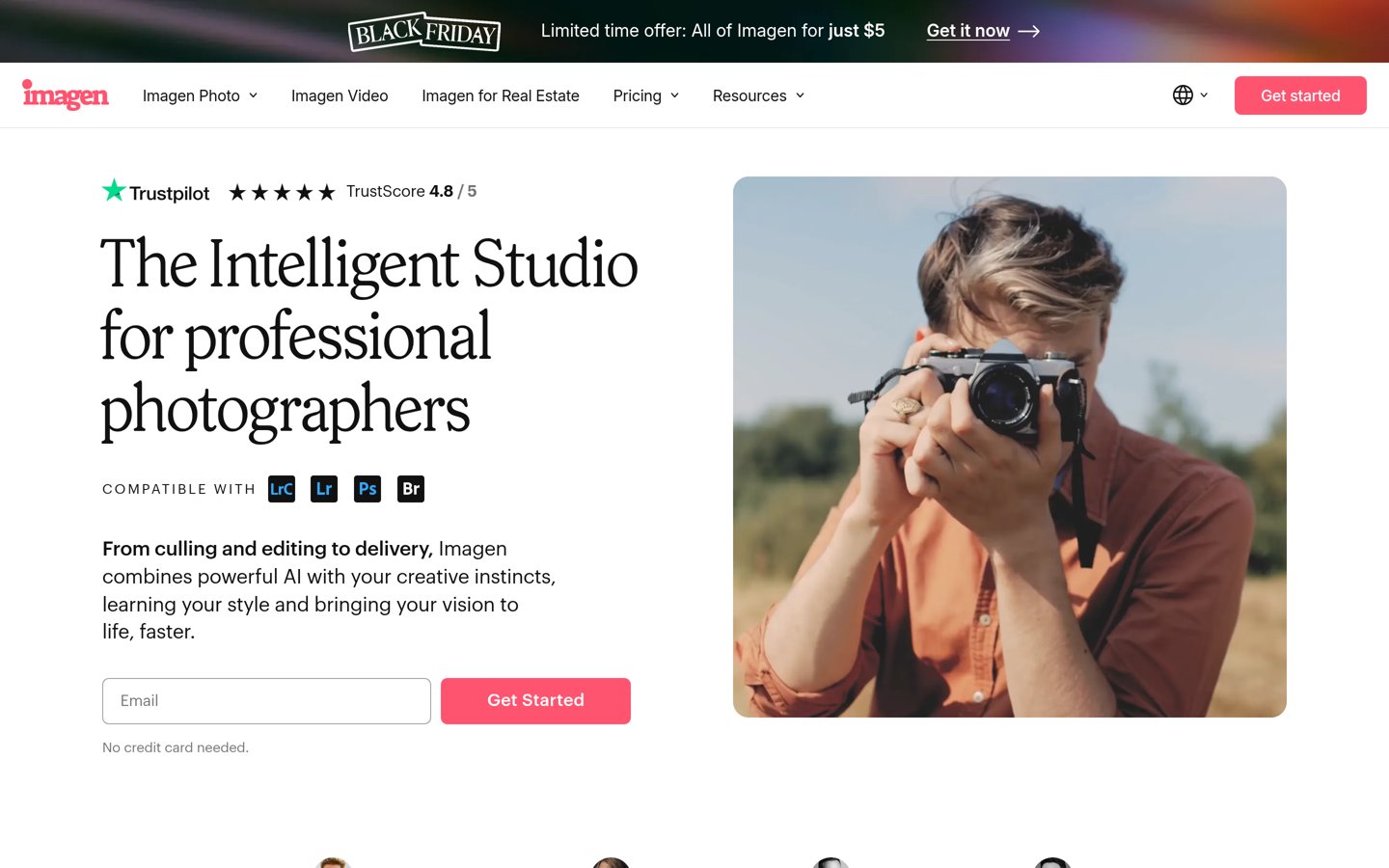
Imagen homepage, captured Nov 2026.
Imagen is an AI photo editing service built around personalized editing profiles, automated color adjustments, culling, and retouching workflows. Its pay-as-you-go option starts with a $7 monthly base fee and editing from $0.05 per photo, while new users can begin with 1,000 free edits without a credit card.
The trade off is variable spending: the $7 monthly fee is only the base charge, and photo processing adds usage costs. Its Limitless subscription costs $129 per month when billed annually. It suits busy portrait and event photographers who want repeatable editing styles across large galleries rather than detailed manual facial manipulation.
What we like
Editing profiles help maintain a consistent visual style
4.5/5on Trustpilot (1,367 reviews, checked Nov 2026)
Starts at$159.99 one-time
Best for detailed RAW portrait processing
Entry editionPhotoLab 10 Essential
Regular license$159.99
Photo workflowRAW development and organization
LicensingPerpetual purchase
dxo.com
DxO PhotoLab homepage, captured Nov 2026.
DxO PhotoLab is a desktop RAW photo editor focused on image quality, optical corrections, tonal adjustments, and selective editing. PhotoLab 10 Essential has a regular new-license price of $159.99, offering photographers a perpetual purchase rather than a required annual subscription.
The trade off is that PhotoLab emphasizes RAW development and optical quality rather than automated facial reshaping or detailed beauty retouching. Its Essential edition also has fewer advanced capabilities than Elite. It suits portrait photographers who need careful control over exposure, color, lens corrections, and natural image detail.
What we like
Detailed RAW development controls
Lens correction and image-quality emphasis
Perpetual license avoids recurring rental fees
Selective adjustments support local portrait edits
Watch out for
Less automated facial retouching than specialist tools
Advanced features differ between Essential and Elite
No free permanent edition
Essential is the paid entry edition; Elite adds advanced processing capabilitiesVisit dxo.com
06
ON1 Portrait AI
4.1/5on Trustpilot (3,207 reviews, checked Nov 2026)
Starts at$69.99 one-time
Best for an affordable perpetual portrait plugin
Listed versionPortrait AI 2023.5
Regular license$69.99
Computer allowance2 computers
OperationStandalone or Adobe plugin
on1.com
ON1 Portrait AI homepage, captured Nov 2026.
ON1 Portrait AI is a dedicated portrait editor offering automatic facial detection and retouching adjustments. The vendor continues to sell its Portrait AI 2023.5 edition with a regular $69.99 perpetual license, allowing standalone operation on 2 computers or use as a plugin in supported Adobe workflows.
The trade off is version age: the separately sold Portrait AI edition is labeled 2023.5, even though ON1 continues developing its broader photo editing software. The storefront currently advertises a discounted purchase price. It suits buyers seeking an inexpensive perpetual portrait editor who are comfortable with an older standalone release.
What we like
Dedicated automatic portrait adjustments
Standalone and plugin operation
Regular entry price below $100
Perpetual license rather than mandatory subscription
Watch out for
Separately sold version is dated 2023.5
Trustpilot rating represents ON1 as a company
Broader editing tasks may require other software
The paid license enables standalone and plugin use; broader ON1 tools are sold separatelyVisit on1.com
07
GIMP
4.3/5on G2 (1,484 reviews, checked Nov 2026)
PriceFree
Best free portrait editing software
Software licenseFree and open source
Current releaseGIMP 3.2.8
Main techniquesLayers, masks, healing and cloning
PlatformsWindows, macOS and Linux
gimp.org
GIMP homepage, captured Nov 2026.
GIMP is a free, open-source image editor that supports portrait retouching through layers, masks, healing tools, brushes, and color adjustments. Its official download page lists version 3.2.8, and the software supports Windows, macOS, and Linux without requiring a subscription or paid upgrade.
The trade off is manual effort: GIMP does not provide the dedicated automated facial workflow found in Evoto or Retouch4me. Complex skin corrections and consistent batch retouching demand more practice and time. It suits students, hobbyists, and photographers who need extensive editing control without paying for a commercial application.
No comparable built-in automated facial retouching workflow
Steeper learning curve for detailed skin corrections
Manual editing takes longer for large portrait sessions
There is no paid plan; the complete application is freeVisit gimp.org
How much does portrait software actually cost?
The lowest advertised entry price does not always represent the total cost of editing a portrait session. A subscription may include a fixed number of exports, charge extra for each processed photo, or provide unlimited editing for a higher recurring fee.
Evoto's $89 annual plan includes 800 credits, while Imagen combines a $7 monthly base fee with usage-based charges starting at $0.05 per photo. These arrangements should be compared using expected delivered image counts.
Perpetual licenses work differently. DxO PhotoLab Essential lists a regular $159.99 purchase price, while Retouch4me photo plugins start at $145 each. These are upfront license costs, not recurring annual charges; the price ladder records the initial expense for comparison.
GIMP avoids licensing fees entirely, although time spent learning manual techniques remains a consideration. Software selection should account for editing volume, additional applications, and the importance of natural-looking results.
How to avoid overediting portrait photos
The purpose of portrait retouching is usually to remove temporary distractions while keeping recognizable facial features, believable skin texture, and realistic lighting. Automated adjustments can help, but they still require careful review.
Start with exposure and white balance before changing the skin. Then correct temporary blemishes, reduce distracting shine, and make small selective adjustments where needed.
Compare the result against the original at a normal viewing size. Aggressive smoothing, excessive eye brightening, or strong facial reshaping can make portraits look artificial.
For client work, establish a consistent editing style before processing an entire gallery. Review representative images with different lighting and skin tones so automated settings do not produce uneven results.
How we chose
We assembled this comparison from established portrait retouching applications, RAW photo editors, and widely used image editing software. We prioritized tools with documented portrait-related features, available commercial licensing or a genuinely free edition, and identifiable public review records.
Prices, licensing details, and public ratings were checked against vendor pages, G2, and Trustpilot on 22 Nov 2026. The regular entry price is used where a temporary discount is displayed. For company-wide Trustpilot profiles, the rating reflects the vendor rather than exclusively the specific product; perpetual purchases are shown as upfront costs in the annual comparison.
We excluded products with discontinued operations, inaccessible pricing, or insufficient evidence for a dependable comparison. We also considered whether a tool primarily performs portrait retouching or broader photo editing, since those workflows have different strengths. No vendor paid for a place, and we do not claim testing for this list.
How to choose the right portrait software
Start by identifying how many portraits you edit, what corrections you need, and whether you want automatic results or detailed manual control.
Identify your main portrait editing task. Choose a dedicated retoucher for skin, eyes, and facial corrections, or a general photo editor for RAW development, color adjustments, and image management. Studio headshots and creative portrait composites can demand different tools.
Calculate your normal editing volume. Estimate the number of photographs you deliver rather than the number you capture. Credit-based services may be economical for selective retouching, while fixed subscriptions or perpetual licenses can be easier to budget for recurring high-volume work.
Check how the software fits your workflow. Confirm support for your operating system, RAW files, standalone editing, and any existing Photoshop or Lightroom workflow. Specialized plugins are most useful when they complement software you already use.
Compare output control and long-term expenses. Look beyond advertised automation. Check whether you can preserve skin texture, reduce excessive changes, adjust individual images, and maintain a consistent style. Include subscription renewals, extra credits, optional plugins, and major-version upgrades when comparing costs.
FAQ
What is the best portrait software in 2026?
Evoto is the strongest option in this comparison for automated facial and skin retouching, with an $89 annual entry plan including 800 credits. Retouch4me is a better fit for specialized corrections inside an existing workflow, while Lightroom is more suitable for RAW editing and photo management.
What is the best free portrait editing software?
GIMP is a practical free choice for portrait editing because it includes layers, masks, healing tools, cloning, and color adjustments without a paid subscription. It requires more manual work than dedicated AI retouching applications, particularly when editing larger portrait sessions.
Is AI portrait retouching better than manual editing?
AI retouching can reduce repetitive work such as removing blemishes and applying consistent adjustments across a gallery. Manual editing offers closer control over delicate facial details. Many photographers benefit from combining automated corrections with selective manual review rather than relying entirely on either method.
Can Lightroom replace dedicated portrait retouching software?
Lightroom handles RAW development, selective masks, color adjustments, image organization, and basic skin corrections. It can be sufficient for natural portrait editing, but detailed beauty retouching, facial corrections, and difficult blemish removal may be easier in specialized software or a layered image editor.
Is Evoto free to use?
Evoto provides access to editing features before paid export, but its commercial workflow uses credits for supported exports. Its regular entry subscription costs $89 annually and includes 800 credits. Photographers should consider how many final edited photographs they expect to deliver before choosing a plan.
Which portrait software has a one-time purchase option?
Retouch4me sells perpetual licenses for individual photo plugins, DxO PhotoLab offers perpetual desktop licenses, and ON1 lists a perpetual license for its Portrait AI 2023.5 edition. These options avoid mandatory annual software rental, although additional plugins or future major-version upgrades may carry separate charges.
What portrait software is best for wedding photographers?
Evoto is suited to photographers who want automated retouching across selected wedding portraits, while Imagen emphasizes consistent editing styles across larger galleries. Lightroom is useful for catalog management and RAW adjustments. The strongest choice depends on the number of photographs delivered and the amount of individual skin correction required.
How much should a photographer spend on portrait software?
A photographer can start with GIMP at no licensing cost. Paid entry options in this comparison range from a $7 monthly base fee plus usage charges to perpetual licenses and annual subscriptions. Calculate expected exports, subscription renewals, and plugin purchases rather than comparing initial prices alone.
Does portrait software automatically remove blemishes?
Dedicated AI applications such as Evoto and Retouch4me can identify and correct common skin imperfections automatically. General editors like Lightroom and GIMP also provide blemish correction tools, although they may require more manual input. Review automated changes carefully to preserve natural skin texture and facial characteristics.