GIMP is the best free photo editor for most people, with Photoshop-level layers, masks and retouching at no cost and no account needed. Pick Photopea to edit PSD files in a browser tab, or Canva when you want fast social graphics with templates.
How we make this list: we compare pricing pages, product documentation and public user reviews, then re-check every price before each update. No product paid for a place. Disclosure.
GIMP, Krita and Paint.NET cost $0 forever with no paid tier, no ads and no locked features.
Affinity is now free for individuals, making it the best no-cost Photoshop-class editor on desktop.
Photopea opens PSD files with layers intact in a browser tab, and Premium costs $5 a month.
Canva Pro costs $120 a year and is the easiest route to fast social graphics with templates.
Pixlr Plus at $1.99 a month billed yearly is the cheapest paid upgrade in this list.
What a free photo editor should cover
Free photo editing splits into two kinds of tool. Desktop editors such as GIMP, Affinity and Paint.NET install on your computer and handle heavy retouching, while browser editors such as Photopea, Pixlr and Fotor run in a tab with nothing to install.
The free tier is where the differences hide. GIMP and Krita are fully free with no paid tier at all, while Canva, Pixlr and Fotor keep their best features, such as background removal and AI tools, behind paid plans.
Check the export limits before you commit. Free plans often cap export quality, add watermarks or limit AI credits, so a tool that edits well may still charge for a clean high-resolution download.
File support matters more than feature count. If you receive PSD files from clients or designers, only Photopea and Affinity open them with layers intact for free, which decides the pick for many freelancers.
GIMP is the GNU Image Manipulation Program, and it has been the free answer to Photoshop since the late nineties. It runs on Windows, macOS and Linux, opens and edits the formats that matter, and handles serious work: photo retouching, compositing, color correction with proper color management, and scripted batch processing.
The trade off is the interface. GIMP takes real time to learn, and its layout feels dated next to modern editors, but nothing it does costs money. It suits anyone who wants Photoshop-level power with no price and no account.
Affinity is the biggest change in budget photo editing in years. After acquiring Serif in 2024, Canva merged Affinity Photo, Designer and Publisher into one app called Affinity and made it completely free for individual use in late 2025, with layered editing, masks, adjustment layers and 32-bit HDR editing.
The trade off is the account. You sign in with a free Canva account to use it, and teams and businesses still pay for commercial use. It suits photographers and designers who want a modern professional editor at zero cost.
Photopea is a browser editor that looks like Photoshop, behaves like Photoshop, and lives in a browser tab. It opens PSD files with layers intact, which makes it practical for teams that receive designer files but do not pay for Creative Cloud, and it handles RAW files, vector graphics and formats including AI and Figma files.
The trade off is ads and history. The free version shows ads along the edge of the screen and limits edit history, while Premium at $5 a month removes them and adds cloud storage and AI credits. It suits freelancers and Chromebook users who need PSD work without installing anything.
Canva is not really a photo editor in the Photoshop sense; it is a design tool with photo editing inside it. The free tier is generous for basic work, with thousands of templates, basic photo adjustments and straightforward publishing, and it holds the largest review base here at 4.7 out of 5 from 7,678 reviewers.
The trade off is depth. Real retouching is limited, and the best features, such as background removal, Magic Resize and brand kits, need Pro at $120 a year. It suits non-designers producing social posts, ads and marketing graphics fast.
What we like
Largest review base here, 7,678 reviews
Templates do the heavy lifting
Free tier covers basic design well
Watch out for
Weak for deep retouching work
Background removal needs the Pro plan
Pro adds background removal and brand kits at $120 a yearVisit canva.com
05
Paint.NET
4.6/5on Capterra (38 reviews, checked Nov 2026)
PriceFree
Best light Windows editor
PriceFree
PlatformsWindows only
PSD supportWith a free plugin
Paid planNone, fully free
getpaint.net
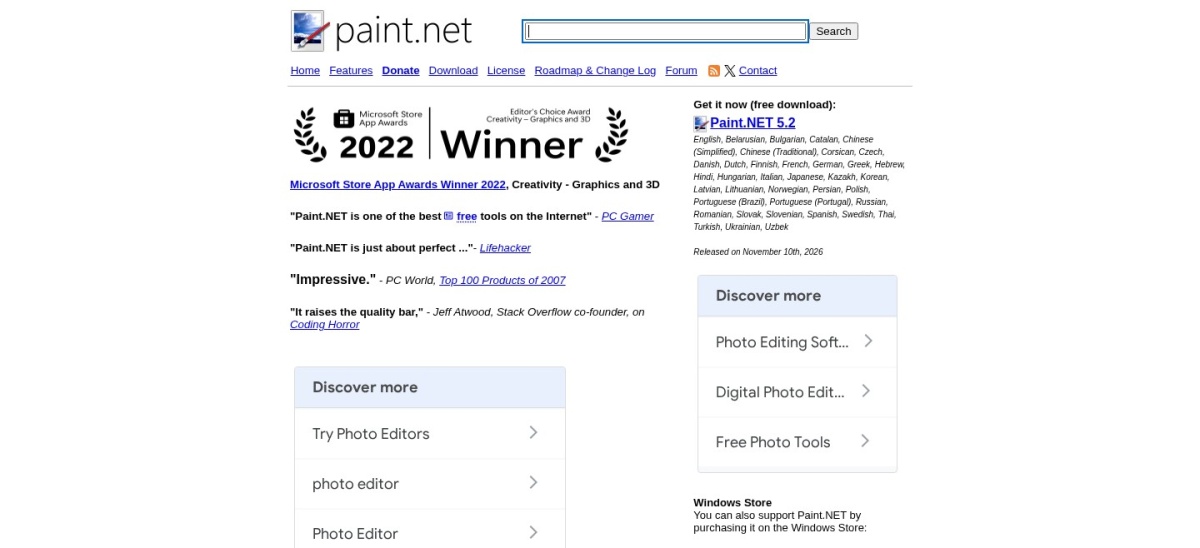
Paint.NET homepage, captured Nov 2026.
Paint.NET is a free Windows editor that started as a college project to replace Microsoft Paint and grew into a capable tool that stays light and quick. It opens fast, edits are snappy even on modest hardware, and layers, unlimited undo, special effects and a wide toolset cover most everyday jobs.
The trade off is platform. It runs on Windows only, and it lacks the deep color management and plugin depth of GIMP. It suits Windows users who find GIMP intimidating and want layered editing without the learning curve.
Pixlr is a browser editor that runs as two editors: Pixlr Express for fast AI-assisted edits, and Pixlr Editor for layer-based work with masks, selections, healing and liquify. The free version covers quick fixes and templates, while Plus at $1.99 a month billed yearly removes ads and adds 80 AI credits a month.
The trade off is the interface. It packs many tools into a small space, which can confuse new users, and heavy retouching is weaker than desktop editors. It suits anyone who wants AI-assisted edits and background removal in the browser at the lowest price here.
What we like
Cheapest paid upgrade in this list
AI tools and background removal included
Two editors for quick and deep work
Watch out for
Busy interface for new users
Weaker for heavy retouching than desktop tools
Premium adds 1,000 AI credits a month at $7.99 billed yearlyVisit pixlr.com
07
Fotor
4.2/5on G2 (342 reviews, checked Nov 2026)
Paid from$8.99/mo
Best for one-click enhancements
PriceFree Basic plan
PlatformsWeb, Windows, Mac, mobile
PSD supportNo
Paid planPro, $8.99/month
fotor.com
Fotor homepage, captured Nov 2026.
Fotor is a browser photo editor for the person who wants a good result in two minutes, not a two-hour editing session. It offers one-click enhancement, portraits, collages and filters, with AI tools for background removal and batch editing, and a free Basic plan with limited credits.
The trade off is export quality. Free exports are limited in quality and watermarked, and HD downloads and transparent PNGs start with Pro at $8.99 a month, or $39.99 a year on annual billing. It suits casual editors and social posters who want fast results.
What we like
One-click enhancement for fast results
Good collages and portrait tools
Free plan covers casual edits
Watch out for
Free exports are limited and watermarked
Best AI tools need the Pro plan
Pro adds HD exports and batch editing at $8.99 a monthVisit fotor.com
08
Krita
4.4/5on G2 (65 reviews, checked Nov 2026)
PriceFree
Best free painting and illustration
PriceFree, open source
PlatformsWindows, Mac, Linux
PSD supportYes, opens PSD files
Paid planNone, fully free
krita.org
Krita homepage, captured Nov 2026.
Krita is a painting program first, and that focus shows in its brush engine, stabilizers, drawing assistants and layer options. It is fully free and open source, and alongside digital painting it handles solid photo retouching, so illustrators who also edit photos get one tool for both jobs.
The trade off is focus. It is built for painting, not photo workflows, so batch editing and photo management are thin. It suits digital painters, illustrators and comic artists who want a free brush-first tool with photo editing on the side.
PhotoScape X is the multi-tool of free photo editors: viewer, editor, batch editor, collage, combine, animated GIF creator, screen capture, color picker and RAW converter in one download. Its batch editor alone justifies the download for event photos, resizing and filtering hundreds of images at once.
The trade off is the interface. It is busy, though approachable for beginners, and the Pro upgrade at $39.99 one-time adds curves, levels and more filters. It suits small businesses processing event photos and anyone who wants collages and GIFs in one free app.
Fully free tools give up nothing. GIMP, Krita and Paint.NET cost $0 forever, with no paid tier, no ads and no locked features, though their interfaces take longer to learn.
Freemium tools gate the extras. Canva Pro adds background removal and brand kits, Pixlr Plus removes ads and adds AI credits, and Fotor Pro adds HD exports and batch editing.
If you edit a few photos a month, a free plan is enough. Daily posters and client work usually need one paid upgrade, and Pixlr Plus at $1.99 a month billed yearly is the cheapest route.
How we chose
We started from the free photo editors most often downloaded and recommended, then kept those with a verifiable rating on G2 or Capterra and a genuinely free plan.
Prices come from each vendor's pricing page, checked on 26 November 2026. Ratings and review counts come from G2 and Capterra on the same day. Where a vendor shows a first-year discount, the list shows the regular price.
We left out tools with no verifiable rating and tools whose free plan is only a trial. No vendor paid for a place, and we do not claim hands-on testing for this list.
How to choose a free photo editor
Start with where you edit and what files you receive, then check the free limits.
Decide desktop or browser first. Desktop editors handle heavy retouching, while browser editors suit shared computers, Chromebooks and quick edits.
Check PSD and RAW support. If you receive PSD files, pick Photopea or Affinity. For RAW photography, GIMP and Photopea both handle RAW files.
Test the free export quality. Edit a photo, export it at full size and look for watermarks or quality caps before you build a workflow around it.
Upgrade only the feature you need. Background removal, batch editing and AI credits are the usual paywalls. Pick the cheapest plan that unlocks the one you use daily.
FAQ
What is the best free photo editing software?
GIMP is the best free photo editor for most people. It offers layers, masks, retouching and plugins at no cost, runs on Windows, Mac and Linux, and needs no account or subscription.
Is GIMP really free?
Yes. GIMP is open-source software under the GPL, maintained by volunteers, and nobody charges for it. There is no paid tier, no ads and no locked feature, and it runs on Windows, Mac and Linux.
Can I edit PSD files for free?
Yes. Photopea opens and edits PSD files with layers intact in a browser tab for free, and Affinity opens them on desktop for free too. Both are the best free routes for files that come from Photoshop.
Is Affinity really free now?
Yes, for individuals. After Canva acquired Serif, the unified Affinity app became free for individual use in late 2025, with the full professional toolkit included. You sign in with a free Canva account.
What is the best free photo editor for beginners?
Canva is the easiest start, with templates and one-click edits that need no skill. Paint.NET is the best desktop pick for Windows beginners who want layers without GIMP's learning curve.
Does Pixlr have a free plan?
Yes. Pixlr is free to use in the browser with ads and limited AI credits. Plus costs $1.99 a month billed yearly and removes ads, adds unlimited saves and 80 AI credits a month.
SaaS SEO and WordPress specialist with about 8 years of experience. Rakib compares WordPress plugins, themes, hosting and software using public pricing, documentation and user reviews. See how we rank.