Best Incident Management Software in 2026: 7 Tools Compared
WLWPLegible EditorsLast verified 22 Nov 2026How we rank14 min read
★ Short answer
PagerDuty is the best incident management software for most IT teams, with a free plan for up to 5 users and Professional at $21 per user monthly when billed annually. Choose incident.io for Slack or Teams-based response, or Rootly for automated incident workflows and retrospectives.
How we make this list: we compare pricing pages, product documentation and public user reviews, then re-check every price before each update. No product paid for a place. Disclosure.
PagerDuty Professional costs $21/user/month billed annually, with a free plan for up to 5 users and 750+ integrations.
incident.io Team starts at $15/user/month billed annually, while its free Basic plan supports single-team on-call.
Rootly Incident Response costs $20/user/month, and adding its separate On-Call product costs another $20/user/month.
FireHydrant supports 10 responders on its free plan; Pro costs $25/responder/month billed annually.
Better Stack starts at $29/responder/month billed annually, combining incident response with monitoring and status pages.
Jira Service Management Standard costs $21.50/agent/month, while Grafana Cloud IRM offers 3 free active users.
What incident management software should cover
Incident management software helps engineering and IT teams respond when applications, infrastructure or critical services fail. It centralizes alerts, identifies responsible responders, coordinates recovery and records what happened.
Start with alert routing, on-call scheduling and escalation policies. These features make sure urgent alerts reach the correct person, including when the primary responder is unavailable.
Next, compare incident coordination. Slack and Microsoft Teams integrations, dedicated incident channels, automated timelines, status pages and runbooks help responders share context while working through an outage.
Post-incident reviews matter too. A useful system should preserve incident events, decisions and follow-up tasks so teams can identify recurring problems instead of repeatedly fixing the same symptoms.
Pricing models differ substantially. Some products charge per responder, others per agent or active user, and advanced alerting may require an additional module. Compare the complete response workflow rather than the lowest advertised subscription.
PagerDuty is an incident management platform combining real-time alerting, on-call scheduling, escalation policies and incident coordination. Its free plan supports up to 5 users, while Professional costs $21 per user monthly on annual billing. The platform provides more than 750 integrations with monitoring, collaboration and development tools.
The trade off is that advanced capabilities such as AIOps, runbook automation and status pages are sold separately, increasing the cost beyond the $21 base price. Monthly Professional billing costs $25 per user. It suits engineering and IT operations teams that need dependable alert routing across multiple services.
What we like
Established on-call scheduling and escalation tools
Free plan supports up to 5 users
More than 750 integrations
Post-incident reviews in Professional
Watch out for
AIOps and status pages cost extra
Advanced workflows can require higher products
Per-user costs increase with team size
Professional adds post-incident reviews and enhanced collaborationVisit pagerduty.com
02
incident.io
4.8/5on G2 (238 reviews, checked Nov 2026)
Paid from$15/mo
Best for collaborative incident response
Free planBasic
Paid planTeam
Starting price$15/user/mo, annual
On-call add-on$10/user/mo
incident.io
incident.io homepage, captured Nov 2026.
incident.io is an incident management platform that coordinates response directly inside Slack or Microsoft Teams. Basic is free and includes single-team on-call, essential automation and a status page. Team starts at $15 per user monthly on annual billing, adding workflow automation and broader incident coordination.
The trade off is that Team costs $19 per user on monthly billing, and its expanded on-call capabilities add $10 per user monthly. That makes the combined workflow more expensive than incident response alone. It suits engineering teams already coordinating production incidents through Slack or Teams.
What we like
Free incident response plan
Native Slack and Microsoft Teams workflows
Automated incident coordination
Status page included in Basic
Watch out for
Expanded on-call capabilities cost extra
Monthly billing costs more than annual billing
Advanced response features require Pro
Team adds workflows and multi-team incident coordinationVisit incident.io
03
Rootly
4.7/5on G2 (218 reviews, checked Nov 2026)
Starts at$20/mo
Best for automated response and retrospectives
Entry productIncident Response
Starting price$20/user/mo
On-call productAdditional $20/user/mo
CollaborationSlack, Teams, Google Chat
rootly.com
Rootly homepage, captured Nov 2026.
Rootly is an incident response and automation platform supporting Slack, Microsoft Teams and Google Chat. Incident Response costs $20 per user monthly and includes AI incident timelines, automated retrospectives, workflows, service catalog features and status pages. Its dedicated AI agent helps responders organize incident context.
The trade off is that on-call scheduling and paging are a separate $20 per-user monthly product, bringing the standard combined price to $40 per user monthly before possible bundle discounts. Advanced AI SRE capabilities require additional pricing discussions. It suits teams focused on repeatable incident workflows and structured post-incident analysis.
What we like
AI-assisted incident timelines and retrospectives
Incident workflows and service catalog included
Works with major team chat platforms
Status pages included with Incident Response
Watch out for
On-call management is separately priced
No permanent free plan listed
Advanced AI SRE pricing requires sales contact
Adding On-Call provides paging, rotations and escalation policiesVisit rootly.com
04
FireHydrant
4.5/5on G2 (143 reviews, checked Nov 2026)
Paid from$25/mo
Best for runbook-driven incident response
Free respondersUp to 10
Free runbooks2
Paid planPro, $25/responder/mo
Pro runbooks5
firehydrant.com
FireHydrant homepage, captured Nov 2026.
FireHydrant is an incident management platform connecting response coordination, runbooks, service information and retrospectives. Its free plan supports up to 10 responders, 2 runbooks, a public status page and 3 integrations. Pro costs $25 per responder monthly billed annually, expanding automation and incident management features.
The trade off is that Pro is billed annually, and the alerting component has its own usage considerations. The Pro plan includes 5 runbooks, 5 integrations and unlimited public status pages, so additional capacity may require an upgrade. It suits teams that want standardized response procedures and documented recovery processes.
What we like
Free access for up to 10 responders
Built-in runbooks and incident coordination
Slack and Microsoft Teams chatbot
Retrospective templates in Pro
Watch out for
Pro requires annual billing
Runbook allowances are limited by plan
Alerting costs need separate evaluation
Pro adds more runbooks, retrospectives and service catalog featuresVisit firehydrant.com
05
Better Stack
4.8/5on G2 (344 reviews, checked Nov 2026)
Paid from$29/mo
Best for monitoring and incident response together
Free monitoring10 monitors and heartbeats
Paid responder$29/mo, annual
Monthly billing$34/responder
Free status page1
betterstack.com
Better Stack homepage, captured Nov 2026.
Better Stack is an observability and incident management platform combining uptime monitoring, alerts, on-call response and status pages. Its free plan includes 10 monitors and heartbeats, a status page and Slack or email alerts. A paid responder license starts at $29 monthly when billed annually and includes unlimited phone and SMS alerts.
The trade off is that paid responder licenses are separate from free team-member access, and monitoring or telemetry requirements can add costs. Monthly responder billing is $34 instead of the annual rate of $29. It suits engineering teams wanting service monitoring and incident notifications in a connected platform.
What we like
Monitoring and incident management in one platform
Free monitoring and status page features
Unlimited phone and SMS alerts for paid responders
Supports logs, traces and infrastructure monitoring
Watch out for
Responder licenses cost extra
Monitoring usage can increase spending
Some advanced capabilities require additional services
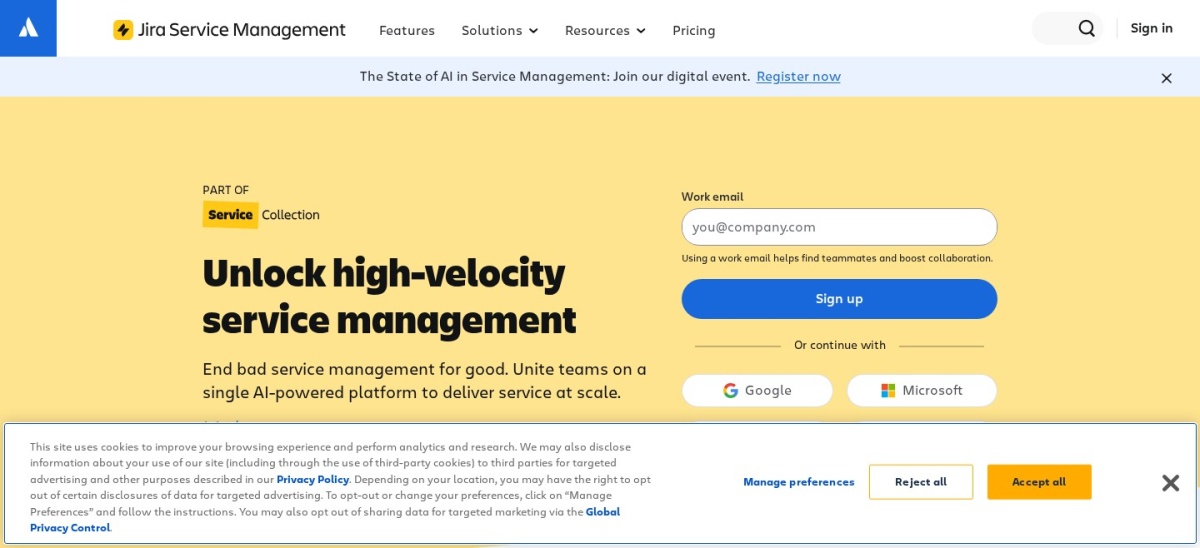
Jira Service Management homepage, captured Nov 2026.
Jira Service Management is an IT service management platform that handles incidents alongside service requests, problems, changes and assets. Its free plan supports up to 3 agents. Standard costs $21.50 per agent monthly and adds asset management, automation capacity, AI-powered support features and expanded service management controls.
The trade off is that advanced incident management and AIOps functionality are concentrated in Premium at $55.28 per agent monthly. Standard is broader than a dedicated paging tool but does not include every advanced operational feature. It suits IT departments already using Jira and seeking a unified service desk and incident workflow.
What we like
Incident management integrated with IT service requests
Standard adds asset management, automation and AI support featuresVisit atlassian.com
07
Grafana Cloud IRM
4.5/5on G2 (220 reviews, checked Nov 2026)
Paid from$19/mo
Best for observability-focused engineering teams
Free IRM users3 active users/month
Paid platformCloud Pro, $19/mo
Additional IRM usageFrom $20/active user
Free supportCommunity
grafana.com
Grafana Cloud IRM homepage, captured Nov 2026.
Grafana Cloud IRM is an incident response and on-call service integrated with Grafana's observability platform. Its free tier includes 3 active incident management users monthly. Cloud Pro starts with a $19 monthly platform fee, including the same active-user allowance, with additional IRM users starting at $20 each.
The trade off is that incident response pricing combines a platform fee with active-user charges once the included allowance is exceeded. Other Grafana Cloud telemetry services can introduce additional usage fees. It suits engineering teams already investigating infrastructure problems through Grafana dashboards and alerts.
What we like
Free allowance for 3 active IRM users
Connected to Grafana monitoring and observability
On-call scheduling and notifications
Usage-based scaling beyond the included allowance
Watch out for
Additional active users increase costs
Cloud platform and IRM charges need combined budgeting
G2 rating represents Grafana Labs more broadly
Cloud Pro adds paid active-user capacity and email supportVisit grafana.com
How incident management pricing works
Most incident management platforms charge based on users who actively respond to incidents. PagerDuty Professional starts at $21 per user monthly on annual billing, while FireHydrant Pro charges $25 per responder monthly with annual billing.
Product packaging can have a larger effect than the base rate. Rootly charges $20 per user monthly for Incident Response and another $20 for On-Call. incident.io Team starts at $15 per user monthly when billed annually, with expanded on-call functionality costing extra.
Better Stack bundles operational monitoring and incident management in its paid responder license, starting at $29 monthly with annual billing. Jira Service Management instead uses agent-based pricing because incident management sits inside a broader IT service management product.
Grafana Cloud IRM applies another model: a $19 monthly Pro platform fee includes 3 active IRM users, with further active users starting at $20 each. Compare the people who need access, not just the total size of your organization.
What a good incident response workflow looks like
A typical workflow begins with a monitoring alert. The incident management platform groups or routes the notification, identifies the responsible service owner and sends the alert to the current on-call responder.
Once acknowledged, responders assess severity, establish an incident channel and assign responsibilities. Automated workflows can create records, notify stakeholders and start runbooks without requiring the incident commander to complete every administrative step.
Throughout recovery, the team records major events and communicates service status. After resolution, a retrospective examines what happened, what contributed to the failure and which follow-up actions can prevent recurrence.
The right tool should make these steps easier without imposing unnecessary procedures. Small engineering teams may need basic paging and a shared incident channel, while complex services benefit from service catalogs, automation and detailed reporting.
How we chose
We selected established incident management products with publicly available pricing and independent customer reviews. The shortlist covers dedicated on-call platforms, chat-based incident coordination tools, observability-linked products and IT service management software. We compared alerting, escalation, automation, response collaboration, status pages and post-incident capabilities.
Official pricing pages and G2 reviews were checked on 23 Nov 2026 for this article dated 22 Nov 2026. Published annual-billing rates were used where specified, and monthly-billing differences were described in the tool reviews. Annual equivalents represent one paid user or the relevant platform minimum, excluding extra modules and usage charges.
We excluded products without a verifiable public entry price or sufficient independent review evidence. We also distinguished separate on-call products from incident response subscriptions and identified where review ratings covered a broader platform. No vendor paid for a place, and we do not claim testing for this list.
How to choose incident management software
Define your response process and compare the tools that support it before committing to a subscription.
List your alerting and escalation requirements. Identify the monitoring systems that generate alerts, the teams responsible for responding and the communication channels you use. Check on-call rotations, escalation policies, notification delivery and integrations before evaluating advanced automation.
Compare incident coordination features. Decide whether your team prefers Slack, Microsoft Teams, dedicated incident dashboards or an IT service desk. Look for role assignments, incident timelines, runbooks, service ownership and stakeholder updates. Make sure responders can find relevant information during an outage.
Calculate the complete response cost. Count the users who need incident response access and the responders who require paging. Add any separate on-call, automation or status page charges. Compare annual commitments with monthly billing and account for future team growth.
Review reporting and operational controls. Check post-incident reviews, action tracking, audit logs, analytics and access permissions. Evaluate how the software records incident decisions and supports follow-up improvements. A short pilot with a simulated outage can expose gaps in your proposed workflow.
FAQ
What is the best incident management software in 2026?
PagerDuty is our top overall choice because it combines established on-call scheduling, alert routing and incident response with more than 750 integrations. Its free plan supports up to 5 users, and Professional starts at $21 per user monthly on annual billing. incident.io and Rootly are strong alternatives for collaboration and automation.
Is there free incident management software?
Yes. PagerDuty offers a free plan for up to 5 users, incident.io Basic provides free incident response with single-team on-call, and FireHydrant supports up to 10 responders. Grafana Cloud IRM also includes 3 active users monthly at no cost. Each free plan has different feature and usage limits.
How much does incident management software cost?
Published entry prices include $15 per user monthly for incident.io Team on annual billing, $20 per user monthly for Rootly Incident Response and $21 per user monthly for PagerDuty Professional on annual billing. Separate on-call products, additional responders and advanced automation can increase total spending.
What is the difference between incident management and on-call management?
On-call management determines who receives alerts and how those alerts escalate when someone does not respond. Incident management covers the wider process of investigating, coordinating, communicating and learning from service disruptions. Some platforms combine both functions, while others price them separately.
Which incident management software works best with Slack?
incident.io and Rootly are strong choices for Slack-based response. incident.io coordinates incidents through Slack or Microsoft Teams, while Rootly supports Slack, Teams and Google Chat with automated workflows. FireHydrant also provides chat-based incident coordination. Compare workflow depth and on-call costs before choosing.
Is PagerDuty worth the cost for small teams?
PagerDuty can be worthwhile when reliable on-call alerting and escalation are priorities. Its free plan supports up to 5 users, allowing a small team to establish basic response processes without a paid subscription. Growing teams should evaluate Professional pricing and the cost of optional capabilities.
Can incident management software reduce downtime?
Incident management software can help teams detect problems, notify responsible engineers and coordinate recovery more consistently. Automated routing, runbooks and shared incident records may reduce delays. However, a tool cannot guarantee shorter outages; response procedures, monitoring quality and team readiness remain important.
What is the difference between PagerDuty and Jira Service Management?
PagerDuty focuses on alerting, on-call scheduling and operational incident response. Jira Service Management handles incidents as part of a broader service management workflow that includes requests, assets and problem management. Teams needing both may integrate them or choose the platform that fits their primary workflow.
What features should an incident management platform include?
Prioritize alert routing, escalation policies, on-call scheduling, incident coordination, integration with monitoring tools and post-incident reviews. Status pages, automated runbooks, service catalogs and analytics can become valuable as operations grow. Check whether these capabilities are included in the entry plan or require paid add-ons.