Best Fund Accounting Software in 2026: 7 Tools Compared
WLWPLegible EditorsLast verified 22 Nov 2026How we rank5 min read
★ Short answer
Aplos leads for dedicated nonprofit fund tracking, with 190 Capterra reviews averaging 4.4 out of 5 and plans starting at $79 per month. MoneyMinder suits volunteer groups on a tight budget at $299 per year, while FundCount fits investment firms and family offices starting at $14,450 per year.
How we make this list: we compare pricing pages, product documentation and public user reviews, then re-check every price before each update. No product paid for a place. Disclosure.
Aplos starts at $79/mo ($948/yr) for Lite and includes fund-level balance sheets and income statements.
MoneyMinder charges $299/yr flat for its Full Edition and holds a 4.9/5 rating across 122 reviews.
FundCount publishes starting prices from $14,450/yr for Fund Admin Incubator up to $38,389/yr for Private Equity.
FastFund Accounting Standard starts at $42/mo ($504/yr) and holds a 4.5/5 score across 69 Capterra reviews.
QuickBooks Online starts at $38/mo ($456/yr) for Simple Start, though nonprofits often use Plus ($115/mo) with classes.
What to look for in fund accounting software
Fund accounting separates money by restriction, grant, program, or partnership vehicle rather than treating every dollar as one pooled business balance. That structure keeps restricted donations, grant budgets, or limited partner capital accounts distinct so teams can report accurately to boards, grantors, or investors.
Nonprofit and community organizations usually need restricted vs. unrestricted fund tracking, budget-vs-actual reporting by fund or program, and clean audit trails. Investment firms, family offices, and fund administrators often need partnership capital accounts, waterfall rules, and multi-entity consolidation.
General business accounting tools can track projects or classes, but dedicated fund accounting prevents accidental cross-spending between restricted pools. Before picking a tool, check whether your organization needs true fund-level balance sheets, donor or investor portals, and how many user seats are included.
Watch out for add-on charges such as payroll, payment processing fees, extra users, and implementation or data migration services. Many vendors also run temporary promotional discounts that reset to higher regular rates after a few months.
Aplos is cloud accounting software built for nonprofits and churches, with its Lite plan at $79 per month including 2 users, fund-level balance sheets and income statements, bank reconciliation, and 1099 management. Aplos notes that over 65,000 nonprofit and church professionals use the platform, and it holds a 4.4 out of 5 rating across 190 Capterra reviews.
The trade off is that Lite leaves out accounts payable, accounts receivable, and budgeting, which requires Core at $129 per month ($1,548 per year). It suits small nonprofits and churches that want dedicated fund tracking without complex enterprise setup.
What we like
Tracks restricted and unrestricted funds with fund-level balance sheets and income statements
Includes 1099 management, bank reconciliation, and unlimited customer support on Lite
Offers a 15-day free trial with no credit card required
Watch out for
Accounts payable, accounts receivable, and budgeting require upgrading to Core at $129/mo
Lite and Core include only 2 user seats
Core at $129/mo adds budgeting, AP/AR, recurring transactions, period close, and user roles.Visit aplos.com
02
MoneyMinder
4.9/5on Capterra (122 reviews, checked Nov 2026)
Starts at$299/yr
Best for volunteer-run groups
Annual price$299/yr flat rate
Setup fee$0 setup fee
Trial30-day free trial
Best forClubs, PTAs & HOAs
moneyminder.com
MoneyMinder homepage, captured Nov 2026.
MoneyMinder is nonprofit financial software aimed at volunteer treasurers, with its Full Edition priced at $299 per year including unlimited bank registers, budget tracking, compliance tools, and no setup fees. MoneyMinder notes over 23 years of service to community groups and holds a 4.9 out of 5 rating across 122 Capterra reviews.
The trade off is that its streamlined reporting and budget-focused layout can feel light for larger organizations with complex multi-department accounting. It suits PTAs, booster clubs, HOAs, and volunteer groups that want predictable annual pricing.
What we like
Predictable $299/yr flat rate with no setup fees or per-user charges
High 4.9/5 review score on Capterra with strong support feedback
Includes a 30-day free trial and bank transaction imports
Watch out for
Less suited to larger organizations needing complex multi-entity or grant workflows
Some reviewers note minor report customization limits
Optional add-ons cover items such as Cheddar Up Team Edition ($99/yr) and IRS 8868 extension e-filing ($25/yr).Visit moneyminder.com
03
FastFund
4.5/5on Capterra (69 reviews, checked Nov 2026)
Starts at$42/mo
Best for modular nonprofit suites
Entry planAccounting Standard ($42/mo)
Next accounting tierPremium ($94/mo)
Fundraising tierFrom $42/mo
TrialFree trial available
araize.com
FastFund homepage, captured Nov 2026.
FastFund is a nonprofit software suite combining fund accounting, fundraising, and payroll, with FastFund Accounting Standard starting at $42 per month for cash receipts, reconciliations, cash disbursements, and budgeting. It holds a 4.5 out of 5 rating across 69 Capterra reviews.
The trade off is that accounts payable, accounts receivable, and direct cost allocations sit on Accounting Premium at $94 per month ($1,128 per year), and fundraising or payroll cost extra. It suits small to mid-sized nonprofits that want modular accounting alongside donor or payroll tools.
What we like
Low $42/mo starting rate for core fund accounting and budgeting
Modular structure lets teams add fundraising or payroll separately
Supports separate fund ledgers and grant or program tracking
Watch out for
Accounts payable, accounts receivable, and direct cost allocations require the $94/mo Premium tier
Data migration from older accounting tools can take extra effort
Accounting Premium at $94/mo adds AP, AR, and direct cost allocations, while Fundraising and Payroll are priced as separate modules.Visit araize.com
04
QuickBooks Online
4.3/5on Capterra (8,555 reviews, checked Nov 2026)
Starts at$38/mo
Best for broad accountant familiarity
Entry planSimple Start ($38/mo)
Plus plan$115/mo (up to 5 users)
Trial30-day free trial
Fund methodClasses & projects on Plus
quickbooks.intuit.com
QuickBooks Online homepage, captured Nov 2026.
QuickBooks Online is a widely used cloud accounting platform whose regular entry plan starts at $38 per month for Simple Start, with a 30-day free trial and 4.3 out of 5 across 8,555 Capterra reviews. Promotional discounts sometimes lower initial months, so check current terms at signup.
The trade off is that dedicated class and project tracking requires Plus at $115 per month ($1,380 per year) and still relies on workarounds rather than true fund balance sheets. It suits organizations that prioritize bookkeeper familiarity and third-party app integrations.
What we like
Large ecosystem of bookkeepers, CPAs, and third-party integrations
Starts at $38/mo for Simple Start with a 30-day free trial
Plus plan at $115/mo supports up to 5 users, project profitability, and class tracking
Watch out for
Uses classes and workarounds rather than native fund accounting ledgers
Payroll and payment processing cost extra on top of the base plan
Upgrading to Plus ($115/mo) or Advanced ($275/mo) adds more users, project tracking, and batch workflows.Visit quickbooks.intuit.com
05
Xero
4.4/5on Capterra (3,341 reviews, checked Nov 2026)
Starts at$27/mo
Best for multi-currency teams
Entry planStarter ($27/mo)
Standard / Premium$55/mo and $90/mo
Trial30-day free trial
Multi-currencyIncluded on higher tiers
xero.com
Xero homepage, captured Nov 2026.
Xero is cloud accounting software with a regular Starter plan at $27 per month that covers bank reconciliation, real-time reports, quotes, up to 20 invoices, and 5 bills. It holds a 4.4 out of 5 rating across 3,341 Capterra reviews and offers a 30-day free trial.
The trade off is that Starter caps invoices and bills and lacks native fund balance sheets for restricted grants or endowment pools. It suits smaller organizations and international teams wanting straightforward cloud bookkeeping and app integrations.
What we like
Low $27/mo regular Starter price with a 30-day free trial
Connects to over 1,000 third-party apps and supports multi-currency on higher plans
Clear interface with real-time reporting and bank reconciliation
Watch out for
Starter plan limits invoices to 20 and bills to 5 per month
Not built specifically for restricted fund accounting or grant compliance
Standard ($55/mo) removes invoice and bill limits, while Premium ($90/mo) adds multi-currency support.Visit xero.com
06
FundCount
4.7/5on GetApp (15 reviews, checked Nov 2026)
Starts at$14,450/yr
Best for family offices and funds
Entry planFund Admin Incubator ($14,450/yr)
Family office / PEFrom $26,950 to $38,389/yr
Assets cited$100B+ on platform
LedgerReal-time general ledger
fundcount.com
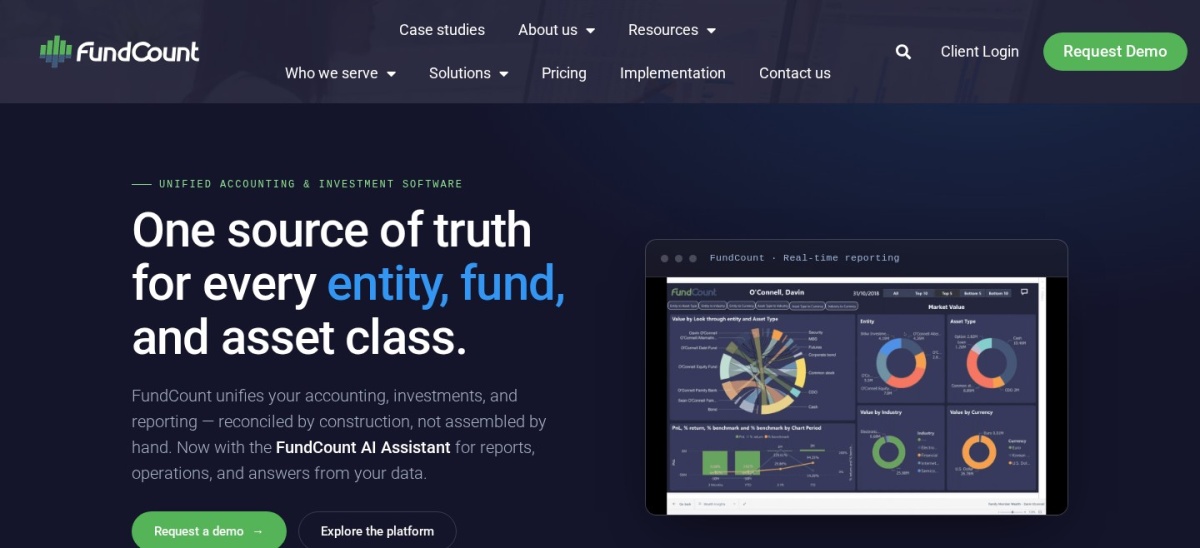
FundCount homepage, captured Nov 2026.
FundCount is an accounting and investment management platform that keeps general ledger, portfolio, and partnership accounting on one real-time ledger, starting at $14,450 per year for Fund Admin Incubator. FundCount cites over $100 billion in assets on the platform and holds a 4.7 out of 5 rating across 15 GetApp reviews.
The trade off is high annual pricing—starting at $26,950 to $38,389 per year for multi-family office, asset management, or private equity tracks—plus hosting and implementation fees. It suits family offices, hedge funds, private equity firms, and fund administrators.
What we like
Publishes clear starting annual prices across specialized fund and family office tracks
Unifies general ledger, partnership accounting, and investment reporting on one system
Handles multi-entity structures, capital accounts, waterfalls, and tax reporting
Watch out for
Cost is far above what small nonprofits or community groups need
Additional funds, entities, hosting, and implementation add to total cost
Multi-Family Office and Fund Administration start at $26,950/yr, Asset Management and Hedge Fund at $35,899/yr, and Private Equity at $38,389/yr.Visit fundcount.com
07
Sage Intacct
4.3/5on Capterra (761 reviews, checked Nov 2026)
Starts atCustom/yr
Best for multi-entity growth
Pricing modelCustom quote
Est. entry tierFrom ~$9,000/yr cited
Capterra rating4.3/5 (761 reviews)
Core strengthDimensional reporting
sage.com
Sage Intacct homepage, captured Nov 2026.
Sage Intacct is cloud financial software widely used by mid-sized organizations and nonprofits for multi-entity consolidation, grant tracking, and dimensional reporting across funds, programs, and locations. It holds a 4.3 out of 5 rating across 761 Capterra reviews.
The trade off is custom quote pricing—with third-party estimates starting around $9,000 per year for basic packages and implementation adding significant cost—plus a steeper setup curve. It suits growing nonprofits and multi-entity organizations outgrowing entry-level tools.
What we like
Dimensional general ledger slices reports by fund, grant, department, or location
Strong multi-entity consolidation and customizable dashboards
Backed by 761 Capterra reviews with high marks for general ledger and reporting
Watch out for
No public self-serve entry price; quotes scale with modules and users
Implementation and report configuration require careful planning
Optional modules expand grant management, multi-entity consolidation, and automated workflows based on organization size.Visit sage.com
Nonprofit vs. investment fund accounting
People searching for fund accounting software often mean one of two very different setups. Nonprofits, churches, schools, and associations track restricted and unrestricted net assets, grant budgets, and program expenses.
Investment managers, family offices, and fund administrators track investor commitments, capital calls, distributions, partnership allocations, and portfolio valuations. Choosing a platform built for your fund type avoids heavy workarounds during audits.
How we chose
We selected established accounting tools that support fund accounting, grant or program tracking, multi-entity dimensions, or investment partnership ledgers across small groups, nonprofits, and investment firms.
Pricing tiers, ratings, and review counts were checked on 22 Nov 2026 using vendor pricing pages and software review directories including Capterra and GetApp.
We skipped products without verifiable current pricing or public review data on checked pages, as well as tools lacking clear ongoing maintenance. No vendor paid for a place, and we do not claim testing for this list.
How to choose fund accounting software
Follow four practical steps to narrow down the right system for your team.
Match the software to your fund model. Decide whether you need nonprofit fund and grant reporting, general ledger class or dimensional tracking, or investment partnership accounting.
Check included seats and core workflows. Confirm how many users come with the base plan and whether budgeting, accounts payable, or grant tracking require an upgrade.
Calculate full annual and add-on costs. Factor in annual versus monthly billing, payroll or payment add-ons, and any implementation or migration fees beyond the entry price.
Test reporting against audit and board needs. Verify that you can export fund-level balances, budget-vs-actual reports, and clean audit trails before committing.
FAQ
What is fund accounting software?
Fund accounting software tracks money in separate funds or pools—such as restricted grants, specific programs, or partner vehicles—so balances and expenses stay distinct. Instead of focusing only on net profit, it emphasizes accountability and stewardship for each designated fund.
Can small businesses or nonprofits use QuickBooks for fund accounting?
QuickBooks Online does not have a dedicated fund balance sheet built in, though nonprofits often use classes and projects on the Plus plan to separate programs or funds. Organizations with strict grant compliance or complex restricted funds often prefer a dedicated fund accounting tool.
How much does fund accounting software cost per year?
Entry-level options range from a few hundred dollars per year—such as MoneyMinder at $299 per year or Xero Starter at $25 per month—up to $948 or more per year for Aplos Lite. Specialized investment and family office platforms like FundCount start at $14,450 per year.
Do all fund accounting tools include donor or investor portals?
No, many accounting platforms focus on the general ledger and financial reporting rather than full donor CRM or investor portal workflows. Check whether donor tracking, fundraising forms, or investor reporting are built in, included on higher tiers, or connected via integrations.
What should we check before migrating from spreadsheets?
List every active fund, grant, or account restriction along with open balances, recurring bills, and reporting dates. Cleaning up your chart of accounts and opening balances before importing data prevents reporting mismatches from day one.
Should we pick monthly or annual billing?
Monthly billing gives flexibility while you verify that the workflow fits your team, while annual billing often lowers unit costs or simplifies budget approval. Always read renewal terms and check whether introductory discounts expire after a few months.