Best Digital Art Software in 2026: 7 Tools Compared
WLWPLegible EditorsLast verified 22 Nov 2026How we rank5 min read
★ Short answer
Adobe Photoshop leads for studio and multi-device production, starting at $22.99 per month ($275.88 per year) on an annual billed-monthly plan. Procreate is the top choice for iPad sketching at $12.99 one-time, while Krita offers a full open-source painting suite at no cost.
How we make this list: we compare pricing pages, product documentation and public user reviews, then re-check every price before each update. No product paid for a place. Disclosure.
Adobe Photoshop holds a 4.6 out of 5 rating across 13,454 G2 reviews and starts at $22.99/mo on an annual plan ($275.88/yr).
Procreate costs $12.99 one-time on iPad with over 300 built-in brushes and no recurring subscription.
Clip Studio Paint offers a $63.00 one-time PRO desktop license or subscriptions starting from $0.99/mo.
Krita is free and open source under GNU GPL v3, with version 5.3.4.1 released in October 2026.
Affinity provides a free core workspace for individuals with optional paid Canva plans for AI tools.
What to look for in digital art software
Choosing digital art software starts with your operating system and input hardware. Desktop painting suits Windows and macOS pen displays, whereas iPad apps rely on touch gestures and Apple Pencil pressure and tilt support.
Pricing models split sharply between monthly subscriptions, one-time licenses, and free software. Recurring plans keep tools updated automatically, while one-time purchases avoid ongoing bills if major version upgrades are optional.
Brush engines and file compatibility shape how your work fits into larger projects. Look for custom brush dynamics, layer masks, and PSD support if you exchange files with teams, illustrators, or clients.
Dedicated painting apps often handle wet media and line art better than general photo editors. Decide whether you need full photo retouching and layout tools or a focused canvas for drawing and painting.
Best for studio workflows and multi-device editing
PlatformsWindows, macOS, iPad, web
BillingAnnual billed monthly
Storage100GB cloud storage
Free option7-day free trial
adobe.com
Adobe Photoshop homepage, captured Nov 2026.
Adobe Photoshop is a raster graphics and digital painting editor available on desktop, web, and mobile, starting at $22.99/mo billed annually ($275.88/yr) with 100GB of cloud storage. It combines layers, masks, brush customization, and broad file compatibility for concept art, compositing, and production pipelines.
The trade off is ongoing subscription cost, which reaches $275.88/yr at the entry individual rate and increases for teams or wider bundles. It suits commercial studios and artists who need broad industry file compatibility and multi-device syncing.
What we like
Widely supported file formats and studio workflows
Runs across desktop, web, and iPad
Includes 100GB cloud storage and Adobe Express Premium on the individual plan
Watch out for
No permanent free tier beyond a 7-day trial
Monthly or annual commitment adds up over time
Dense interface can feel heavy for simple sketching
Higher tiers add Lightroom, more cloud storage, generative credits, or team management.Visit adobe.com
02
Procreate
4.9/5on G2 (72 reviews, checked Nov 2026)
Starts at$12.99 one-time
Best for iPad illustration and sketching
PlatformsiPadOS
BillingOne-time purchase
Brushes300+ built-in brushes
3D supportUSDZ and OBJ painting
procreate.com
Procreate homepage, captured Nov 2026.
Procreate is a touch-first digital painting app built for iPad and Apple Pencil, priced at $12.99 one-time with no recurring subscription. It provides over 300 built-in brushes, layer blend modes, time-lapse recording, and 3D model painting.
The trade off is hardware lock-in at $12.99 one-time, since it runs only on iPadOS and requires separate apps for iPhone or animation. It suits iPad artists who want a responsive portable canvas without monthly fees.
What we like
Low $12.99 one-time price with no subscription
Responsive Apple Pencil handling and clean touch workspace
Supports PSD export and 3D model texture painting
Watch out for
No Windows, macOS, or Android version
No free tier or trial before buying
Layer counts depend on canvas size and iPad memory
Procreate Pocket for iPhone and Procreate Dreams for animation are sold separately.Visit procreate.com
03
Krita
4.4/5on G2 (64 reviews, checked Nov 2026)
PriceFree
Best for free desktop painting and animation
PlatformsWindows, macOS, Linux, Android
LicenseGNU GPL v3 open source
Latest releaseVersion 5.3.4.1
Cost$0 free download
krita.org
Krita homepage, captured Nov 2026.
Krita is a free, open-source digital painting program released under GNU GPL v3, with version 5.3.4.1 available for desktop and Android at $0. It focuses on illustration, concept art, brush engines, line stabilizers, and frame-by-frame animation.
The trade off is a steeper learning curve and occasional slowdowns on very large canvases despite costing $0 with no required paid plan. It suits budget-conscious illustrators and concept artists painting on desktop or Android tablets.
What we like
Completely free and open source with no subscription fee
Customizable dockers, brush engines, and line stabilizers
Includes built-in frame-by-frame animation tools
Watch out for
Busy interface takes time to configure
Complex PSD files can lose some fidelity
Heavy canvases demand capable hardware
Optional store downloads exist on some platforms to fund development.Visit krita.org
04
Clip Studio Paint
4.4/5on G2 (56 reviews, checked Nov 2026)
Starts at$63 one-time
Best for comics, manga, and line art
PlatformsWindows, macOS, iPad, Android, iPhone
PRO desktop$63.00 one-time
SubscriptionsAvailable across devices
Vector layersSupported for clean line art
clipstudio.net
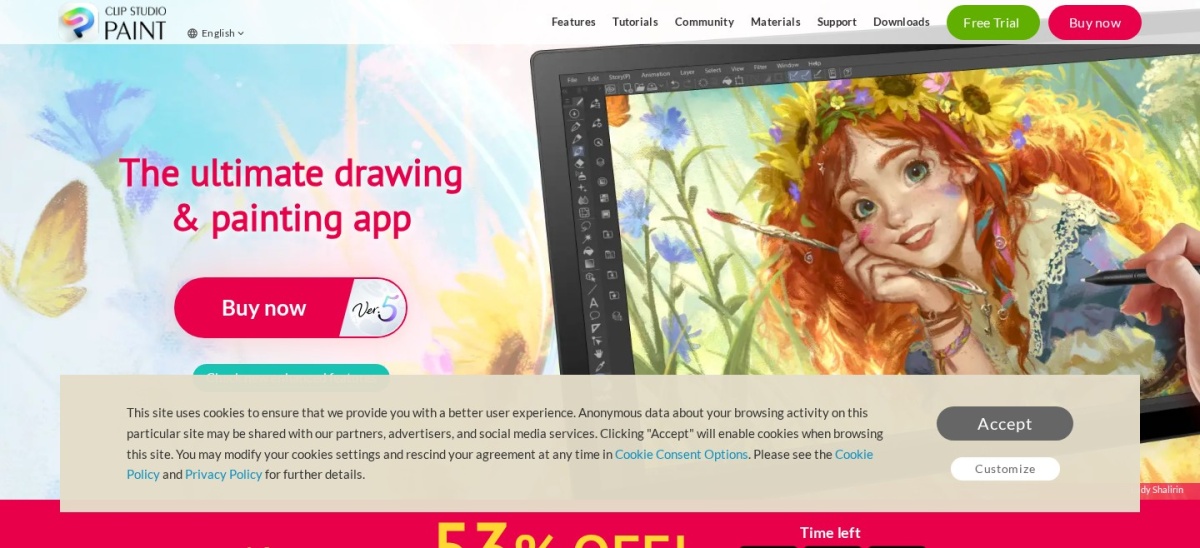
Clip Studio Paint homepage, captured Nov 2026.
Clip Studio Paint is a drawing and comic creation tool offering a PRO perpetual desktop license at $63.00 one-time alongside monthly or annual plans. It provides vector layers, rulers, 3D reference figures, and comic panel tools.
The trade off is split licensing across devices and editions, starting from $63.00 one-time for PRO desktop while EX and multi-device plans cost more. It suits comic creators, webtoon artists, and illustrators who rely on ink and line work.
What we like
Perpetual PRO desktop license available at $63.00
Strong vector line work, rulers, and comic page tools
Large library of user and official brush assets
Watch out for
Feature updates on perpetual versions require an Update Pass
Mobile and tablet versions use subscription plans
Many panels and options take time to learn
EX adds multi-page comic export and broader animation features, with Update Passes sold separately.Visit clipstudio.net
05
Rebelle
4.8/5on G2 (90 reviews, checked Nov 2026)
Starts at$89.99 one-time
Best for realistic watercolor and wet-paint simulation
PlatformsWindows, macOS
Rebelle 8$89.99 one-time
Rebelle 8 Pro$149.99 one-time
Refund policy30-day refund window
escapemotions.com
Rebelle homepage, captured Nov 2026.
Rebelle is a digital painting program for Windows and macOS that simulates watercolor flow, pigment mixing, and wet media, starting at $89.99 one-time for Rebelle 8. It models paper texture, paint drying, and brush behavior to mimic traditional media.
The trade off is a narrower feature set for graphic design and photo editing at $89.99 one-time, with no iPad app. It suits painters who want realistic watercolor, ink, and oil behavior without a subscription.
What we like
Detailed watercolor diffusion and traditional media physics
One-time purchase pricing with no monthly subscription
Best for combining raster painting, vector, and layout
PlatformsWindows, macOS, iPad
Core price$0 for individuals
AccountCanva account required
ToolsetsPixel, vector, layout
affinity.studio
Affinity homepage, captured Nov 2026.
Affinity is a creative suite combining raster image editing, vector tools, and page layout in one workspace, with a $0 core tier for individuals. Artists can paint with brushes, adjust layers non-destructively, and switch between pixel and vector work.
The trade off is requiring a Canva account and paying for Canva plans if you want AI features, even though the core app costs $0. It suits illustrators and designers who mix raster art with vectors and layouts on a zero-dollar budget.
What we like
Core raster, vector, and layout tools are free at $0
Available across Windows, macOS, and iPad
Supports layered PSD import and export
Watch out for
Requires a Canva account to use
AI tools sit behind separate paid Canva plans
Lacks some specialized studio plugins and automation
Paid Canva plans add premium AI features rather than unlocking basic raster or vector editing.Visit affinity.studio
07
Sketchbook
4.4/5on G2 (177 reviews, checked Nov 2026)
Paid from$24.99/yr
Best for fast sketching and clean drawing UI
PlatformsDesktop and mobile
Direct price$24.99/yr per seat
Free versionFree core app available
FocusSketching and drawing
sketchbook.com
Sketchbook homepage, captured Nov 2026.
Sketchbook is a drawing and sketching application with a free core version and direct desktop licenses priced at $24.99/yr per seat. It emphasizes quick startup, pencil and marker brushes, layers, guides, and an uncluttered canvas.
The trade off is fewer deep photo-editing, typography, or layout tools compared with full suites, starting at $24.99/yr per seat for direct licenses. It suits concept sketchers, product designers, and beginners who want a straightforward drawing interface.
What we like
Clean interface with fast access to drawing brushes
Free version lets users try core drawing tools first
Affordable $24.99/yr direct seat pricing
Watch out for
Limited photo manipulation and layout features
Direct licensing is annual and excludes mobile platforms
Fewer advanced production tools than studio suites
Direct licenses unlock full desktop tools for organizations and schools.Visit sketchbook.com
Subscription vs. one-time licenses
Monthly and annual subscriptions bundle continuous updates and cloud features, but ongoing fees continue as long as you draw. Adobe Photoshop starts at $22.99/mo billed annually ($275.88/yr).
One-time licenses such as Procreate at $12.99, Clip Studio Paint PRO desktop at $63.00, and Rebelle 8 at $89.99 keep upfront costs predictable. Check whether major future releases or mobile apps require separate purchases before buying.
How we chose
We selected established digital art software across desktop, tablet, and mobile workflows using vendor documentation, comparison guides, and public G2 review data.
Prices, ratings, and review counts were checked on 22 Nov 2026 against vendor pricing pages and G2 listings.
We excluded discontinued tools and unverified pricing entries, listing regular prices rather than temporary promotions.
No vendor paid for a place, and we do not claim testing for this list.
How to choose digital art software
Follow four practical steps to match the software to your devices and art style.
Match the app to your primary device first. Pick an app that runs natively on your Windows PC, Mac, or iPad so stylus pressure and palm rejection work reliably.
Decide how you want to pay over time. Compare recurring annual plans against one-time licenses or free tools like Krita and Affinity based on how long you plan to use the software.
Check brush types and file format needs. Make sure the program supports the brush textures you favor and exports formats like PSD, PNG, or TIFF for your workflow.
Start with a trial or free tier before committing. Test brush feel, layer performance, and workspace layout on a real sketch before paying for an annual plan or pro edition.
FAQ
What is the best free digital art software?
Krita is a strong free choice for desktop and Android painting, offering customizable brushes and animation tools at $0 under GNU GPL v3. Affinity also offers a $0 core suite for individuals across Windows, macOS, and iPad.
Is Procreate available on Windows or Android?
No, Procreate is built for iPadOS and costs $12.99 one-time. If you draw on Windows, macOS, or Android, look at Krita, Clip Studio Paint, Rebelle, or Sketchbook instead.
Does Clip Studio Paint require a subscription?
Not on desktop for the PRO edition, which offers a $63.00 one-time license alongside subscription plans. Mobile and tablet plans use subscriptions, and optional Update Passes cover newer feature releases.
Which software is best for watercolor and traditional painting?
Rebelle focuses on wet-media simulation, watercolor flow, pigment blending, and paper texture starting at $89.99 one-time for Rebelle 8. Krita and Procreate also include natural-media brush presets for general painting.
How much does Adobe Photoshop cost per year?
Photoshop starts at $22.99 per month billed annually, which equals $275.88 per year, and includes 100GB of cloud storage. Higher-tier plans and team seats cost more.
Can I open PSD files in non-Adobe art apps?
Many digital art programs support PSD import or export, including Clip Studio Paint, Krita, Procreate, and Affinity. Complex adjustment layers or proprietary effects may still differ slightly between programs.