Best Content Operations Software in 2026: 7 Tools Compared
WLWPLegible EditorsLast verified 22 Nov 2026How we rank10 min read
★ Short answer
Asana is the best content operations software for most marketing teams, with automated workflows, editorial project management, and custom fields from $10.99 per user per month. Choose monday.com for visual campaign planning or ClickUp for combining content documentation and production tasks in a shared workspace.
How we make this list: we compare pricing pages, product documentation and public user reviews, then re-check every price before each update. No product paid for a place. Disclosure.
Asana Starter costs $131.88 per user annually and has a 4.4/5 G2 rating across 14,147 reviews.
monday.com Basic starts at $108 per seat annually, with a free plan supporting up to 2 seats.
ClickUp Core has a regular price of $12 per user per month, with a displayed promotional price of $9.
Notion Plus costs $120 per seat annually and extends page version history to 30 days.
Airtable Team costs $240 per user annually and supports customizable content databases.
What to look for in content operations software
Content operations software coordinates the planning, creation, review, publication, and maintenance of marketing content. It helps editorial teams replace disconnected spreadsheets, email conversations, and document folders with structured production workflows.
A useful content operations platform should provide clear ownership, deadlines, production stages, and visibility into upcoming publications. Custom fields and workflow templates make it easier to standardize content briefs and editorial requirements.
Review and approval capabilities are particularly important for agencies and organizations with several stakeholders. Look for contextual feedback, permission controls, version tracking, and notifications that reduce unnecessary communication.
Consider whether you need direct publishing capabilities or primarily want to coordinate production. Dedicated content marketing platforms can distribute articles and social posts, while general work management tools offer greater flexibility across marketing departments.
Evaluate subscription costs alongside implementation requirements. Per-user billing can become expensive when freelancers, editors, clients, and external reviewers all need access to the platform.
For complex creative production and marketing projects
$10/mo
Free plan
4.2/5
Price ladder: cheapest paid plan per year
List prices, USD, checked Nov 2026
monday.comFREE$108
NotionFREE$120
WrikeFREE$120
AsanaFREE$132
ClickUpFREE$144
AirtableFREE$240
PlanableFREE$390
The 7 best content operations software tools
01
Asana
4.4/5on G2 (14,147 reviews, checked Nov 2026)
Paid from$10.99/mo
Best for managing end-to-end content production workflows
Entry paid planStarter
Workflow automationUnlimited on Starter
Project visualizationCalendar, timeline and Gantt
BillingPer user, annually
asana.com
Asana homepage, captured Nov 2026.
Asana is a work management platform that helps marketing teams coordinate editorial calendars, content briefs, assignments, and publishing deadlines. Its Starter plan costs $10.99 per user per month on annual billing and includes customizable templates, intake forms, reporting, project timelines, and unlimited workflow automations.
The trade off is that advanced approval and portfolio management capabilities require the Advanced plan at $24.99 per user per month, while direct CMS publishing generally requires integrations. It suits established editorial teams that need clear accountability and repeatable content production processes.
Best for visual editorial calendars and campaign management
Entry paid planBasic
Free seats2
Free boards3
BillingPer seat, annually
monday.com
monday.com homepage, captured Nov 2026.
monday.com is a configurable work management platform for tracking editorial assignments, creative requests, and marketing campaigns through visual boards. Its free plan supports 2 seats and 3 boards, while Basic starts at $9 per seat per month on annual billing and provides greater capacity for ongoing projects.
The trade off is that the $9 Basic subscription has more limited workflow functionality than higher tiers, and paid subscriptions are purchased in seat groups. It suits marketing departments that prefer visual production boards and configurable campaign tracking over traditional document-based workflows.
What we like
Visual content production boards
Customizable editorial status fields
Reusable marketing templates
Collaborative work documents
Centralized campaign progress tracking
Watch out for
Advanced automation requires higher subscriptions
Seat grouping can increase actual costs
Direct publication requires external integrations
Basic expands board capacity and provides additional collaboration features.Visit monday.com
03
ClickUp
4.6/5on G2 (15,883 reviews, checked Nov 2026)
Paid from$12/mo
Best for combining content documentation and task management
Entry paid planCore
Free storage60 MB
Core automations1,000/month
Content documentationCollaborative Docs
clickup.com
ClickUp homepage, captured Nov 2026.
ClickUp is a collaborative workspace that combines editorial tasks, content briefs, documents, calendars, and workflow automation. Its free plan includes unlimited tasks and collaborative documents with 60 MB of storage, while Core has a regular price of $12 per user per month and includes custom fields and 1,000 monthly automations.
The trade off is that the regular $12 monthly price is higher than the displayed $9 promotional rate, and the platform's extensive configuration options can require additional onboarding. It suits content teams seeking to consolidate editorial documentation and production management rather than maintain separate applications.
What we like
Content briefs and tasks share the same workspace
Custom task types and editorial statuses
Calendar and board visualization
Workflow automation on the entry paid plan
Generous free task management capabilities
Watch out for
Initial workspace configuration can take time
Free storage is limited
Additional AI consumption may require separate payment
Best for structured editorial databases and content inventories
Entry paid planTeam
Data structureRelational records
Workflow designConfigurable databases and interfaces
BillingPer user, annually
airtable.com
Airtable homepage, captured Nov 2026.
Airtable is a database-oriented work platform for organizing content inventories, editorial calendars, keyword assignments, and digital assets. Its Team plan costs $20 per user per month when billed annually and expands the capacity of its free offering for teams managing interconnected content records.
The trade off is that the $20 monthly subscription can become expensive for large editorial teams, and building a customized content management system requires initial configuration. It suits content operations departments that manage extensive article inventories, related campaigns, metadata, and several publication channels.
What we like
Relational structure connects campaigns and content records
Customizable editorial metadata
Flexible filtering and content organization
Configurable team interfaces
Automation for repetitive record updates
Watch out for
Higher per-user price than general task managers
Requires database and workflow configuration
Direct publishing generally requires integrations
Team expands database capacity and customization beyond the free subscription.Visit airtable.com
05
Notion
4.6/5on G2 (14,021 reviews, checked Nov 2026)
Paid from$10/mo
Best for editorial knowledge bases and content documentation
Entry paid planPlus
Free attachment limit5 MB/file
Plus attachment limit5 GB/file
Plus page history30 days
notion.com
Notion homepage, captured Nov 2026.
Notion is a collaborative documentation platform that supports editorial knowledge bases, content briefs, style guides, and production databases. Its Plus plan costs $10 per seat per month and expands attachment limits from 5 MB to 5 GB per file while providing 30 days of page history.
The trade off is that the $10 Plus subscription does not include every advanced AI or organizational permission capability, and formal editorial approval processes require custom configuration. It suits content teams that prioritize shared documentation, brand guidelines, research repositories, and flexible editorial planning.
What we like
Combines editorial documentation with structured databases
Reusable content brief and article templates
Collaborative editing and contextual feedback
Central location for brand and writing guidelines
Affordable paid entry point
Watch out for
Formal approval workflows require configuration
Free attachment sizes are restrictive
Advanced AI capabilities can generate additional costs
Plus expands attachment allowances, page history, and team content capacity.Visit notion.com
06
Planable
4.6/5on G2 (1,137 reviews, checked Nov 2026)
Paid from$390/yr
Best for collaborative content reviews and social publishing
Entry paid planBasic
Monthly post allowance60 per workspace
Supported scheduling platforms9
BillingPer workspace
planable.io
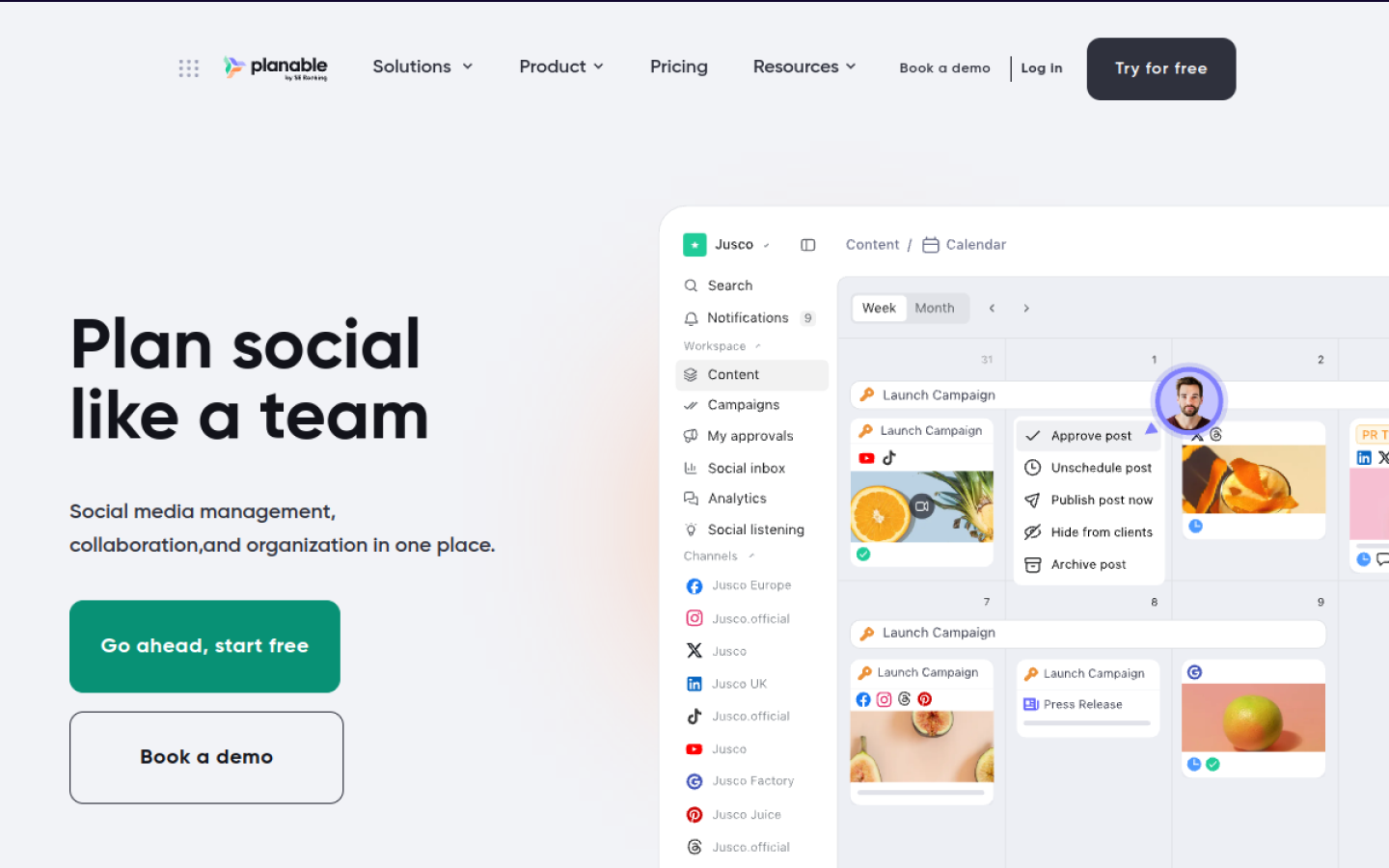
Planable homepage, captured Nov 2026.
Planable is a content collaboration platform that helps agencies and marketing teams create, review, approve, and schedule social media content. Its Basic subscription costs $390 per workspace annually or $39 with monthly billing and supports up to 60 posts per workspace each month.
The trade off is that the $390 annual subscription applies to an individual workspace, so agencies managing several clients may need additional subscriptions. Higher publishing volumes and more advanced approval configurations require upgrades. It suits social media teams seeking clearer stakeholder feedback and content approval processes.
Less suitable for complex long-form editorial production
Basic expands ongoing publishing capacity, while Pro supports higher content volumes.Visit planable.io
07
Wrike
4.2/5on G2 (4,650 reviews, checked Nov 2026)
Paid from$10/mo
Best for complex creative production and marketing projects
Entry paid planTeam
Team plan capacity2–15 users
Project visualizationBoards, tables and Gantt charts
BillingPer user, annually
wrike.com
Wrike homepage, captured Nov 2026.
Wrike is a work management platform for coordinating creative production, marketing campaigns, and cross-functional editorial projects. Its Team subscription costs $10 per user per month on annual billing, supports 2–15 users, and includes interactive Gantt charts, shareable dashboards, and AI-assisted content editing.
The trade off is that the $10 Team subscription has limited customization compared with Business at $25 per user per month, and advanced creative collaboration capabilities can require upgrades or add-ons. It suits marketing departments coordinating complex deliverables across writers, designers, project managers, and other stakeholders.
What we like
Detailed project schedules and dependency tracking
Centralized creative production management
Configurable reporting dashboards
AI-assisted content editing and comment summaries
Dedicated marketing and creative workflow capabilities
Some creative collaboration features require add-ons
Team adds interactive Gantt charts, shareable dashboards, and AI Essentials.Visit wrike.com
How much does content operations software cost?
The general-purpose content operations platforms in this comparison have entry prices ranging from $108 to $240 per user annually. monday.com Basic costs $108, Notion Plus and Wrike Team each cost $120, and Asana Starter costs $131.88.
Airtable Team costs $240 per user annually, reflecting its focus on configurable databases and structured workflows. ClickUp Core has a regular annualized price of $144, excluding its displayed promotional discount.
Planable uses workspace-based billing instead of standard per-user pricing. Its Basic subscription costs $390 annually per workspace. This structure can benefit collaborative teams but becomes more expensive when agencies maintain separate workspaces for several clients.
The price ladder compares annualized entry subscriptions, but seat-based and workspace-based prices are not directly equivalent. Calculate costs according to the number of editors, contributors, reviewers, and client workspaces your organization needs.
Content operations software vs. a content management system
A content management system primarily stores, manages, and publishes website content. Content operations software coordinates the activities that happen before and after publication, including topic research, brief creation, assignments, editing, approvals, and content maintenance.
Asana, ClickUp, and Wrike focus on coordinating production workflows rather than hosting public website content. Airtable and Notion provide flexible environments for organizing content records and editorial knowledge, while Planable supports direct social media scheduling.
Most established marketing teams benefit from using a content operations platform alongside their existing CMS. Connecting these systems through integrations can reduce duplicate data entry and help editorial managers track content from the initial idea through publication and subsequent updates.
How we chose
We shortlisted established work management, editorial collaboration, and content planning platforms using individual G2 review profiles and official vendor documentation. We prioritized products that help marketing teams manage content assignments, editorial calendars, stakeholder feedback, documentation, and repeatable production workflows.
The editorial publication date is 22 Nov 2026. We accessed official pricing pages and public G2 ratings on 24 Nov 2026. Prices reflect regular published subscriptions rather than temporary promotions, and annualized costs use the applicable billing unit.
We excluded discontinued products, platforms without sufficient public review evidence, and tools whose paid pricing could not be confirmed. Rankings reflect editorial workflow flexibility, collaboration capabilities, pricing transparency, and suitability for different content production requirements. No vendor paid for a place, and we do not claim testing for this list.
How to choose the right content operations software
Map your existing editorial workflow and identify the production bottlenecks that software should help your team resolve.
Identify the stages of your content workflow. Document how ideas become briefs, how writers receive assignments, who reviews drafts, and how approved content reaches publication. Choose a platform that can represent these stages without introducing unnecessary administrative work.
Determine your content documentation requirements. Choose Notion if editorial guidelines and shared knowledge are central to your operations. Consider Airtable for structured content inventories, or Asana and ClickUp when task ownership, deadlines, and production coordination are your main priorities.
Review collaboration and approval capabilities. Check whether freelancers, clients, editors, and other stakeholders can contribute without purchasing unnecessary licenses. Planable is particularly relevant for social content reviews, while Wrike supports broader creative production and project coordination.
Calculate costs using your actual team structure. Include paid seats, client workspaces, premium automation, integrations, and any additional approval features. Compare complete subscription costs rather than headline prices, and verify that your preferred plan supports the required editorial workflow.
FAQ
What is content operations software?
Content operations software helps organizations coordinate the processes involved in planning, creating, reviewing, publishing, and maintaining content. It typically combines editorial calendars, task assignments, workflow automation, collaborative documentation, and reporting to improve production visibility and accountability.
What is the best content operations software?
Asana is our overall recommendation because it combines editorial project management, workflow automation, custom fields, and reporting. monday.com is a suitable alternative for visual campaign management, while ClickUp works well for teams combining content documentation with task management.
How much does content operations software cost?
The per-user platforms in this comparison start between $9 and $20 per month at their regular published rates. Workspace-based platforms such as Planable use a different billing model, and total costs depend on team size, collaboration requirements, and subscription features.
What is the best free content operations software?
ClickUp offers a free subscription with unlimited tasks, collaborative documents, and calendar views. Asana, Notion, Airtable, monday.com, and Wrike also provide free entry options. Planable provides a limited trial rather than a permanent free subscription.
Is content operations software different from an editorial calendar?
Yes. An editorial calendar primarily organizes publication dates and upcoming content topics. Content operations software manages the broader production process, including assignments, dependencies, draft reviews, asset coordination, workflow automation, and reporting across editorial projects.
Which content operations software is best for agencies?
Planable is particularly useful for agencies that manage social media content and client approvals through separate workspaces. Asana and Wrike are suitable alternatives for agencies coordinating long-form articles, design deliverables, marketing campaigns, and more complex client projects.
Can content operations software publish content directly?
Some dedicated platforms support direct publishing or scheduling to connected channels. Planable supports social media scheduling, while general work management platforms such as Asana and ClickUp typically require external integrations or separate publishing systems to distribute completed content.
What metrics should content operations teams track?
Useful operational metrics include production turnaround time, missed deadlines, approval delays, revision frequency, content output, and contributor workload. Teams should also connect these operational measurements with publication performance to evaluate whether production improvements contribute to meaningful marketing outcomes.
Do small businesses need content operations software?
Small businesses can benefit from content operations software when several contributors participate in content production or when publication schedules become difficult to manage. Free subscriptions can provide a practical starting point before businesses invest in advanced automation and collaboration capabilities.