Best Automated Accounting Software in 2026: 7 Tools Compared
WLWPLegible EditorsLast verified 22 Nov 2026How we rank10 min read
★ Short answer
Zoho Books is the best automated accounting software for most small businesses, with recurring invoices, payment reminders and paid plans starting at $15 per month when billed annually. QuickBooks Online is a good alternative for accountant collaboration, while Xero suits businesses that need accounting access without per-user subscription fees.
How we make this list: we compare pricing pages, product documentation and public user reviews, then re-check every price before each update. No product paid for a place. Disclosure.
Zoho Books offers recurring invoices and payment reminders for free, with connected bank feeds starting at $180 per year.
QuickBooks Online has a 4.3/5 Capterra rating from 8,555 reviews and paid subscriptions starting at $38 per month.
Xero starts at $27 per month without per-user license fees, although its Early plan limits invoices and bills.
Wave Pro costs $190 per year and includes automatic bank imports, transaction categorization and payment reminders.
FreshBooks has a 4.5/5 rating from 4,534 reviews, making it a strong option for service businesses.
Kashoo includes unlimited users in its $30-per-month subscription, while Sage 50 serves businesses with more complex inventory and accounting requirements.
What to look for in automated accounting software
Automated accounting software reduces manual bookkeeping by connecting financial accounts, importing transactions and applying predefined accounting rules. The goal is to spend less time entering information and more time reviewing financial results.
Look for bank feeds, recurring invoices, transaction matching and automatic payment reminders. These features help businesses maintain accurate records without repeating the same administrative tasks every week.
Check whether automation is available in the entry-level subscription. Some accounting platforms offer inexpensive plans that require manual transaction imports, while automatic reconciliation and approval workflows require an upgrade.
Consider how the software connects with payment processors, inventory systems, payroll applications and existing business tools. Missing integrations can create additional manual work even when the accounting platform itself offers automation.
Automation should support financial controls rather than replace them. Accountants and business owners still need to review unusual transactions, verify account balances and approve important financial decisions.
Zoho Books is a cloud accounting platform that combines bookkeeping, invoicing, expense management and financial reporting. Its free edition supports a business user and an accountant, with scheduled invoices, payment reminders and more than 50 financial reports.
The trade off is that connecting bank feeds requires Standard at $15 per month with annual billing or $20 with monthly billing, while custom workflows require a higher subscription. It suits small businesses that want to introduce accounting automation gradually without committing to an expensive platform.
What we like
Free edition includes recurring billing
Affordable annual subscription
Connects with other Zoho business applications
Supports customizable accounting workflows on higher plans
Includes customer self-service functionality
Watch out for
Free edition has eligibility restrictions
Advanced workflow automation requires an upgrade
Inventory management is reserved for higher subscriptions
Standard adds connected bank feeds, recurring expenses and API access.Visit zoho.com
02
QuickBooks Online
4.3/5on Capterra (8,555 reviews, checked Nov 2026)
Paid from$38/mo
Best for accountant collaboration and bookkeeping
Bank synchronizationIncluded
Free plan invoice allowance2 per month without payment activation
Accountant accessPaid plans
Paid planSimple Start
quickbooks.intuit.com
QuickBooks Online homepage, captured Nov 2026.
QuickBooks Online is a cloud bookkeeping platform that connects financial transactions with invoices, expenses and accounting reports. Its free edition supports a single bank connection, while Simple Start provides access for the business owner and 2 accountants.
The trade off is the subscription cost, with Simple Start regularly priced at $38 per month and more extensive functionality requiring higher plans. A temporary introductory discount is available, but the comparison uses regular pricing. It suits businesses that collaborate closely with external bookkeeping and accounting professionals.
What we like
Direct synchronization with connected financial accounts
Dedicated accountant access on paid plans
Supports invoicing and financial record management
Large public review base
Multiple subscription levels for growing businesses
Watch out for
Higher regular price than several competitors
Free plan does not include accountant access
More advanced automation requires additional spending
4.4/5on Capterra (3,341 reviews, checked Nov 2026)
Starts at$27/mo
Best for accounting collaboration without seat fees
Bank reconciliationIncluded
Entry invoice allowance20
Per-user license feesNone
Paid planEarly
xero.com
Xero homepage, captured Nov 2026.
Xero is an online accounting platform for managing invoices, expenses, bank reconciliation and financial performance. Its Early subscription includes document capture, basic financial analysis and a 30-day cash flow forecast without separate subscription fees for individual users.
The trade off is that Early costs $27 per month at the regular rate and limits invoice and bill processing to 20 invoices and 5 bills, respectively. Automatic reconciliation and broader bill automation are available with Growing. It suits businesses that want employees and accountants to share financial information.
What we like
No separate per-user subscription fees
Connected banking and reconciliation tools
Document capture included in the entry plan
Financial forecasting capabilities
Extensive accounting integration options
Watch out for
Entry-level invoice and bill restrictions
Automatic reconciliation requires Growing
Temporary introductory discounts do not reflect ongoing costs
Growing adds automatic reconciliation, bill automation and expanded forecasting.Visit xero.com
04
Wave
4.4/5on Capterra (1,732 reviews, checked Nov 2026)
Paid from$190/yr
Best for inexpensive automated bookkeeping
Automatic bank importsPro plan
Transaction categorizationPro plan
Free invoicingUnlimited
Paid planPro
waveapps.com
Wave homepage, captured Nov 2026.
Wave is an accounting and invoicing platform designed for independent professionals and small businesses. Its Starter edition allows unlimited estimates, invoices, bills and bookkeeping records, while Pro introduces automatic transaction imports, categorization and unlimited digital receipt capture.
The trade off is that the main bookkeeping automation features require Pro at $190 per year or $19 per month, despite the availability of free accounting functionality. A temporary discount applies to eligible monthly subscriptions. It suits budget-conscious businesses that need straightforward bookkeeping and customer billing.
What we like
Unlimited invoicing in the free edition
Affordable annual subscription
Automatic transaction categorization with Pro
Digital receipt capture
Automatic reminders for overdue invoices
Watch out for
Free edition lacks automatic bank imports
Payment processing involves additional fees
Less suitable for complex inventory operations
Pro adds automated bank imports, transaction categorization and payment reminders.Visit waveapps.com
05
FreshBooks
4.5/5on Capterra (4,534 reviews, checked Nov 2026)
Starts at$23/mo
Best for freelancers and service businesses
Entry client allowance5 clients
Expense trackingIncluded
Additional team members$11/user/mo
Paid planLite
freshbooks.com
FreshBooks homepage, captured Nov 2026.
FreshBooks is a cloud accounting and billing platform focused on client-based businesses. Its Lite subscription supports invoicing for up to 5 clients, expense monitoring, estimates and financial reports, helping independent professionals organize billing and business expenses.
The trade off is that Lite regularly costs $23 per month and restricts the number of billable clients, while businesses needing broader accounting functionality must upgrade. A temporary introductory sale reduces the initial subscription cost. It suits consultants, freelancers and agencies that prioritize client billing over complex inventory management.
What we like
Client-focused invoicing and estimates
Expense monitoring and financial reports
Accessible interface for independent professionals
Supports online invoice payments
High rating across thousands of public reviews
Watch out for
Lite restricts the number of billable clients
Additional team members increase subscription costs
No permanent free accounting subscription
Paid subscriptions provide client invoicing, expense tracking and financial reporting.Visit freshbooks.com
06
Kashoo
4.5/5on Capterra (132 reviews, checked Nov 2026)
Starts at$30/mo
Best for simple accounting with unlimited users
Bank feedsIncluded
User allowanceUnlimited
Free trial14 days
Paid planSingle subscription
kashoo.com
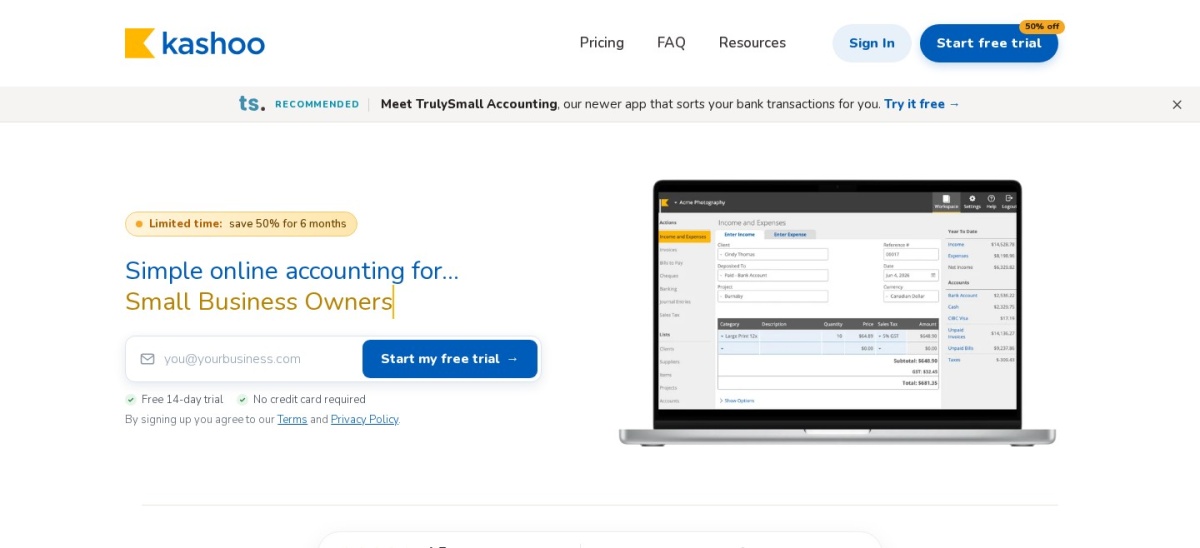
Kashoo homepage, captured Nov 2026.
Kashoo is a small business accounting platform that combines synchronized bank feeds, customer invoicing, expense management and double-entry bookkeeping. Its subscription includes unlimited users, unlimited invoices and a 14-day trial for evaluating the accounting workflow.
The trade off is that Kashoo lists its monthly subscription at $30, with separate subscriptions required for additional businesses and fewer migration options for existing invoices and contacts. It suits small teams that want shared bookkeeping access and a straightforward subscription structure.
What we like
Unlimited users without additional seat charges
Connected banking functionality
Supports double-entry accounting
Includes project and inventory tracking
Dedicated year-end information for accountants
Watch out for
Existing invoice and contact migration is restricted
Separate subscriptions required for additional businesses
No permanent free edition
The paid subscription includes bank synchronization, financial records and shared user access.Visit kashoo.com
07
Sage 50
4/5on Capterra (634 reviews, checked Nov 2026)
Starts at$132.17/mo
Best for inventory-heavy accounting operations
Automated bank reconciliationIncluded
Inventory managementIncluded
Entry user allowance1
Paid planPro Accounting
sage.com
Sage 50 homepage, captured Nov 2026.
Sage 50 is an accounting system for businesses that need detailed financial records alongside inventory, purchasing and job management. Its Pro Accounting subscription includes automated bank reconciliation, purchasing controls, cloud access and accounting functionality for 1 user.
The trade off is that Pro Accounting lists at $132.17 per month with an annual commitment, and broader workflow automation requires higher subscriptions. It suits established businesses that need more structured purchasing, inventory and financial management than lightweight bookkeeping applications provide.
What we like
Automated bank reconciliation
Integrated inventory management
Purchasing and job accounting functionality
Automatic software updates and backups
Advanced accounting options for growing operations
Watch out for
High entry subscription cost
Annual commitment required
Entry subscription supports a single user
Advanced workflows require higher plans
Pro includes automated reconciliation, inventory management and purchasing controls.Visit sage.com
Which accounting tasks should businesses automate?
Start with transaction imports. Connected bank accounts reduce the need to download statements and manually enter each financial transaction into the accounting system.
Recurring billing is another useful starting point. Businesses with ongoing customer subscriptions or regular service agreements can schedule invoice creation and reminders instead of preparing each invoice individually.
Receipt capture helps organize expense documentation. Depending on the platform, businesses can extract transaction information from uploaded documents and attach those records to the corresponding accounting entries.
Transaction matching and reconciliation help identify payments that correspond to existing invoices or expenses. Review exceptions and unmatched entries before closing the accounting period.
More advanced automation can support purchasing approvals, financial forecasting and scheduled reporting. These capabilities become increasingly useful when multiple employees participate in financial operations.
How much does automated accounting software cost?
Zoho Books has the lowest confirmed annualized paid entry price in this comparison at $180, followed by Wave at $190 per year. Both offer free accounting editions, although connected bank automation requires a paid subscription.
FreshBooks has a regular monthly entry price of $23, compared with $27 for Xero and $38 for QuickBooks Online. These prices represent entry subscriptions rather than equivalent packages with identical features.
Kashoo lists its monthly subscription at $30 and includes unlimited users. Sage 50 lists Pro Accounting at $132.17 per month with an annual commitment, reflecting its broader inventory and operational accounting functionality.
Calculate the complete subscription cost before choosing a platform. Additional employees, payment processing, payroll, document capture, integrations and higher transaction allowances can affect the amount your business ultimately pays.
How we chose
We identified established accounting platforms through Capterra's accounting software directories, product reviews and official vendor documentation. The comparison prioritizes bookkeeping automation, financial management, subscription affordability and suitability for different business requirements.
The requested editorial date is 22 Nov 2026. Prices, ratings and review counts were verified against accessible vendor pricing pages and Capterra on 24 Nov 2026. Regular subscription prices are used instead of temporary introductory offers, and monthly subscriptions are annualized for comparison.
We excluded products without accessible vendor pricing, insufficient public review information or limited relevance to accounting automation. Rankings reflect available accounting functionality, subscription restrictions and practical business requirements rather than ratings alone. No vendor paid for a place, and we do not claim testing for this list.
How to choose the best automated accounting software
Identify the accounting tasks that consume the most time before comparing subscriptions, automation features and integration options.
Identify your repetitive bookkeeping tasks. List the financial activities your team handles regularly, including invoice creation, expense entry, receipt collection, payment follow-ups and reconciliation. Prioritize platforms that reduce manual effort in those specific areas.
Check automation at the subscription level. Compare the actual features included in each plan rather than relying on general product descriptions. Connected banking, automatic reconciliation and customizable workflows may require different subscriptions within the same platform.
Calculate the total ongoing cost. Use regular subscription prices and include additional employees, payment processing, payroll and integrations. Consider whether an annual commitment makes financial sense for your business.
Confirm compatibility and accounting controls. Review supported financial institutions, accounting exports, access permissions and migration options. Involve your accountant before switching platforms so your financial records and reporting requirements remain consistent.
FAQ
What is the best automated accounting software?
Zoho Books is our top pick for most small businesses because it offers affordable subscriptions, recurring invoices and payment reminders. QuickBooks Online is suitable for accountant collaboration, while Xero provides shared accounting access without individual user subscription fees.
What is automated accounting software?
Automated accounting software uses connected financial data, scheduled actions and configurable rules to reduce repetitive bookkeeping work. Depending on the platform, it can import transactions, categorize expenses, generate recurring invoices, match payments and assist with financial reporting.
Is there free automated accounting software?
Yes. Zoho Books, QuickBooks Online and Wave offer free accounting editions. However, the scope of automation differs between products. Zoho Books includes recurring invoicing and payment reminders for eligible free users, while Wave requires Pro for automatic bank imports.
Can accounting software completely replace a bookkeeper?
Accounting software can reduce repetitive data entry and improve financial organization, but it cannot reliably replace all bookkeeping responsibilities. Businesses still need human oversight for unusual transactions, reconciliation exceptions, financial adjustments, compliance requirements and important accounting decisions.
Which accounting software is best for automatic bank reconciliation?
Sage 50 includes automated bank reconciliation in Pro Accounting, while Xero offers automatic reconciliation through its Growing subscription. The right choice depends on transaction complexity, financial institution compatibility, subscription budget and the level of control your accounting team requires.
Which automated accounting software is best for freelancers?
FreshBooks is a good option for freelancers who prioritize client invoices, expenses and estimates. Wave offers inexpensive bookkeeping automation through Pro, while Zoho Books provides a free accounting edition that can suit eligible independent professionals and small businesses.
Does automated accounting software reduce accounting errors?
It can reduce errors associated with manually entering transactions, copying invoice details and maintaining separate records. However, incorrect categorization rules, incomplete bank feeds and duplicate transactions can still create problems. Regular financial reviews remain important even when bookkeeping is automated.
Can automated accounting software integrate with other business applications?
Many accounting platforms connect with payment processors, payroll tools, customer management systems and inventory applications. Integration availability varies by vendor and subscription, so confirm that your existing business applications are supported before choosing or migrating to a new platform.