CapCut is the best AI video editing platform for quick edits, with the strongest free tier, auto-captions and templates for TikTok, Reels and Shorts. Descript is the best pick for talking-head video, because you edit the transcript and the video follows.
How we make this list: we compare pricing pages, product documentation and public user reviews, then re-check every price before each update. No product paid for a place. Disclosure.
CapCut leads on free quick edits: auto-captions, templates and effects for TikTok, Reels and Shorts, with a 4.6 out of 5 App Store rating from 1.1 million ratings.
Descript edits video like a document, with a 4.6 out of 5 G2 rating from 934 reviews and Hobbyist at $16 a month billed annually.
OpusClip turns long videos into scored vertical shorts at $15 a month, with a 4.6 out of 5 G2 rating from 124 reviews.
VEED is the cheapest paid plan here at $12 a month for Lite, with a 4.6 out of 5 G2 rating from 1,755 reviews.
Runway is the pick for AI effects such as object removal, at $15 a month on a credit system.
What quick edits actually are
Quick edits are the unglamorous bulk of video work: trimming silences, adding captions, cutting a two-minute clip out of a forty-minute recording, turning a blog post into a video. Nobody needs a Hollywood timeline for that, and the old desktop editors are too slow for the volume social demands.
The AI tools in this list handle the fast jobs: edit by text, auto-cut silences, generate captions, and repurpose long content into shorts in minutes. Most run in the browser or on your phone, so there is nothing to install for the quick jobs.
Match the tool to the content type. Talking-head videos belong in Descript or Wisecut, long content needing clips belongs in OpusClip, social-first quick edits belong in CapCut or Kapwing, and text that needs to become video belongs in Pictory or InVideo.
Watch for watermarks and credit systems. Free tiers that watermark exports are fine for drafts but not for publishing, and credit-based pricing like Runway's can spike with heavy generative use.
The 9 best AI video editing platforms for quick edits
01
CapCut
4.6/5on App Store (1.1M reviews, checked Nov 2026)
Paid from$19.99/mo
Best AI video editing platform for quick edits
Free planYes, basic tools and templates
Paid planPro, $19.99/month
PlatformsPhone, desktop and web
Best forTikTok, Reels and Shorts
capcut.com
CapCut homepage, captured Nov 2026.
CapCut is ByteDance's video editor for vertical social video, running as a phone app, a desktop program and a browser editor. Its strength is the finishing layer short-form needs: auto-captions, background removal, speed changes and templates built for TikTok, Reels and Shorts.
The trade off is the ownership question. Teams at companies that restrict ByteDance products should check policy first, and some free exports carry watermarks with premium effects behind Pro. Pro costs $19.99 a month or $179.99 a year, and the free tier remains the fastest free way to finish a social video.
Descript is a transcript-first video editor: it transcribes your recording, and deleting a sentence from the text deletes it from the video. For talking-head videos, podcasts and online courses, that is an order of magnitude faster than a timeline, and Overdub clones your voice to fix flubbed words without re-recording.
The trade off is scope. It is not the tool for cinematic B-roll work, and transcription errors need checking before you publish. Hobbyist costs $16 a month billed annually for 10 media hours and watermark-free 1080p export, while Creator at $24 a month raises that to 30 hours and 4K.
OpusClip is an AI clipping tool: you upload a long recording, and it picks the highlight moments, adds animated captions and reframes each clip to 9:16. For podcasters, streamers and course creators sitting on hours of content, it turns an archive into weeks of shorts with minimal effort.
The trade off is curation. The AI's picks are genuinely good at finding punchy moments, though you will still review them, and quality depends on the source material. Starter costs $15 a month and removes the watermark, with a free tier for trying it out.
What we like
AI finds the best moments automatically
Virality scoring ranks clips
Auto-captions and reframing included
Watch out for
Quality depends on the source material
Creative control is limited
Pro adds more credits and longer exports at $29 a monthVisit opus.pro
04
VEED
4.6/5on G2 (1,755 reviews, checked Nov 2026)
Paid from$12/mo
Best browser editor for captions
Free planYes, watermarked 720p
Paid planLite, $12/month
Languages100 plus for subtitles
Best forCaptions and quick browser edits
veed.io
VEED homepage, captured Nov 2026.
VEED is a browser-based video editor built for quick jobs: auto-subtitle generation in 100 plus languages, silence removal, background noise cleanup and one-click resizing. You open a video, add captions for silent-scroll social viewing, and export without installing software.
The trade off is the tier maze. AI features sit on higher tiers, and the entry price has moved several times in 2026, so confirm the current Lite price before you commit. Lite is listed at $12 a month on G2's vendor-supplied pricing, with Pro at $29 a month.
What we like
Auto-subtitles in 100 plus languages
No install, works in the browser
Rated 4.6 out of 5 from 1,755 G2 reviews
Watch out for
AI features sit on higher tiers
Entry price has moved several times in 2026
Pro adds 4K export and translation at $29 a monthVisit veed.io
05
Runway
4.1/5on G2 (105 reviews, checked Nov 2026)
Paid from$15/mo
Best for AI effects and generative video
Free planYes, limited credits
Paid planStandard, $15/month
BillingCredit-based
Best forAI effects and fixes
runwayml.com
Runway homepage, captured Nov 2026.
Runway is where AI video editing gets serious: remove objects from footage, extend scenes generatively, and create video from text prompts. For quick edits, its value is in the impossible fixes: the boom mic in frame, the logo that needs blurring, the background that needs replacing.
The trade off is the credit system. Generative features consume credits fast, so watch the meter, and the learning curve for advanced features is real. Standard costs $15 a month, with Pro at $28 a month for heavier generative work.
What we like
Object removal and inpainting in video
Text-to-video generation
Professional-grade AI effects
Watch out for
Credit-based pricing can surprise
Learning curve for advanced features
Pro adds more credits and generative models at $28 a monthVisit runwayml.com
06
Pictory
4.6/5on G2 (81 reviews, checked Nov 2026)
Paid from$19/mo
Best for turning text into video
Free planYes, free trial
Paid planFrom around $19/month
InputBlog posts and scripts
Best forText-first content teams
pictory.ai
Pictory homepage, captured Nov 2026.
Pictory is a text-to-video tool that converts written content into video: paste a blog post or script, and it builds a narrated video with stock footage, captions and music.
The trade off is the look. The output has a recognisable stock-footage aesthetic, so it suits informational content better than brand storytelling, and creative control is limited. Plans start around $19 a month with a free trial.
InVideo is a text-to-video platform whose AI turns a text prompt or script into a complete video with narration, stock footage and captions, aimed squarely at faceless YouTube and social content.
The trade off is price and review. The $25-a-month entry is higher than some rivals, and AI-generated videos need review before publishing. It suits teams running high-volume video content where throughput justifies the price.
Kapwing is the browser editor for teams: no install, shareable project links, and commenting for feedback rounds. It handles the quick jobs well, trimming clips, adding subtitles, resizing for platforms, and meme-style edits, with AI tools for auto-captioning and background removal.
The trade off is the free tier. Free exports carry watermarks, and processing can be slow on long videos. Pro costs $16 a month billed annually and removes watermarks with faster processing. For distributed teams doing quick turnaround edits with review cycles, Kapwing's collaboration beats desktop tools.
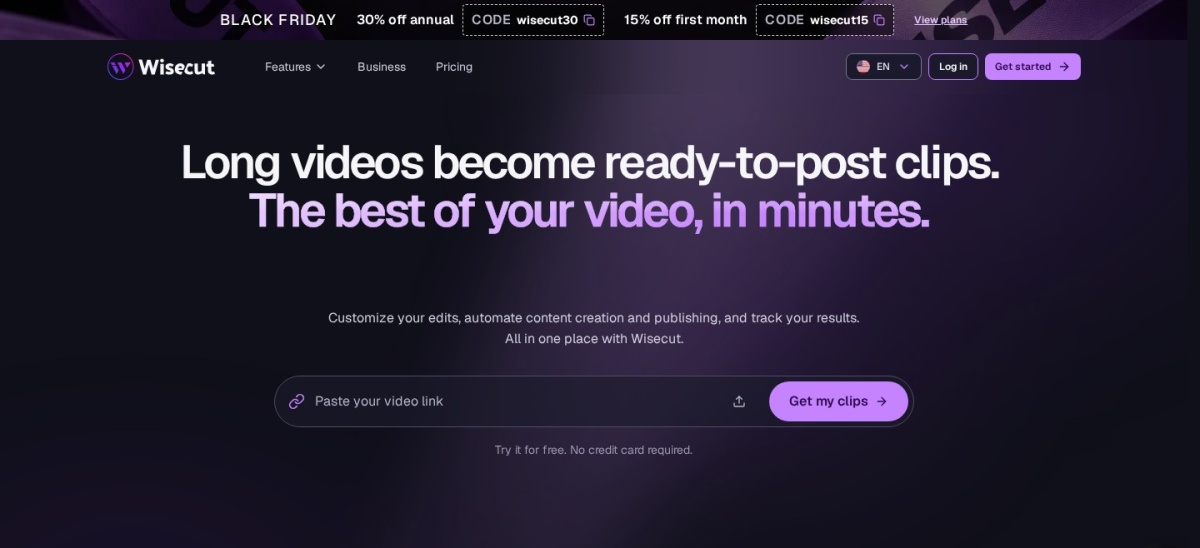
Wisecut is an automatic editor for talking videos that cuts silences, filler words and pauses. Upload a recording and it returns a tightened cut with captions, background music and reframing, all chosen by AI, with a storyboard view for quick fixes.
The trade off is focus. It is purpose-built for spoken content, so cinematic projects should look elsewhere, and music and pacing choices are automated rather than yours. Plans start around $15 a month with a free tier.
Text-first editors such as Descript and Wisecut transcribe your recording and let you edit the words. Delete a sentence from the transcript and the video cut follows, which is radically faster for talking-head video, podcasts and courses.
Timeline-first editors such as CapCut, Kapwing and VEED keep the classic timeline and add AI on top: auto-captions, background removal, speed curves and templates. They suit visual, trend-driven social video where pace and effects matter more than words.
Clipping tools such as OpusClip sit apart: you upload a long recording and the AI picks the highlight moments, adds animated captions and reframes each clip to vertical.
How we chose
We started from the AI video editors most often recommended for quick edits, then kept those with a verifiable rating on G2 or the Apple App Store.
Ratings and review counts come from G2, checked in October 2026 on comparison guides and re-read on 26 November 2026. Prices come from vendor pricing pages and published comparisons.
We left out tools with no verifiable rating and desktop-only editors with no AI features. No vendor paid for a place, and we do not claim hands-on testing for this list.
How to choose an AI video editing platform
Sort by the job first: talking head, short-form social, long-to-short, or text-to-video.
Name the job before the tool. Talking head, short-form social, long-to-short or text-to-video: the category looks crowded until you sort by job, then the choice is usually obvious.
Start free and measure time saved. CapCut, Kapwing, Descript and Runway all have free tiers that cover real work. Time a typical edit in your current tool, then in the AI alternative.
Check watermarks and credit limits. Free tiers that watermark exports are fine for drafts but not for publishing. Credit-based pricing can spike with heavy generative use.
Audit your stack quarterly. If an editor, a captioner and a clip tool all live in separate subscriptions, the monthly total creeps past the price of one good all-rounder.
FAQ
What is the best free AI video editor for quick edits?
CapCut has the strongest free tier for social video editing with auto-captions and effects. Kapwing is the best free browser-based option for collaborative quick edits, and Descript's free plan suits talking-head content.
Can AI edit my videos automatically?
For specific jobs, yes. Wisecut removes silences automatically, OpusClip extracts clips from long videos, Descript lets you edit via transcript, and Pictory turns scripts into finished videos. Fully automatic editing of creative projects is still human-led.
Which tool is best for turning long videos into shorts?
OpusClip is purpose-built for long-to-short repurposing with virality scoring. Alternatives include Vizard AI and Munch, but OpusClip's clip quality and captioning make it the default recommendation for podcasters and streamers.
Do I need to install software for AI video editing?
Not necessarily. Kapwing, Pictory, InVideo, Runway and OpusClip all run in the browser. CapCut and Descript offer desktop apps alongside web versions. Browser tools are best for quick edits and collaboration.
How much does AI video editing software cost?
Free tiers cover all nine tools here for light use. Paid plans run roughly $12 to $25 a month for individuals, with VEED at $12 a month and InVideo at $25 a month. Enterprise and team plans cost more.
Is CapCut really free?
Yes, the free tier is genuinely capable for social video, with auto-captions, templates and effects. Some exports carry watermarks and premium effects sit behind Pro, which costs $19.99 a month or $179.99 a year.
What is the best AI video editor for YouTube?
Descript is the best pick for talking-head YouTube videos and podcasts, because editing the transcript is far faster than a timeline. For Shorts, CapCut or OpusClip will get clips out faster.
Can I use these tools on my phone?
CapCut runs as a phone app, a desktop program and a browser editor. Kapwing, VEED, Pictory and InVideo run in the browser on mobile, while Descript and Runway are desktop-first with web access.
SaaS SEO and WordPress specialist with about 8 years of experience. Rakib compares WordPress plugins, themes, hosting and software using public pricing, documentation and user reviews. See how we rank.