Best AI Tools for Business Productivity in 2026: 7 Tools Compared
WLWPLegible EditorsLast verified 22 Nov 2026How we rank12 min read
★ Short answer
ChatGPT is our top AI business productivity tool, with a $20 monthly Plus plan covering writing, analysis, coding, research and file work. ClickUp is better for managing projects and AI-assisted team workflows, while Notion combines company knowledge, documents and AI agents in a shared workspace.
How we make this list: we compare pricing pages, product documentation and public user reviews, then re-check every price before each update. No product paid for a place. Disclosure.
ChatGPT Plus costs $20 monthly and provides expanded access to reasoning, file analysis, image generation and research tools.
ClickUp Core has a regular price of $12 per user monthly with annual billing, while Business adds more ongoing AI capabilities at a regular $25 rate.
Notion Plus starts at $10 per member monthly, but ongoing Notion Agent and AI Meeting Notes capabilities require Business at $20.
Zapier Professional starts at $19.99 monthly with annual billing, adding multi-step workflows, premium applications and AI fields.
Fireflies.ai Pro costs $10 per seat monthly billed annually, adding video recording, AI Skills and 8,000 minutes of meeting storage per seat.
Grammarly Pro costs $144 annually, while Canva Pro costs $18 monthly at its regular rate and includes 10 times the premium AI allowance of Canva Free.
What makes an AI productivity tool useful for business?
Business productivity software helps employees complete recurring tasks, organize information, communicate and coordinate projects. AI adds drafting, summarization, information retrieval and automation to these established workflows.
The best choice depends on where work slows down. A general-purpose assistant can prepare documents and analyze files, but a project platform is better for assigning work, maintaining deadlines and tracking responsibilities.
Look for workflow integration rather than isolated AI features. AI-generated meeting summaries become more valuable when action items can move into project management, customer records or approved follow-up processes.
Consider whether AI is included in the cheapest paid subscription. Some platforms provide only trial access at entry level, while advanced agents or premium models require a higher edition or usage-based credits.
Data handling also matters. Business teams should evaluate permissions, connected applications, retention policies and human approval requirements before automating activities involving customers, employees or confidential information.
ChatGPT is a general-purpose AI assistant for business writing, research, spreadsheet analysis, coding and problem-solving. Its free edition provides limited model and tool access, while Plus costs $20 monthly and expands access to advanced reasoning, file uploads, image generation, voice conversations and Deep Research. It can help employees prepare reports, summarize information and work through complex business questions.
The trade off is that Plus has variable usage limits and does not include separately billed API consumption. It also requires verification of important facts and business decisions. It suits professionals and small teams that need one versatile AI assistant before investing in more specialized productivity applications.
What we like
Supports writing, research, coding and analysis
Can analyze uploaded documents and files
Includes image generation and voice capabilities
Free edition available
Useful across many business departments
Watch out for
Plus usage limits vary by feature
API usage is billed separately
Important outputs require human verification
Team governance needs appropriate organizational licensing
Plus adds higher model limits, advanced reasoning access and expanded research and creation tools.Visit openai.com
02
ClickUp
4.6/5on G2 (15,880 reviews, checked Nov 2026)
Paid from$12/mo
Best for AI-powered project and task management
Entry paid planCore, regular $12/user/mo
Advertised sale$9/user/mo annually
Core AI accessTrial and limited credits
Core automations1,000/month
clickup.com
ClickUp homepage, captured Nov 2026.
ClickUp is a work management platform combining projects, tasks, documents, chat and AI assistance. Its Free Forever plan includes unlimited tasks and collaborative documents, while Core has a regular price of $12 per user monthly with annual billing. Core adds unlimited storage, custom fields, dashboards, automation capacity and trial access to ClickUp Brain.
The trade off is that Core does not include unrestricted ongoing premium AI access, and the advertised $9 rate is a discount rather than the regular price. Business has a regular $25 per-user monthly rate with expanded AI features. It suits teams needing structured project tracking with AI assistance and workflow automation.
What we like
Combines tasks, documents, chat and project tracking
Free plan includes unlimited tasks
Supports AI-assisted project workflows
Core includes 1,000 monthly automations
Integrates with common business applications
Watch out for
Core AI features include trial limitations
Advanced AI features require higher editions
Complex workspaces need careful configuration
All workspace members may require paid upgrades
Business adds ongoing ClickUp Brain access, premium models, advanced dashboards and higher automation capacity.Visit clickup.com
03
Notion
4.6/5on G2 (14,021 reviews, checked Nov 2026)
Paid from$10/mo
Best for AI knowledge management and collaboration
Entry paid planPlus, $10/member/mo
Plus AI accessLimited trial
AI-focused planBusiness, $20/member/mo
Custom Agents$10 per 1,000 credits
notion.com
Notion homepage, captured Nov 2026.
Notion is a connected workspace for documents, databases, project management and company knowledge. Its free edition supports personal organization, while Plus starts at $10 per member monthly and adds collaboration features, custom forms and expanded file capabilities. Business costs $20 per member monthly and includes Notion Agent, AI Meeting Notes and enterprise search.
The trade off is that Plus offers only trial access to advanced AI, and Custom Agents use separately purchased credits. Teams must also keep their knowledge bases accurate for reliable AI responses. It suits organizations that want shared documentation, project information and AI assistance in one workspace.
What we like
Combines documents, knowledge and projects
Free edition available
Business includes Notion Agent
AI Meeting Notes support team follow-ups
Connected search can retrieve workplace information
Watch out for
Plus includes only trial AI capabilities
Custom Agents require usage credits
Per-member pricing increases with team size
Knowledge bases require ongoing maintenance
Business adds Notion Agent, AI Meeting Notes, enterprise search and advanced collaboration controls.Visit notion.com
04
Zapier
4.5/5on G2 (2,170 reviews, checked Nov 2026)
Paid from$19.99/mo
Best for AI workflow automation between applications
Free plan100 tasks/month
Entry paid planProfessional
Starting price$19.99/mo billed annually
Paid AI featuresAI fields and webhooks
zapier.com
Zapier homepage, captured Nov 2026.
Zapier is an AI orchestration and automation platform connecting business applications, forms and structured data. Its free plan includes 100 monthly tasks, unlimited Zaps, Tables and Forms, and Zapier Copilot. Professional starts at $19.99 monthly with annual billing and adds multi-step workflows, premium integrations, webhooks and AI fields.
The trade off is that workflow costs depend on task consumption, and connected AI services may have separate charges. Professional also supports one user, while shared team administration requires Team. It suits businesses automating lead management, customer communication, reporting and data transfers across existing software.
What we like
Connects business applications without extensive coding
Free edition includes 100 monthly tasks
Supports multi-step automated workflows
Includes AI-assisted automation building
Combines Zaps, Tables and Forms
Watch out for
Task usage can increase subscription costs
Complex workflows need maintenance
External AI services may charge separately
Professional lacks shared team administration
Professional adds multi-step Zaps, premium apps, webhooks and AI fields.Visit zapier.com
05
Fireflies.ai
4.7/5on G2 (756 reviews, checked Nov 2026)
Paid from$10/mo
Best for AI meeting notes and follow-up automation
Entry paid planPro, $10/seat/mo annually
Free storage400 minutes/team
Pro storage8,000 minutes/seat
AI capabilitiesSummaries and AI Skills
fireflies.ai
Fireflies.ai homepage, captured Nov 2026.
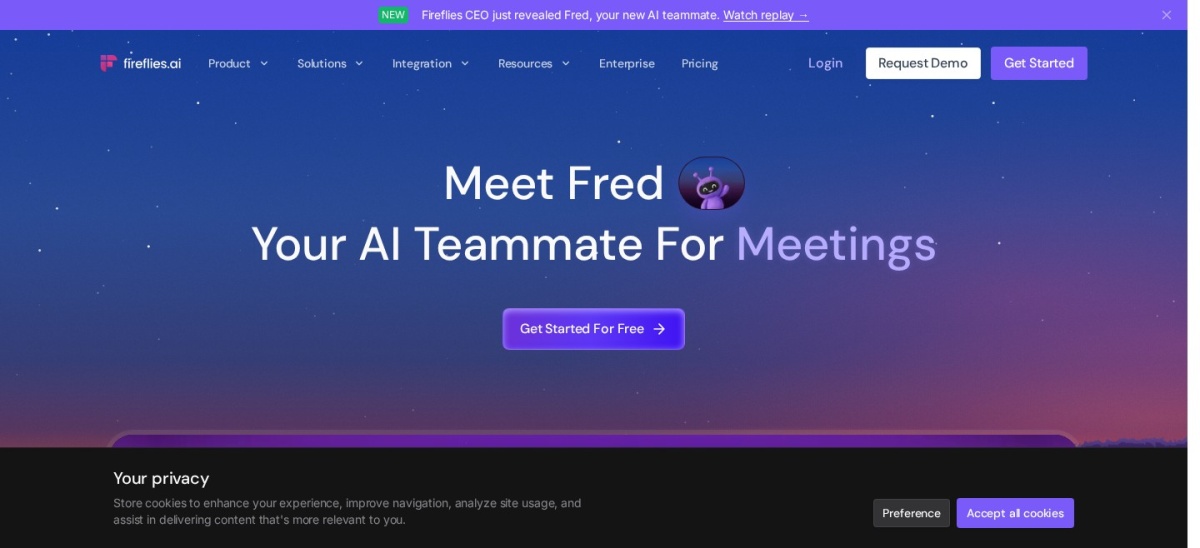
Fireflies.ai is an AI meeting assistant that records conversations, generates transcripts, summarizes decisions and identifies action items. Its free edition includes unlimited transcription and AI summaries with 400 minutes of team storage. Pro costs $10 per seat monthly billed annually and adds video recording, downloadable transcripts, AI Skills and 8,000 minutes of storage per seat.
The trade off is that advanced AI operations use dynamic credits, and Pro costs $18 per seat with monthly billing. Team conversation analytics require Business at $19 per seat monthly with annual billing. It suits sales, customer success and management teams that spend considerable time documenting meetings and preparing follow-ups.
What we like
Automatically transcribes and summarizes meetings
Free plan includes unlimited transcription
Pro supports video recordings and exports
AI Skills automate post-meeting activities
Integrates with meeting and business applications
Watch out for
Advanced AI operations may use paid credits
Free storage is limited
Conversation analytics require Business
Transcription accuracy depends on audio quality
Pro adds video recording, exports, AI Skills, personal assistance and expanded meeting storage.Visit fireflies.ai
06
Grammarly
4.7/5on G2 (14,155 reviews, checked Nov 2026)
Paid from$144/yr
Best for improving everyday business communication
Entry paid planPro
Annual price$144/member
Monthly alternative$30/member
AI writingRewrites and tone suggestions
grammarly.com
Grammarly homepage, captured Nov 2026.
Grammarly is an AI writing assistant that helps employees improve grammar, clarity, tone and consistency across business communication. Its free edition provides basic writing assistance, while Pro costs $144 per member annually and adds advanced rewriting, tone suggestions and additional team-oriented features. It works across supported browsers, email services and document editors.
The trade off is that monthly billing costs $30 per member, substantially more than the annual equivalent. Grammarly also focuses on communication rather than project management or business automation. It suits teams that produce frequent client emails, reports, proposals and other written materials requiring consistent quality.
What we like
Works across supported writing applications
Improves grammar, clarity and tone
Free edition available
Pro includes advanced sentence rewriting
Supports consistent business communication
Watch out for
Monthly billing costs more than annual billing
Overlaps with general AI writing assistants
Suggestions can alter intended meaning
Does not manage projects or business workflows
Pro adds advanced rewriting, tone guidance and expanded writing assistance.Visit grammarly.com
07
Canva
4.7/5on G2 (7,924 reviews, checked Nov 2026)
Paid from$18/mo
Best for AI-powered marketing and business visuals
Entry paid planPro, $18/month regular
Free templates1.6M+
Pro templates3.6M+
Premium AI allowance10x Canva Free
canva.com
Canva homepage, captured Nov 2026.
Canva is a visual communication platform for creating business presentations, marketing graphics, social media content and other designs with AI assistance. Its free edition includes more than 1.6 million templates and limited AI features. Pro costs $18 monthly at its regular rate and adds 3.6 million-plus templates, expanded AI tools, premium assets and 5 brand kits.
The trade off is that premium AI usage is allowance-based, and collaborative approval features require Business at $25 per person monthly. A temporary discount reduces the initial Pro price, but the regular rate remains $18. It suits marketing teams and professionals producing finished visuals without dedicated graphic design software.
What we like
Combines AI generation with design templates
Free edition includes substantial creative assets
Supports presentations and marketing graphics
Pro offers expanded premium AI usage
Brand kits help maintain visual consistency
Watch out for
AI usage is limited by subscription allowances
Team approvals require Business
Advanced design tasks may require specialist software
Premium content requires a paid subscription
Pro adds premium templates, expanded AI tools, brand kits and creative editing features.Visit canva.com
How to combine AI productivity tools across business workflows
For daily knowledge work, ChatGPT can help draft documents, analyze information and prepare research summaries. Grammarly can then improve language and consistency in customer-facing communication.
For project delivery, ClickUp provides tasks, schedules and team coordination, while Notion can store company documentation, meeting decisions and reusable knowledge. Teams may use either as their central workspace depending on requirements.
For meetings and follow-ups, Fireflies.ai captures conversations, generates summaries and identifies action items. Approved information can then move into project management or customer systems through supported integrations.
For process automation, Zapier connects applications and triggers repeatable actions. Canva supports the final presentation and visual production stage when business communication requires graphics or branded materials.
Avoid adopting every product at once. Start with the workflows generating the most repetitive work, establish reliable information sources and add automation after the underlying process is understood.
How to compare AI productivity software costs
Published entry prices are not equivalent to complete AI functionality. Notion Plus costs $10 per member monthly but includes only trial AI access, while Business costs $20 and provides ongoing Notion Agent capabilities.
ClickUp Core has a regular price of $12 per user monthly with annual billing, although its pricing page advertises a discounted rate. Advanced AI capabilities require higher licensing or additional usage allowances.
Subscription-based services include ChatGPT Plus at $20 monthly, Canva Pro at $18 monthly and Grammarly Pro at $144 annually. Fireflies.ai and Zapier offer lower annual-billing starting rates but introduce storage, credits or task-related limits.
Calculate total costs using actual employee counts, subscription periods and expected usage. Include AI credits, workflow overages, connected service charges and administrative requirements before comparing products.
How we chose
We researched established AI-enabled business productivity applications covering general assistance, project management, company knowledge, workflow automation, meetings, professional communication and visual creation. We prioritized maintained products with substantial independent review histories and identifiable business productivity use cases.
Official vendor pricing pages and G2 review listings were checked on 24 Nov 2026 using the 22 Nov 2026 editorial reference date. Published rates reflect regular prices rather than introductory discounts, with annual billing conditions clearly stated. We also distinguished entry-level subscriptions from higher editions required for ongoing advanced AI functionality.
We excluded products with insufficient public reviews, unclear subscription information or limited relevance to practical business work. We compared documented features, pricing structures, integrations and public user feedback rather than assuming AI automation guarantees productivity improvements. No vendor paid for a place, and we do not claim testing for this list.
How to choose AI tools for business productivity
Identify where employees spend the most time on repetitive work, then compare applications using these steps.
Identify your highest-impact productivity problems. Separate writing, research, project coordination, meeting documentation and data transfer. Select tools that directly address expensive or repetitive workflows instead of adopting AI features without a defined business purpose.
Check which AI features are included. Compare entry subscriptions with advanced editions, paying attention to trials, model limits, usage credits and automation allowances. Request clarification when the advertised subscription excludes the AI capabilities your team actually needs.
Evaluate integrations, permissions and controls. Confirm compatibility with current project management, communication and customer systems. Review data access, administrator permissions, retention policies and human approval requirements for automated actions.
Measure total cost and workflow improvement. Calculate subscriptions across the required users and expected usage volumes. Compare recurring costs with time saved, reduction in manual steps, output quality and the additional administration needed to maintain each application.
FAQ
What is the best AI tool for business productivity?
ChatGPT is our top overall choice because it supports writing, research, coding, file analysis and general problem-solving within one assistant. ClickUp is a better fit for managing structured projects and tasks, while Notion specializes in connected company knowledge and AI-assisted collaboration.
Which AI productivity tools are best for small businesses?
ChatGPT, ClickUp, Notion and Zapier provide useful starting points for small businesses. ChatGPT supports everyday knowledge work, ClickUp manages projects, Notion organizes information and Zapier automates application workflows. Each offers a free edition, allowing teams to evaluate functionality before purchasing subscriptions.
How much do AI business productivity tools cost?
Published entry rates include ClickUp Core at a regular $12 per user monthly with annual billing, Fireflies.ai Pro at $10 per seat monthly billed annually and ChatGPT Plus at $20 monthly. Advanced AI capabilities, team administration and usage-based services may increase the total cost.
Can AI automate repetitive business tasks?
Yes. Platforms such as Zapier can connect applications and trigger repeatable processes, while ClickUp supports project automation and Notion provides agent capabilities. Start with clearly defined workflows and require human approval for actions involving payments, customer commitments or sensitive information.
Which AI tool is best for project management?
ClickUp is particularly suitable for teams requiring task assignments, timelines, project dashboards and AI-assisted workflows. Notion is an alternative when documentation and project knowledge are central to the work. Compare their permissions, reporting and automation capabilities against your existing process.
What is the best AI tool for business meetings?
Fireflies.ai is a dedicated meeting assistant that records conversations, generates transcripts, summarizes discussions and identifies follow-up actions. Its free plan includes unlimited transcription with storage limits, while Pro expands recording and automation capabilities. Participants should be informed about recording and applicable privacy requirements.
Can AI improve employee productivity?
AI can reduce time spent drafting documents, summarizing meetings, organizing information and transferring data between systems. Actual results depend on task selection, implementation quality and human review. Businesses should measure completed work, accuracy and time saved instead of relying solely on vendor productivity claims.
Are free AI productivity tools suitable for businesses?
Free editions can support evaluation and lighter workloads, but they often restrict storage, AI access, task volumes or administrative controls. Before relying on them for regular business operations, review data handling, continuity requirements, access permissions and whether the available features meet team needs.
How can businesses protect confidential data when using AI?
Use approved accounts and review each provider's privacy, retention and data-processing terms. Limit access to sensitive information, configure permissions and avoid connecting unnecessary applications. Automated workflows should include monitoring and human approval where mistakes could affect customers, employees or financial records.