Canva is the best of these Adobe alternatives for most people: it covers design, photo and video from a free plan, with Pro at $120 a year, and it is rated 4.7 out of 5 on G2 from 7,659 reviews. Pick Figma for interface design and Affinity for pro photo and vector work with no subscription.
How we make this list: we compare pricing pages, product documentation and public user reviews, then re-check every price before each update. No product paid for a place. Disclosure.
Canva is the only pick that covers social graphics, photo editing, video and documents in one free plan, with Pro at $120 a year.
Figma is the UI design standard at $16 an editor a month on annual billing, rated 4.7/5 on G2 from 1,593 reviews.
Affinity is now free for individuals and replaces Photoshop, Illustrator and InDesign-style layout in one app.
DaVinci Resolve Studio costs $295 once, and its free version is the strongest free video editor here.
Paid plans run from $63 once for Clip Studio Paint PRO to $269 a year for CorelDRAW, and three tools are completely free.
How do you pick the right Adobe alternatives?
No single tool replaces all of Adobe Creative Cloud. Photoshop, Illustrator, InDesign, Premiere Pro and Acrobat do different jobs, so the right swap depends on which Adobe app you actually open every day.
Start from the work, not the brand. A social media manager needs templates and quick video, a print designer needs vector precision, and a video editor needs colour tools and a timeline that holds up on long projects.
Free tools cover more than most buyers expect. Affinity is now free for individuals, GIMP and Inkscape cost nothing at all, and DaVinci Resolve edits 4K video free, so a subscription is only worth it when the paid features save real hours each week. Our guide on adding a logo in WordPress shows how far a free vector file goes once it leaves the editor.
Watch the pricing model as much as the price. One-time licences such as DaVinci Resolve Studio at $295 and Clip Studio Paint PRO at $63 stop charging after the first payment, while Canva, Figma, Sketch and CorelDRAW bill every year.
Canva is an online design platform that covers social graphics, presentations, photo editing, video and documents in one place. The free plan includes templates, stock photos and basic editing tools, and Pro costs $120 a year with a Brand Kit, 1 TB of storage, a background remover and premium assets. It is rated 4.7 out of 5 on G2 from 7,659 reviews.
The trade off is depth. Canva cannot match Photoshop for detailed retouching or Illustrator for precise vector work, and the best templates and assets sit behind Pro. It suits marketers, small teams and anyone who needs finished graphics fast without learning a pro editor.
What we like
Free plan covers most everyday design jobs
Templates, stock photos and video in one place
Pro at $120 a year is the cheapest full-suite subscription here
Easy to learn, with no install needed
Watch out for
Weak for detailed photo retouching and print work
Best assets and Brand Kit need Pro
Per-person pricing adds up for larger teams
Pro adds the Brand Kit, 1 TB storage and premium assetsVisit canva.com
02
Figma
4.7/5on G2 (1,593 reviews, checked Nov 2026)
Paid from$192/yr
Best for UI and product design
Free planStarter, 3 design files
Pro price$16/editor/mo, billed yearly
Monthly billing$20/editor/mo
PlatformsBrowser, Windows, Mac
figma.com
Figma homepage, captured Nov 2026.
Figma is a browser-based design tool where teams build interfaces, prototypes and design systems in the same file. The free Starter plan covers 3 design files, and Professional costs $16 an editor a month on annual billing, adding unlimited files, shared libraries and Dev Mode handoff. It is rated 4.7 out of 5 on G2 from 1,593 reviews.
The trade off is price at scale. Every editor needs a paid seat, so a five-person team pays $960 a year on annual billing, and the Organisation plan starts at $55 a seat a month. It suits product teams that design together and hand files to developers every day.
What we like
Real-time collaboration in the browser
Components and variables keep design systems consistent
Dev Mode gives developers inspectable specs
Large plugin and template community
Watch out for
Per-editor pricing grows fast with team size
Needs an internet connection for live collaboration
No real photo editing or print layout tools
Professional adds unlimited files and shared librariesVisit figma.com
03
Affinity
4.5/5on G2 (452 reviews, checked Nov 2026)
PriceFree
Best free pro photo and vector suite
PriceFree for individuals
Apps in onePhoto, vector, page layout
Rating sourceG2, Affinity Designer profile
PlatformsWindows, Mac, iPad
affinity.serif.com
Affinity homepage, captured Nov 2026.
Affinity is a single app from Canva that combines photo editing, vector design and page layout, the three jobs Photoshop, Illustrator and InDesign cover between them. It is free for individuals, with no subscription and no paid tier for personal use, and it is rated 4.5 out of 5 on G2 from 452 reviews.
The trade off is the young ecosystem. Affinity has fewer plugins, templates and tutorials than Adobe, and teams that share files with Adobe users must export rather than work in native formats. It suits designers who want pro tools without a monthly bill.
DaVinci Resolve is a professional video editor from Blackmagic Design that combines editing, colour grading, visual effects and audio in one download. The free version exports 4K with no watermark, and Studio costs $295 once, adding AI tools, noise reduction and resolutions beyond 4K. It is rated 4.7 out of 5 on G2 from 221 reviews.
The trade off is the learning curve. The interface packs in pro tools that take time to learn, and the free version leaves out some AI features and higher-end effects. It suits creators and small studios that want film-grade colour and editing without a subscription.
CorelDRAW is a vector illustration and page layout suite with photo editing built in through PHOTO-PAINT. The annual plan costs $269 a year, with a one-time licence at $549, and a 15-day trial lets you try it first. It is rated 4.3 out of 5 on G2 from 556 reviews.
The trade off is price and platform. At $269 a year it is the most expensive subscription in this list, and the Mac version trails the Windows version on some features. It suits print shops, sign makers and illustrators who need precise vector and layout tools.
Sketch is a native Mac app for interface design and prototyping, with a web app for sharing files and collecting comments. Standard costs $12 an editor a month billed yearly and includes real-time collaboration, unlimited documents and free developer handoff. It is rated 4.4 out of 5 on G2 from 1,300 reviews.
The trade off is the Mac requirement. There is no Windows or Linux app, and there is no free plan beyond the 30-day trial, though a one-time Mac-only licence costs $120. It suits Mac-based designers who want fast offline editing and reusable components.
What we like
Fast native Mac app with offline editing
Reusable components and shared libraries
One-time $120 Mac licence available
Free developer handoff on paid plans
Watch out for
Mac only, no Windows or Linux app
No free plan beyond the 30-day trial
Smaller community than Figma
Standard adds real-time collaboration and 50 GB storageVisit sketch.com
07
Clip Studio Paint
4.4/5on G2 (55 reviews, checked Nov 2026)
Starts at$63/yr
Best for comics and illustration
PRO licence$63 one-time
EX licence$277 one-time
Monthly plansFrom $0.99/mo on phones
PlatformsWindows, Mac, iPad, Android
clipstudio.net
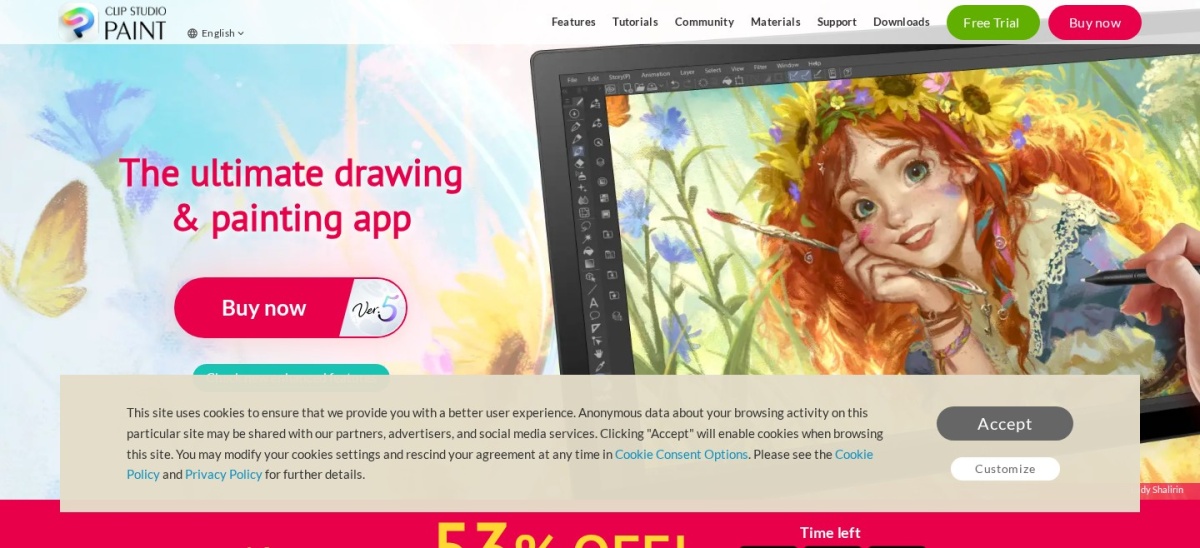
Clip Studio Paint homepage, captured Nov 2026.
Clip Studio Paint is a drawing and painting app built for comics, manga and illustration, with panel frames, speech balloons, screen tones and poseable 3D models. PRO costs $63 as a one-time licence for Windows and Mac, and monthly plans start at $0.99 on phones. It is rated 4.4 out of 5 on G2 from 55 reviews.
The trade off is focus. Clip Studio Paint is a drawing tool first, so it has no page layout, photo retouching or interface design features, and full-length animation needs the $277 EX licence. It suits illustrators and comic artists who draw every day.
GIMP is a free, open-source image editor for detailed photo manipulation and graphic design. Version 3.2.8 includes layers, masks, selections, colour adjustments, filters and support for extensions, with no subscription and no paid tier. It is rated 4.3 out of 5 on G2 from 1,484 reviews.
The trade off is polish. GIMP takes longer to learn than Canva or Affinity, and it has no built-in cloud storage, stock library or AI tools. It suits anyone who needs serious photo editing for free and is willing to learn the interface.
Inkscape is a free, open-source vector graphics editor for logos, icons, illustrations and diagrams. It works in native SVG files, so artwork scales cleanly from a favicon to a billboard, and version 1.4.4 is actively maintained. It is rated 4.4 out of 5 on G2 from 417 reviews.
The trade off is speed and polish. Inkscape runs slower than Affinity or CorelDRAW on complex files, and it has no CMYK workflow for print shops. It suits illustrators and logo designers who want a free vector tool with real SVG fidelity.
Match the pick to the Adobe app you use most. Photoshop users should start with Affinity or GIMP, Illustrator users with Affinity, Inkscape or CorelDRAW, and Premiere Pro users with DaVinci Resolve.
Figma replaces Adobe XD for interface design, and it does the job better than XD did, with live collaboration and developer handoff in the same file.
Canva replaces Adobe Express and much of InDesign for everyday marketing work, but it is not a print layout tool, so keep Affinity or CorelDRAW for books and packaging.
Nobody here replaces Acrobat for heavy PDF work. If forms, signatures and preflight checks are your daily work, keep a dedicated PDF tool beside your design pick.
How we chose
We started from the tools most often named as Adobe replacements in G2 reviews and design roundups, then kept nine that cover photo editing, vector design, UI design, illustration and video, each with a public rating.
Prices come from each vendor's pricing page, checked on 29 November 2026. Ratings and review counts come from G2 on the same day. Where a vendor shows a sale, the list shows the regular price: CorelDRAW at $269 a year and Clip Studio Paint PRO at $63.
We left out tools with no public rating and tools that only cover one small job. No vendor paid for a place, and we do not claim to have used these tools ourselves.
How to choose your Adobe alternative
Start with the Adobe app you open most, then match the replacement to that job before you compare prices.
Name the Adobe app you are replacing. Photoshop, Illustrator, InDesign, Premiere Pro and Acrobat need different tools, so a list that covers everything helps nobody.
Try the free option first. Affinity, GIMP, Inkscape and DaVinci Resolve cost nothing to start, and Canva and Figma have free plans, so test with a real project before paying.
Check the file formats you must keep. If clients send .ai or .psd files, confirm your pick opens and exports them cleanly before you cancel a subscription.
Compare the second-year cost, not the first. One-time licences such as DaVinci Resolve Studio at $295 stop charging, while subscriptions bill every year, so add up two years before you decide.
FAQ
What are the best Adobe alternatives in 2026?
Canva is the best all-round Adobe alternative for most people, with a free plan and Pro at $120 a year. Figma leads for interface design, Affinity is the best free pro suite for photo and vector work, and DaVinci Resolve is the best free video editor.
Is there a completely free alternative to Adobe Creative Cloud?
Yes. Affinity is now free for individuals and covers photo editing, vector design and page layout, while GIMP handles photo work and Inkscape handles vector work, both free and open source. DaVinci Resolve edits video free as well.
How much do Adobe alternatives cost?
Three tools in this list are free: Affinity, GIMP and Inkscape. Paid plans run from $63 once for Clip Studio Paint PRO to $269 a year for CorelDRAW, with Canva Pro at $120 a year and Figma at $192 a year per editor.
What is the best Adobe alternative for beginners?
Canva is the easiest starting point, with templates and a free plan that needs no training. Beginners who want pro tools should try Affinity next, since it is free and its photo, vector and layout tools grow with your skills.
Canva vs Affinity: which is the better Adobe alternative?
Canva wins for speed and templates: it produces finished social graphics and presentations in minutes. Affinity wins for pro work: it offers deeper photo retouching, precise vector tools and page layout, all free for individuals.
What is the best free alternative to Premiere Pro?
DaVinci Resolve is the best free Premiere Pro alternative. Its free version edits 4K video with no watermark and includes pro colour grading, Fusion effects and Fairlight audio. Studio costs $295 once if you need the AI tools.
What is the best alternative to Illustrator for vector design?
Affinity is the best Illustrator alternative for most designers: it is free, fast and handles vector illustration, photo editing and layout in one app. Inkscape is the best free option, and CorelDRAW suits print shops at $269 a year.
SaaS SEO and WordPress specialist with about 8 years of experience. Rakib compares WordPress plugins, themes, hosting and software using public pricing, documentation and user reviews. See how we rank.