Explainers · Explainer
What Is WordPress Bedrock? The Composer-Based WordPress Boilerplate
Short answer
Bedrock is an open source WordPress boilerplate from Roots that manages WordPress core, plugins and themes as Composer dependencies, stores configuration in environment files, and uses a cleaner folder structure with a separate web root. It suits developers who want version-controlled, repeatable WordPress projects rather than installing and updating everything through the dashboard.
Key takeaways
- Bedrock is a WordPress project structure from the Roots team, installed with Composer.
- WordPress core, plugins and themes become dependencies listed in composer.json.
- Configuration lives in .env files and per-environment config files, not in wp-config.php.
- The web root is a separate web folder, and wp-content is renamed to app.
- It suits developers and teams using Git and deployment pipelines, not dashboard-only users.
What problem does Bedrock solve?
Bedrock solves the messiness of managing WordPress projects by hand, giving developers a consistent structure, dependency management with Composer and environment-based configuration that works well with Git.
In a standard install, WordPress core, plugins and themes are updated from the dashboard and live together in one folder. That makes it hard to track exactly which versions a project uses or to rebuild the same site on another server.
The official Bedrock page on roots.io describes it as a WordPress boilerplate with Composer, easier configuration and an improved folder structure.
Bedrock is maintained by Roots, an independent open source organisation that also makes other WordPress developer tools and has supported the WordPress developer community for many years.
How does Bedrock use Composer?
Bedrock lists WordPress core, plugins and themes in a composer.json file, so running composer install downloads the exact versions the project needs, and composer update changes them in a controlled way.
Composer is the standard dependency manager for PHP. Bedrock brings that standard approach to WordPress.
Plugins and themes from the WordPress directory are installed from a Composer repository that mirrors them, while premium plugins can be added through private repositories or other methods.
Our guide on using Composer with WordPress explains the basics of Composer in a WordPress context.
What does the Bedrock folder structure look like?
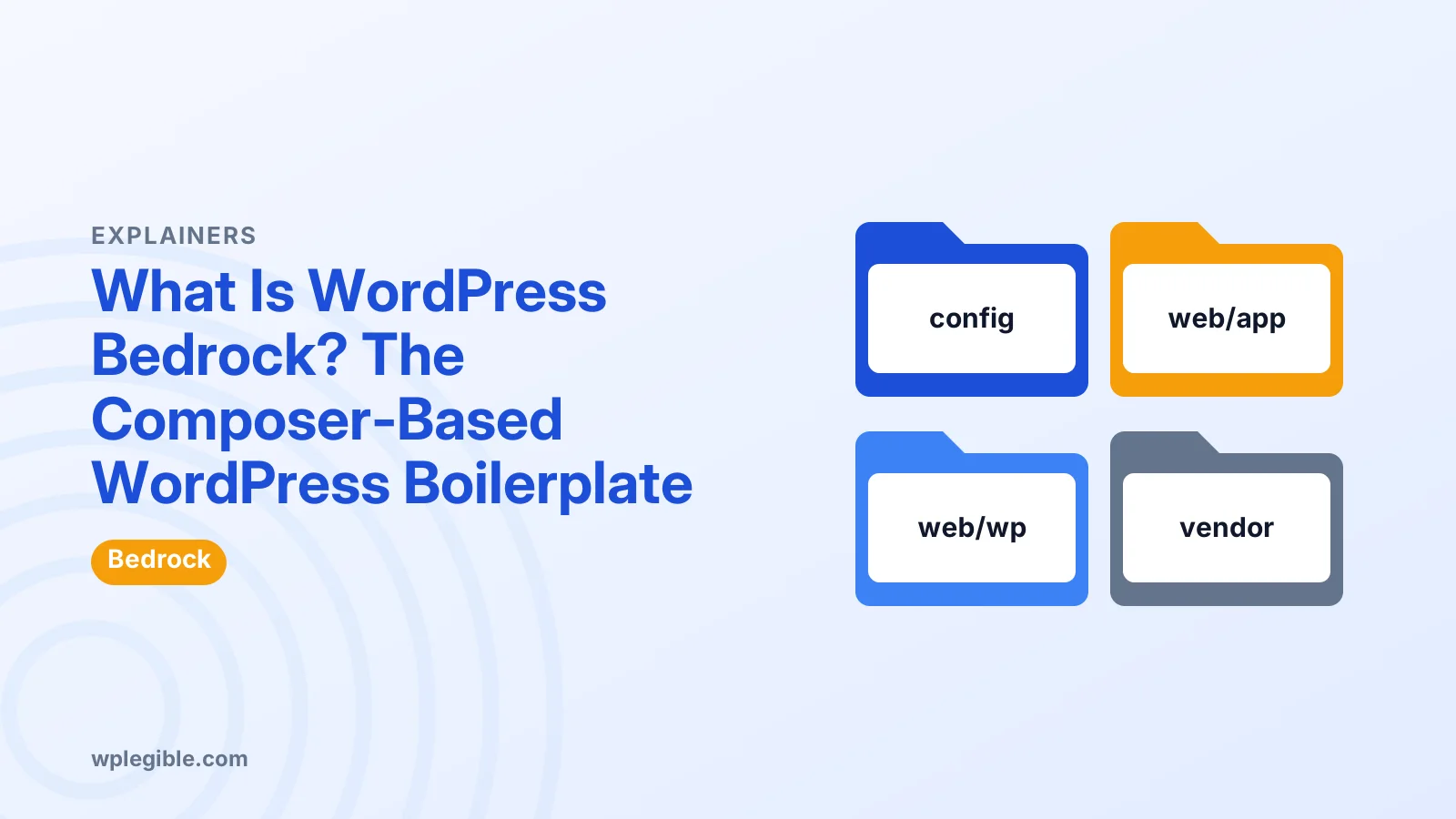
Bedrock keeps configuration and dependencies outside the public web folder, places WordPress core in its own subfolder, and renames wp-content to app inside a web folder that the server uses as its document root.
The main parts are a config folder for settings, a web folder that the server points to, web/wp for WordPress core, and web/app for themes, plugins, mu-plugins and uploads.
Keeping configuration files and the vendor folder outside the web root means they cannot be loaded directly from a browser, which is a security improvement.
The Bedrock documentation on its folder structure shows the full layout.
How is configuration handled?
Bedrock reads settings such as the database name, user, password and site URLs from a .env file, and uses separate configuration files for development, staging and production environments.
This follows ideas from the Twelve-Factor App methodology, which recommends keeping configuration in the environment rather than in code.
The .env file is not committed to Git, so passwords and keys stay out of the repository. Each server has its own .env with the right values.
Environment files let you, for example, show debugging on development and turn it off on production automatically.
What else does Bedrock include?
Bedrock adds an autoloader that lets normal plugins run as must-use plugins, disallows indexing on non-production environments by default, and includes a test setup for project code.
The must-use autoloader is handy for plugins that should always be active and should not be switched off from the dashboard.
Blocking search engines on staging prevents duplicate copies of your site from appearing in search results by accident.
The Bedrock GitHub repository lists the current features and requirements.
How do you install Bedrock?
Run composer create-project roots/bedrock in a new folder, copy the example .env file and fill in your database details and URLs, then point your web server's document root to the project's web folder.
Bedrock needs a current PHP version and Composer installed on your computer or server. Check the requirements in its documentation before starting.
After installation, open the site in a browser and run the normal WordPress setup. From then on, add plugins and themes with Composer rather than the dashboard.
Local development tools can run Bedrock sites too. Our guide on setting up a local WordPress development environment covers common options.
How do you add plugins and themes?
Add them with composer require followed by the package name, commit the updated composer.json and composer.lock files, and run composer install on each server to deploy the same versions.
The composer.lock file records exact versions. Committing it means every environment installs identical code.
Custom themes and plugins you build for the project usually live directly in the repository under web/app.
Updates follow the same pattern. Update the version, test locally, commit and deploy.
What are the drawbacks of Bedrock?
Bedrock adds a learning curve, needs command-line access and Composer on the server or in a build step, and can confuse clients or hosts that expect a standard WordPress layout.
Some managed hosts and one-click tools assume wp-content is in the usual place. Bedrock works on many hosts, but check compatibility before committing.
Updating plugins from the dashboard is usually disabled or discouraged, which suits developers but can frustrate site owners who expect to click Update.
Premium plugins without Composer support need extra setup, such as private repositories or committing them directly.
Who should use Bedrock?
Bedrock suits developers, agencies and teams who manage several WordPress projects, use Git and deployment pipelines, and want reproducible builds and cleaner security boundaries.
For a single small site managed through the dashboard, standard WordPress is usually simpler and perfectly adequate.
Agencies benefit most, because the same structure across every project makes onboarding, updates and deployments predictable.
A new developer joining the team can clone any project, run one command and have the same versions of WordPress, plugins and themes as everyone else. That removes a whole class of works-on-my-machine problems and makes code review far easier.
How does Bedrock relate to WordPress core?
Bedrock does not change how WordPress works; it changes how the project is organised and installed, so themes and plugins behave as they would on any WordPress site.
WordPress core is installed as a dependency, but it is the same software. Our explainer on what WordPress core is covers what core includes.
Because Bedrock uses standard WordPress features, you can move a site back to a conventional structure later if needed, though it takes some work.
How do you deploy a Bedrock site?
Deploy by pushing the repository to the server or a build system, running composer install with production settings, setting the .env values for that environment and pointing the web root to the web folder.
Many teams automate this with continuous deployment tools, so every merge to the main branch updates the staging or production site.
Uploads are not part of the repository, because they change constantly and can be very large. Store them on the server, sync them separately or use cloud storage, and include them in backups.
Frequently asked questions
Who makes Bedrock?
Bedrock is made by Roots, an independent open source organisation that builds WordPress developer tools. It is free to use and published on GitHub.
Is Bedrock a theme or plugin?
Neither. Bedrock is a project boilerplate that changes how a WordPress site is structured and installed. You still use normal themes and plugins inside it.
Do I need Composer to use Bedrock?
Yes. Bedrock manages WordPress core, plugins and themes with Composer, so you need Composer on your computer or as part of your deployment process.
Can I update plugins from the dashboard with Bedrock?
It is usually discouraged or disabled. Plugins are updated with Composer, tested, committed to Git and then deployed, so every environment stays in sync.
Is Bedrock good for beginners?
Usually not. Bedrock suits developers comfortable with the command line, Git and Composer. Beginners are better served by a standard WordPress install.
Sources
- Bedrock Roots
- roots/bedrock GitHub
- Composer getcomposer.org
- III. Config The Twelve-Factor App
Is your product missing, or something out of date?
Tell us what to add or correct. We read every note and reply when we need a source. A message does not buy a ranking.
Thanks — we review requests within 3 business days.
Related guides
About the editors
Researched from the primary sources listed above and checked against our editorial rules before publishing.