Buffer is the best of the Repurpose io alternatives for creators who want cheap cross-posting, with a free plan for 3 channels and paid plans from 5 dollars a channel a month. Publer suits tighter budgets at 4 dollars a month, while Descript is the pick when clips and editing matter more than scheduling.
How we make this list: we compare pricing pages, product documentation and public user reviews, then re-check every price before each update. No product paid for a place. Disclosure.
Buffer is the cheapest direct replacement for Repurpose.io cross-posting, with a free plan for 3 channels and Essentials at $5 per channel a month.
Publer undercuts Buffer for a single account at $4 a month billed yearly, and its free plan covers 3 accounts with 10 scheduled posts each.
Metricool is the only pick here that pairs scheduling with cross-channel analytics and competitor tracking, from $20 a month for 5 brands.
Descript, Opus Clip and Lumen5 create the clips and videos first, while the schedulers only distribute what already exists.
Repurpose.io itself costs $35 a month for Starter, so every tool here starts cheaper on its entry plan.
How do you choose the best Repurpose io alternatives?
Repurpose.io does one narrow job: it watches one platform and republishes your finished videos to the others automatically. Most alternatives split that job in two, so start by naming which half you need.
If the bottleneck is distribution, pick a scheduler. Buffer, Publer and Metricool all let you upload once and post to several channels, and all three have a free plan to try first.
If the bottleneck is making the clips, pick a creator tool. Descript edits by transcript, Opus Clip cuts vertical clips with a virality score, and Lumen5 turns articles into video.
Price is charged in different units, so compare like with like. Buffer and Publer charge per channel or account, Metricool charges per brand, and the clip tools charge per month with credit limits.
Buffer is the simplest scheduler on this list, and the closest like-for-like swap for Repurpose.io cross-posting. The free plan covers 3 channels with 10 scheduled posts per channel, and Essentials costs $5 per channel a month billed yearly, with unlimited scheduled posts, an AI assistant and advanced analytics.
The trade off is that Buffer only schedules what you upload, so it never republishes a TikTok to Reels on its own the way Repurpose.io does. You also pay per channel, so ten channels cost $50 a month billed yearly. It suits solo creators with a handful of channels who want the smallest bill.
What we like
Cheapest per-channel scheduler here
Free plan covers 3 channels
Unlimited scheduled posts on paid plans
Clean interface with an AI assistant
Watch out for
No automatic cross-posting workflows
Per-channel billing adds up fast
Only 1 user on Essentials
Team adds unlimited users at $10 per channel a monthVisit buffer.com
02
Publer
4.7/5on G2 (543 reviews, checked Nov 2026)
Paid from$4/mo
Best for the lowest single-account price
Free plan3 accounts, 10 posts each
Entry planProfessional, per account
Scheduled postsUnlimited on paid plans
G2 rating4.7/5, 543 reviews
publer.com
Publer homepage, captured Nov 2026.
Publer is a scheduler built around bulk posting and recycling, with the highest G2 rating in this list at 4.7 out of 5 from 543 reviews. The free plan covers 3 social accounts with 10 scheduled posts each, and Professional costs $4 a month billed yearly for one account, with unlimited scheduling, workspaces and RSS automations.
The trade off is that the free plan cannot connect X, and extra accounts add $4 a month each on Professional, so the bill grows with every profile. The 7-day trial is also short. It suits creators who batch a month of posts at once and repost evergreen content.
What we like
Highest G2 rating in this list
Lowest paid entry at $4 a month
Bulk scheduling and post recycling
Unlimited workspaces on paid plans
Watch out for
Free plan cannot connect X
Per-account billing grows with profiles
Only a 7-day trial on Professional
Business adds analytics and API access at $8 a monthVisit publer.com
03
Metricool
4.4/5on G2 (102 reviews, checked Nov 2026)
Paid from$20/mo
Best for scheduling plus analytics
Free plan1 brand, 20 posts a month
Entry planStarter, up to 5 brands
AnalyticsUnlimited history on paid plans
G2 rating4.4/5, 102 reviews
metricool.com
Metricool homepage, captured Nov 2026.
Metricool is the only tool here that pairs scheduling with cross-channel analytics, competitor tracking and ad reporting in one dashboard. The free plan covers 1 brand with 20 posts a month, and Starter costs $20 a month billed yearly for up to 5 brands, with unlimited publishing, 100 competitor profiles and unlimited analytics history.
The trade off is that Starter is a single-operator plan with no team members, and the free plan cannot connect LinkedIn or X. Prices also exclude VAT, which is added at checkout. It suits freelancers and small agencies managing several brands who want to see which platform earns the views.
Descript is an editor that lets you cut video by editing its transcript, which makes turning a long recording into short clips far faster than a timeline editor. The free plan includes 60 minutes a month with a watermark, and Hobbyist costs $16 a month billed yearly per person, with filler-word removal, auto-captions and AI clip suggestions.
The trade off is that Descript is not a scheduler, so clips still need Buffer or Publer to reach every platform. The free plan is also watermarked and capped at an hour a month. It suits creators whose bottleneck is cutting clips, not posting them.
What we like
Fastest way to cut clips from long video
Auto-captions and filler-word removal
Free plan to try the editor
Strong G2 rating from 928 reviews
Watch out for
No scheduling or auto-posting
Free plan is watermarked
Priced per person, not per team
Creator adds 4K export and more AI features at $24 a monthVisit descript.com
05
Opus Clip
4.6/5on G2 (124 reviews, checked Nov 2026)
Paid from$15/mo
Best for AI-picked viral clips
Free planOne clip a day, watermarked
Entry planStarter, monthly only
Credits150 a month on Starter
G2 rating4.6/5, 124 reviews
opus.pro
Opus Clip homepage, captured Nov 2026.
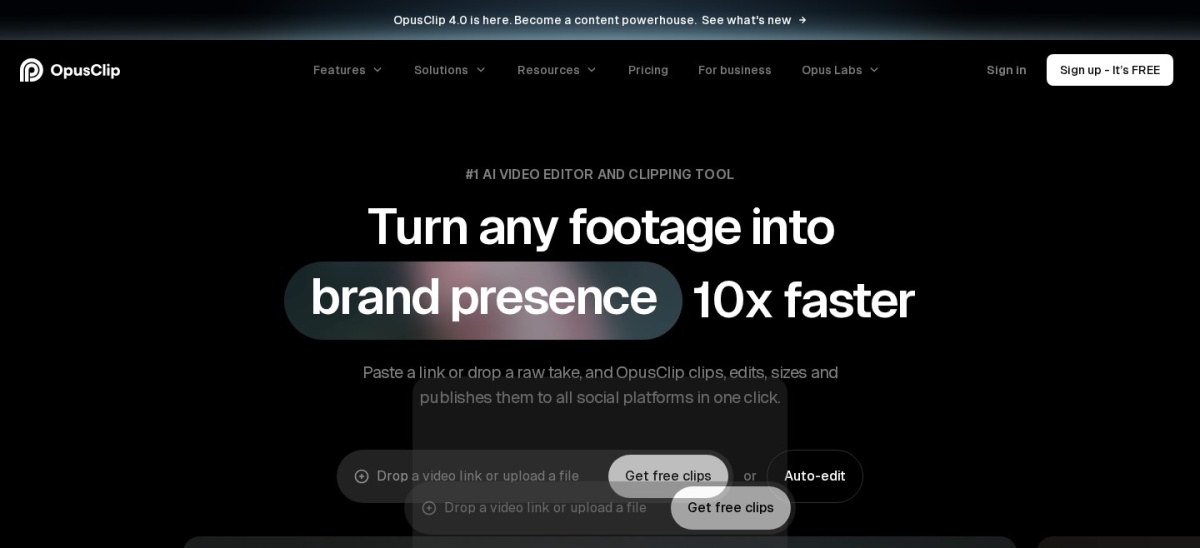
Opus Clip is built for one job: turning a long video into short vertical clips for TikTok, Reels and Shorts, with animated captions, auto-reframing and a virality score on each clip. The free plan makes one clip a day, and Starter costs $15 a month with 150 credits, where one credit covers one minute of uploaded video.
The trade off is that Starter is monthly billing only, so there is no annual discount on the entry plan, and free exports expire after 3 days. Clip picks can also miss the moment, so you still review each one. It suits podcasters and interview shows with a back catalog to mine.
What we like
Virality scores rank every clip
Animated captions in 20+ languages
Free plan with one clip a day
Auto-reframing for vertical video
Watch out for
Starter has no annual discount
Free exports expire after 3 days
Clip picks sometimes miss the mark
Pro adds more credits at $29 a month, or $14.50 billed yearlyVisit opus.pro
06
Riverside
4.8/5on G2 (1,754 reviews, checked Nov 2026)
Starts at$24/mo
Best all-in-one for podcasters
Free planNo
Entry planPro, 1 studio
RecordingLocal 4K video, separate tracks
G2 rating4.8/5, 1,754 reviews
riverside.fm
Riverside homepage, captured Nov 2026.
Riverside is a remote recording studio that records each guest locally in up to 4K video with uncompressed audio, then adds Magic Clips, show notes, hosting and multistreaming in the same subscription. Pro costs $24 a month billed yearly and includes 1 studio, 400 AI credits and separate track downloads.
The trade off is price and scope: it is the most expensive tool here, and there is no permanent free plan, so you pay before you record. It also does far more than repurposing, which is overkill if you only need distribution. It suits podcasters who want recording, clips and hosting on one bill.
StreamYard is a browser live studio where guests join from a link with no downloads, and the show streams to YouTube, Facebook and LinkedIn at once. The free plan includes live streaming with a StreamYard logo, and Essential costs $14.99 a month billed yearly, with multistreaming, overlays and recording included.
The trade off is that recording is secondary: 4K local tracks need the Advanced tier, and the free plan carries branding. It also records rather than republishes, so finished videos still need a scheduler to reach every platform. It suits live-first shows and interview formats.
Restream is a multistreaming tool that sends one live broadcast to several platforms at once, with cross-platform chat, cloud recordings and video transcription in 39 languages. The free plan streams to 2 channels, and Standard costs $16 a month billed yearly, with 3 simultaneous channels, 1080p video and 30 days of recording storage.
The trade off is that recordings are stored for only 15 days on the free plan and 30 days on Standard, and advanced features need higher tiers. G2 also rates it from only 85 reviews, a smaller base than the schedulers here. It suits creators who stream live first and clip later.
Lumen5 is the only tool here that works in the opposite direction: paste a blog post or script and it builds a storyboard of stock scenes with text and voiceover. The free plan makes 5 videos a month up to 2 minutes long at 720p with a Lumen5 outro, and Basic costs $19 a month billed yearly.
The trade off is resolution: Basic exports at 720p and saves 1080p for Starter at $59 a month billed yearly. It also makes new videos rather than distributing old ones, so it pairs with a scheduler instead of replacing one. It suits teams with a written archive to turn into video.
What we like
Turns written content into video
Free plan with 5 videos a month
Stock library built in
Good for LinkedIn and employer branding
Watch out for
Basic exports at 720p only
1080p needs the $59 Starter plan
Does not distribute finished videos
Starter adds 1080p export at $59 a month billed yearlyVisit lumen5.com
Should you keep Repurpose.io instead?
Repurpose.io still wins on one thing: it watches a source account and republishes automatically, with no upload step at all. Starter costs $35 a month, or $349 a year, with 5,000 published videos a month.
Keep it if your workflow is already hands-off and you post the same video to TikTok, Reels and Shorts every day. The alternatives here ask you to upload or schedule each piece yourself.
Switch if you want cheaper distribution, analytics or clip creation. Buffer and Publer both start under $5 a month, Metricool adds reporting, and Descript or Opus Clip make the clips Repurpose.io never could.
How we chose
We started from every tool that creators name as a Repurpose.io replacement, then kept those with a verifiable G2 rating and a current pricing page, which left 9 tools spanning schedulers, clip makers and live studios.
Prices come from each vendor's pricing page, checked on 29 November 2026, with regular prices shown and annual billing used for the yearly figure. Ratings and review counts come from G2 on the same day.
We left out tools with no verifiable rating on G2, Capterra or Trustpilot, including Castmagic, whose G2 listing could not be verified. No vendor paid for a place, and we do not claim hands-on testing for this list.
How to choose a Repurpose.io alternative
Match the tool to the job that is actually slow for you, then check the billing unit before you commit.
Name the bottleneck first. If posting takes the time, buy a scheduler. If cutting clips takes the time, buy a clip maker. Buying the wrong half changes nothing.
Check the billing unit. Buffer charges per channel, Publer per account and Metricool per brand. Count your channels, accounts or brands first, then compare totals.
Try the free plan with real content. Post one video through the free plan and watch where it lands. Free tiers here range from 3 channels to 5 videos a month, so the limits show fast.
Add a clip maker only if you need one. Descript or Opus Clip earn their keep when long recordings sit unused. If your videos are already short, a scheduler alone is enough.
FAQ
What is the best Repurpose io alternative in 2026?
Buffer is the best Repurpose io alternative for most creators. Its free plan covers 3 channels, Essentials costs $5 per channel a month billed yearly, and it is the cheapest direct replacement for cross-posting finished videos to several platforms.
What is the cheapest Repurpose.io alternative?
Publer is the cheapest paid option here at $4 a month billed yearly for one social account, undercutting Buffer Essentials at $5 per channel a month. Buffer and Publer both have free plans, so the cheapest route of all is to start free and pay only when you outgrow the limits.
Does any Repurpose.io alternative republish automatically?
No tool here republishes automatically the way Repurpose.io does. Buffer, Publer and Metricool schedule posts you upload, while Descript and Opus Clip create clips you then post. Repurpose.io itself is the only hands-off option, at $35 a month for Starter.
Which Repurpose.io alternative is best for podcasters?
Riverside is the best pick for podcasters because it records, clips, hosts and streams in one subscription, with a 4.8 out of 5 G2 rating from 1,754 reviews. Descript is the cheaper editing-first option at $16 a month, and Castmagic-style show notes are not covered by any tool here.
Is there a free Repurpose.io alternative?
Yes. Buffer, Publer, Metricool, Descript, Opus Clip, StreamYard, Restream and Lumen5 all have free plans, ranging from 3 channels to 5 videos a month. Riverside is the only tool in this list with no permanent free plan, so start with one of the free options.
Buffer or Publer: which should I pick?
Pick Buffer if you want the simplest scheduler with the cleanest interface and a free plan for 3 channels. Pick Publer if you batch posts and recycle evergreen content, since it has the higher G2 rating at 4.7 out of 5 and the lower entry price at $4 a month.
SaaS SEO and WordPress specialist with about 8 years of experience. Rakib compares WordPress plugins, themes, hosting and software using public pricing, documentation and user reviews. See how we rank.