monday.com is the best Microsoft Project alternative for most teams, rated 4.7 out of 5 on G2 from 17,975 reviews, with boards, timelines and Gantt views from $9 a seat a month. Smartsheet is the closest match for spreadsheet-style planning, and Zoho Projects is the cheapest paid plan at $4 a user a month.
How we make this list: we compare pricing pages, product documentation and public user reviews, then re-check every price before each update. No product paid for a place. Disclosure.
monday.com leads at 4.7/5 on G2 from 17,975 reviews, but Gantt views need Standard at $12 a seat a month, not the $9 Basic plan.
Smartsheet is the closest to Microsoft Project's grid-and-Gantt style at $9 a user a month, and the only tool here with no free plan.
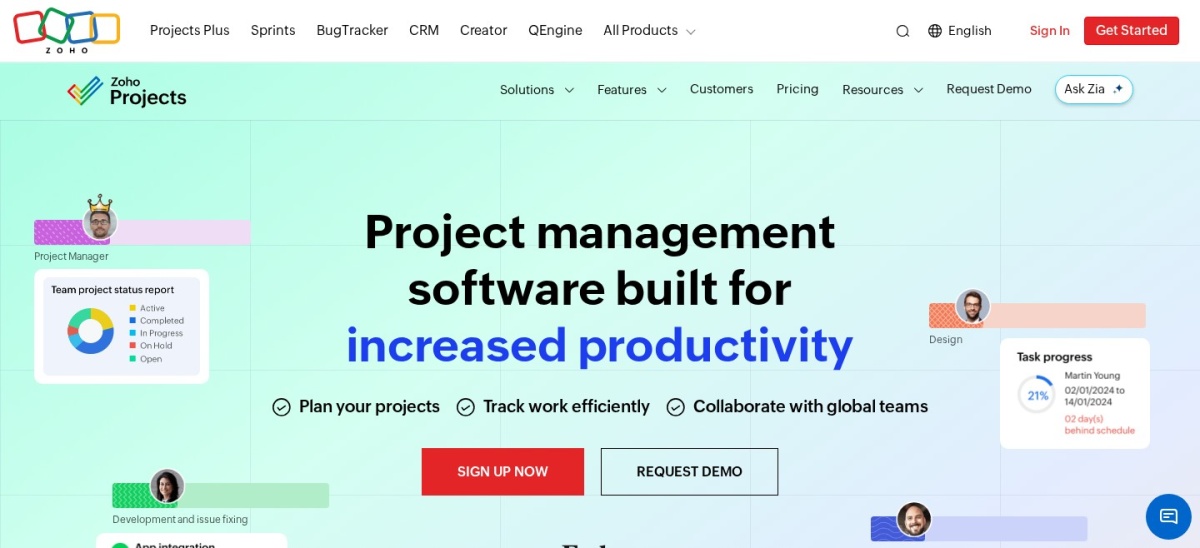
Zoho Projects is the cheapest paid plan in this list at $4 a user a month, with Gantt charts, time tracking and budgeting included.
ClickUp lists Core at $12 a user a month as the regular price; the $9 figure on its pricing page is a sale price.
Trello is the simplest switch at $5 a user a month, but it has no native Gantt view on the Standard plan.
Every tool here except Smartsheet has a free plan, though most free plans cap users, projects or boards.
How do you pick the best Microsoft Project alternative?
Microsoft Project is built for heavyweight scheduling. Most teams that look for an alternative do not need its full critical-path engine; they need shared timelines, clear owners and a price that scales per seat.
Start from the Gantt view. A real Microsoft Project alternative should show dependencies, milestones and a timeline without a paid add-on or a spreadsheet export, so check which plan unlocks the Gantt view before you compare prices.
Price per seat is only half the bill. monday.com needs at least 3 seats, Wrike's Team plan stops at 15 users, and several tools charge more for the plan that adds portfolios or resource views, so model your real team size first.
Migration matters more than the feature list. Most tools here import tasks from a spreadsheet, but native Microsoft Project file import is rare, so plan on rebuilding the schedule rather than opening the old file. Our content calendar planning guide shows the same plan-first approach for editorial work.
monday.com is a visual work platform built around boards with typed columns for status, owner, date and budget. The free plan covers up to 2 seats and 3 boards, while Basic at $9 a seat a month billed yearly adds unlimited items, boards and viewers.
The trade off is that the cheapest paid plan is light. Basic has no timeline or Gantt view and no automations, so teams that need scheduling views must move to Standard at $12 a seat a month, and every paid plan needs at least 3 seats. It suits most teams leaving Project that want readable boards without a long setup.
Smartsheet is a spreadsheet-style work platform, so Project users who live in grids will feel at home. Sheets hold tasks, dates, owners and budgets, with Gantt, Card and Calendar views, formulas and automations, and Pro costs $9 a user a month billed yearly.
The trade off is the lack of a free plan. There is a trial, but ongoing use needs a paid seat, and dashboards, reporting and resource views sit on Business at $19 a user a month. It suits teams that want Project's grid feel in a shared, cloud tool.
Asana is a work management platform for planning and tracking tasks, projects and goals across a team. The Personal plan is free for up to 2 users, and Starter at $10.99 a user a month billed yearly adds timeline and Gantt views, dashboards, unlimited automations and free guests.
The trade off is that portfolio and resource management sit higher up. Goals, portfolios, workload and time tracking need Advanced at $24.99 a user a month billed yearly. It suits growing teams that want clear timelines without Project's scheduling weight.
ClickUp is an all-in-one work platform that bundles tasks, docs, whiteboards, chat, goals and time tracking into one workspace. The free plan allows unlimited tasks and members with 100MB of storage, and Core at $12 a user a month as the regular price adds unlimited storage, Gantt charts, dashboards and native time tracking.
The trade off is breadth. ClickUp packs so much into one app that new teams face a real learning curve, and AI features cost extra on top of the seat price. It suits teams that want to replace several tools at once and are willing to spend a week learning it.
Wrike is a work management platform built for complex, multi-stakeholder projects, with Gantt charts, workload views, approvals and portfolio reporting. The free plan covers basic task work, and Team at $10 a user a month billed yearly adds interactive Gantt charts, custom workflows and AI Essentials.
The trade off is the jump past 15 users. Team covers 2 to 15 users, and growing past that moves the whole team to Business at $25 a user a month, while seats are sold in blocks of five. It suits mid-size teams that need resource planning and cross-team visibility.
Teamwork.com is a project platform built for agencies and client-services teams, pairing delivery with time tracking, budgets and profitability reports. The free plan covers up to 5 users and 5 projects, and Basics at $9.99 a user a month billed yearly adds project health reporting, client collaboration and 5,000 automations.
The trade off is that the profitability features sit higher up. Capacity planning, retainers and the HubSpot integration need Accelerate at $24.99 a user a month, and the Teamwork Desk help desk is sold separately. It suits agencies that bill by the hour and need to see margin per project.
Jira is Atlassian's issue and project tracker, built for software teams and flexible enough to run general work at scale. The free plan covers up to 10 users with 2GB of storage, and Standard at $8.48 a user a month adds 250GB of storage, audit logs and 400 automation steps per user a month.
The trade off is that Jira is built for engineering first. Backlogs, sprints and custom issue workflows are strong, but non-technical teams face a steep learning curve, and the per-user price changes by seat band. It suits software teams that already track work in sprints.
Zoho Projects is a low-priced project tool with Gantt charts, timesheets, budgeting and workflow automation, tied into the wider Zoho suite. The free plan allows 3 projects for up to 5 users, and Premium at $4 a user a month billed yearly adds unlimited projects, time tracking, Gantt charts and project budgeting.
The trade off is that Zoho's own pricing page does not show the dollar figures clearly, so the $4 annual and $5 monthly rates come from third-party listings of the same plans, and moving to Enterprise at $9 doubles the per-user price. It suits small teams that want full Gantt and budgeting at the lowest price here.
What we like
Cheapest paid plan in this list
Gantt, time tracking and budgets on Premium
Deep Zoho suite integrations
Watch out for
Pricing not shown clearly on Zoho's own page
Enterprise tier doubles the per-user price
Enterprise adds SSO, custom roles and a sandboxVisit zoho.com
09
Trello
4.4/5on G2 (14,064 reviews, checked Nov 2026)
Paid from$5/user/mo
Best simplest switch from Project
Free planYes, 10 boards
Gantt viewNo, Timeline on Premium
Cheapest paid planStandard, $5/user/mo
Next planPremium, $10/user/mo
trello.com
Trello homepage, captured Nov 2026.
Trello is Atlassian's Kanban board tool, where cards move across lists for each stage of the work. The free plan covers 10 boards and 10 collaborators, and Standard at $5 a user a month billed yearly adds unlimited boards, Calendar view, custom fields and unlimited storage.
The trade off is scheduling depth. Trello has no native Gantt view on Standard; the Timeline view that stands in for one needs Premium at $10 a user a month, and reporting stays light. It suits small teams that want the simplest possible switch and can live without a Gantt chart.
Switching from Microsoft Project: what to check first
Do not expect to open a Project file in the new tool. Most alternatives here import tasks from a spreadsheet, so export your schedule to CSV first and rebuild the timeline in the new app.
Rebuild dependencies by hand. Start and finish dates usually survive an import, but links between tasks often do not, so check the critical path again before you trust the new dates.
Run the old and new tools side by side for one project. Pick a small live project, track it in both places for two weeks, and only move the team once the new timeline matches reality.
How we chose
We started from the tools most often named as Microsoft Project replacements in G2 comparisons and project-management roundups, then kept those with a public G2 rating, a published price and a Gantt or timeline view.
Prices come from each vendor's pricing page or its G2 pricing listing, checked on 29 November 2026. Ratings and review counts come from G2 on the same day. Where a vendor shows a sale, the list shows the regular price.
We left out enterprise-only tools with no published price and tools with no public rating. No vendor paid for a place, and we do not claim hands-on testing for this list.
How to choose a Microsoft Project alternative
Start with the schedule you actually run, then match the tool to it.
List what Project does for you today. Gantt charts, dependencies, baselines, resource views. If you only use the Gantt view, almost any tool here works; if you use baselines and resource levelling, only Smartsheet, Wrike and Teamwork come close.
Check which plan unlocks the Gantt view. monday.com needs Standard, Trello needs Premium, and the rest include it on the cheapest paid plan. Price the plan you need, not the cheapest one on the page.
Price your real team size. Seat minimums and user caps change the bill. monday.com needs 3 seats, Wrike Team stops at 15 users, and Jira's per-user price changes by seat band.
Trial it on one live project. Import a real schedule, rebuild the dependencies and see whether the dates still hold. A two-week trial on real work beats any feature checklist.
FAQ
What is the best Microsoft Project alternative in 2026?
monday.com is the best Microsoft Project alternative for most teams. It is rated 4.7 out of 5 on G2 from 17,975 reviews, and its boards, timelines and Gantt views cover most of what Project does, from $9 a seat a month.
What is the cheapest Microsoft Project alternative?
Zoho Projects is the cheapest paid plan in this list at $4 a user a month billed yearly, with Gantt charts, time tracking and budgeting included. Trello is next at $5 a user a month, though it has no Gantt view on that plan.
Is there a free Microsoft Project alternative?
Yes. Eight of the nine tools here have a free plan, including monday.com, Asana, ClickUp, Wrike, Teamwork, Jira, Zoho Projects and Trello. Free plans usually cap users, projects or boards, so they fit small teams better than large ones.
Which Microsoft Project alternative has the best Gantt chart?
Smartsheet has the Gantt view closest to Project, because its grid sheets, dependencies and formulas work the same way. monday.com and Wrike also have strong Gantt views, but monday.com needs the $12 Standard plan to unlock them.
Is monday.com or Smartsheet better than Microsoft Project?
monday.com is better for teams that want shared boards and fast adoption, while Smartsheet is better for teams that want Project's grid-and-Gantt style in the cloud. Neither matches Project's full critical-path and resource-levelling engine, so heavy schedulers should trial both first.
Which Microsoft Project alternative is best for small teams?
Trello is the simplest pick for a small team at $5 a user a month, and Zoho Projects is the cheapest full-featured pick at $4. Asana is the easiest middle ground, with timelines and Gantt views from $10.99 a user a month.
SaaS SEO and WordPress specialist with about 8 years of experience. Rakib compares WordPress plugins, themes, hosting and software using public pricing, documentation and user reviews. See how we rank.