Best WooCommerce Rental Plugins in 2026: 7 Tools Compared
WLWPLegible EditorsLast verified 22 Nov 2026How we rank12 min read
★ Short answer
Rental Products is the best WooCommerce rental plugin for physical inventory, with 1,000+ active installations, rental stock tracking, deposits and return management. Choose Plugin Republic for flexible booking durations and a $79/year entry plan, or WpRently for vehicle and equipment rentals with a free version.
How we make this list: we compare pricing pages, product documentation and public user reviews, then re-check every price before each update. No product paid for a place. Disclosure.
Rental Products leads for physical inventory, with 1,000+ active installations, a 4.5/5 WooCommerce Marketplace rating and a $199/year license.
Plugin Republic supports hourly, daily and overnight rentals, with its Single license costing $79/year and a 4.8/5 developer rating on Trustpilot.
WpRently has 1,000+ active installations, a 4.4/5 WordPress.org rating and a free version for rental bookings. Pro starts at $69/year.
PluginHive costs $149/year and supports duration-based bookings, seasonal pricing and calendar synchronization. Its developer has a 4.9/5 Trustpilot rating.
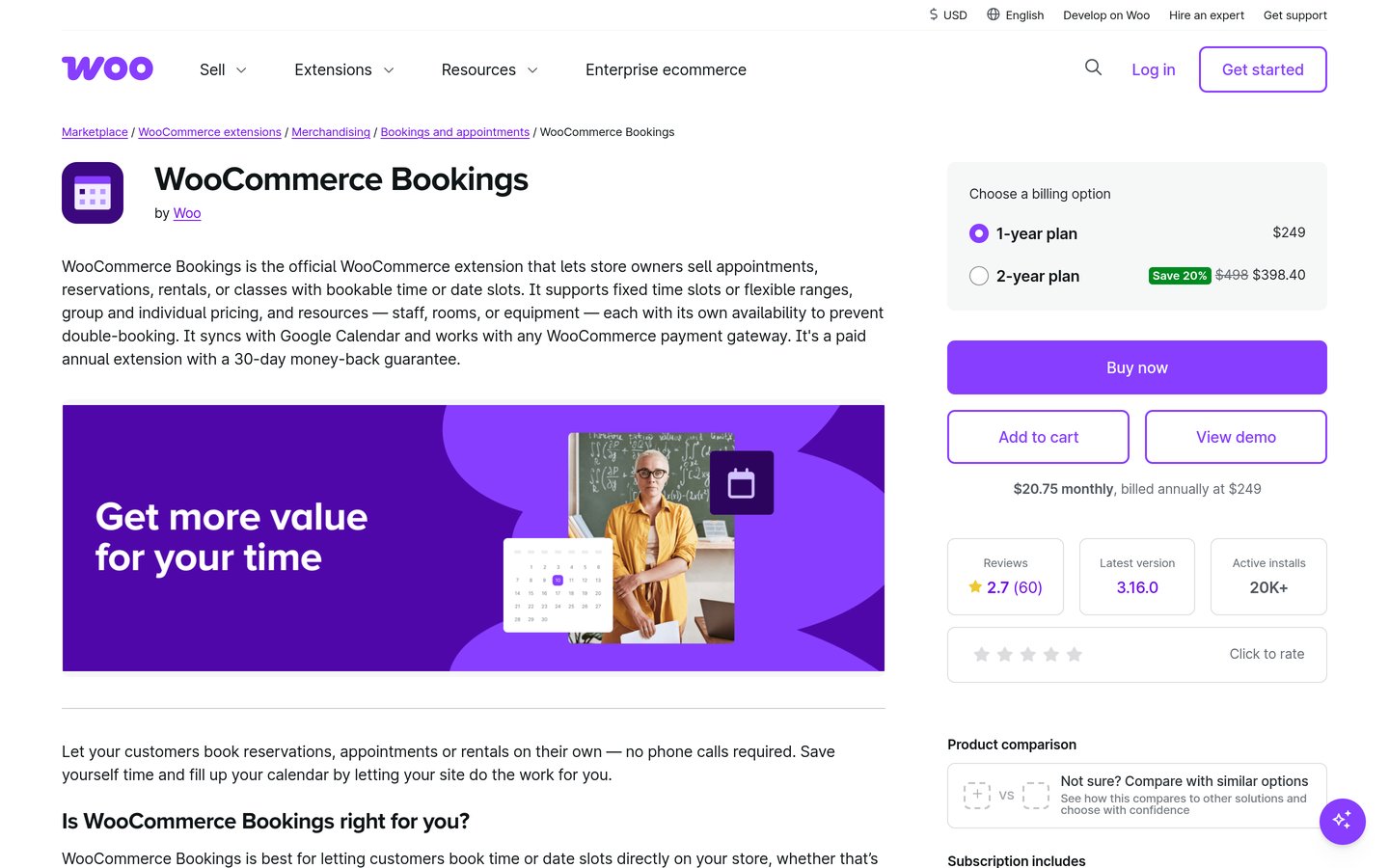
WooCommerce Bookings has 20,000+ active installations and costs $249/year, but its Marketplace rating is 2.7/5 from 60 reviews.
JetBooking costs $75/year, while WPS Bookings has 3,000+ active installations and a $79/year Pro plan.
What to look for in a WooCommerce rental plugin
A WooCommerce rental plugin lets customers reserve products, equipment, vehicles or spaces for specific periods. Unlike ordinary product purchases, rental transactions require availability checks, duration-based pricing and a process for returning or releasing rented items.
Start by identifying your rental duration. Equipment rental companies may charge hourly or daily rates, while accommodation businesses often charge per night. Some plugins support both methods, but their booking calendars and pricing calculations differ.
Inventory management is another important consideration. A rental plugin should account for stock already reserved during overlapping periods. Businesses handling physical equipment should also consider pickup dates, return dates, security deposits and late returns.
Pricing flexibility can affect which plugin works for your business. Look for seasonal rates, weekend adjustments, longer-rental discounts and additional fees. Some plugins include these features, while others require extensions.
Finally, check WordPress maintenance, WooCommerce compatibility and the regular license price. A lower-cost booking plugin may be sufficient for simple reservations, but businesses managing physical stock need features beyond a basic date picker.
4.5/5on WooCommerce Marketplace (26 reviews, checked Nov 2026)
Starts at$199/yr
Best WooCommerce rental plugin overall
Rental periodsDate and time-based
InventoryStock and return tracking
Security depositsBuilt in
Paid planSingle site, $199/yr
woocommerce.com
Rental Products homepage, captured Nov 2026.
Rental Products is a WooCommerce extension for renting physical inventory, with 1,000+ active installations and a 4.5/5 Marketplace rating from 26 reviews. It supports rental-only or rent-or-buy products, stock tracking, security deposits and return management. The current version also provides time-based rentals, rental bundles and an inventory dashboard.
The trade off is its $199 annual subscription and a setup process focused on stock management rather than general appointments. Time-based rentals also have restrictions for certain pickup and bundle workflows. It suits equipment, costume and party-supply businesses that need to track what is rented and when it returns.
What we like
Tracks rental inventory and overdue returns
Built-in security deposit collection
Supports rental bundles and rent-or-buy products
Flexible rental pricing and availability rules
Central dashboard for stock and bookings
Watch out for
Higher annual price than several alternatives
Requires WooCommerce
Some time-based rental configurations have restrictions
Not designed primarily for staff appointment scheduling
The paid license includes inventory tracking, deposits, rental pricing and updates.Visit woocommerce.com
02
Plugin Republic
4.8/5on Trustpilot (110 reviews, checked Nov 2026)
Starts at$79/yr
Best for flexible rental durations and availability
Rental durationsHourly, daily and overnight
Calendar integrationGoogle Calendar and iCal
LicenseSingle site
Paid planSingle, $79/yr
pluginrepublic.com
Plugin Republic homepage, captured Nov 2026.
Plugin Republic is the developer of Bookings for WooCommerce, a plugin for rentals, appointments and reservations. The company has a 4.8/5 Trustpilot rating from 110 reviews. Its booking plugin supports calendar date selection, hourly and overnight bookings, pricing rules, availability controls and integrations with external calendars.
The trade off is that physical inventory returns and security deposits are not its primary focus. The Single license costs $79 per year plus applicable taxes, while a $199 lifetime option is also available. It suits businesses renting spaces, equipment or services that need flexible booking periods.
What we like
Supports multiple booking duration formats
Flexible date selection and availability controls
Google Calendar and iCal integration
Affordable annual entry license
Lifetime license available
Watch out for
No permanently free edition
Physical return tracking is less specialized than Rental Products
Complex booking rules require configuration
The paid license includes booking calendars, pricing rules and availability management.Visit pluginrepublic.com
03
WpRently
4.4/5on WordPress.org (33 reviews, checked Nov 2026)
Paid from$69/yr
Best free starting point for vehicles and equipment
Rental categoriesVehicles, equipment and spaces
Pricing durationsHourly, daily and monthly
Active installations1K+
Paid planStandard, $69/yr
mage-people.com
WpRently homepage, captured Nov 2026.
WpRently is a WooCommerce rental management plugin with 1,000+ active installations and a 4.4/5 WordPress.org rating from 33 reviews. Its free version supports rental products, booking dates, service categories and WooCommerce checkout. The plugin covers cars, bikes, dresses, equipment and accommodation-style reservations.
The trade off is that advanced rental management features and additional pricing options may require Pro or separate extensions. Standard costs $69 per year plus applicable tax for one website. It suits smaller rental businesses that want to start free and expand their booking configuration later.
What we like
Free rental booking version
Supports several rental business types
WooCommerce checkout integration
Rental availability and pricing controls
Regular premium price under $100 per year
Watch out for
Advanced features may require separate paid add-ons
Smaller installation base than general booking plugins
Complex inventory workflows require configuration
Standard adds Pro rental management features, updates and priority support.Visit mage-people.com
04
PluginHive
4.9/5on Trustpilot (999 reviews, checked Nov 2026)
Starts at$149/yr
Best for rental bookings and calendar synchronization
Booking periodsMinute, hour, day and night
AvailabilityProduct and resource rules
Calendar integrationGoogle, Outlook and Apple
Paid planSingle Site, $149/yr
pluginhive.com
PluginHive homepage, captured Nov 2026.
PluginHive is the developer of Bookings and Appointments for WooCommerce, with a 4.9/5 Trustpilot company rating from 999 reviews. Its booking plugin supports duration-based reservations, resources, seasonal pricing and calendar synchronization. Businesses can create rentals for equipment, spaces and other bookable products using WooCommerce checkout.
The trade off is that some specialized workflows, including deposits and recurring bookings, require separately purchased extensions. The regular Single Site license costs $149 per year, including updates and support. It suits rental businesses that need detailed availability rules and external calendar integration.
What we like
Flexible booking durations and pricing
Google, Outlook and Apple calendar integrations
Seasonal availability and rental rates
Resource-based reservations
Established developer with extensive public reviews
Watch out for
No permanently free core edition
Deposits require a separate extension
Specialized booking workflows may increase total cost
Trustpilot rating covers the developer rather than this plugin alone
The paid plugin includes advanced scheduling, resource management and calendar integration.Visit pluginhive.com
05
WooCommerce Bookings
2.7/5on WooCommerce Marketplace (60 reviews, checked Nov 2026)
Starts at$249/yr
Best official WooCommerce booking extension
Booking productsAppointments and rentals
AvailabilityProduct and resource rules
Active installations20K+
Paid planSingle site, $249/yr
woocommerce.com
WooCommerce Bookings homepage, captured Nov 2026.
WooCommerce Bookings is the official WooCommerce extension for appointments, rentals and reservations, with 20,000+ active installations. It has a 2.7/5 Marketplace rating from 60 reviews. The plugin creates bookable products with configurable durations, availability, pricing, people and resources, with payments handled through WooCommerce checkout.
The trade off is its $249 annual price and lower public rating than the other Marketplace rental extension in this comparison. Accommodation-specific workflows use an additional free extension, while other integrations may cost extra. It suits businesses that prefer an official WooCommerce solution for reservable services, rooms and resources.
What we like
Official WooCommerce extension
Supports appointments, rentals and reservations
Product and resource availability rules
Uses existing WooCommerce payment gateways
Compatible with the free Accommodation Bookings add-on
Watch out for
Higher annual cost than most alternatives
Low Marketplace customer rating
Specialized workflows may need additional extensions
Less focused on physical rental stock returns
The paid extension adds bookable products, resource scheduling and availability management.Visit woocommerce.com
06
WPS Bookings
4.5/5on WordPress.org (43 reviews, checked Nov 2026)
Paid from$79/yr
Best for budget rental and accommodation calendars
Free calendarGlobal booking calendar
Rental periodsDate and time slots
Active installations3K+
Paid planOne Site, $79/yr
wpswings.com
WPS Bookings homepage, captured Nov 2026.
WPS Bookings is a WooCommerce booking plugin with 3,000+ active installations and a 4.5/5 WordPress.org rating from 43 reviews. Its free edition supports bookable products, availability calendars, booking limits and customer cancellations. It also provides calendar synchronization options for accommodation-style reservations.
The trade off is that advanced scheduling controls, custom booking fields and additional integrations require Pro. The One Site license costs $79 per year, with a separate 25% discount code displayed by the vendor. It suits smaller accommodation and rental websites that need a booking calendar without a premium starting commitment.
Pro adds custom fields, advanced booking rules, rescheduling and additional integrations.Visit wpswings.com
07
JetBooking
4.7/5on Trustpilot (1,350 reviews, checked Nov 2026)
Starts at$75/yr
Best for custom rental and accommodation websites
Booking websitesRentals and accommodation
Editor supportElementor and Gutenberg
WooCommerceBooking checkout integration
Paid planOne Project, $75/yr
crocoblock.com
JetBooking homepage, captured Nov 2026.
JetBooking is a Crocoblock booking plugin for rental properties, accommodation and other date-based reservations. Crocoblock has a 4.7/5 Trustpilot rating from 1,350 reviews. JetBooking supports dynamic booking forms, availability calendars, duration-based pricing and WooCommerce checkout integration through its booking configuration.
The trade off is that complex rental websites may require additional Crocoblock tools for dynamic content and custom layouts. JetBooking costs $75 per year for one project, with a temporary $60 promotional price. It suits developers building customized rental directories or accommodation booking websites.
What we like
Flexible booking forms and calendar layouts
WooCommerce payment integration
Elementor and Gutenberg compatibility
Suitable for accommodation and property rentals
Dynamic pricing and availability settings
Watch out for
Additional Crocoblock plugins may be needed
No permanently free edition
More setup than dedicated rental product extensions
Trustpilot rating covers the Crocoblock company
The paid license adds booking calendars, rental rules and dynamic reservation management.Visit crocoblock.com
Physical rental inventory vs date-based booking plugins
WooCommerce rental plugins fall into different categories. Some focus on physical products that leave a business and must eventually be returned. Others primarily reserve appointments, spaces or accommodation for specific periods.
Rental Products is particularly relevant for physical inventory. It provides stock tracking, rental bundles, security deposits, return management and administrative tools for overdue rentals.
WooCommerce Bookings, PluginHive and Plugin Republic focus more broadly on reservable products, time slots and resources. They can support rental businesses, but their inventory and return workflows differ.
WpRently combines several booking categories, including vehicles, equipment and accommodation. WPS Bookings and JetBooking are also relevant when the main requirement is controlling dates and availability.
Choose based on what happens after checkout. A business shipping cameras needs return tracking and inventory controls, while a property business may prioritize overnight pricing, availability calendars and external reservation synchronization.
Which WooCommerce rental pricing features matter most?
Hourly and daily pricing are useful for equipment and vehicle rentals. Confirm whether the plugin supports the rental duration you actually sell, including partial days, overnight bookings and minimum booking periods.
Longer rentals often require discounts or different rate calculations. Some plugins support pricing tiers, while others provide fixed-duration packages or seasonal pricing rules.
Security deposits are different from partial payments. A refundable security deposit protects against damage or late returns, while a partial payment collects part of the rental fee upfront. Confirm that your chosen plugin handles the distinction.
Availability buffers are another important feature. Rental businesses may need time between bookings for cleaning, equipment inspections, delivery or transportation.
Before launching, verify pricing calculations with overlapping reservations, unavailable dates, taxes and additional services. Correct availability management matters as much as the displayed rental price.
How we chose
We researched established WooCommerce rental extensions and booking plugins suitable for equipment, vehicles, spaces and accommodation. Candidates came from the official WooCommerce Marketplace, WordPress.org and specialist WooCommerce developers. We compared rental pricing, availability, inventory management, deposits, calendar integrations and booking workflows.
We opened official pricing pages, plugin listings and public review sources on 22 Nov 2026. WordPress.org provided ratings, review counts, installation figures and maintenance information for directory plugins. WooCommerce Marketplace ratings were used for its paid extensions, while Trustpilot provided developer-level ratings for plugins without suitable directory listings. Prices reflect regular entry licenses rather than promotional offers.
We excluded plugins that were closed or outdated, had insufficient evidence of adoption or lacked a verifiable regular price. We also excluded products whose pricing pages could not be reliably opened, including candidates with inaccessible CodeCanyon listings. Developer-level ratings were distinguished from product-specific reviews. No vendor paid for a place, and we do not claim hands-on testing for this list.
How to choose the right WooCommerce rental plugin
Identify your rental business model first, then compare booking duration, inventory controls, checkout requirements and regular licensing costs.
Define what customers will rent. Determine whether you rent physical equipment, vehicles, accommodation or reservable spaces. Choose a stock-focused plugin when items must be returned, or a booking-focused plugin when customers mainly reserve dates and time slots.
Check rental duration and availability rules. Confirm support for hourly, daily, overnight or longer bookings as required. Review stock quantities, overlapping reservations, unavailable dates and buffer periods to prevent accepting bookings you cannot fulfill.
Review pricing, deposits and return management. Look for seasonal pricing, duration discounts, additional charges and refundable security deposits where needed. Equipment businesses should also check pickup arrangements, overdue returns and whether inventory is released correctly after a rental ends.
Compare the complete annual cost. Use regular license prices rather than temporary discounts. Check whether deposits, calendar synchronization, product extras or advanced rental reports require additional extensions. Also confirm supported site counts and update entitlements.
FAQ
What is the best WooCommerce rental plugin?
Rental Products is a strong overall choice for physical equipment rentals because it includes inventory tracking, rental pricing, deposits and return management. Plugin Republic is better suited to flexible reservation periods, while WpRently offers a free starting point for different rental business types.
Can WooCommerce handle rental products?
Yes, but standard WooCommerce products do not provide a complete rental management system. A rental plugin adds date selection, booking availability and duration-based pricing. More specialized extensions can also track physical inventory, deposits, pickups and returns.
Is there a free WooCommerce rental plugin?
Yes. WpRently provides a free version for different rental booking categories, while WPS Bookings includes free reservation and calendar functionality. Both offer premium upgrades for additional features. Review their free capabilities before choosing one for a live rental business.
Which WooCommerce plugin is best for equipment rentals?
Rental Products is particularly suitable for equipment because it manages rental stock, security deposits, returns and availability. WpRently is another option for equipment and vehicle reservations. The right choice depends on whether you need detailed physical inventory tracking or mainly a customer booking calendar.
Can I rent cars or bikes through WooCommerce?
Yes. WpRently supports car and bike rental booking workflows, while Rental Products can represent vehicles as rentable inventory. Other booking plugins also support date-based vehicle reservations. Check pickup times, duration pricing, available quantities and deposit requirements before launching.
Do WooCommerce rental plugins prevent double bookings?
Rental plugins can prevent overlapping reservations by checking availability and existing bookings. Their methods differ depending on whether availability is tracked by product, quantity, resource or calendar. Confirm that the system accounts for simultaneous checkout activity and any external reservations.
Can WooCommerce rental plugins collect security deposits?
Yes. Rental Products includes a security deposit feature for physical rentals. Other booking plugins may require additional extensions or payment configurations. A security deposit is different from a partial rental payment, so verify how refunds and outstanding balances are handled.
Which WooCommerce rental plugin works with accommodation bookings?
JetBooking and WPS Bookings are relevant to accommodation reservations, while WooCommerce Bookings supports overnight stays through its free Accommodation Bookings add-on. Plugin Republic also provides overnight booking options. Compare calendar synchronization, check-in rules and pricing periods before choosing.
How much does a premium WooCommerce rental plugin cost?
The regular prices in this comparison start at $69 per year for WpRently Pro. JetBooking costs $75, Plugin Republic and WPS Bookings cost $79, PluginHive costs $149, Rental Products costs $199, and WooCommerce Bookings costs $249 annually.