Best Self Employed Accounting Software in 2026: 7 Tools Compared
WLWPLegible EditorsLast verified 22 Nov 2026How we rank12 min read
★ Short answer
Wave is our top self-employed accounting software because its free Starter plan includes unlimited invoices, estimates, bills, and bookkeeping records. Pro costs $190 annually and adds bank transaction imports and receipt capture. Zoho Books offers more traditional accounting features, while FreshBooks is better for client invoicing and expense tracking.
How we make this list: we compare pricing pages, product documentation and public user reviews, then re-check every price before each update. No product paid for a place. Disclosure.
Wave Starter includes unlimited invoices, estimates, bills, and bookkeeping records for free. Pro costs $190 annually, and G2 rates Wave 4.3/5 from 329 reviews.
Zoho Books offers free accounting for eligible small businesses. Standard costs $15 per organization monthly with annual billing and supports 3 users.
FreshBooks Lite costs $23 monthly at its regular rate and supports invoicing up to 5 clients. It holds a 4.5/5 G2 rating from 983 reviews.
QuickBooks Solopreneur offers a free plan with 2 monthly invoices and 5 tracked trips. Lite costs $20 monthly and expands those allowances.
ZipBooks provides free unlimited invoicing and basic reporting. Smarter costs $15 monthly and adds recurring invoices, multiple bank connections, and time tracking.
Xero Early costs $27 monthly at its regular rate, while Bonsai Basic starts at $9 per user monthly with annual billing, but its invoicing features require Essentials.
What to look for in self-employed accounting software
Self-employed accounting software helps freelancers, contractors, consultants, and solo business owners organize income, expenses, invoices, and financial records. A suitable platform should simplify everyday bookkeeping without requiring extensive accounting knowledge.
Start with income and expense tracking. You should be able to record business payments, categorize spending, reconcile transactions, and understand whether your work is profitable. Automatic bank feeds can reduce manual entry, although their availability varies by provider and financial institution.
Invoicing is particularly important for service-based businesses. Look for professional invoice templates, payment reminders, recurring invoices, online payment options, and clear records of outstanding balances.
Consider whether you need full double-entry accounting or mainly invoice and expense management. Traditional accounting platforms provide detailed financial statements and account reconciliation. Freelancer-focused platforms may emphasize client billing, project expenses, and time tracking.
Finally, compare the regular subscription price rather than promotional offers. Free plans can be sufficient initially, but bank synchronization, receipt scanning, additional clients, advanced reporting, and automation may require paid subscriptions.
For managing freelance clients and project finances
$9/mo
No free plan
4.6/5
Price ladder: cheapest paid plan per year
List prices, USD, checked Nov 2026
Bonsai$108
Zoho BooksFREE$180
ZipBooksFREE$180
WaveFREE$190
QB SoloFREE$240
FreshBooks$276
Xero$324
The 7 best self employed accounting software tools
01
Wave
4.3/5on G2 (329 reviews, checked Nov 2026)
Paid from$190/yr
Best free accounting software for self-employed professionals
Free invoicesUnlimited
Free bookkeepingUnlimited records
Bank transaction importsPro
Paid planPro, $190/yr
waveapps.com
Wave homepage, captured Nov 2026.
Wave is an accounting and invoicing platform designed for freelancers and small business owners. Its free Starter plan includes unlimited invoices, estimates, bills, and bookkeeping records. Users can track income and expenses, manage customers, and accept online payments, with processing fees applying to transactions.
The trade off is that automatic bank transaction imports, receipt capture, and automated payment reminders require Pro. Pro costs $190 annually or $19 monthly at the regular rate, with a temporary introductory discount advertised separately. It suits self-employed professionals who need dependable basic bookkeeping without a mandatory subscription.
What we like
Free unlimited invoices and estimates
Free core bookkeeping and bill records
Pro includes automatic bank transaction imports
Pro adds receipt scanning and payment reminders
Simple pricing for independent business owners
Watch out for
Automatic bank feeds require Pro
Online payment processing charges apply
Some financial services depend on account eligibility
Limited advanced inventory and project management
Pro adds bank synchronization, receipt scanning, automated reminders, and expanded accounting automationVisit waveapps.com
02
Zoho Books
4.4/5on G2 (333 reviews, checked Nov 2026)
Paid from$15/mo
Best for affordable full-featured bookkeeping
Free annual invoices1,000
Standard users3
Standard annual invoices5,000
Paid planStandard, $15/org/mo annually
zoho.com
Zoho Books homepage, captured Nov 2026.
Zoho Books is cloud accounting software for managing invoices, expenses, banking, financial statements, and customer records. Its free plan includes invoicing, expense tracking, and basic accounting features, with an allowance of 1,000 invoices annually. Standard costs $15 per organization monthly with annual billing and supports 3 users.
The trade off is that the free plan has transaction limits and Standard excludes some advanced inventory and project features. Standard costs $180 annually, while monthly billing costs $20 per organization. It suits freelancers who want traditional accounting features and room to expand their financial workflows.
What we like
Free accounting plan available
Standard includes 3 users
Bank feeds and reconciliation on Standard
Custom reports and recurring expenses
Integrates with other Zoho applications
Watch out for
Free plan has invoice and expense limits
Advanced inventory requires higher editions
Some automation and integrations require upgrades
Configuration may take longer than simpler invoicing software
Standard adds bank feeds, recurring expenses, custom reports, and expanded transaction capacityVisit zoho.com
03
FreshBooks
4.5/5on G2 (983 reviews, checked Nov 2026)
Starts at$23/mo
Best for freelancers who invoice clients regularly
Lite billable clients5
Free trialAvailable
Expense trackingIncluded
Paid planLite, regular $23/mo
freshbooks.com
FreshBooks homepage, captured Nov 2026.
FreshBooks is accounting and invoicing software designed for freelancers, consultants, and service businesses. Lite normally costs $23 monthly and allows invoicing up to 5 clients. It includes estimates, expense tracking, online payment acceptance, and financial reports, helping independent professionals manage client billing and everyday expenses.
The trade off is the 5-client Lite limit and additional charges for team members and certain payment features. The regular monthly price equals $276 annually, although a temporary 90% introductory discount is advertised. It suits freelancers who prioritize professional invoices and client-facing financial workflows.
What we like
Professional invoices and estimates
Built-in expense tracking
Online payment options
Financial reports for independent businesses
Large public review sample
Watch out for
Lite limits billable clients to 5
Additional team members cost extra
Advanced accounting features require higher plans
Promotional prices differ substantially from regular pricing
Plus expands billable client capacity and adds more accounting and billing automationVisit freshbooks.com
04
QuickBooks Solopreneur
4/5on Capterra (123 reviews, checked Nov 2026)
Paid from$20/mo
Best for solo income, expense and mileage tracking
Free monthly invoices2
Free mileage trips5/month
Lite invoicesUnlimited
Paid planLite, regular $20/mo
quickbooks.intuit.com
QuickBooks Solopreneur homepage, captured Nov 2026.
QuickBooks Solopreneur is accounting software built for independent business owners managing income, expenses, invoices, and mileage. Its free plan includes 2 invoices monthly, 2 receipt uploads, and 5 tracked mileage trips. Lite expands these allowances to unlimited invoices, receipts, and mileage tracking and supports managing 3 contractors.
The trade off is that Lite does not provide the complete reporting and accountant collaboration features available in Simple Start. Lite normally costs $20 monthly, equivalent to $240 annually, with a temporary introductory discount advertised. It suits sole operators who want financial tracking and expense organization.
What we like
Free entry plan for solo businesses
Mileage and receipt tracking
Unlimited invoices on Lite
Expense categorization and financial records
Optional access to tax assistance features
Watch out for
Free invoicing and mileage allowances are restrictive
Lite does not include accountant access
Broader reporting requires Simple Start
Some payment and filing services have additional fees
Lite adds unlimited invoices, receipts, mileage tracking, and expanded contractor managementVisit quickbooks.intuit.com
05
ZipBooks
4.7/5on G2 (86 reviews, checked Nov 2026)
Paid from$15/mo
Best for simple invoicing and bookkeeping
Free invoicesUnlimited
Free bank connections1
Smarter team members5
Paid planSmarter, $15/mo
zipbooks.com
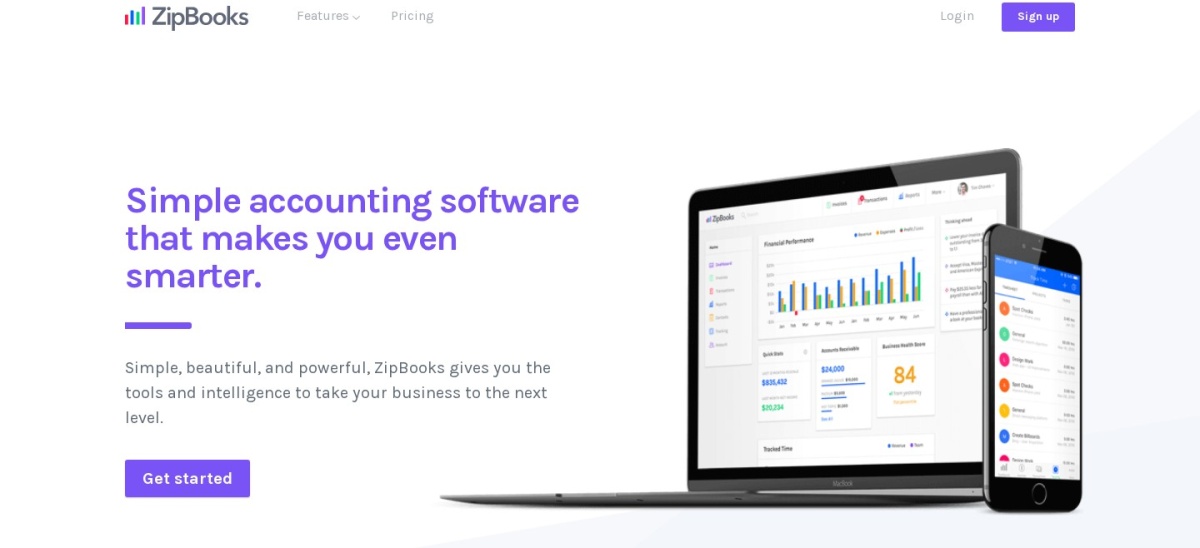
ZipBooks homepage, captured Nov 2026.
ZipBooks is online accounting software for contractors, freelancers, and small businesses. Its free Starter plan provides unlimited invoicing, customer and vendor records, basic reports, and one bank connection. Smarter costs $15 monthly and adds recurring invoices, payment reminders, multiple bank connections, time tracking, and 5 team members.
The trade off is that advanced reconciliation, transaction tagging, and detailed reporting require Sophisticated at $35 monthly. Smarter costs $180 annually at the regular monthly rate. It suits freelancers who need affordable invoicing and straightforward bookkeeping without extensive financial administration.
What we like
Free unlimited invoices
Free basic accounting reports
Smarter includes recurring invoices
Time tracking included in Smarter
Supports digital payments through connected providers
Watch out for
Free plan allows only one bank connection
Advanced reconciliation requires Sophisticated
Smaller integration ecosystem than larger accounting products
Detailed financial reporting requires an upgrade
Smarter adds recurring invoices, automatic reminders, multiple bank accounts, and time trackingVisit zipbooks.com
06
Xero
4.4/5on G2 (1,864 reviews, checked Nov 2026)
Starts at$27/mo
Best for accounting with room to grow
Early invoices20
Early bills5
Free trialAvailable
Paid planEarly, regular $27/mo
xero.com
Xero homepage, captured Nov 2026.
Xero is cloud accounting software for invoicing, bank reconciliation, expense tracking, and financial reporting. Early normally costs $27 monthly and includes 20 invoices, 5 bills, bank transaction reconciliation, document capture, and financial reports. It also connects with more than 1,000 business applications.
The trade off is that Early has restrictive invoice and bill allowances, making Growing more appropriate for busier businesses. The regular $27 monthly price equals $324 annually, although a temporary 90% introductory discount is advertised. It suits self-employed professionals expecting to expand their accounting requirements.
What we like
Bank reconciliation and financial reporting
More than 1,000 business application integrations
Document capture included
Suitable for collaboration with accounting professionals
Established accounting platform with extensive reviews
Watch out for
Early limits invoices to 20
Early limits bills to 5
Some expense and project features cost extra
Regular pricing is higher than several freelancer-focused alternatives
Growing removes the entry-plan invoice and bill restrictions and expands accounting flexibilityVisit xero.com
07
Bonsai
4.6/5on Capterra (95 reviews, checked Nov 2026)
Starts at$9/mo
Best for managing freelance clients and project finances
Basic planTime tracking and CRM
Basic projectsUnlimited
Invoicing planEssentials, $19/user/mo annually
Paid planBasic, $9/user/mo annually
hellobonsai.com
Bonsai homepage, captured Nov 2026.
Bonsai is a freelance business management platform for organizing clients, projects, tasks, and financial administration. Its Basic plan costs $9 per user monthly with annual billing and includes unlimited projects, time tracking, CRM, and unlimited clients. Essentials adds invoicing, payments, proposals, contracts, income tracking, and expense tracking.
The trade off is that Basic does not include invoicing or expense accounting. Those features require Essentials at $19 per user monthly with annual billing, compared with Basic's $108 annual cost. It suits freelancers who want to connect project delivery, time tracking, and client billing in one workspace rather than use a traditional accounting system alone.
What we like
Combines CRM, projects, and time tracking
Basic supports unlimited projects and clients
Essentials includes invoicing and expense tracking
Client portal and contract management available
Suitable for service-based freelance workflows
Watch out for
Basic does not include invoicing or expense tracking
Financial features require Essentials or higher
Less focused on full general-ledger accounting
Advanced integrations and reporting require Premium
Essentials adds invoices, payments, contracts, expense tracking, income tracking, and a client portalVisit hellobonsai.com
Bookkeeping software vs invoicing software for the self-employed
Invoicing software primarily helps businesses bill clients, receive payments, send reminders, and track outstanding balances. It is useful for freelancers whose main administrative task is charging customers for completed work.
Bookkeeping software records the broader financial picture. It categorizes income and expenses, tracks accounts, reconciles financial transactions, and produces reports that help business owners understand profitability.
Full accounting platforms generally support more detailed financial records than standalone invoicing systems. Wave, Zoho Books, Xero, and ZipBooks provide accounting functionality, while Bonsai emphasizes managing client work and related financial activities.
Choose based on your actual financial responsibilities. A freelance consultant may prioritize invoices and expenses, while a business managing multiple accounts, substantial purchases, or complex transactions may require more comprehensive accounting.
What self-employed accounting software really costs
Subscription fees are the most visible expense, but they are not always the entire cost. Payment processing, payroll services, additional users, advanced reporting, and optional financial services may create extra charges.
Wave provides free core bookkeeping and invoicing, while its annual Pro subscription costs $190. Zoho Books Standard costs $180 annually with annual billing, and ZipBooks Smarter costs $180 annually at its listed monthly rate.
Client limits also affect value. FreshBooks Lite supports invoicing up to 5 clients, while Bonsai requires Essentials for invoicing and expense tracking. Comparing features at the actual plan you need is more useful than comparing entry prices alone.
How we chose
We shortlisted established accounting and freelance business management platforms with relevant invoicing, expense tracking, bookkeeping, payment, and reporting capabilities. We compared free accounting options with paid products designed for self-employed professionals, service businesses, and growing independent operations.
The article uses 22 Nov 2026 as its editorial date. Official pricing pages and public G2 or Capterra review listings were opened and checked on 23 Nov 2026. All reported prices are in USD, and annual equivalents use regular rates rather than temporary promotional discounts.
We excluded discontinued products, tools without confirmable regular entry-level prices, and applications lacking substantial independent review evidence. Bonsai is included for freelancer financial workflows, but its Basic plan limitations are disclosed. No vendor paid for a place, and we do not claim testing for this list.
How to choose accounting software when you're self-employed
Identify how your business earns and spends money, then compare invoicing, expense tracking, bookkeeping, and reporting features against your budget.
List your essential accounting tasks. Determine whether you mainly send invoices and track expenses or also need bank reconciliation, detailed financial statements, recurring bills, and professional accountant access. Start with the functions you will use regularly.
Check invoice, client, and transaction limits. Review how many clients, invoices, bank connections, and expense records each plan supports. A low-cost subscription can become restrictive when your workload or customer base grows.
Compare automation and financial reporting. Consider bank synchronization, receipt capture, automatic categorization, recurring invoices, and payment reminders. Look for reports that clearly show income, spending, outstanding payments, and profitability.
Calculate your actual annual cost. Use regular subscription rates, not introductory promotions. Include payment processing fees, additional users, optional accounting services, and the price of upgrading when essential features are missing from the entry plan.
FAQ
What is the best accounting software for self-employed professionals?
Wave is our top choice because its free plan includes unlimited invoices, estimates, bills, and bookkeeping records. Zoho Books is suitable for people who need more structured accounting features, while FreshBooks is especially useful for service providers who frequently invoice clients.
Is there free accounting software for self-employed people?
Yes. Wave provides free core accounting and unlimited invoices. Zoho Books offers a free accounting plan with transaction limits, and ZipBooks provides unlimited invoicing and basic reports on Starter. QuickBooks Solopreneur also offers a free plan with limited invoices, receipts, and mileage tracking.
Which accounting software is cheapest for freelancers?
Wave, Zoho Books, and ZipBooks offer free plans, making them affordable starting points. For paid upgrades, ZipBooks Smarter costs $15 monthly, while Zoho Books Standard costs $15 monthly with annual billing. Compare invoicing, bank synchronization, and reporting needs before choosing.
Do self-employed people need accounting software?
Accounting software is not always mandatory, but it can make financial recordkeeping easier. It helps organize business income, expenses, invoices, and supporting documents. The need for more detailed accounting depends on business complexity, reporting obligations, and whether manual records remain manageable.
What is the difference between bookkeeping and accounting?
Bookkeeping focuses on recording and organizing financial transactions, including income, expenses, and payments. Accounting involves interpreting those records, preparing financial statements, evaluating performance, and supporting financial decisions. Many small-business software platforms combine both sets of capabilities.
Which accounting software is best for invoicing clients?
FreshBooks is designed around client invoicing, estimates, expense tracking, and payment collection. Wave and ZipBooks also provide unlimited invoicing on their free plans. FreshBooks Lite has a 5-client limit, so freelancers with larger customer lists should compare alternative plans.
Can accounting software automatically track expenses?
Yes. Some platforms import transactions from connected financial accounts and help categorize spending. Wave Pro includes automatic bank transaction imports, while Zoho Books Standard supports bank feeds. Receipt scanning and automatic categorization may require paid plans, and financial institution compatibility varies.
How much does self-employed accounting software cost?
Free options are available from Wave, Zoho Books, ZipBooks, and QuickBooks Solopreneur. Paid entry plans in this comparison range from Bonsai Basic at $9 per user monthly with annual billing to Xero Early at $27 monthly. Required features, payment charges, and upgrades affect total costs.
Can I use accounting software to prepare for tax filing?
Accounting software can organize income, expenses, receipts, mileage, and financial reports that support tax preparation. Some platforms also provide tax-related features or integrations. However, software capabilities differ, and using an accounting application does not replace understanding filing requirements or obtaining professional advice when necessary.