Best Cross Platform Password Managers in 2026: 7 Tools Compared
WLWPLegible EditorsLast verified 22 Nov 2026How we rank6 min read
★ Short answer
Bitwarden is the top pick because its free plan syncs unlimited logins across unlimited devices without a device cap. 1Password suits teams and users wanting polished apps and Travel Mode, while Proton Pass fits privacy-focused buyers who want built-in email aliases.
How we make this list: we compare pricing pages, product documentation and public user reviews, then re-check every price before each update. No product paid for a place. Disclosure.
Bitwarden offers unlimited vault items and device sync on its free plan, with Premium at $19.80/yr ($1.65/mo billed annually).
1Password starts at $35.88/yr ($2.99/mo billed annually) with a 14-day trial and no permanent free plan.
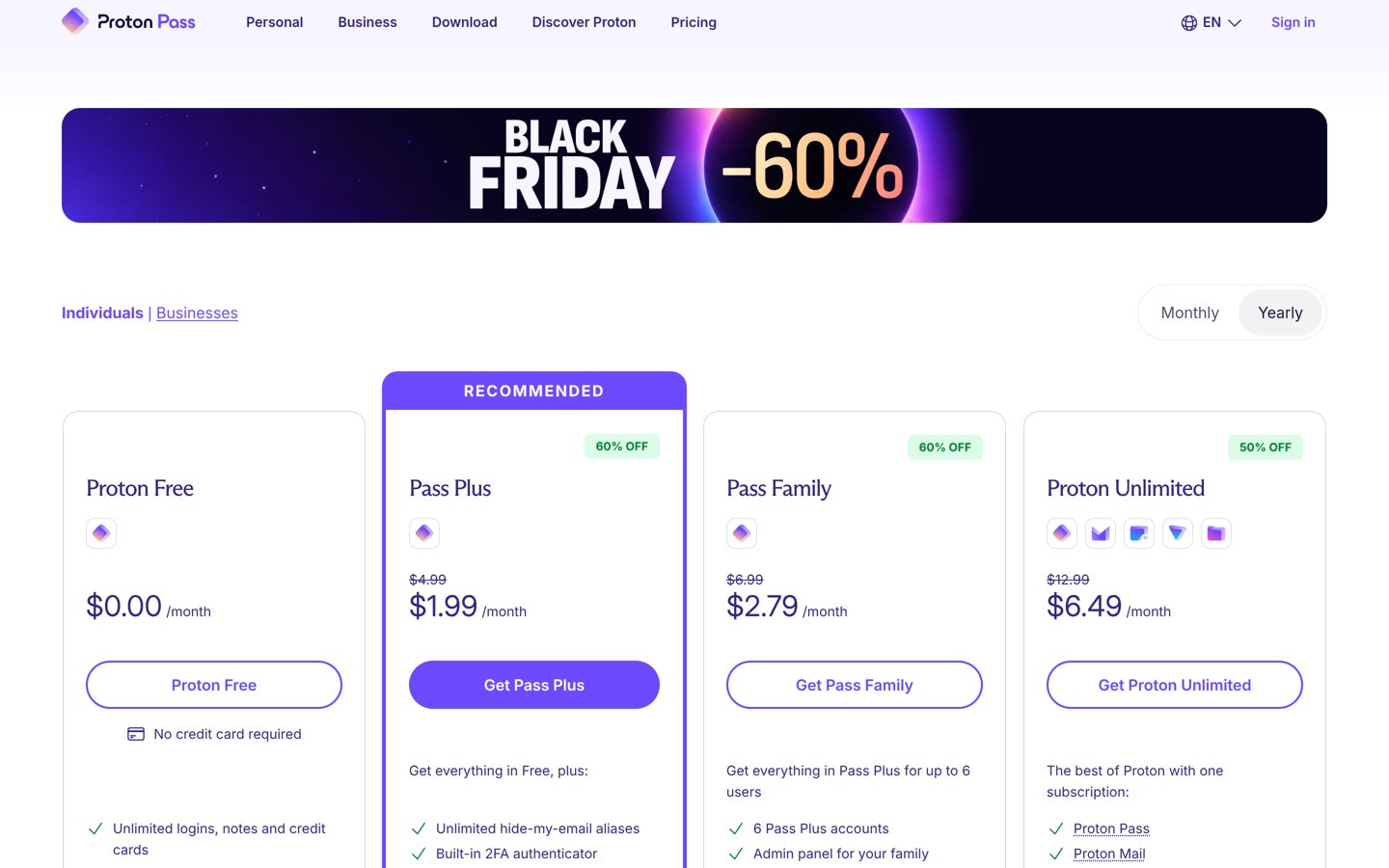
Proton Pass includes a free tier with unlimited passwords and passkeys, while Pass Plus starts at $35.88/yr ($2.99/mo).
NordPass provides a free plan on one active device, with annual personal plans starting at $23.88/yr ($1.99/mo).
RoboForm offers a free single-device plan and a regular personal rate of $29.88/yr ($2.49/mo billed annually) after first-year promotions.
What to look for in a cross platform password manager
Picking a cross platform password manager starts with checking how each tool handles device limits, browser extensions, and mobile autofill across desktop and phone operating systems. Some services allow unlimited synced devices for free, while others lock multi-device sync behind a paid subscription or restrict free accounts to one device at a time.
Security architecture and account recovery also vary widely across vendors. Look for zero-knowledge encryption, passkey support, two-factor authentication options such as authenticator apps or hardware keys, and clear emergency access or vault export rules so you are never locked out.
Pricing pages often highlight first-year introductory discounts or multi-year bundles that renew at a higher regular rate. Comparing the regular annual price, checking whether a free plan fits your daily workflow, and reviewing extra add-ons like email aliases or breach monitoring helps keep long-term costs predictable.
Bitwarden is an open-source password manager that includes unlimited passwords, notes, cards, passkeys, and cross-device sync on its free plan. Paid individual plans start at $19.80/yr ($1.65/mo billed annually) and hold a 4.6/5 rating across 1,523 G2 reviews.
The trade off is a more utilitarian interface and mobile autofill quirks compared to pricier rivals, starting at $19.80/yr for Premium. It suits budget-conscious individuals and technical users who value open-source transparency and cross-device syncing without paying upfront.
What we like
Unlimited passwords and synced devices on the free tier
Open-source codebase with optional self-hosting
Low regular annual price for individual Premium features
Supports passkeys and hardware security keys
Watch out for
Interface feels more functional than sleek
Some users report occasional autofill or mobile app friction
Paid Premium ($19.80/yr) adds built-in TOTP codes, 5 GB encrypted file storage, emergency access, and vault health reports.Visit bitwarden.com
1Password is a cross-platform credential and passkey manager known for consistent desktop and mobile apps, shared vaults, and Watchtower breach alerts. It carries a 4.6/5 rating across 1,823 G2 reviews and starts at $35.88/yr ($2.99/mo billed annually).
The trade off is having no permanent free tier after the 14-day trial and a higher annual cost than entry competitors at $35.88/yr. It suits users and teams who want cohesive design, strong passkey support, and smooth vault sharing across devices.
What we like
Cohesive apps and browser extensions across desktop and mobile
Watchtower alerts highlight compromised or weak credentials
Strong support for passkeys, shared vaults, and family or team plans
Watch out for
No free plan after the 14-day trial ends
Costs more per year than several budget competitors
Paid plans start at $35.88/yr for Individual, unlocking full vault access, Watchtower alerts, and cross-device sync.Visit 1password.com
Proton Pass is a privacy-focused password and passkey manager from Proton that includes a free plan with unlimited logins and up to 10 email aliases. Paid Pass Plus starts at $35.88/yr ($2.99/mo billed annually), and Proton Pass holds a 4.7/5 rating on G2.
The trade off is that unlimited aliases, custom domains, and built-in 2FA codes require a paid plan starting at $35.88/yr. It suits privacy-minded users and existing Proton subscribers who want to mask sign-up emails across devices.
What we like
Free plan supports unlimited passwords and passkeys across devices
Built-in email aliases help cut inbox spam on new sign-ups
4.7/5 rating on G2 with a clean, modern interface
Watch out for
Free plan caps aliases at 10 and vaults at 2
No self-hosting option for independent server control
Paid Pass Plus ($35.88/yr) adds unlimited email aliases, custom domains, integrated 2FA, and dark web monitoring.Visit proton.me
NordPass is a cross-platform password manager from Nord Security with a straightforward interface and a free plan limited to one active device. Its 1-year personal plan starts at $23.88/yr ($1.99/mo), while NordPass Business holds a 4.5/5 rating across 644 G2 reviews.
The trade off is single-device active use on the free plan and higher renewal rates after promotional terms at $23.88/yr. It suits everyday users who want an uncluttered layout and straightforward password generation across devices.
What we like
Accessible interface with simple setup and autofill
Entry annual personal pricing starts at $23.88/yr
Supports passkeys, data breach scanning, and shared items
Watch out for
Free tier restricts active sessions to one device at a time
Renewal rates can rise after initial introductory terms
Paid personal plans ($23.88/yr on the 1-year tier) unlock multi-device sync, data breach monitoring, and password health checks.Visit nordpass.com
RoboForm is a long-running password manager and form filler with a free tier for unlimited passwords on one device and a 4.6/5 rating across 758 G2 reviews. Its regular annual personal rate is $29.88/yr ($2.49/mo billed annually), though first-year promotions frequently lower the initial bill.
The trade off is an interface some users find dated and single-device limits on the free plan at $29.88/yr regular price. It suits users who fill long online forms often and want low regular annual pricing.
What we like
Reliable form filling for addresses, profiles, and logins
4.6/5 rating across 758 G2 reviews
Regular annual personal price sits under $30/yr
Watch out for
Free plan limits active usage to a single device
Interface looks less modern than newer rivals
Paid Premium ($29.88/yr regular price) adds multi-device sync, web access, shared folders, emergency access, and breach monitoring.Visit roboform.com
06
LastPass
4.5/5on G2 (2,134 reviews, checked Nov 2026)
Paid from$36/yr
Best for one-device-type free basic use
Free tierOne device type only
Entry paid plan$3.00/mo billed annually ($36/yr)
G2 rating4.5/5 across 2,134 reviews
Capterra rating4.6/5 across 2,787 reviews
lastpass.com
LastPass homepage, captured Nov 2026.
LastPass is a widely known password manager offering a free plan restricted to one device type and a paid Premium tier at $36/yr ($3.00/mo billed annually). It holds a 4.5/5 rating across 2,134 G2 reviews and supports major browsers and mobile platforms.
The trade off is limiting the free plan to one device type and past security incidents that still weigh on buyer trust at $36/yr. It suits users already familiar with its browser extension who want straightforward cross-device access on a paid tier.
What we like
Broad browser and mobile platform availability
Large review footprint with 2,134 G2 reviews at 4.5/5
Includes emergency access and dark web monitoring on Premium
Watch out for
Free tier only works on one device type
Past security breaches remain a concern for cautious buyers
Paid Premium ($36/yr) unlocks access across all device types, 1 GB encrypted file storage, dark web monitoring, and emergency access.Visit lastpass.com
Dashlane is a cross-platform password and digital wallet tool that bundles VPN access, phishing alerts, and dark web monitoring into its $59.88/yr ($4.99/mo billed annually) personal plan. It holds a 4.5/5 rating across 636 G2 reviews and has no free plan.
The trade off is a higher annual price than standalone password managers and no free tier at $59.88/yr. It suits users who want a single subscription covering password autofill, breach alerts, and a VPN.
What we like
Bundles VPN protection and dark web monitoring with password management
Smooth browser autofill and passkey support across devices
4.5/5 rating across 636 G2 reviews
Watch out for
No free plan available
Higher annual cost than simpler password-only tools
Paid plans start at $59.88/yr for personal accounts, including unlimited devices, VPN access, phishing alerts, and dark web monitoring.Visit dashlane.com
Free vs. paid device sync
Not every password manager treats a free plan the same way across phones, laptops, and browsers. Bitwarden and Proton Pass allow cross-device access with unlimited logins on their free tiers, whereas NordPass and RoboForm limit free usage to one active device.
Upgrading to a paid plan usually adds extras beyond device count, such as built-in two-factor codes, encrypted file storage, emergency access, or dark web monitoring. If you only need basic cross-device login storage, check whether the free tier already covers your devices before paying.
How we chose
This list was compiled from established cross platform password managers with active desktop, mobile, and browser support and public user review records.
Pricing and review ratings were checked on 22 Nov 2026 against vendor pricing pages and public review directories such as G2 and Capterra.
Products lacking verifiable pricing or active multi-platform support were left out. No vendor paid for a place, and we do not claim testing for this list.
How to choose a cross platform password manager
Follow four practical steps to narrow down the right vault for your devices and budget.
List every device and browser you use daily. Confirm the tool supports your operating systems and browsers and check whether free plans cap active devices.
Compare regular annual pricing rather than promo rates. Check the standard renewal or annual billing cost so first-year discounts do not surprise you later.
Check security extras like passkeys, 2FA, and aliases. Decide if you want built-in authenticator codes, email aliases, or a bundled VPN instead of buying separate tools.
Verify export and account recovery options before committing. Make sure you can export your vault data and set up emergency access or recovery steps in case you lose a device.
FAQ
Which cross platform password manager has the best free plan?
Bitwarden stands out for free cross-platform use because it supports unlimited passwords and sync across unlimited devices without a paid upgrade. Proton Pass is another strong free option if you want email aliases alongside unlimited passwords and passkeys.
Do I need a paid plan to sync passwords across phone and computer?
Not always. Bitwarden and Proton Pass include cross-device sync on their free plans, while NordPass and RoboForm limit free accounts to one device at a time.
Does 1Password offer a free tier?
No. 1Password offers a 14-day free trial and then requires a paid subscription, starting at $35.88/yr ($2.99/mo billed annually) for Individual accounts.
Why do some password managers cost more per year?
Higher-priced plans often bundle extra tools such as a VPN, dark web monitoring, phishing alerts, or polished apps and shared family or team features. Whether that extra cost makes sense depends on whether you would otherwise pay for those extras separately.
What is a passkey, and do these tools support it?
A passkey is a phishing-resistant sign-in credential that replaces traditional passwords using device biometrics or security keys. Major password managers in this guide support saving and using passkeys across supported platforms and browsers.
Can I switch password managers later if I change my mind?
Yes. Most password managers let you export your saved logins and import them into another vault, though you should re-check two-factor codes and attachments when migrating.