Best AI Presentation Software Tools in 2026: 7 Tools Compared
WLWPLegible EditorsLast verified 22 Nov 2026How we rank14 min read
★ Short answer
Gamma is our top AI presentation software pick for most users, with a free plan supporting 10 slides per prompt and Plus starting at $108 per year. Beautiful.ai is better for automatically formatted business decks, while Decktopus suits users wanting AI-generated slides and presentation coaching.
How we make this list: we compare pricing pages, product documentation and public user reviews, then re-check every price before each update. No product paid for a place. Disclosure.
Gamma Plus costs $108/year with annual billing, removes branding and supports up to 100 slides per prompt.
Beautiful.ai Pro costs $144/year and includes unlimited slides, AI generation and PowerPoint import/export.
Decktopus Pro costs $119.88/year with annual billing and includes 750 AI credits per month.
Plus AI Basic costs $120/year and works directly inside Google Slides and PowerPoint.
Visme Starter costs $147/year and includes premium design assets, while PowerPoint export requires Business at $297/year.
SlidesAI Pro costs $120/year and includes 30,000 annual AI credits, with up to 20 slides per deck.
What matters when comparing AI presentation software
AI presentation software turns prompts, outlines, notes or documents into structured slide decks. Some platforms build presentations in their own editors, while others add AI features directly to PowerPoint or Google Slides.
Start with slide quality and editing control. AI can help organize information and suggest layouts, but generated text, images and charts still need review. A presentation that looks good initially may require substantial changes before an important meeting.
Check PowerPoint compatibility before subscribing. Some platforms export editable PPTX files, while others reserve that format for expensive plans. Exported layouts, animations and fonts may not behave exactly as they do in the original editor.
Pricing also depends on AI allowances. One tool might offer monthly credits, another might impose annual generation limits, and another might restrict slide counts or advanced models. Compare how many presentations you actually expect to create.
For business teams, branding, collaboration, templates and sharing controls are important. Solo users may prefer a simpler generator, while agencies and larger organizations often need consistent visual identity and reusable presentation assets.
Gamma is an AI-powered presentation and document creator that turns prompts, outlines and uploaded files into formatted content. Its free plan supports up to 10 slides per prompt, PDF and PPTX imports, and exports to PowerPoint, PDF and Google Slides. Users can edit layouts and share presentations through the browser.
The trade off is less precise control over slide positioning than a traditional presentation editor. Plus starts at $108 per year with annual billing and removes Gamma branding, while custom branding and detailed analytics require Pro. It suits users who want a quick first draft without designing every slide manually.
What we like
Free plan includes PowerPoint and PDF export
Generates presentations from prompts and imported content
Creates documents and web-based content too
Plus removes Gamma branding
Browser-based sharing and editing
Watch out for
Precise layout control can be restrictive
Advanced branding requires a higher plan
Exported PowerPoint formatting may need adjustments
Plus removes branding and expands AI capabilities; Pro adds custom branding and analytics.Visit gamma.app
02
Beautiful.ai
4.6/5on G2 (196 reviews, checked Nov 2026)
Starts at$144/yr
Best for automatically formatted business slides
Entry planPro
SlidesUnlimited
PowerPoint import/exportIncluded
Free trial14 days
beautiful.ai
Beautiful.ai homepage, captured Nov 2026.
Beautiful.ai is a presentation design platform combining AI content generation with automatically adjusting slide layouts. Pro costs $144 per year with annual billing and includes unlimited slides, AI-powered generation, PowerPoint import/export, viewer analytics and customizable presentation templates. Its Smart Slides reorganize content as users edit.
The trade off is less freedom to position individual elements compared with PowerPoint. Beautiful.ai also requires a paid subscription after its 14-day trial, which requires a payment card. It suits consultants, marketers and business professionals who value consistent layouts over unrestricted design control.
What we like
Automatically adjusts slide layouts
Unlimited slides on Pro
PowerPoint import and export
Viewer analytics included
Business-oriented templates
Watch out for
No permanent free plan
Manual layout customization is limited
Trial requires payment information
Team adds collaboration and shared brand management for organizations.Visit beautiful.ai
03
Decktopus
4.3/5on G2 (78 reviews, checked Nov 2026)
Starts at$119.88/yr
Best for presentation generation and coaching
Entry planPro
Monthly AI allowance750 credits
Estimated generationAbout 150 slides/month
ExportsPDF, PPT and PNG
decktopus.com
Decktopus homepage, captured Nov 2026.
Decktopus is an AI presentation platform that generates outlines, slide content, designs and images from prompts. Its Pro plan costs $119.88 annually, includes 750 AI credits per month and supports presentation creation, carousels, version history, mobile access and PDF, PowerPoint and PNG exports.
The trade off is that AI generation depends on a monthly credit allowance, and users needing extensive control may still prefer a conventional slide editor. The regular month-to-month price is $24.99, and a separate Black Friday promotion should not be confused with standard pricing. It suits professionals who also want presentation rehearsal through Loop.
What we like
Generates outlines and slide designs
Includes presentation rehearsal assistance
Exports to multiple formats
Version history included
Supports presentations and carousels
Watch out for
AI credits limit generation volume
Regular monthly billing costs more
Generated content still needs factual review
Pro provides AI generation, export options, version history and presentation coaching.Visit decktopus.com
04
Plus AI
3.2/5on G2 (5 reviews, checked Nov 2026)
Starts at$120/yr
Best for PowerPoint and Google Slides users
Entry planBasic
Monthly AI credits1,500
EditorsGoogle Slides and PowerPoint
Free trial7 days
plusai.com
Plus AI homepage, captured Nov 2026.
Plus AI is an AI presentation assistant that works directly inside Google Slides and Microsoft PowerPoint. Basic costs $120 per year with annual billing and includes 1,500 monthly AI credits, complete presentation generation, individual slide insertion, rewriting and layout changes. A seven-day trial includes 1,000 AI credits.
The trade off is that Basic lacks the advanced document-upload and AI image features available in Pro, which costs $240 annually. Its published G2 rating is also based on a small review sample. It suits professionals who want to keep their existing PowerPoint or Google Slides workflow.
What we like
Works inside PowerPoint and Google Slides
Can rewrite and reformat existing slides
Supports individual slide generation
Annual Basic plan is relatively affordable
Includes a trial for evaluating integrations
Watch out for
No permanent free plan
Document uploads require Pro
Very small G2 review sample
Some reviewers report support concerns
Pro adds document uploads, AI image generation and a larger monthly credit allowance.Visit plusai.com
05
Visme
4.5/5on G2 (513 reviews, checked Nov 2026)
Paid from$147/yr
Best for presentations and visual marketing
Entry planStarter
AI credits on Starter200
Project limitUnlimited
PowerPoint exportBusiness plan
visme.co
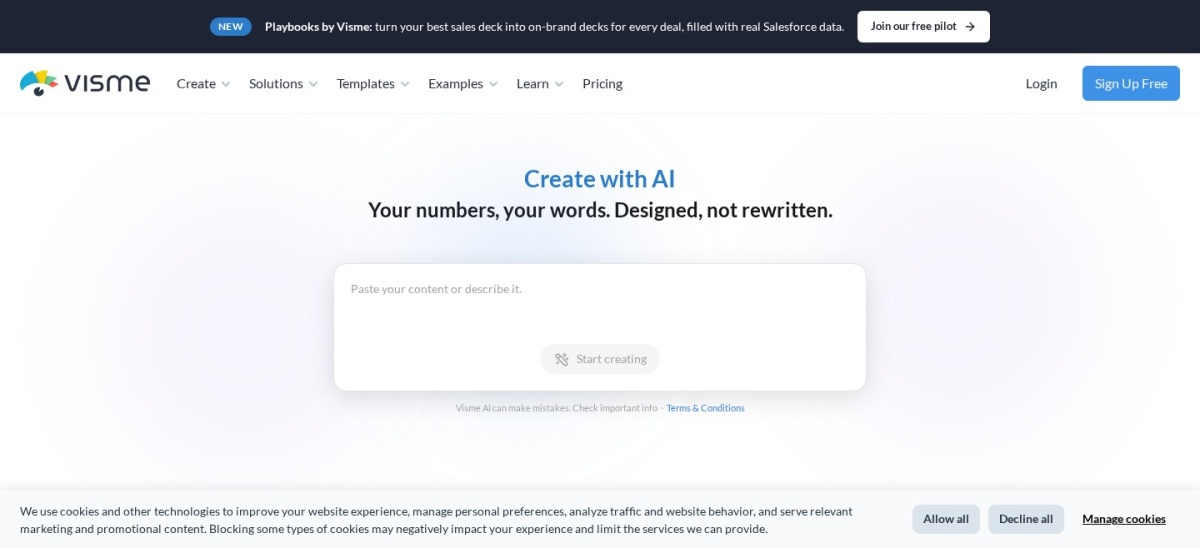
Visme homepage, captured Nov 2026.
Visme is a visual content creation platform with AI-assisted presentations, infographics, documents and marketing assets. Its free Basic plan provides limited templates and AI access, while Starter costs $147 annually and includes premium assets, additional export options, unlimited projects and expanded AI allowances.
The trade off is that Starter does not include PowerPoint export, advanced brand controls or the full collaboration feature set. Business costs $297 annually and adds PPTX exports, Brand Kit, analytics and more integrations. It suits marketing teams that create presentations alongside other visual content.
What we like
Creates presentations and other visual content
Free plan available
Large template and asset library
AI-assisted design and writing
Supports charts and data visualization
Watch out for
PowerPoint export requires Business
Advanced branding needs a higher plan
AI usage allowances apply
Starter unlocks premium assets; Business adds PPTX export, Brand Kit and analytics.Visit visme.co
06
SlidesAI
4.4/5on G2 (8 reviews, checked Nov 2026)
Paid from$120/yr
Best for turning documents and notes into slides
Entry planPro
Annual AI credits30,000
Maximum slides20 per deck
Free AI credits200/month
slidesai.io
SlidesAI homepage, captured Nov 2026.
SlidesAI is an AI presentation generator that converts topics, notes, scripts and documents into editable slide decks. The free Basic plan includes 200 AI credits per month, while Pro costs $120 annually and includes 30,000 yearly credits, document uploads, advanced models and up to 20 slides per deck.
The trade off is that longer decks and heavier AI usage require more expensive plans. Premium costs $250 annually and increases the annual allowance to 84,000 credits with support for larger decks. It suits educators, students and professionals who frequently transform written material into presentations.
What we like
Free plan with monthly AI credits
Creates presentations from documents and notes
Supports branded presentation templates
Works with PowerPoint and Google Slides workflows
Annual plans include substantial credit allowances
Watch out for
Pro has a per-deck slide limit
AI generation consumes credits
Very small G2 review sample
Pro adds document uploads and more credits; Premium increases deck size and AI capacity.Visit slidesai.io
07
Presentations.ai
3.9/5on G2 (14 reviews, checked Nov 2026)
Paid from$240/yr
Best for AI-generated business presentation drafts
Entry paid planPro
Annual billing$240
Pro credits5,000
PowerPoint exportPro
presentations.ai
Presentations.ai homepage, captured Nov 2026.
Presentations.ai is an AI-native presentation platform that turns prompts, documents, URLs and rough notes into structured decks. It offers an entry-level free option, while Pro costs $240 annually and includes 5,000 AI credits, high-quality PowerPoint export, presentation tracking, analytics and brand customization.
The trade off is its higher entry subscription compared with several alternatives and credit-based access to advanced AI features. Its G2 rating is also based on a limited review sample. It suits professionals who prioritize generating business presentation drafts from existing information and need editable PowerPoint exports.
What we like
Generates decks from prompts and documents
PowerPoint export on Pro
Presentation tracking and analytics
Brand customization options
Supports structured business presentations
Watch out for
Higher annual price than several competitors
Advanced AI functionality uses credits
Small public review sample
PowerPoint export requires a paid plan
Pro adds PowerPoint export, analytics and branding; Gold expands credits and advanced AI capabilities.Visit presentations.ai
How much does AI presentation software really cost?
AI presentation subscriptions are usually priced per user, with annual billing reducing the monthly equivalent. However, the cheapest plan is not necessarily the best value if it restricts editing, exports or generation volume.
Gamma Plus starts at $108 annually, while Beautiful.ai Pro costs $144 annually. Both support presentation creation, but Gamma emphasizes prompt-based generation and flexible formats, while Beautiful.ai focuses on automatically adjusting layouts.
Decktopus Pro costs $119.88 with annual billing, compared with its regular $24.99 month-to-month rate. The company also advertises promotional discounts, which should not be treated as standard subscription pricing.
Plus AI Basic and SlidesAI Pro both cost $120 annually. Plus AI focuses on editing inside existing presentation applications, while SlidesAI emphasizes generating decks from written inputs and documents.
Before purchasing, check whether AI allowances renew monthly or annually, whether they roll over, and whether additional credits can be purchased. Also verify the formats you can download without upgrading.
Should you replace PowerPoint with an AI presentation tool?
AI presentation generators are useful for creating initial outlines, arranging content and suggesting layouts. They can reduce the manual work involved in building a presentation from a blank document.
Traditional slide editors remain valuable when presentations need exact element positioning, complex animations, detailed charts or strict corporate formatting. Generated decks often require manual review before external use.
Gamma, Beautiful.ai and Decktopus provide dedicated presentation environments. Plus AI takes a different approach by adding AI generation and editing capabilities directly to PowerPoint and Google Slides.
For organizations that exchange editable PowerPoint files, export quality matters as much as generation speed. Test charts, fonts, images and animations after exporting rather than assuming the downloaded file will match the browser preview.
AI presentation tools work best as drafting and design assistants. People should still check factual accuracy, calculations, citations, visual accessibility and whether the presentation communicates the intended message.
How we chose
We selected established AI presentation platforms covering prompt-to-slide generation, document conversion, automatically formatted layouts and native PowerPoint or Google Slides workflows. We evaluated publicly documented features, export formats, pricing structures, collaboration capabilities and user feedback.
Official pricing pages and G2 review profiles were checked on 22 Nov 2026. Prices reflect published regular entry plans, with annual billing identified where applicable. Ratings and review counts come from G2, and smaller review samples are treated cautiously rather than presented as conclusive evidence of product quality.
We excluded products without confirmable official entry pricing and tools whose main purpose was unrelated to presentation creation. We retained some established products with limited public reviews because they serve distinct presentation workflows, but their ratings carry less evidential weight. No vendor paid for a place, and we do not claim testing for this list.
How to choose the best AI presentation software
Identify how you create presentations, which formats you need and how much editing control your workflow requires. Use these steps to narrow the shortlist.
Decide where you want to edit slides. Choose a dedicated AI presentation editor if you want the software to generate layouts and manage the design process. If you regularly exchange PowerPoint files or collaborate in Google Slides, consider a tool such as Plus AI that operates within your existing applications.
Compare generation limits and AI credits. Estimate how many decks you create and how frequently you revise them. SlidesAI Pro provides 30,000 annual AI credits, while Decktopus Pro includes 750 monthly credits. Review what counts as an AI action before comparing the allowances directly.
Check branding, exports and customization. Verify whether the entry plan supports PowerPoint downloads, custom fonts, branding and reusable templates. Visme reserves PPTX export for Business, while Gamma offers PowerPoint export on its free plan. Consider whether exported slides remain suitable for future editing.
Evaluate total annual value. Compare subscription costs with the features you will actually use. Gamma Plus costs $108 annually, Beautiful.ai Pro costs $144, and Presentations.ai Pro costs $240. Consider editing requirements, credit allowances and collaboration needs before paying for additional features.
FAQ
What is the best AI presentation software in 2026?
Gamma is our overall choice because it offers prompt-based presentation generation, a free plan, multiple export formats and affordable paid upgrades. Beautiful.ai is a stronger alternative for automatically adjusting slide layouts, while Decktopus combines generation with presentation coaching.
Can AI create a complete PowerPoint presentation?
Yes. Platforms such as Gamma, Decktopus and Presentations.ai can generate structured decks from prompts or other content and provide PowerPoint export options. However, exported slide formatting can differ from the original, so review fonts, layouts, charts and other elements before presenting.
Which AI presentation maker has the best free plan?
Gamma is a practical free choice because it supports presentation generation, up to 10 slides per prompt, and exports to PDF, PowerPoint and Google Slides. Visme and SlidesAI also offer free plans, although their AI features and export allowances differ.
How much does AI presentation software cost?
Entry subscriptions vary by platform. Gamma Plus costs $108 per year, Plus AI Basic costs $120 annually, and Beautiful.ai Pro costs $144 annually. More advanced options, including Presentations.ai Pro at $240 per year, add different AI, export and analytics capabilities.
Is Gamma better than Beautiful.ai?
Gamma is a better fit for quickly turning prompts and notes into web-based presentations and exported slide decks. Beautiful.ai is worth considering when automatically adjusting layouts and consistent business presentation design are the main priorities. Both can reduce manual formatting work, but neither removes the need to review the content.
Can AI presentation software work with Google Slides?
Yes. Plus AI integrates directly with Google Slides, allowing users to generate and rewrite content within the editor. Gamma supports Google Slides exports, while SlidesAI also supports Google Slides presentation workflows. The best choice depends on whether you prefer native editing or a separate AI generator.
Are AI-generated presentations editable?
Most AI presentation platforms allow users to change generated text, images and slide layouts. However, the editing experience differs significantly. Dedicated editors may restrict precise positioning, while tools operating inside PowerPoint provide access to familiar controls. Exported files should be checked for compatibility.
Which AI presentation software is best for business teams?
Beautiful.ai is useful for standardized business presentation layouts, while Visme supports branded visual content and collaborative design features on higher plans. Plus AI is appealing for teams already using PowerPoint or Google Slides. Compare team permissions, brand controls and subscription costs before selecting a platform.
Can I trust the information generated by AI presentation tools?
AI-generated slide content should be treated as a draft rather than a verified source. Check statistics, calculations, citations, quotations and factual claims against reliable references. Human review is particularly important for financial reports, investor presentations, medical information and other high-stakes materials.