Adobe Illustrator is the best of these affinity designer alternatives for professional print and logo work, with the industry-standard vector engine at $22.99 a month. CorelDRAW suits print shops at $269 a year, while Inkscape and Lunacy give you a full vector editor free.
How we make this list: we compare pricing pages, product documentation and public user reviews, then re-check every price before each update. No product paid for a place. Disclosure.
Adobe Illustrator is the only pick with the industry-standard file format every print shop and agency expects, at $22.99 a month.
CorelDRAW is the closest desktop rival for print and signage, with an annual plan at $269 and a $549 one-time licence.
Figma is the best pick if your work lives in the browser with a team, at $16 a month per full seat.
Inkscape and Lunacy are genuinely free vector editors, rated 4.4 and 4.3 on G2, with no paid plan needed.
Canva is the easiest switch for quick social and marketing graphics, with Pro at $120 a year, but its vector tools are shallow.
How do you choose the right affinity designer alternative?
Start from the file format your clients and printers expect. If they send .ai files or need print-ready CMYK output, Illustrator or CorelDRAW is the safer pick than a browser tool.
A subscription is the real cost to compare, not the headline monthly price. Illustrator costs $275.88 a year, CorelDRAW $269, and Figma $192 per editor, while Inkscape and Lunacy cost nothing at all.
Free tools are not cut-down demos here. Inkscape opens and edits SVG natively, and Lunacy reads Sketch and Figma files, so either can replace Affinity for logo and illustration work without a bill. Our logo guide shows how to place a finished logo on a WordPress site.
Browser tools trade depth for convenience. Canva, Figma, Kittl and Photopea run anywhere with nothing to install, but only Figma matches a desktop editor for precise path work; Canva is better for fast templates than for drawing.
Adobe Illustrator is the vector editor the design industry runs on, and the single-app plan costs $22.99 a month. It includes Illustrator on desktop, iPad and web, Adobe Express Premium, Adobe Fonts and 100GB of cloud storage, with a 7-day free trial and no free plan.
The trade off is the subscription, which never ends and has no one-time purchase option. At $275.88 a year it is the most expensive pick in this list, and cancelling an annual plan early can trigger a fee. It suits professional illustrators and studios whose clients and printers expect native .ai files.
What we like
Industry-standard .ai files every studio accepts
Deepest pen, path and typography tools here
Includes Adobe Fonts and 100GB of storage
Watch out for
Most expensive pick at $275.88 a year
No free plan, only a 7-day trial
Steep learning curve for beginners
Paid plans add the full Creative Cloud apps from $54.99 a monthVisit adobe.com
02
CorelDRAW
4.3/5on G2 (556 reviews, checked Nov 2026)
Starts at$269/yr
Best for print shops and signage
Vector editingYes, plus page layout
One-time purchase$549, Graphics Suite 2026
PlatformsWindows, macOS, Web
Paid planAnnual, $269/yr
coreldraw.com
CorelDRAW homepage, captured Nov 2026.
CorelDRAW is the long-running vector suite for print, signage and layout work, and the annual plan costs $269 a year. The suite adds Corel PHOTO-PAINT for pixel editing, Corel Font Manager and a browser version, with a 15-day free trial and no free plan.
The trade off is the Mac version, which reviewers say still lags the Windows release, and a smaller tutorial community than Illustrator. The $549 one-time purchase only beats the annual plan from year three. It suits sign shops and print production teams that want layout and vector tools in one suite.
What we like
Multipage layout plus vector tools in one suite
One-time purchase option at $549
Strong print and signage workflows
Watch out for
Mac build lags the Windows release
Smaller community than Illustrator
No free plan, only a 15-day trial
The $549 one-time licence beats the annual plan from year threeVisit coreldraw.com
03
Figma
4.7/5on G2 (1,585 reviews, checked Nov 2026)
Paid from$16/mo
Best for browser-based team design
Vector editingYes, with auto layout
Free planStarter, 3 design files
PlatformsBrowser, Windows, macOS
Paid planProfessional, $16/mo per seat
figma.com
Figma homepage, captured Nov 2026.
Figma is a browser-based design tool built around real-time collaboration, and the free Starter plan covers three design files. Paid Professional seats cost $16 a month and add unlimited files, shared libraries and advanced developer handoff.
The trade off is that Figma is built for screens, not print: it has no CMYK mode and weak print export, and paid costs rise with every editor seat. It suits product and interface teams that design together in the browser and hand files to developers.
What we like
Real-time collaboration with no install
Generous free Starter plan
Strong developer handoff tools
Watch out for
No CMYK or print-ready workflow
Costs rise with each paid editor seat
Needs an internet connection for full features
Professional adds unlimited files and shared librariesVisit figma.com
04
Canva
4.7/5on G2 (7,659 reviews, checked Nov 2026)
Paid from$120/yr
Best for fast marketing graphics
Vector editingBasic shapes and curves
Free planYes, 5GB storage
PlatformsBrowser, Windows, macOS, apps
Paid planPro, $120/yr
canva.com
Canva homepage, captured Nov 2026.
Canva is a browser design platform built on templates, and its free plan covers most everyday graphics with 5GB of storage. Pro costs $120 a year and adds Brand Kit, background remover, Magic Resize, 1TB of storage and the AI tools that now power Affinity.
The trade off is vector depth: Canva edits shapes and curves but cannot match a desktop editor for precise path work or print colour. It suits marketers and small teams who need on-brand social posts, slides and flyers fast, not illustrators drawing from scratch.
What we like
Easiest tool in this list to learn
Huge template library for fast output
Free plan covers most everyday graphics
Watch out for
Shallow vector and path tools
Best assets and AI sit behind Pro
Not built for print-ready CMYK work
Pro adds Brand Kit, Magic Resize and 1TB of storageVisit canva.com
05
Sketch
4.5/5on G2 (1,226 reviews, checked Nov 2026)
Starts at$12/mo
Best for Mac interface design teams
Vector editingYes, Mac-native
Free planNo, 30-day trial
PlatformsmacOS only
Paid planStandard, $12/mo per editor
sketch.com
Sketch homepage, captured Nov 2026.
Sketch is a Mac-native design toolkit for interfaces and vector illustration, and the Standard subscription costs $12 a month per editor on annual billing. It includes the native Mac app, real-time collaboration, unlimited documents and free developer handoff.
The trade off is platform: Sketch runs on macOS only, so Windows teammates can only view files in a browser. A Mac-only licence costs $120 with one year of updates. It suits Mac-based product teams that want a fast native editor instead of a browser tab.
Inkscape is a free, open-source vector editor that costs nothing and runs on Windows, macOS and Linux. It edits SVG natively, with pen and path tools, gradients, text on paths and extensions, and the current release is version 1.4.4.
The trade off is polish: the interface feels dated next to Affinity, it can run slowly on large files and it has no CMYK separation for professional print. It suits designers who want a full vector editor for logos and illustration with no bill at all.
Lunacy is a free vector editor from Icons8 that reads Sketch, Figma and .ai files, and it now runs in the browser as well as on Windows, macOS and Linux. It includes built-in icons, photos, illustrations and AI tools, with no paid plan.
The trade off is a small review base, 28 G2 reviews, and no collaboration tools to match Figma. It suits solo designers who want a free Sketch-style editor with ready-made assets and offline files.
Photopea is a free image editor that runs entirely in a browser tab and opens PSD, .ai, SVG and Sketch files with layers intact. The free version includes the full feature set with ads, and Premium costs $5 a month mainly to remove them.
The trade off is focus: Photopea is a raster editor first, so its vector tools are basic next to Affinity, and the free version shows ads. It suits anyone who needs to open and edit a PSD or .ai file fast without installing anything.
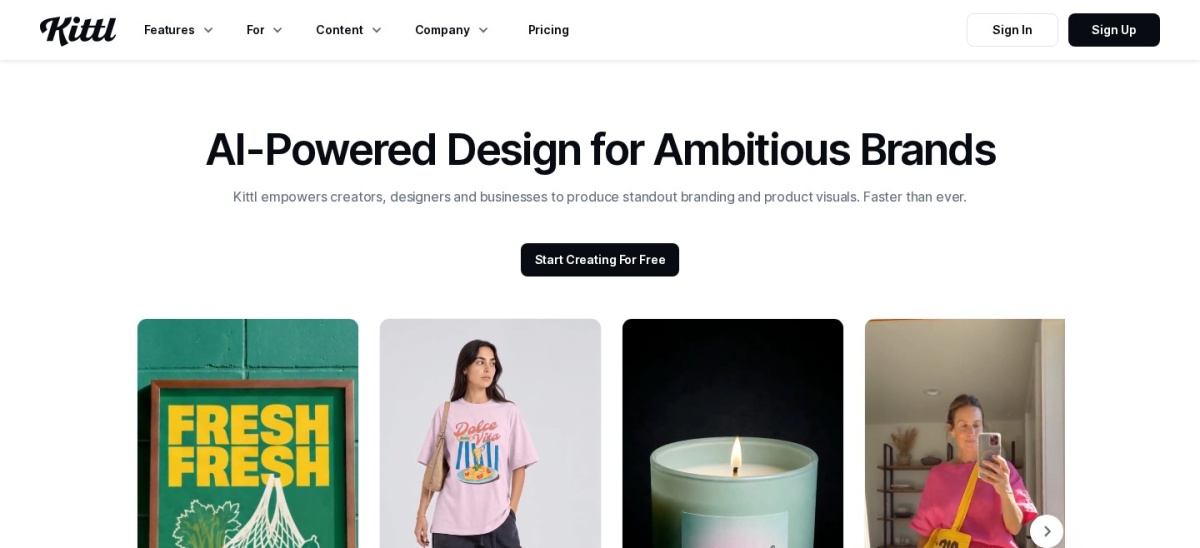
Kittl is a browser design platform built around typography, templates and AI image generation, aimed at merch and print-on-demand creators. The free plan is for personal use, and Pro costs $14 a month billed yearly with 2,000 AI tokens a month and a commercial licence.
The trade off is scope: Kittl is built for posters, shirts and merch, not for precise logo construction, and its free plan needs attribution and has no commercial use. It suits sellers who want fast typography-led designs with a commercial licence.
What we like
Standout typography and vintage type tools
AI generation with 2,000 tokens on Pro
Commercial licence up to 500,000 copies
Watch out for
Free plan is personal use only
Built for merch, not precise illustration
Only 37 G2 reviews so far
Pro adds a commercial licence and 2,000 AI tokensVisit kittl.com
Free vs paid: what you give up
Free picks cover the drawing itself well. Inkscape, Lunacy and Photopea all open common vector files and export SVG, PDF and PNG without a bill.
Paid plans mostly add collaboration and assets. Figma charges per editor seat, Canva Pro adds brand kits and AI tools, and Kittl Pro adds a commercial licence.
The dearest tools earn their price on files, not features. Illustrator and CorelDRAW cost about $270 a year because printers and agencies already work in their formats.
If you only draw logos and illustrations for yourself, start free. Our logo guide shows how to place the finished file on a WordPress site.
How we chose
We started from the vector editors designers name most often as Affinity Designer replacements, then kept the nine with a public numeric rating and a pricing page we could open.
Prices come from each vendor's pricing page, checked on 29 November 2026. Ratings and review counts come from G2 on the same day. Where a vendor shows a sale, the list shows the regular price.
We left out tools with no public rating, including Linearity Curve, whose pricing page shows no prices, and VectorStyler, which has no G2, Capterra or Trustpilot listing. No vendor paid for a place, and we do not claim hands-on testing for this list.
How to choose an Affinity Designer alternative
Start with the files you already have, then match the tool to the work you do most.
Check which files you must open. If clients send .ai or Sketch files, pick a tool that opens them natively: Illustrator, CorelDRAW, Lunacy or Inkscape.
Decide whether print matters. Print work needs CMYK and print-ready export, which points to Illustrator or CorelDRAW. Screen-only work is fine in Figma or Canva.
Count the seats before you count the price. A $16 Figma seat is cheap for one designer and dear for ten. Free tools cost the same for any team size.
Try the free tier first. Inkscape, Lunacy, Photopea, Figma and Canva all have free plans. Draw one real logo in your top pick before paying.
FAQ
What is the best Affinity Designer alternative in 2026?
Adobe Illustrator is the best overall pick for professional work. It is the industry-standard vector editor at $22.99 a month, rated 4.6 out of 5 on G2 from 6,192 reviews, and its .ai files open everywhere.
What is the best free alternative to Affinity Designer?
Inkscape is the best free alternative. It is a full open-source vector editor rated 4.4 out of 5 on G2, edits SVG natively and runs on Windows, macOS and Linux at no cost.
Is there a one-time purchase alternative to Affinity Designer?
Yes. CorelDRAW Graphics Suite sells a $549 one-time licence alongside its $269 annual plan, and Sketch sells a $120 Mac-only licence with one year of updates.
Can I use Figma instead of Affinity Designer?
Yes for screen design, with limits. Figma is free to start and strong for interfaces and team work, but it has no CMYK mode, so it is a poor pick for print-ready logos and packaging.
Which Affinity Designer alternative is best for beginners?
Canva is the easiest to start with, thanks to templates and a free plan. For real vector drawing without paying, Lunacy is the friendliest free editor, with built-in icons and photos.
Do any alternatives open Affinity Designer files?
Most open common formats rather than Affinity's own files. Illustrator, CorelDRAW, Inkscape, Lunacy and Photopea all open SVG, PDF and .ai files, so export your Affinity work to SVG first.
SaaS SEO and WordPress specialist with about 8 years of experience. Rakib compares WordPress plugins, themes, hosting and software using public pricing, documentation and user reviews. See how we rank.