monday.com is the best Shortcut alternative for most teams, rated 4.7 out of 5 on G2 from more than 17,400 reviews, with paid plans from $9 per seat a month. Pick Linear for the closest dev-focused match at $8 a user a month, or Trello for the cheapest paid plan at $5.
How we make this list: we compare pricing pages, product documentation and public user reviews, then re-check every price before each update. No product paid for a place. Disclosure.
monday.com leads this list at 4.7 out of 5 on G2 from 17,422 reviews, with paid plans from $9 a seat a month.
Linear is the closest match for dev teams at $8 a user a month, with a free plan up to 250 issues.
Trello has the cheapest paid plan at $5 a user a month, against $8.50 for Shortcut's own Team plan.
ClickUp replaced its Unlimited plan with Core in October 2026: $12 regular, with $9 shown on yearly billing.
All 9 tools have a free plan, and paid plans run from $5 to $15 a user a month.
What should you look for in Shortcut alternatives?
Shortcut is built for software teams. Work is organised as stories, epics and iterations on Kanban boards, with roadmaps, docs and OKRs, and it is rated 4.4 out of 5 on G2 from 177 reviews. Its Team plan costs $8.50 a user a month, so any alternative should beat that price or add something Shortcut lacks.
Sprint support is the first filter. Linear, Jira and ClickUp run sprints natively, while monday.com, Asana and Wrike handle them through boards and timelines, and Trello, Notion and Basecamp have no sprint tooling at all.
Price per seat is the second filter. Trello starts at $5 a user a month and Linear at $8, both under Shortcut's $8.50, while Basecamp Plus at $15 is the dearest per-seat plan here. Check the seat rules too: monday.com needs at least 3 seats and Asana bills in blocks of five above five users.
Free plans vary more than prices do. ClickUp's free plan covers unlimited tasks and members, Jira's covers up to 10 users, and Basecamp's covers a single project, so a free plan that fits a solo user can still force an upgrade for a team of five.
monday.com is a visual work platform built around boards with typed columns for status, owner, date and budget. The free plan covers up to 2 seats and 3 boards, while Basic at $9 per seat a month billed yearly adds unlimited items, boards and viewers, plus 1,000 AI credits a month.
The trade off is that Basic has no timeline or Gantt view and no automations, so teams that need scheduling views must move to Standard at $12 per seat a month. It suits teams that want Shortcut's board feel with more views, templates and integrations.
What we like
Highest G2 rating in this list at 4.7 out of 5
More than 200 templates for planning and launches
Unlimited free viewers on paid plans
Watch out for
Paid plans need at least 3 seats
Automations only start on Standard at $12
Standard adds timeline, Gantt and 250 automation actionsVisit monday.com
02
Linear
4.7/5on G2 (900 reviews, checked Nov 2026)
Paid from$8/mo
Best for dev teams that want speed
Free planUp to 250 issues
Cheapest paidStandard, $8/user/mo
SprintsCycles built in
G2 rating4.7/5 from 900 reviews
linear.app
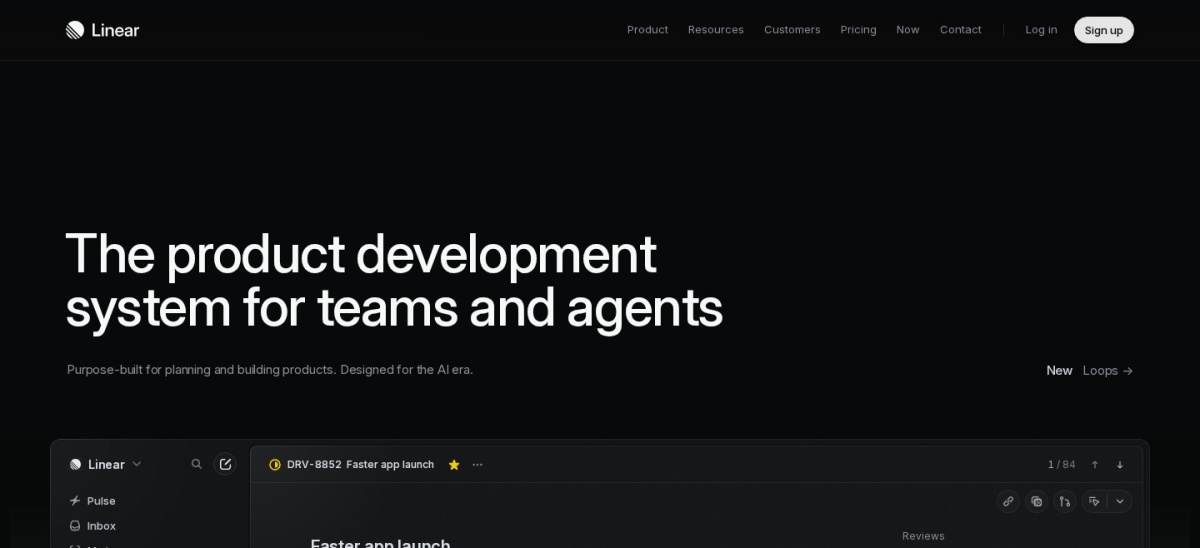
Linear homepage, captured Nov 2026.
Linear is a fast, keyboard-first issue tracker built for software teams that found Jira slow and Trello too simple. The free plan covers unlimited members and up to 250 issues, while Standard at $8 a user a month removes the cap and adds admin controls and unlimited file uploads.
The trade off is range. Linear has no built-in docs wiki or broad marketing templates, so teams that plan non-engineering work beside sprints need a second tool. It suits engineering teams of roughly five to fifty who live in cycles and GitHub.
What we like
Fastest issue tracking in this list, built for engineers
Cycles, projects and roadmaps built in
Two-way GitHub sync on paid plans
Watch out for
Free plan caps at 250 issues per workspace
No built-in docs or wiki
Plus at $14 adds AI features and cross-workspace sharingVisit linear.app
03
ClickUp
4.6/5on G2 (14,878 reviews, checked Nov 2026)
Paid from$12/mo
Best all-in-one value
Free planUnlimited tasks, 60 MB
Cheapest paidCore, $12/user/mo
Yearly billingPage shows $9/user/mo
G2 rating4.6/5 from 14,878 reviews
clickup.com
ClickUp homepage, captured Nov 2026.
ClickUp is an all-in-one workspace with tasks, collaborative docs, whiteboards, sprint management, goals and native time tracking. The Free Forever plan covers unlimited tasks and members with 60 MB of storage, and Core adds unlimited storage, Gantt charts, custom fields and 1,000 automations a month.
The trade off is complexity. Core lists at $12 a user a month, with the page currently showing $9 a user a month on yearly billing, and the settings run deep enough that a team without someone owning setup ends up with messy workflows. It suits teams that want one subscription to replace several tools.
What we like
Most features per dollar in this list
Free plan covers unlimited tasks and members
Sprint management included on every plan
Watch out for
Deep settings take time to learn
Core's $12 regular price rose from the old $7 Unlimited plan
Business at $17 billed yearly adds more automations and AIVisit clickup.com
04
Notion
4.6/5on G2 (13,767 reviews, checked Nov 2026)
Paid from$10/mo
Best for docs plus project tracking
Free planYes, solo use
Cheapest paidPlus, $10/member/mo
DatabasesYes, with linked views
G2 rating4.6/5 from 13,767 reviews
notion.com
Notion homepage, captured Nov 2026.
Notion is a flexible workspace where pages, a team wiki, task lists and linked databases live together. The free plan covers solo use with unlimited blocks, while Plus at $10 per member a month billed yearly adds unlimited collaborative blocks, unlimited file uploads and 30 days of page history.
The trade off is structure. Notion has no built-in sprints or velocity reports, so engineering teams must build their own sprint system from databases. It suits product teams that plan in docs and want tasks beside specs, meeting notes and a wiki.
What we like
Docs, wiki and tasks in one subscription
Flexible databases with linked views
Generous free plan for solo use
Watch out for
No built-in sprints or burndown charts
Full AI needs the $20 Business plan
Business at $20 adds full AI and SAML single sign-onVisit notion.com
05
Trello
4.4/5on G2 (14,081 reviews, checked Nov 2026)
Paid from$5/mo
Best cheapest paid plan
Free plan10 boards per workspace
Cheapest paidStandard, $5/user/mo
Automations1,000 runs a month
G2 rating4.4/5 from 14,081 reviews
trello.com
Trello homepage, captured Nov 2026.
Trello is a visual Kanban tool from Atlassian where cards move across lists on boards. The free plan covers unlimited cards with 10 boards per workspace, while Standard at $5 a user a month adds unlimited boards, advanced checklists, card mirroring and 1,000 automation runs a month.
The trade off is depth. Trello has no built-in sprints, story points or roadmaps, so software teams outgrow it once they need backlog planning. It suits small teams that want the simplest possible board and the lowest paid price in this list.
What we like
Cheapest paid plan here at $5 a user a month
Easiest board to learn in this list
Free plan is usable for years
Watch out for
No sprints, story points or roadmaps
Per-user pricing climbs as teams scale
Premium at $10 adds timeline, calendar and more automationsVisit trello.com
06
Asana
4.4/5on G2 (14,048 reviews, checked Nov 2026)
Paid from$10.99/mo
Best for cross-team coordination
Free planUp to 2 users
Cheapest paidStarter, $10.99/user/mo
Timeline viewYes, on Starter
G2 rating4.4/5 from 14,048 reviews
asana.com
Asana homepage, captured Nov 2026.
Asana is a work management platform with list, board, timeline and Gantt views for coordinating work across departments. The free Personal plan covers up to 2 users, while Starter at $10.99 a user a month billed yearly adds timeline views, workflow builder, unlimited automations and custom fields.
The trade off is the seat rules. Starter has a 2-seat minimum and Asana sells seats in blocks of five above five users, so a 12-person team pays for 15 seats. It suits teams that coordinate marketing, operations and product work in one place.
What we like
Timeline and Gantt views from the Starter plan
Unlimited automations and free guests
Strongest cross-department adoption in this list
Watch out for
Free plan covers only 2 users
Seat blocks make mid-size teams pay for empty seats
Advanced at $24.99 adds portfolios, goals and workloadVisit asana.com
07
Jira
4.3/5on G2 (7,941 reviews, checked Nov 2026)
Paid from$7.92/mo
Best for large engineering orgs
Free planUp to 10 users
Cheapest paidStandard, $7.92/user/mo
Annual tier$950/yr for 10 users
G2 rating4.3/5 from 7,941 reviews
atlassian.com
Jira homepage, captured Nov 2026.
Jira is Atlassian's issue and project tracker, built for software teams running sprints, backlogs and releases at scale. The free plan covers up to 10 users, while Standard adds user roles, external collaboration, 250 GB of storage and 400 automation steps per user a month.
The trade off is price complexity. Monthly billing is $9.70 a user a month for teams up to 100, while the 10-user annual tier costs $950 a year, which works out at $7.92 a user a month. It suits large engineering orgs that already use Confluence and Bitbucket.
Wrike is a work management platform with Gantt charts, workload views, approvals and portfolio reporting for mid-size and large teams. The free plan covers unlimited users with board and table views, while Team at $10 a user a month billed yearly adds interactive Gantt charts, custom workflows and AI Essentials.
The trade off is the seat cap. Team covers only 2 to 15 users, and growing past that moves the whole team to Business at $25 a user a month. It suits teams running many projects in parallel that will invest time in setup.
What we like
Workload views and capacity planning built in
Gantt charts from the Team plan
More than 400 integrations
Watch out for
Team plan stops at 15 users
Business costs 2.5 times more per seat
Business at $25 adds time tracking and advanced reportsVisit wrike.com
09
Basecamp
4.1/5on G2 (5,489 reviews, checked Nov 2026)
Paid from$15/mo
Best flat-rate pick for large teams
Free plan1 project, 1 GB
Cheapest paidPlus, $15/user/mo
Flat-rate option$299/mo, unlimited users
G2 rating4.1/5 from 5,489 reviews
basecamp.com
Basecamp homepage, captured Nov 2026.
Basecamp bundles projects, message boards, chat, schedules and file storage in one calm interface. The free plan covers one project with 1 GB of storage, while Plus at $15 a user a month adds unlimited projects, 500 GB of storage and unlimited integrations.
The trade off is the per-seat price for small teams. Plus costs $15 a user a month, the highest in this list, but Pro Unlimited at $299 a month covers unlimited users, so large teams pay a flat fee. It suits teams that want one place for tasks and discussion without sprint tooling.
What we like
Flat $299 a month covers unlimited users
Chat, files and schedules in one place
No per-seat fees on the Pro plan
Watch out for
No sprints, story points or roadmaps
Free plan covers only one project
Pro Unlimited at $299 a month adds 5 TB and priority supportVisit basecamp.com
Before you switch: what to check first
Export your Shortcut data first. Stories, epics and iteration history do not always carry over cleanly, so check each alternative's importer before you cancel.
Check the GitHub integration. Linear and Jira sync both ways with GitHub, and Shortcut teams that link commits to stories should test that link on the free plan before paying.
Keep one planning view outside the tracker. If your team also publishes content, a shared content calendar keeps launch dates visible while the new tool beds in.
How we chose
We started from the tools G2 lists as Shortcut alternatives and the project trackers most often compared with it, then kept the nine with a public G2 rating and a published price.
Prices come from each vendor's pricing page, checked on 29 November 2026. Ratings and review counts come from G2 on the same day, except Linear's count, which comes from a G2-based comparison. Where a vendor shows a sale or promo price, the list shows the regular price.
We left out smaller dev trackers whose review counts were too small to compare fairly. No vendor paid for a place, and we do not claim hands-on testing for this list.
How to choose a Shortcut alternative
Start with how your team actually plans sprints, then let price and seat rules narrow the list.
Match the sprint workflow first. If your team runs two-week sprints with story points, shortlist Linear, Jira or ClickUp. If work is mostly boards and deadlines, monday.com, Asana or Trello will feel closer to home.
Count the seats you will actually pay for. monday.com needs at least 3 seats, Asana bills in blocks of five above five users, and Wrike's Team plan stops at 15. Multiply the per-seat price by the billed seats, not the team size.
Try the free plan with real work. Import one sprint or project and run it for two weeks. Check the GitHub link, the board speed and whether reports answer the questions your stand-up asks.
Check what the cheapest paid plan leaves out. Trello's $5 plan has no sprints, monday.com's $9 plan has no automations, and Linear's $8 plan caps history at 30 days. The next tier up is the real price if you need those features.
FAQ
What is the best Shortcut alternative in 2026?
monday.com is the best Shortcut alternative for most teams. It is rated 4.7 out of 5 on G2 from 17,422 reviews, and its Basic plan costs $9 per seat a month billed yearly, with a free plan for up to 2 seats.
What is the best free alternative to Shortcut?
Trello is the best free alternative for simple boards, with unlimited cards and 10 boards per workspace. Linear's free plan is better for dev teams, covering unlimited members and up to 250 issues.
Which Shortcut alternative is best for software development teams?
Linear is the best pick for software teams. It is built for engineers, with cycles, projects and roadmaps, two-way GitHub sync, and a Standard plan at $8 a user a month, just under Shortcut's $8.50 Team plan.
How much do Shortcut alternatives cost?
Paid plans run from $5 to $15 a user a month: Trello at $5, Jira at $7.92 on its 10-user annual tier, Linear at $8, monday.com at $9, Notion and Wrike at $10, Asana at $10.99, ClickUp at $12 and Basecamp Plus at $15.
Is there a cheaper alternative to Shortcut?
Yes. Shortcut's Team plan costs $8.50 a user a month, and Trello at $5 and Linear at $8 both undercut it. Jira's 10-user annual tier also works out cheaper at $7.92 a user a month, though monthly billing is $9.70.
monday.com vs Linear: which is better as a Shortcut alternative?
monday.com is better for most teams, with a 4.7 G2 rating from 17,422 reviews and more than 200 templates. Linear is better for engineering-only teams, with faster issue tracking, built-in cycles and a lower $8 price, but no docs wiki or broad templates.
SaaS SEO and WordPress specialist with about 8 years of experience. Rakib compares WordPress plugins, themes, hosting and software using public pricing, documentation and user reviews. See how we rank.