Virtual Staging AI is the best virtual home staging software for most real estate agents, offering six photos per month for $192 annually with unlimited regenerations. Choose Planner 5D for detailed furniture layouts or AI HomeDesign for staging alongside broader property photo editing.
How we make this list: we compare pricing pages, product documentation and public user reviews, then re-check every price before each update. No product paid for a place. Disclosure.
Virtual Staging AI offers six monthly photos, furniture removal and unlimited regenerations for $192 per year.
Planner 5D costs $59.99 per year and earns a 4.7/5 G2 rating from 189 reviews.
AI HomeDesign includes 30 photos per month and unused photo rollover for $228 annually.
Apply Design offers manual furniture placement from $10 per standard DIY image without a subscription.
RoomSketcher and Coohom offer annual subscriptions at $144 and $300 respectively for floor-plan-based visualization.
Collov AI includes 60 monthly photo credits for $228 annually, but its 2.5/5 Trustpilot rating warrants caution.
What makes the best virtual home staging software worth paying for?
Virtual home staging helps buyers imagine how an empty property could look when furnished. Photo-based staging software adds digital furniture, lighting and decorative elements to existing property photographs without requiring physical furniture rental.
AI staging and 3D room planning solve different problems. AI software generates furnished images from existing photos, while room planners let users build layouts, position furniture and create visualizations from different perspectives.
Pricing models matter more than headline subscription costs. Some platforms charge for original photographs, others deduct credits for individual generations, and tools such as Apply Design charge according to the type of staging requested.
Accurate property representation matters more than decorative quality. Review generated photographs for altered windows, unrealistic furniture dimensions and misleading structural changes. Clearly disclose virtual staging wherever applicable listing requirements call for it.
3.4/5on Trustpilot (176 reviews, checked Nov 2026)
Starts at$192/yr
Best for fast real estate photo staging
Entry planBasic, 6 photos/month
Staging methodAI-generated furniture
Furniture removalIncluded
RegenerationsUnlimited
virtualstagingai.app
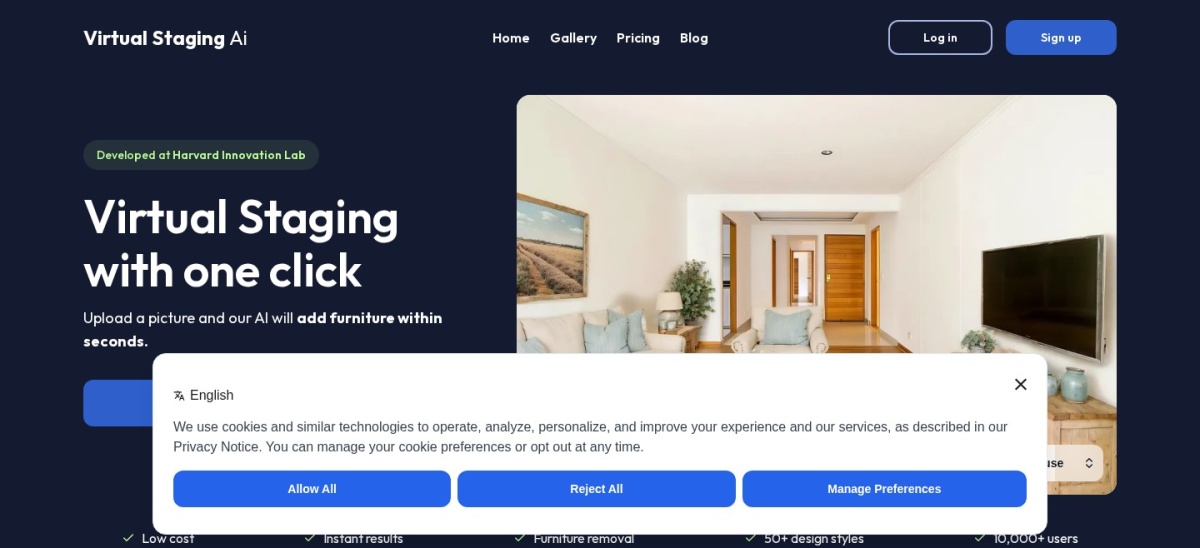
Virtual Staging AI homepage, captured Nov 2026.
Virtual Staging AI is a photo-based staging platform that generates furnished property images without requiring users to build digital room models. Its Basic subscription covers six photographs monthly, includes furniture removal and allows repeated generations and downloads of those photographs. The vendor advertises a processing time of approximately 10 seconds.
The trade off is that unlimited generations do not mean unlimited original photographs. Basic costs $192 per year, while the Standard plan increases the allowance to 20 monthly photographs for $228 annually. It suits real estate agents who need furnished listing photographs quickly and can work within predictable monthly limits.
What we like
Fast automated furniture placement
Repeated generations without additional photo charges
Furniture removal included in Basic
Downloads without watermarks
Multiple interior styles and room categories
Watch out for
Entry plan limits the number of original photographs
Planner 5D is a home design and visualization application for creating furnished interiors from editable floor plans. Its Premium subscription includes 100 monthly AI credits, expanded furniture selection, AI-assisted room design and HD rendering. The free version supports project creation across desktop and mobile devices.
The trade off is that detailed staging can require more preparation than uploading a photograph to a dedicated AI staging platform. Premium renews at $59.99 annually or costs $19.99 with monthly billing. It suits homeowners, property marketers and designers who want control over room layouts and furniture arrangements.
Professional rendering features require a higher subscription
AI features have a credit allowance
Premium adds AI credits, expanded furniture access and HD rendering.Visit planner5d.com
03
AI HomeDesign
2.7/5on Trustpilot (47 reviews, checked Nov 2026)
Starts at$228/yr
Best for complete property photo editing
Entry planPro, 30 photos/month
Unused photosRollover supported
Image storage6 months
Editing modelPhoto-based credits
aihomedesign.com
AI HomeDesign homepage, captured Nov 2026.
AI HomeDesign is an AI property photography platform combining virtual staging with furniture removal, room restyling and other image adjustments. Its annual Pro subscription includes 30 monthly photographs, multiple editing tools and watermark-free exports. Users can continue refining a photograph without consuming another photo credit for every adjustment.
The trade off is its mixed customer feedback and the annual payment requirement for the quoted $228 subscription. Priority assistance and advanced integrations are reserved for higher plans. It suits photographers and property marketers who regularly need several editing operations on the same listing photographs.
What we like
Multiple property photography tools
Repeated editing of credited photographs
Unused photo allowance rolls over
Free initial image generations
Watermark-free paid exports
Watch out for
Low Trustpilot rating compared with several alternatives
Entry plan excludes priority support
API access requires a higher plan
Pro adds recurring photo allowances, rollover and watermark-free downloads.Visit aihomedesign.com
04
Apply Design
3.6/5on Trustpilot (72 reviews, checked Nov 2026)
Starts at$10 one-time
Best for precise furniture placement without subscriptions
Billing modelPay per coin
DIY photo1 coin
Automatic photo1.5 coins
Panoramic stagingSupported
applydesign.io
Apply Design homepage, captured Nov 2026.
Apply Design is a virtual staging platform that combines automatic furnishing with a manual furniture editor. A regular DIY photograph costs one coin, while automatic staging uses 1.5 coins. Coins cost $10 each for purchases below 10, and new users can stage their first image free.
The trade off is that staging several properties can become expensive compared with recurring AI subscriptions. Automatic staging costs $15 per standard photograph at the smallest coin purchase tier. It suits occasional property sellers and photographers who want direct control over furniture selection without paying a recurring subscription.
What we like
No mandatory recurring subscription
Manual control over furniture arrangements
Automatic staging available
Panoramic image staging supported
Unlimited DIY revisions
Watch out for
Per-image charges can become expensive at volume
Automatic staging consumes additional coins
Manual design requires more user input
Paid coins unlock staging jobs; the $10 ladder value represents one coin, not annual usage.Visit applydesign.io
05
RoomSketcher
4.5/5on G2 (150 reviews, checked Nov 2026)
Paid from$144/yr
Best for furnished real estate floor plans
Entry planPro
Monthly credits5
Floor plans2D and 3D
Custom brandingIncluded in Pro
roomsketcher.com
RoomSketcher homepage, captured Nov 2026.
RoomSketcher is a property floor planning application for producing furnished layouts, interior visualizations and spatial presentations. Its free account includes two starting credits and one AI floor plan conversion. Pro provides five monthly credits, access to the complete furniture collection and additional presentation features.
The trade off is that some visual outputs consume credits even when users have a paid subscription. Pro costs $144 annually or $24 with monthly billing. It suits real estate professionals who want to communicate property dimensions, furniture arrangements and room connections rather than only furnishing existing photographs.
What we like
Furnished property floor plans
High G2 rating from 150 reviews
AI-assisted floor plan conversion
Custom branding on Pro
Room measurements and scaled printing
Watch out for
Some outputs consume additional credits
Requires more preparation than direct photo staging
Free access has limited starting credits
Pro unlocks the complete furniture library, branding and additional visualization outputs.Visit roomsketcher.com
06
Coohom
4.3/5on G2 (183 reviews, checked Nov 2026)
Paid from$300/yr
Best for high-resolution interior visualization
Entry planPro Individuals
Free projectsUp to 3
Paid renderingUnlimited 4K images
Virtual walkthroughs360-degree presentations
coohom.com
Coohom homepage, captured Nov 2026.
Coohom is a cloud-based interior visualization platform for creating furnished room models, property presentations and high-resolution images. Its free account supports up to three design projects, while Pro removes the project limit and includes unlimited 4K image rendering. Designers can also create custom furniture models and interactive interior presentations.
The trade off is the time required to construct accurate digital room layouts before producing the finished images. Pro costs $300 annually, making it more expensive than several simpler room planners. It suits professional staging businesses, interior designers and property developers producing detailed visual presentations.
What we like
Unlimited 4K image rendering on Pro
Custom furniture modeling
Interactive interior walkthroughs
Unlimited paid design projects
High-resolution property presentations
Watch out for
Greater learning curve than automatic photo staging
Free account limits project creation
Advanced collaboration requires a higher subscription
Higher annual cost than basic room planners
Pro removes project limits and adds watermark-free 4K rendering.Visit coohom.com
07
Collov AI
2.5/5on Trustpilot (37 reviews, checked Nov 2026)
Starts at$228/yr
Best for larger monthly AI staging allowances
Entry planStandard
Monthly photo credits60
Commercial licenseIncluded
Furniture removalIncluded
collov.ai
Collov AI homepage, captured Nov 2026.
Collov AI is a real estate image editing platform that combines automated virtual staging with furniture removal and additional property photo tools. Its Standard annual subscription includes 60 monthly photo credits, repeated generations, commercial image usage and high-resolution downloads. It also provides a virtual staging disclosure feature.
The trade off is customer confidence and restricted access to advanced editing functions. Standard costs $228 annually before temporary promotional discounts, while more advanced staging features require higher subscriptions. It suits agents who prioritize monthly photo allowances but are willing to evaluate output quality and subscription terms before committing.
Standard adds recurring photo credits, commercial usage and watermark-free exports.Visit collov.ai
Should you use AI virtual staging or 3D room planning?
AI virtual staging is generally better for existing property photographs. Agents can upload an empty living room, choose a furnishing style and generate an image suitable for further review. Virtual Staging AI, AI HomeDesign and Collov AI focus on this workflow.
Three-dimensional room planning is better when furniture dimensions and room layouts matter. Planner 5D, RoomSketcher and Coohom let users create furnished digital spaces that can be viewed from different angles.
Apply Design occupies a middle ground. Its manual editor gives photographers more control over furnishing decisions while working with existing property images rather than constructing an entire digital building.
How much does virtual home staging software actually cost?
Subscription prices do not tell you the entire cost of virtual staging. Virtual Staging AI Basic costs $192 annually for six monthly photographs, while its Standard plan costs $228 annually for 20 monthly photographs.
Per-image billing can make sense for occasional listings. Apply Design charges $10 for a standard DIY photograph at its smallest purchase tier, with lower coin prices available for larger purchases. Its price ladder entry represents a single purchase rather than an annual subscription.
Annual room planning subscriptions can be less expensive than dedicated photo staging software. Planner 5D Premium costs $59.99 annually, but the additional time required to build and furnish digital rooms should be considered.
Annual prices in this guide represent published recurring annual subscriptions rather than temporary sale prices. Compare the actual number of usable images, regeneration policies and additional credit charges before choosing a plan.
How we chose
We selected dedicated virtual staging applications and interior visualization software that can produce furnished residential property images. We compared furniture placement, image editing, rendering capabilities, output restrictions and pricing models relevant to real estate agents, photographers and property marketers.
We checked official pricing pages and public G2 or Trustpilot ratings on 29 Nov 2026. Annual subscription prices use published annual billing rates, excluding temporary promotional discounts. Apply Design uses a one-time credit purchase rather than an annual subscription, so its yearly comparison value represents a single standard DIY staging purchase.
We excluded products without verifiable pricing or numeric public ratings, along with traditional furniture rental businesses and services that do not provide a relevant software workflow. Free trials and complimentary initial generations are not classified as permanent free plans. No vendor paid for a place, and we do not claim testing for this list.
How to choose virtual home staging software
Compare your listing volume, required design control, image quality and total operating costs before choosing a virtual staging platform.
Decide which staging workflow you need. Choose photo-based AI staging for existing property images. Choose a 3D room planner if you need editable furniture layouts, room measurements or interior views from different perspectives.
Estimate your recurring photo volume. Count the original photographs you expect to stage each month. Compare that number against subscription allowances, pay-per-image charges and the cost of purchasing additional credits.
Check furniture control and visual accuracy. Look for furniture removal, placement adjustments and regeneration options. Examine whether the software preserves the original room structure and produces furniture that fits the available space.
Review billing and publication requirements. Confirm renewal prices, cancellation conditions, commercial image permissions and applicable virtual staging disclosure requirements. Keep original photographs available alongside staged versions.
FAQ
What is the best virtual home staging software in 2026?
Virtual Staging AI is the best overall choice for agents who need fast photo-based staging. Its $192 annual Basic subscription includes six monthly photographs and repeated generations. Planner 5D is a better choice when detailed furniture arrangements and editable room layouts are more important.
Is there any free virtual home staging software?
Yes. Planner 5D, RoomSketcher and Coohom provide free accounts for creating furnished digital interiors. Their free plans restrict certain models, rendering options or projects. Apply Design and AI HomeDesign also offer complimentary initial staging opportunities, although continued usage requires payment.
How much does virtual home staging software cost?
Virtual home staging software starts at $59.99 annually for Planner 5D Premium among the subscription products compared here. Dedicated photo staging subscriptions include Virtual Staging AI at $192 annually, while Apply Design offers individual DIY staging purchases starting at $10.
What is the easiest virtual staging software for beginners?
Virtual Staging AI is a suitable beginner choice because it generates furnished images directly from existing photographs. Users do not need to draw floor plans or build furniture models. Its automated workflow is particularly relevant for agents who only need finished listing images.
Is Virtual Staging AI better than Planner 5D?
Virtual Staging AI is better for furnishing existing listing photographs quickly, while Planner 5D offers greater control over editable room layouts. Virtual Staging AI Basic costs $192 annually, compared with $59.99 annually for Planner 5D Premium. The appropriate choice depends on the desired output.
What is the best virtual staging software without a monthly subscription?
Apply Design is a suitable option for avoiding recurring subscriptions. It uses prepaid coins, with a standard DIY photograph consuming one coin and automatic staging consuming 1.5 coins. Its smallest purchase tier charges $10 per coin, making costs directly dependent on usage.
Can virtual staging software remove existing furniture?
Yes. Virtual Staging AI, Apply Design, AI HomeDesign and Collov AI include furniture removal capabilities. These tools can help prepare occupied or cluttered rooms for digital furnishing. Review the resulting images carefully because automated removal can introduce inaccuracies around walls, flooring and permanent fixtures.
Can real estate agents publish AI-staged property photographs?
Yes, provided the images comply with applicable advertising and property listing requirements. Clearly disclose virtual staging where required, avoid misleading structural changes and retain original property photographs. Generated furniture should demonstrate possible room usage rather than misrepresent what is included with the property.
SaaS SEO and WordPress specialist with about 8 years of experience. Rakib compares WordPress plugins, themes, hosting and software using public pricing, documentation and user reviews. See how we rank.