Todoist is the best to-do list app for most people. Its free plan covers 5 projects with reminders, and Pro costs $5 a month billed yearly, rated 4.5 out of 5 on G2. Pick TickTick for the lowest paid price, $35.99 a year, or Microsoft To Do for a free app that works with Outlook.
How we make this list: we compare pricing pages, product documentation and public user reviews, then re-check every price before each update. No product paid for a place. Disclosure.
Todoist is the best all-round pick: a solid free plan, Pro at $5 a month billed yearly, and a 4.5 out of 5 rating on G2 from 866 reviews.
TickTick has the cheapest paid plan in this list at $35.99 a year, and adds a calendar, habit tracking and a Pomodoro timer.
Things 3 is the only one-time purchase here at $9.99 for iPhone, but it works on Apple devices only, with no Windows, Android or web version.
Microsoft To Do is completely free and the best choice if you already use Outlook and Microsoft 365.
ClickUp and Asana are team tools first: both charge per user, so they cost more than a personal to-do app once a team grows.
What a good to-do list app should cover
A to-do list app earns its place by making capture fast. You should be able to add a task in seconds, give it a date, and find it again without digging through menus.
Reminders are where free plans differ most. Some apps limit reminders or recurring tasks to paid plans, so check what the free version actually lets you set before you commit.
Sync matters too. If you plan on your phone and work on a laptop, the app needs to keep both in step. Our guide on scheduling posts in WordPress shows the same habit of planning ahead that a good task list supports.
Price is the last filter. Most apps here charge $35 to $60 a year for one person, while team tools charge per user per month, which adds up fast.
Todoist is a to-do list app built around fast capture and natural language dates, so typing "call Ana tomorrow at 9am" creates a dated task. The free Beginner plan covers 5 personal projects, 3 filter views, list and board layouts and task reminders, with 120+ integrations.
The trade off is price. Pro costs $5 a month billed yearly ($60 a year) or $7 billed monthly, and adds 300 projects, calendar and table layouts, task duration, custom reminders and 150 filter views. It suits people who plan every day in one app and want it on every device.
What we like
Fast task capture with natural language dates
Works on web, desktop, mobile and watch
Free plan is usable, with reminders included
Rated 4.5 out of 5 from 866 G2 reviews
Watch out for
Calendar layout and custom reminders need Pro
Pro price rose in December 2025, from $48 to $60 a year
Pro adds calendar views, deadlines and 150 filter viewsVisit todoist.com
02
TickTick
4.5/5on G2 (114 reviews, checked Nov 2026)
Paid from$35.99/yr
Best value paid plan
Free planYes, with lists and reminders
CalendarBuilt in, with habit tracking
Pomodoro timerYes
Paid planPremium, $35.99/yr
ticktick.com
TickTick homepage, captured Nov 2026.
TickTick is a to-do list app that packs a calendar, habit tracker and Pomodoro timer into the same app as your tasks. The free plan covers lists, reminders and a calendar view, and Premium costs $35.99 a year or $2.99 a month.
The trade off is polish. Reviewers praise its flexibility and low price but note occasional glitches and fewer integrations than Todoist. It suits people who want one app for tasks, habits and focused work sessions.
4.8/5on App Store (28,106 reviews, checked Nov 2026)
Starts at$9.99/once
Best one-time purchase for Apple users
iPhone price$9.99 one-time
iPad price$19.99 one-time
Mac price$49.99 one-time
SubscriptionNone
culturedcode.com
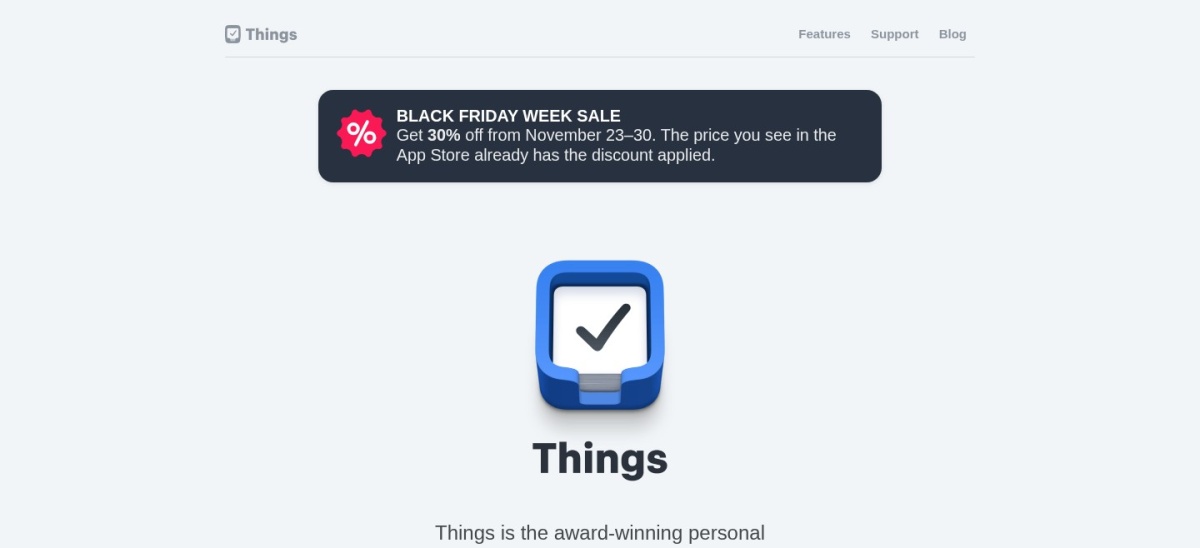
Things 3 homepage, captured Nov 2026.
Things 3 is a personal task manager for Mac, iPhone, iPad and Apple Watch, sold as a one-time purchase per device with no subscription. The iPhone app costs $9.99, iPad $19.99 and Mac $49.99, and sync through Things Cloud is free. It is rated 4.8 out of 5 from 28,106 App Store ratings.
The trade off is reach. There is no Windows, Android or web version, no shared lists, and each device is a separate purchase, so all three main apps cost $79.97. A sale was running at the time of writing, with 30% off until 30 November, so the App Store showed $6.99 for iPhone. It suits Apple-only users who would rather pay once than rent an app.
Microsoft To Do is a free task app from Microsoft that syncs with Outlook and Microsoft 365. It offers lists, due dates, reminders and a My Day planner that turns each morning into a short planning session, and it runs on Windows, Mac, iOS, Android and the web.
The trade off is depth. It covers the basics well but lacks the custom filters, calendar views and automation of paid rivals, and reviewers note limited sharing and few integrations outside Microsoft apps. It suits Outlook users who want a simple free list.
What we like
Completely free, no paid plan
Syncs with Outlook tasks and Microsoft 365
My Day planner helps plan each morning
Rated 4.4 out of 5 on G2
Watch out for
Fewer features than paid rivals
Limited sharing and integrations outside Microsoft
Any.do is a to-do list, calendar and daily planner in one app, so tasks sit next to meetings in the same view. The free Personal plan covers lists, reminders and the calendar, and Premium costs $4.99 a month billed yearly ($59.88 a year) or $7.99 billed monthly.
The trade off is that the best features are paid. Recurring tasks, color tags, location reminders and WhatsApp reminders all need Premium, and two official Any.do pages showed different Premium prices when checked, so confirm the total at checkout. It suits people who plan each day in a calendar view.
What we like
Tasks, calendar and daily planner in one app
My Day view turns each morning into a plan
Works on phone, desktop, browser and watch
Rated 4.2 out of 5 on G2 from 197 reviews
Watch out for
Recurring tasks and location reminders need Premium
Official pages show different Premium prices
Recent reviews are mixed on billing and sync
Premium adds recurring tasks, location and WhatsApp remindersVisit any.do
06
ClickUp
4.6/5on G2 (12,526 reviews, checked Nov 2026)
Paid from$12/mo
Best to-do app that grows into a team tool
Free planYes, unlimited tasks
Core price$12/user/mo regular, billed yearly
ViewsList, board, calendar, Gantt
Paid planCore, $12/user/mo regular
clickup.com
ClickUp homepage, captured Nov 2026.
ClickUp is a work app that starts as a to-do list and grows into docs, boards, goals and time tracking. The Free Forever plan covers unlimited tasks and subtasks, collaborative docs, kanban boards and a calendar view, with 60 MB of storage.
The trade off is that it charges per user. Core lists at $9 per user a month billed yearly on sale, with a regular price of $12, so a small team pays $144 a year per person at the regular rate. It suits people whose personal lists may grow into shared team work.
What we like
Free plan covers unlimited tasks and boards
Grows from personal lists into team work
Many views: list, board, calendar and Gantt
Rated 4.6 out of 5 from 12,526 G2 reviews
Watch out for
Paid plans charge per user, so teams pay more
More complex than a simple to-do app
Core adds custom fields, unlimited storage and Gantt chartsVisit clickup.com
07
Asana
4.4/5on G2 (14,024 reviews, checked Nov 2026)
Paid from$10.99/mo
Best for shared lists with a team
Free planPersonal, up to 2 users
Starter price$10.99/user/mo billed yearly
Seat minimum2 seats on Starter
Paid planStarter, $10.99/user/mo
asana.com
Asana homepage, captured Nov 2026.
Asana is a work management app where each task has an owner, a due date and a place in a shared project. The free Personal plan covers up to 2 users with unlimited tasks and projects, and Starter costs $10.99 per user a month billed yearly, or $13.49 billed monthly.
The trade off is that it is built for teams. Starter has a 2-seat minimum, so the real floor is about $264 a year, and timeline views, custom fields and unlimited automations all sit behind the paid plan. It suits small teams that share lists and need to see who owns what.
What we like
Clear ownership: every task has an owner and due date
Timeline and Gantt views on Starter
Free plan covers unlimited tasks for 2 users
Rated 4.4 out of 5 from 14,024 G2 reviews
Watch out for
Starter has a 2-seat minimum
Too heavy for a simple personal list
Starter adds timeline views, dashboards and automationsVisit asana.com
08
Trello
4.4/5on G2 (14,037 reviews, checked Nov 2026)
Paid from$5/mo
Best board-style to-do list
Free collaboratorsUp to 10 per Workspace
BoardsUnlimited on Standard
AutomationBuilt in on every board
Paid planStandard, $5/user/mo billed yearly
trello.com
Trello homepage, captured Nov 2026.
Trello is a board-style to-do app where each task is a card you drag between lists. The free plan covers up to 10 collaborators per Workspace with unlimited cards, and Standard costs $5 per user a month billed yearly, or $6 billed monthly.
The trade off is structure. Cards and checklists handle simple lists well, but there is no built-in calendar planning or habit tracking, and bigger workflows need Premium at $10 per user a month. It suits visual planners who like moving cards across a board.
What we like
Simple visual boards that are easy to learn
Free plan covers up to 10 collaborators
Built-in automation on every board
Rated 4.4 out of 5 from 14,037 G2 reviews
Watch out for
No built-in calendar planning or habit tracking
Paid plans charge per user
Standard adds unlimited boards, card mirroring and more automationVisit trello.com
09
Remember The Milk
4.4/5on G2 (16 reviews, checked Nov 2026)
Paid from$49.99/yr
Best simple classic to-do list
Free planYes, Basic plan
Smart listsYes, with saved searches
SyncWeb, desktop and mobile
Paid planPro, $49.99/yr
rememberthemilk.com
Remember The Milk homepage, captured Nov 2026.
Remember The Milk is a long-running to-do list service built around smart add and saved searches. The free Basic plan covers lists, reminders and sync across web, desktop and phones, and Pro costs $49.99 a year with subtasks, unlimited sharing, color-coded tags and Outlook sync.
The trade off is age. The design feels dated next to newer apps, and Pro has no free trial, so you pay $49.99 a year before trying the paid features. It suits people who want a plain, reliable list with strong search.
Free plans cover the basics well. Most include lists, due dates and at least basic reminders.
Paid plans mostly add reminders and views. You get custom reminders, calendar layouts, more projects and longer history.
The cheapest paid plan here is TickTick at $35.99 a year, while team tools charge per user per month, which costs far more for a group.
If you only track your own tasks, start free and pay only when a limit you keep hitting is behind the paywall.
How we chose
We started from the best-known to-do list apps with a free plan or a one-time purchase, then kept those with a public rating and a published price.
Prices come from each vendor's pricing page, checked on 25 November 2026. Ratings come from G2 on the same day, except Things 3, which uses its App Store rating. Where a vendor shows a sale, the list shows the regular price.
We left out apps with no public rating or no published price. No vendor paid for a place, and we do not claim to have used these tools ourselves.
How to choose a to-do list app
Start with the devices you use every day, then check the free plan before you pay.
Check your devices first. Things 3 only works on Apple devices, while Todoist, TickTick and Microsoft To Do run almost everywhere. Pick an app that runs where you work.
Try the free plan for a week. Add real tasks, set reminders and see whether the free limits get in your way. Most people learn more in a week of use than from a feature list.
Count the cost per person, not per app. Team tools charge per user per month, so a $5 plan costs $60 a year for one person and $600 for ten. See how a content calendar plans shared work before you pay for a team plan.
Pick one app and stick with it. Two task lists split your attention and tasks fall through the gap. Move everything into the one app you chose.
FAQ
What is the best to-do list app?
Todoist is the best to-do list app for most people. Its free plan covers 5 projects with reminders, Pro costs $5 a month billed yearly, and it is rated 4.5 out of 5 on G2 from 866 reviews.
What is the best free to-do list app?
Microsoft To Do is the best fully free option, with lists, reminders, a My Day planner and Outlook sync at no cost. Todoist and TickTick also have useful free plans if you want more features later.
What is the cheapest paid to-do list app?
TickTick Premium is the cheapest paid plan in this list at $35.99 a year, or $2.99 a month. Things 3 costs $9.99 once for iPhone, which is cheaper still if you only use Apple devices.
Is Todoist better than TickTick?
Todoist is the better all-round app, with faster capture, more integrations and a higher review count on G2. TickTick wins on price at $35.99 a year and adds a calendar, habit tracking and a Pomodoro timer that Todoist lacks.
Can I use a to-do list app on all my devices?
Most apps in this list sync across web, desktop and mobile. The exception is Things 3, which works on Apple devices only, with no Windows, Android or web version.
Do I need a paid plan for reminders?
Not always. Todoist, TickTick and Microsoft To Do include reminders in their free plans. Any.do and some rivals keep custom, location or recurring reminders behind a paid plan, so check before you pay.
SaaS SEO and WordPress specialist with about 8 years of experience. Rakib compares WordPress plugins, themes, hosting and software using public pricing, documentation and user reviews. See how we rank.