Clockify is the top pick for small businesses, offering a free plan and entry paid tiers starting at $3.99 per seat per month billed annually. For cleaner timer workflows, Toggl Track starts at $9 per user per month annually, while Harvest supports built-in client invoicing from $9 per seat per month annually.
How we make this list: we compare pricing pages, product documentation and public user reviews, then re-check every price before each update. No product paid for a place. Disclosure.
Clockify offers a free tier plus Basic paid plans starting at $3.99 per seat/month billed annually ($47.88/yr per seat).
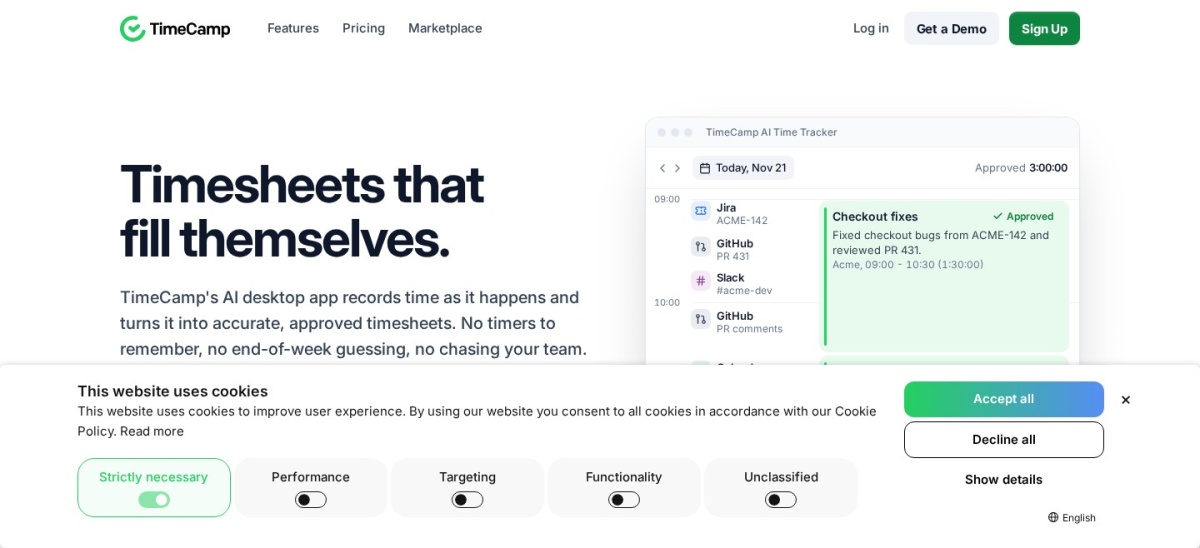
TimeCamp starts at $3.99 per user/month billed annually ($47.88/yr per user) and includes automatic app and website tracking.
My Hours starts at $4 per user/month billed annually ($48/yr per user) with a free plan for up to 5 users.
Hubstaff starts at $4.99 per seat/month billed annually ($59.88/yr per seat) with a 2-seat minimum for remote and field teams.
Toggl Track starts at $9 per user/month billed annually ($108/yr per user) with a 4.7 Capterra rating across 2,590 reviews.
What small businesses should look for in time tracking software
Small businesses track time for two distinct reasons: billing clients accurately for project work and verifying employee hours for payroll or shift coverage. A freelance agency needs billable rates, project budgets, and clean client exports, whereas a shop or field crew needs mobile clock-ins, breaks, and overtime rules.
Per-seat pricing adds up quickly as headcount grows, especially when tools enforce minimum seat counts or charge extra for add-ons. Checking whether a free plan caps users or projects helps avoid surprise upgrades before daily tracking becomes a team habit.
Automatic activity capture reduces forgotten timers, while manual timers and weekly timesheets keep workflows predictable without intrusive monitoring. Pick a tool your team will actually open every day rather than one packed with unused features.
For hourly shift scheduling and location time clocks
$30/mo
Free plan
4.6/5
Price ladder: cheapest paid plan per year
List prices, USD, checked Nov 2026
ClockifyFREE$48
TimeCampFREE$48
My HoursFREE$48
Hubstaff$60
Toggl TrackFREE$108
HarvestFREE$108
HomebaseFREE$360
The 7 best time tracking software for small business
01
Clockify
4.8/5on Capterra (9,268 reviews, checked Nov 2026)
Paid from$3.99/mo
Best for budget-friendly team time tracking and timesheets
Entry paid planBasic ($3.99/seat/mo annual)
Monthly billing$4.99/seat/mo
Free tierAvailable
Review rating4.8/5 (9,268 on Capterra)
clockify.me
Clockify homepage, captured Nov 2026.
Clockify is a time tracking and timesheet tool from CAKE.com used by 7M+ users across web, desktop, and mobile apps. It offers a free plan alongside paid tiers starting with Basic at $3.99 per seat per month billed annually, or $4.99 billed monthly.
The trade off is that the interface feels more functional than polished, and some reviewers report friction editing entries or syncing across devices at $47.88 per seat per year annually. It suits small teams that want low-cost project timers and timesheets without high per-seat fees.
What we like
Free plan available for getting started without upfront cost
Low entry paid rate at $3.99 per seat/month on annual billing
Supports timers, manual timesheets, kiosk mode, and 100+ integrations
High review score of 4.8/5 across 9,268 Capterra reviews
Watch out for
Interface looks more practical than visually refined
Manual time entry edits can take extra steps
Mobile and desktop experiences can feel uneven
Basic paid plan adds administration controls; higher tiers add billing, budgets, and scheduling.Visit clockify.me
02
Toggl Track
4.7/5on Capterra (2,590 reviews, checked Nov 2026)
Paid from$9/mo
Best for simple timers and clean project reporting
Entry paid planStarter ($9/user/mo annual)
Monthly billing$12/user/mo
Free tierUp to 3 users
Review rating4.7/5 (2,590 on Capterra)
toggl.com
Toggl Track homepage, captured Nov 2026.
Toggl Track is a timer and reporting app built around fast one-click logging across web, desktop, mobile, and calendar integrations. It offers a free plan for up to 3 users, while Starter begins at $9 per user per month billed annually, or $12 monthly.
The trade off is that per-user costs climb faster than budget rivals at $108 per user per year annually, and native client invoicing is not part of its core workflow. It suits small client-service teams and consultants that want straightforward timers and readable reports.
What we like
Free plan covers up to 3 users with timers and calendar integrations
Easy onboarding and low daily friction for mixed-comfort teams
Clear project and team reports for client reviews
Watch out for
Higher starting seat price than budget competitors
No built-in client invoicing or payroll features
Some users note bulk editing and mobile depth can feel limited
Starter adds billable rates, timeline views, tags, milestones, and team reports.Visit toggl.com
03
Harvest
4.5/5on Capterra (656 reviews, checked Nov 2026)
Paid from$9/mo
Best for turning tracked hours into client invoices
Entry paid planTeams ($9/seat/mo annual)
Monthly billing$11/seat/mo
Free tier1 seat, 2 projects
Review rating4.5/5 (656 on Capterra)
getharvest.com
Harvest homepage, captured Nov 2026.
Harvest is a time tracking and invoicing tool that connects logged hours and expenses directly to client invoices and online payments. Its free plan supports 1 seat and 2 active projects, while Teams starts at $9 per seat per month billed annually, or $11 monthly.
The trade off is that Teams starts at $108 per seat per year annually and usage-based charges or add-ons like Forecast can raise total costs beyond the base seat rate. It suits freelancers and small service teams that invoice clients directly from tracked hours.
What we like
Built-in invoicing and online payment collection from tracked time
Simple interface with budget tracking and alerts
Free plan available for solo freelancers with up to 2 projects
Watch out for
Usage-based fees and add-ons can increase total bills above base seat pricing
Free tier is strictly limited to one user and two projects
Forecasting is sold as a separate add-on rather than a native core view
Teams opens multi-user tracking and invoicing; higher tiers add profitability, approvals, and SSO.Visit getharvest.com
04
Hubstaff
4.5/5on Capterra (1,615 reviews, checked Nov 2026)
Starts at$4.99/mo
Best for remote and field teams needing activity or GPS tracking
Entry paid planStarter ($4.99/seat/mo annual)
Monthly billing$7/seat/mo (2-seat min)
Free tierNo permanent free plan
Review rating4.5/5 (1,615 on Capterra)
hubstaff.com
Hubstaff homepage, captured Nov 2026.
Hubstaff is a workforce time tracking platform offering timesheets, activity levels, optional screenshots, app and URL tracking, and GPS add-ons across desktop and mobile apps. Starter begins at $4.99 per seat per month billed annually, or $7 monthly, with a 2-seat minimum and no permanent free plan.
The trade off is that Starter costs $59.88 per seat per year annually with a 2-seat minimum, and extra add-ons or employee monitoring can feel pricey or intrusive. It suits managers overseeing distributed or field staff who want proof of work and location controls.
What we like
Low entry Starter rate at $4.99 per seat/month on annual billing
Supports activity tracking, screenshots, and optional GPS location add-ons
Clear path to team payments, scheduling, and payroll on higher tiers
Watch out for
No free plan beyond a trial, and paid plans carry a 2-seat minimum
Activity monitoring and screenshots may feel intrusive to some staff
Popular add-ons add per-seat charges on top of base plans
Starter covers basic time tracking and timesheets; higher tiers add budgets, tasks, and payments.Visit hubstaff.com
05
TimeCamp
4.7/5on Capterra (602 reviews, checked Nov 2026)
Paid from$3.99/mo
Best for automatic desktop app and website time capture
Entry paid planStarter ($3.99/user/mo annual)
Monthly billing$5.49/user/mo
Free tierAvailable
Review rating4.7/5 (602 on Capterra)
timecamp.com
TimeCamp homepage, captured Nov 2026.
TimeCamp is a time tracking app that records desktop applications and websites in the background alongside manual timers and timesheets. It offers a free plan and starts paid plans at $3.99 per user per month billed annually, or $5.49 month-to-month.
The trade off is that Starter costs $47.88 per user per year annually while budget tracking and app/website reports require higher tiers, and some users report occasional mobile or session quirks. It suits small teams that forget to start timers and want automatic activity logs.
What we like
Affordable Starter rate at $3.99 per user/month billed annually
Automatic background tracking reduces forgotten billable or project hours
Offers a free tier to test basic tracking before upgrading
Watch out for
Budgets and app/website tracking sit on higher paid tiers rather than Starter
Some reviewers note dated desktop visuals or mobile/sync rough edges
Activity tracking can feel heavy for teams that prefer manual timers
Starter adds time and billing tools; higher tiers add budgets, productivity tracking, and approvals.Visit timecamp.com
06
My Hours
4.8/5on Capterra (986 reviews, checked Nov 2026)
Paid from$4/mo
Best for straightforward timesheets and client billing
Entry paid planBasic ($4/user/mo annual)
Monthly billing$5/user/mo
Free tierUp to 5 active users
Review rating4.8/5 (986 on Capterra)
myhours.com
My Hours homepage, captured Nov 2026.
My Hours is a time tracking and billing tool designed around simple timesheets, project budgets, and client reports across web, desktop, and mobile apps. It includes a free plan for up to 5 active users and starts paid plans with Basic at $4 per user per month billed annually, or $5 monthly.
The trade off is that Basic costs $48 per user per year annually with basic invoicing and light project management tools compared to full work suites. It suits small teams and agencies that want fast setup and clear client time reports without bloat.
What we like
Free plan supports up to 5 active users for small starter teams
Low Basic rate at $4 per user/month on annual billing
High 4.8/5 rating across 986 Capterra reviews for ease of use
Watch out for
Invoicing tools are basic rather than a full accounts receivable system
Limited project management features outside time and budgets
Some reviewers note slower project list loading or manual historical edits
Basic covers core time tracking; Pro adds billing, budgets, approvals, and custom reports.Visit myhours.com
07
Homebase
4.6/5on Capterra (1,158 reviews, checked Nov 2026)
Paid from$30/mo
Best for hourly shift scheduling and location time clocks
Entry paid planEssentials ($30/location/mo)
Free tier1 location, up to 10 staff
Payroll add-on$49/mo + $6/employee
Review rating4.6/5 (1,158 on Capterra)
joinhomebase.com
Homebase homepage, captured Nov 2026.
Homebase is a shift scheduling and time clock platform built for hourly teams in retail, food service, and local shops. Its Basic plan is free for 1 location and up to 10 employees, while Essentials starts at $30 per location per month ($360/yr per location) with unlimited employees.
The trade off is that Essentials costs $360 per location per year at the monthly rate, plus extra fees for payroll or add-ons, and it is built for shifts rather than billable project timers. It suits local businesses managing hourly shifts and clock-ins rather than agency project billing.
What we like
Free Basic plan covers 1 location and up to 10 employees
Unlimited employees on paid location plans rather than per-seat fees
Combines shift schedules, time clocks, team messaging, and optional payroll
Watch out for
Priced per location and can get costly across multiple sites or add-ons
Payroll is a separate add-on with a base fee plus per-employee charges
Not designed for freelance or agency billable project timers
Essentials adds advanced scheduling, time tracking, and team communication; higher tiers add PTO, hiring, and HR.Visit joinhomebase.com
Project timers vs. shift clocks for small businesses
Project-based tools like Clockify, Toggl Track, Harvest, TimeCamp, and My Hours focus on assigning hours to clients, tasks, and billable rates. They work best for agencies, consultants, studios, and service businesses that bill by the hour or track project budgets.
Shift-focused platforms like Homebase center on schedules, clock-ins, breaks, and labor costs per location. Choosing the wrong category forces extra workarounds, such as faking shift schedules for client projects or tracking hourly retail shifts with project timers.
How we chose
We selected established time tracking and time clock tools widely used by small businesses, freelancers, and shift-based teams across project logging, invoicing, automatic capture, and workforce scheduling.
All pricing tiers, free plan limits, and review ratings were checked on 22 Nov 2026 using official vendor pages and public software review directories.
We excluded tools lacking verifiable current pricing or established public review traction, and we noted where add-ons or usage fees can raise total costs above entry rates. No vendor paid for a place, and we do not claim testing for this list.
How to pick the right time tracker in 4 steps
Follow these four steps before rolling out a time tracker to your team.
Decide whether you need project timers or shift clock-ins. Match the software to how your business earns money, whether that means client project budgets or hourly shift schedules.
Check free plan limits against your headcount. Compare user caps, seat minimums, and project limits so you know when a growing team will need a paid plan.
Calculate total annual cost including add-ons. Look past headline monthly rates to check annual billing discounts, seat minimums, invoicing or payroll add-ons, and usage fees.
Test daily logging speed with a few team members. A simple timer or timesheet that people actually use beats a complex system that gets ignored after week one.
FAQ
What is the cheapest paid time tracking tool for a small business?
Clockify and TimeCamp both start paid plans at $3.99 per user/seat per month billed annually ($47.88/yr), while My Hours starts at $4 per user/month annually ($48/yr). All three also offer free tiers to start.
Do small businesses really need paid time tracking software?
Not always at first: free plans from Clockify, Toggl Track, My Hours, and Homebase cover basic tracking for small teams or solo users. Paid plans become worthwhile once you need billable rates, approvals, deeper reports, or higher user and project limits.
Should I choose per-user pricing or per-location pricing?
Per-user pricing usually fits small office or remote teams with steady headcount, while per-location pricing like Homebase can work better for a single shop or restaurant with many hourly staff. Always multiply by your actual team size or locations over a full year.
What is the difference between manual timers and automatic tracking?
Manual timers and timesheets require people to start, stop, or enter hours themselves, which works well for straightforward client or shift logging. Automatic trackers like TimeCamp and Hubstaff capture activity or location in the background, reducing missed hours but adding privacy or monitoring considerations.
Why do advertised monthly prices sometimes differ from the final bill?
Many tools discount annual billing compared to month-to-month rates, enforce minimum seat counts, or charge extra for add-ons and usage overages. Always check billing terms and add-on pricing before committing.
Which tool is best if I want built-in client invoicing?
Harvest is a strong fit when you want time tracking and expenses tied directly to client invoices and online payments. If you use separate accounting software, exporting reports from a simple timer may be enough.
SaaS SEO and WordPress specialist with about 8 years of experience. Rakib compares WordPress plugins, themes, hosting and software using public pricing, documentation and user reviews. See how we rank.