CLO 3D is the best textile design software for realistic fabric draping and pattern fitting, holding a 4.6/5 G2 rating across 7 reviews. Adobe Illustrator is best for scalable vector surface prints and repeats, while Krita suits solo designers who want free wrap-around painting without a paid plan.
How we make this list: we compare pricing pages, product documentation and public user reviews, then re-check every price before each update. No product paid for a place. Disclosure.
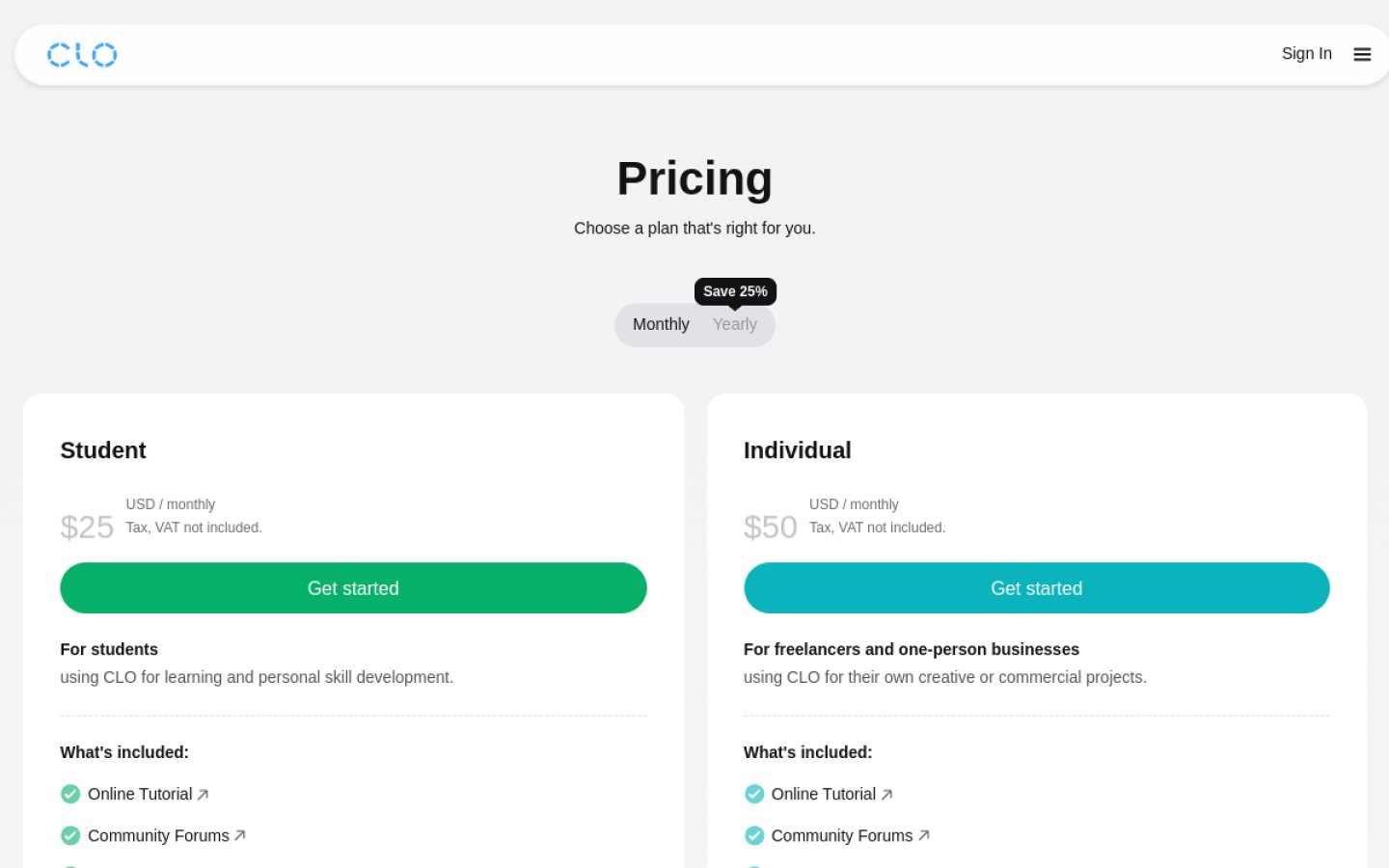
CLO 3D starts at $50/mo ($600/yr) for the Individual plan with a 4.6/5 G2 rating across 7 reviews.
Adobe Illustrator starts at US$22.99/mo billed monthly on an annual plan (US$263.88/yr prepaid) and holds a 4.6/5 G2 rating across 6,209 reviews.
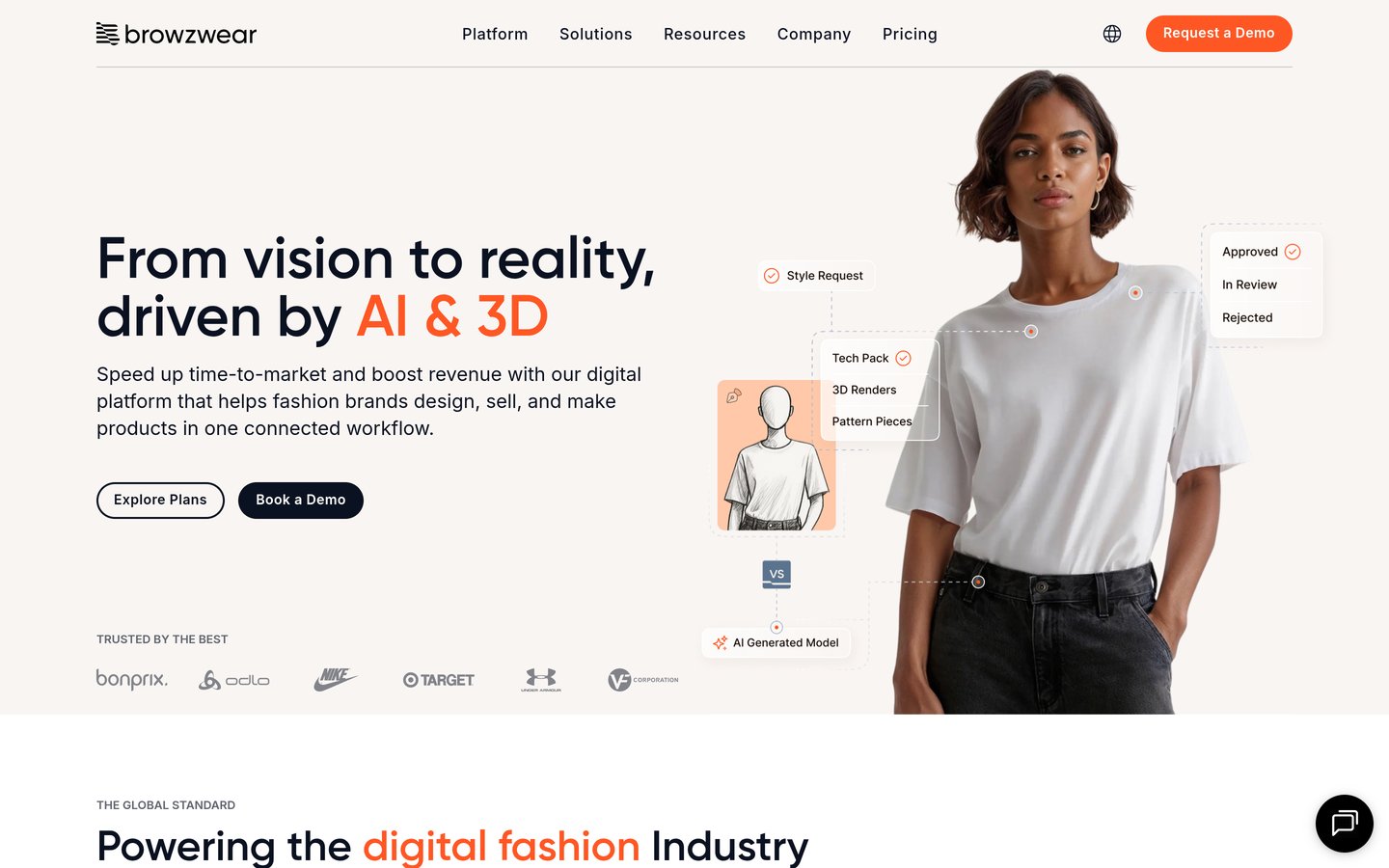
Browzwear starts at $75/mo or $750/yr for the Freelancer plan with a 4.8/5 G2 rating across 56 reviews.
CorelDRAW Graphics Suite lists a regular annual subscription of US$439.00/yr (US$21.92/mo on promo) and a 4.3/5 G2 rating across 557 reviews.
Affinity is free with a Canva account ($0 paid plan) and combines vector, pixel, and layout tools on desktop and iPad.
Krita and Blender are both free and open source, holding 4.4/5 and 4.6/5 G2 ratings respectively.
What to look for in textile design software
Textile design spans surface print repeats, woven and knit structures, and 3D garment drape testing. A tool built for vector logos or general 3D rendering handles fabric behavior very differently from dedicated apparel and textile software.
Check whether your workflow relies on seamless tile repeats, color separations, 2D pattern blocks, or physical fabric physics. Print designers often need clean color channels and repeat previews, while garment makers look for accurate seam tension and drape.
Pay close attention to licensing rules and promotional pricing. Some tools restrict individual licenses to solo creators or charge per seat for teams, while annual discounts can lower the first-year cost compared to standard list rates.
Also check file compatibility with mills, printers, and 3D pipelines. Supporting formats like SVG, PSD, DXF, or OBJ helps avoid re-drawing motifs or patterns when handing files off for production.
CLO 3D is a 3D garment design and fabric simulation tool rated 4.6/5 on G2 across 7 reviews. It lets designers test patterns, trims, and fabric drape on virtual models before physical sampling.
The trade off is the price at $50/mo (excluding tax and VAT) for the Individual plan, with a steeper learning curve reported by beginners. It suits apparel designers and solo creators who rely on virtual garment fitting.
What we like
Realistic 3D cloth simulation and fabric behavior previews
Saves physical sampling time when testing garment fit and sizing
Dedicated student and recent graduate discount options available
Watch out for
Steep learning curve for beginners new to 3D garment tools
Complex multi-layer simulations can slow down performance
Individual license applies to solo creators and one-person businesses
Paid plans unlock full commercial 3D design tools and workspace access.Visit clo3d.com
02
Adobe Illustrator
4.6/5on G2 (6,209 reviews, checked Nov 2026)
Starts at$22.99/mo
Best for scalable vector motifs and repeats
FocusVector illustration
Annual billed monthlyUS$22.99/mo
Annual prepaidUS$263.88/yr
Trial7-day free trial
adobe.com
Adobe Illustrator homepage, captured Nov 2026.
Adobe Illustrator is a vector graphics editor rated 4.6/5 on G2 across 6,209 reviews. It helps textile designers draw clean motifs, fashion flats, and scalable artwork that stay sharp at any print size.
The trade off is ongoing subscription cost at US$22.99/mo billed monthly on an annual plan (or US$263.88/yr prepaid) and a learning curve for new users. It suits surface print designers and apparel illustrators working in vector workflows.
What we like
Sharp vector scaling for print layouts, motifs, and technical flats
Large review base of 6,209 ratings on G2 and wide tutorial support
Integrates with other Adobe Creative Cloud apps and libraries
Watch out for
Requires an ongoing subscription rather than a one-time license
Steep learning curve for mastering paths and advanced tools
Lacks native 3D fabric draping physics compared to cloth simulators
Paid plans include full desktop, iPad, and web access plus cloud storage.Visit adobe.com
03
Browzwear
4.8/5on G2 (56 reviews, checked Nov 2026)
Starts at$750/yr
Best for 3D apparel prototyping and team collaboration
Focus3D apparel & fabric
Freelancer plan$750/yr ($75/mo)
Teams plan$3,950/yr
Learner licenseFree for eligible students
browzwear.com
Browzwear homepage, captured Nov 2026.
Browzwear is a 3D fashion design and digital product creation platform rated 4.8/5 on G2 across 56 reviews. It pairs VStitcher garment simulation with Stylezone collaboration tools for reviewing virtual samples.
The trade off is cost starting at $750/yr (or $75/mo) for the Freelancer plan and $3,950/yr for Teams, with some users noting slowdowns on heavy files. It suits apparel brands, studios, and freelancers building virtual prototypes.
What we like
High 4.8/5 rating across 56 G2 reviews for realistic garment rendering
Stylezone cloud tools support reviewing styles and collections
Offers a self-serve Freelancer tier alongside team and enterprise plans
Watch out for
Higher annual cost than general vector or open-source design tools
Complex multi-element projects can experience performance slowdowns
Some 2D/3D commands take practice to use smoothly
Freelancer and Teams plans include VStitcher and Stylezone access with tiered credits.Visit browzwear.com
04
CorelDRAW
4.3/5on G2 (557 reviews, checked Nov 2026)
Starts at$439/yr
Best for print production and bitmap-to-vector tracing
FocusVector & print layout
Regular annualUS$439.00/yr
One-time optionAvailable (US$859 regular)
Trial15-day free trial
coreldraw.com
CorelDRAW homepage, captured Nov 2026.
CorelDRAW Graphics Suite is a vector and layout suite rated 4.3/5 on G2 across 557 reviews. Designers use it for vector artwork, multi-page layouts, and PowerTRACE bitmap-to-vector conversion for print and screen workflows.
The trade off is a regular annual list price of US$439.00/yr (with a promotional first-year rate of US$21.92/mo or US$263.00/yr) and occasional file conversion friction with other suites. It suits print-focused studios and designers who want vector and layout tools together.
What we like
Strong vector drawing, node editing, and PowerTRACE image tracing tools
Supports Windows, Mac, and Web workflows plus DXF and DWG export on Web
Offers both subscription and one-time purchase licensing options
Watch out for
Regular annual subscription pricing is higher than some rivals
Importing or exporting files with other design suites can cause formatting issues
Large or complex files can slow down editing
Subscriptions include desktop and web access, monthly AI credits, and format exports.Visit coreldraw.com
05
Affinity
4.4/5on G2 (73 reviews, checked Nov 2026)
PriceFree
Best free all-in-one vector, pixel, and layout app
FocusVector, pixel & layout
Price$0 with Canva account
PlatformsMac, Windows & iPad
FormatsPSD, AI, PDF, SVG
affinity.studio
Affinity homepage, captured Nov 2026.
Affinity is a creative app combining vector, pixel, and layout studios for Mac, Windows, and iPad, with a 4.4/5 rating on G2 across 73 reviews. Individuals can use its core design and export tools for free with a Canva account.
The trade off is that optional Canva AI tools inside Affinity require a paid Canva plan, and older versions will not receive future updates. It suits solo designers who want vector, pixel, and print layout tools without a software fee.
What we like
Free for individuals with vector, pixel, and layout tools included
Supports importing and exporting common formats such as PSD, AI, PDF, and SVG
Works offline after initial sign-in and activation
Watch out for
Requires a Canva account to download and activate the app
Canva AI tools inside the app require a paid Canva plan
Does not include dedicated 3D fabric draping simulation
Core vector, pixel, and layout tools are free; optional Canva AI needs a Canva plan.Visit affinity.studio
06
Krita
4.4/5on G2 (64 reviews, checked Nov 2026)
PriceFree
Best open-source painting app for seamless repeats
FocusDigital painting & wraps
PriceFree & open source
G2 rating4.4/5 (64 reviews)
Brush enginesCustomizable brushes
krita.org
Krita homepage, captured Nov 2026.
Krita is a free, open-source digital painting program rated 4.4/5 on G2 across 64 reviews. Designers use its brush engines and wrap-around canvas view to paint hand-drawn textures and check seamless tile edges.
The trade off is occasional slowdowns on large canvases and PSD compatibility quirks, with no paid tier needed to use the app. It suits surface and textile painters who want hand-brushed motifs on a zero-dollar budget.
What we like
Free and open source with no subscription or licensing fees
Rich brush engines suited to painterly motifs and fabric textures
Wrap-around mode helps spot repeat seams while painting
Watch out for
Can lag when working with very large files or oversized brushes
Opening or saving complex PSD files can occasionally cause issues
Interface can feel dense for first-time users
Full open-source painting features are free with no paid plan required.Visit krita.org
07
Blender
4.6/5on G2 (319 reviews, checked Nov 2026)
PriceFree
Best free 3D suite for fabric and product previews
Focus3D modeling & cloth
PriceFree & open source
G2 rating4.6/5 (319 reviews)
LicenseGNU GPL
blender.org
Blender homepage, captured Nov 2026.
Blender is a free, open-source 3D creation suite rated 4.6/5 on G2 across 319 reviews. Textile and product designers use it for UV mapping, cloth physics, and 3D mockups showing patterns on objects.
The trade off is a steep learning curve and heavy memory use on complex scenes, with no paid plan required. It suits 3D-minded designers and studios who want free 3D cloth and rendering tools.
What we like
Completely free and open source under the GNU GPL license
Strong 3D modeling, UV unwrapping, texturing, and rendering tools
Large community with extensive tutorials and add-ons
Watch out for
Steep learning curve for users unfamiliar with 3D viewports
High RAM demand when handling dense geometry or complex scenes
Less specialized for pattern making than dedicated apparel CAD tools
All core 3D modeling, physics, and rendering tools are free under open-source licensing.Visit blender.org
Matching software to 2D prints or 3D garments
Surface pattern designers usually spend most of their time on color palettes, repeat tiles, and print-ready files. Vector editors like Adobe Illustrator and CorelDRAW handle crisp shapes and layout work well, while Krita suits hand-painted textures.
Garment and product designers often need to see how cloth drapes and folds before cutting fabric. CLO 3D, Browzwear, and Blender help visualize 3D form, though dedicated apparel tools focus more closely on garment patterns.
How we chose
We built this list from established design and apparel software widely used for textile motifs, repeats, patterns, and 3D fabric visualization.
We checked official pricing pages and public review listings on 22 Nov 2026 to record regular starting prices, review counts, and ratings without guessing missing figures.
We excluded unverified tools, discontinued software, and products without clear public pricing or review data so every entry reflects an active option.
No vendor paid for a place, and we do not claim testing for this list.
How to choose textile design software
Follow four steps to pick software that fits your textile workflow and budget.
Define your primary textile output. Decide whether you focus on flat surface repeats, technical pattern blocks, 3D garment simulation, or client mockups.
Check annual and team licensing costs. Compare monthly, annual, and per-seat pricing along with student or promotional rates before committing.
Verify file format and export support. Make sure the software exports the vector, raster, 3D, or pattern formats your printers, mills, or clients require.
Test on your actual hardware. Run a free trial or free tier with a sample fabric or repeat file to check speed and interface comfort.
FAQ
What is the best textile design software overall?
CLO 3D is a top pick for 3D garment and fabric simulation with a 4.6/5 G2 rating across 7 reviews. For 2D vector motifs and print layouts, Adobe Illustrator holds a 4.6/5 G2 rating across 6,209 reviews.
Is there free textile design software?
Yes, Affinity is free for individuals with a Canva account, while Krita and Blender are free and open source. Each has trade-offs, so many designers pair a free tool with other utilities.
What is the difference between 2D pattern tools and 3D fabric tools?
2D tools focus on flat shapes, repeats, and technical drawings, while 3D tools simulate how cloth drapes, folds, and fits on a form. Using 3D previews can reduce physical sample rounds.
Can I use Adobe Illustrator for textile repeats?
Yes, designers commonly use Adobe Illustrator to create scalable motifs, colorways, and repeat patterns for print and apparel. Its regular annual plan starts at US$22.99/mo billed monthly.
Do students get discounts on textile design software?
Several vendors offer student or learner options, including CLO 3D at $25/mo ($225/yr) and a free learner license option from Browzwear for eligible students. Always check eligibility rules at sign-up.
Should beginners start with free or paid software?
Beginners learning basics or testing ideas can start with a free option like Affinity, Krita, or Blender before paying for a subscription. Paid tools make more sense once you need specific production or simulation features.
SaaS SEO and WordPress specialist with about 8 years of experience. Rakib compares WordPress plugins, themes, hosting and software using public pricing, documentation and user reviews. See how we rank.