Bravo Store Systems is our top pick for pawn shops, serving 3,300+ stores with built-in compliance workflows and plans starting at $99/mo. CashFootprint Point-of-Sale suits shops wanting a $99 one-time Windows license, while PawnMaster fits established loan and retail operations.
How we make this list: we compare pricing pages, product documentation and public user reviews, then re-check every price before each update. No product paid for a place. Disclosure.
Bravo Store Systems serves 3,300+ stores with published plans starting at $99/mo.
CashFootprint Point-of-Sale offers a $99 one-time Standard Windows license and holds a 4.8/5 rating across 74 Capterra reviews.
PawnMaster lists a $150/mo starting rate on Capterra and holds a 4.0/5 rating across 19 reviews.
Hi-Tech Pawn starts at $39.36/mo per feature on Capterra with a 3.5/5 rating across 2 reviews.
Moneywell lists a $79/mo per-feature starting price on Capterra and holds a 4.0/5 rating across 4 reviews.
What to look for in pawn shop software
Pawn shops balance collateral lending, retail sales, layaways, and state or federal reporting on every ticket. Good software ties customer IDs, item photos, serial numbers, and payment histories to a single record so counter staff do not re-enter data across loans and sales.
Local reporting and compliance tools matter as much as checkout speed. Many shops rely on automated police or regulatory exports, hold-period tracking, and firearm bound book or form workflows where allowed by law.
Pricing models vary widely across vendors. Some charge a flat monthly subscription, others price per feature or per user, and a few sell one-time Windows licenses that may still charge extra for support, cloud hosting, or hardware.
Before switching platforms, check data migration support for existing tickets, inventory barcodes, and historical records. You should also verify whether barcode scanners, receipt printers, and signature pads fit your existing counter setup.
For shops combining device repair with buy-sell-trade
$75/mo
No free plan
4.2/5
Price ladder: cheapest paid plan per year
List prices, USD, checked Nov 2026
CashFootprint$99
Hi-Tech Pawn$472
RepairQ$900
Moneywell$948
PawnSnap$1,068
Bravo$1,188
PawnMaster$1,800
The 7 best pawn shop software
01
Bravo Store Systems
4.6/5on Capterra (38 reviews, checked Nov 2026)
Starts at$99/mo
Best for all-in-one pawn and compliance workflows
Starting price$99/mo
Reported scale3,300+ stores
Capterra rating4.6/5 (38)
Key workflowsLoans, layaway, compliance
bravostoresystems.com
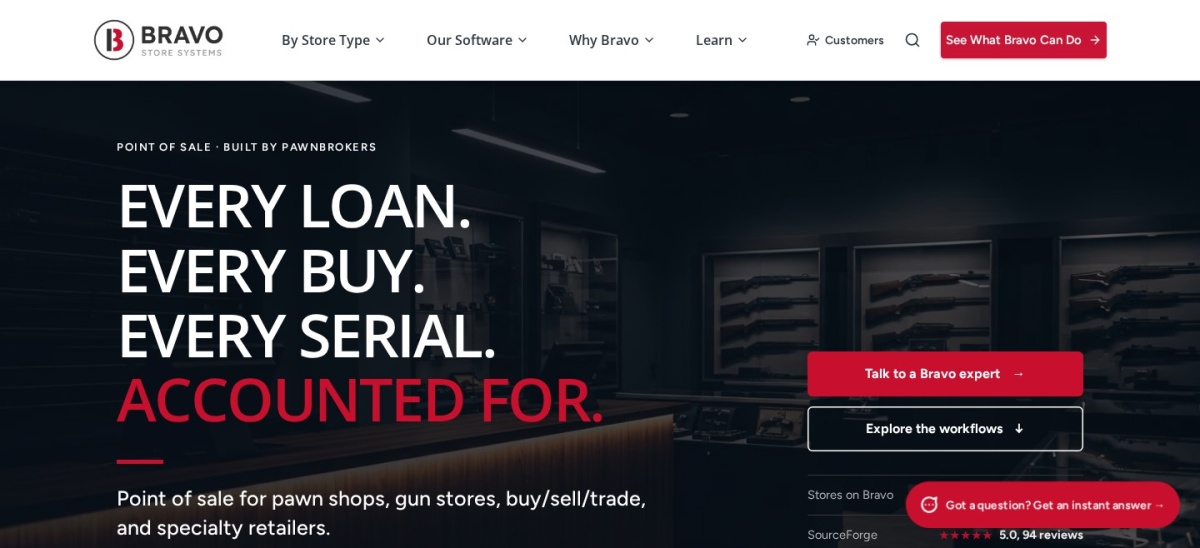
Bravo Store Systems homepage, captured Nov 2026.
Bravo Store Systems is a point-of-sale platform built for pawn shops, buy-sell-trade stores, and retailers across 3,300+ stores. Its published starting price is $99/mo, with multi-transaction tickets, inventory tracking, and compliance tools.
The trade off is that custom store configurations, multi-location setups, and add-ons can raise costs above the $99/mo ($1,188/yr) floor. It suits shops that want one system for loans, retail, and reporting.
What we like
Serves 3,300+ stores with a 4.6/5 rating across 38 Capterra reviews
Published starting price of $99/mo with multi-transaction checkout
Covers pawn loans, layaways, buy-sell-trade, and compliance reporting
Offers data migration and onboarding support for switching stores
Watch out for
Full pricing depends on store count, users, and configuration
Feature depth can require staff training during setup
Higher tiers and custom quotes add multi-store scale, extra channels, and tailored modules.Visit bravostoresystems.com
02
CashFootprint Point-of-Sale
4.8/5on Capterra (74 reviews, checked Nov 2026)
Starts at$99 one-time
Best for one-time Windows licensing without monthly fees
Starting price$99 one-time
PlatformWindows desktop
Capterra rating4.8/5 (74)
Trial optionFree trial available
lothill.com
CashFootprint Point-of-Sale homepage, captured Nov 2026.
CashFootprint Point-of-Sale is a desktop Windows point-of-sale application with no monthly software fee on its base purchase. The Standard edition sells for $99 one-time per computer with checkout, inventory tracking, and employee permissions.
The trade off is that it is a local Windows program rather than a cloud suite, and optional extras like hosted databases or priority support cost extra. It suits shops that want a low-cost one-time Windows license.
What we like
Holds a 4.8/5 rating across 74 Capterra reviews
$99 one-time Standard license per computer with no monthly base fee
Includes inventory tracking, low-stock alerts, and sales reports
Free trial available before buying a license
Watch out for
Requires one license per computer and runs on Windows
Hosted database access and priority support cost extra
The $299 Professional edition adds customer management, barcode label printing, gift cards, and loyalty points.Visit lothill.com
03
Moneywell
4/5on Capterra (4 reviews, checked Nov 2026)
Starts at$79/mo
Best for simple web-based ticket and payment tracking
Starting price$79/mo
Pricing modelPer feature monthly
Capterra rating4.0/5 (4)
DeploymentWeb-based
capterra.com
Moneywell homepage, captured Nov 2026.
Moneywell is a web-based pawn and resale tracking system built for loans, layaways, customer profiles, and reporting. Capterra lists its Basic starting price at $79/mo per feature with a free trial available.
The trade off is that per-feature pricing can add up ($948/yr minimum at $79/mo) and its review count on Capterra is small. It suits smaller shops that want straightforward browser-based loan and payment tracking.
What we like
Browser-based access for loans, layaways, and customer histories
Supports payment tracking, margin tools, and compliance reporting
Free trial available on Capterra
Watch out for
Per-feature pricing increases total cost as modules are added
Only 4 reviews on Capterra, giving a limited sample size
Adding extra modules or features increases the monthly subscription beyond the $79/mo starting rate.Visit capterra.com
04
Hi-Tech Pawn
3.5/5on Capterra (2 reviews, checked Nov 2026)
Starts at$39.36/mo
Best for modular loan, title, and check-cashing modes
Starting price$39.36/mo
Trial option30-day free trial
Capterra rating3.5/5 (2)
Operating modesPawn, title, check
hitechpawn.com
Hi-Tech Pawn homepage, captured Nov 2026.
Hi-Tech Pawn is a pawn management system that supports pawn loans, title lending, and check cashing or advance workflows. Capterra lists a starting price of $39.36/mo per feature alongside a 30-day free trial.
The trade off is that combining multiple feature sets raises monthly costs ($472.32/yr at $39.36/mo) and Capterra has only 2 reviews. It suits shops that want modular lending tools and a 30-day trial.
What we like
Low entry rate listed at $39.36/mo per feature on Capterra
Covers pawn management, title loans, and check services
Advertises a 30-day free trial
Watch out for
Multi-feature subscriptions cost more than a single-mode setup
Rated 3.5/5 across just 2 Capterra reviews
Selecting two or three operating modes raises the subscription rate on the vendor pricing table.Visit hitechpawn.com
05
PawnMaster
4/5on Capterra (19 reviews, checked Nov 2026)
Starts at$150/mo
Best for established shops with multi-step counter workflows
Starting price$150/mo
Capterra rating4.0/5 (19)
Core toolsLoans, sales, layaway
ReportingSales and compliance
capterra.com
PawnMaster homepage, captured Nov 2026.
PawnMaster is a long-running pawn shop management system focused on loans, sales, layaways, customer records, and reporting. Capterra lists its starting price at $150/mo, with a 4.0/5 rating across 19 reviews.
The trade off is a higher starting cost ($1,800/yr at $150/mo) and mixed feedback around interface clicks and support. It suits pawn shops that want detailed reporting and traditional counter workflows.
What we like
4.0/5 rating across 19 Capterra reviews
Handles pawns, sales, layaways, and customer history in one system
Detailed reporting tools praised by long-term users
Watch out for
Higher $150/mo starting rate listed on Capterra
Some reviewers note multi-click screens and dated menus
Additional users, modules, and add-ons can increase monthly cost beyond the $150/mo starting figure.Visit capterra.com
06
PawnSnap
4.9/5on Capterra (10 reviews, checked Nov 2026)
Starts at$89/mo
Best for cloud-hosted pawn workflows and quick support
Starting price$89/mo
Pricing unitPer user monthly
Capterra rating4.9/5 (10)
Core toolsPawns, buys, inventory
capterra.com
PawnSnap homepage, captured Nov 2026.
PawnSnap is a cloud-hosted pawn shop system covering pawns, buys, sales, consignment, inventory labels, and reporting. Capterra lists a starting price of $89/mo per user and a 4.9/5 rating across 10 reviews.
The trade off is per-user pricing ($1,068/yr per user at $89/mo) and limited custom report flexibility noted by reviewers. It suits shops that want cloud hosting and responsive support.
What we like
4.9/5 rating across 10 Capterra reviews
Cloud-hosted setup without maintaining an in-store server
Covers pawns, buys, consignment, barcode labels, and reporting
Watch out for
Priced per user per month starting at $89/mo on Capterra
Reviewers note standard reports rather than custom SQL reports
Adding more user seats increases the monthly subscription beyond the $89/mo per-user starting rate.Visit capterra.com
07
RepairQ
4.2/5on Capterra (19 reviews, checked Nov 2026)
Starts at$75/mo
Best for shops combining device repair with buy-sell-trade
Starting price$75/mo
Capterra rating4.2/5 (19)
FocusRepair tickets and POS
Trial optionFree trial available
servicecentral.com
RepairQ homepage, captured Nov 2026.
RepairQ is a web-based point-of-sale and ticket tracking platform built for repair and buy-sell-trade shops. Capterra lists a starting price of $75/mo alongside a 4.2/5 rating across 19 reviews.
The trade off is that it centers on repair tickets and retail rather than traditional pawn loan terms ($900/yr at $75/mo). It suits shops that run active repair benches alongside buy-sell-trade counters.
What we like
4.2/5 rating across 19 Capterra reviews
Tracks repair tickets, parts, diagnostics, and customer waivers
Supports buy, sell, trade, inventory, and reporting in one system
Watch out for
Not dedicated specifically to pawnbroking loan schedules
Some reviewers report occasional UI rough spots and add-on limits
Higher tiers and multi-location setups add broader business intelligence, integrations, and account options.Visit servicecentral.com
Cloud vs. desktop deployment for pawn shops
Cloud-based software runs in a browser or hosted environment, letting owners check inventory, sales, and reports without managing an in-store server. It is helpful if you manage more than one location or want automatic updates handled by the vendor.
Desktop or local installations keep data on your own Windows PCs, which can suit shops that prefer local control or want a one-time license without recurring subscription fees. The trade off is that you handle local backups, PC maintenance, and hardware compatibility.
How we chose
We built this list from established pawn shop and buy-sell-trade software vendors appearing in software directories and vendor pages, focusing on active platforms with public review profiles.
All prices, review counts, and ratings were checked on 22 Nov 2026 from vendor pages and Capterra listings, using the lowest published regular price where available.
We excluded platforms without verifiable pricing or review data on opened pages, as well as general retail tools that lack pawn or buy-sell-trade workflows. No vendor paid for a place, and we do not claim testing for this list.
How to choose pawn shop software
Follow four steps before signing a contract or buying licenses.
Map your core transaction types first. List whether your counter handles pawn loans, renewals, layaways, outright buys, repairs, or firearm sales so you pick a platform built for those workflows.
Check local reporting and compliance rules. Confirm how the software exports police or agency reports, tracks hold periods, and records customer IDs in your jurisdiction.
Calculate total cost across stations and add-ons. Compare monthly subscriptions, per-user or per-feature rates, and one-time licenses alongside hardware, support, and migration fees.
Test counter speed and migration plans. Run a demo or trial with your barcode scanner, receipt printer, and signature pad, and ask how existing customer and inventory data moves over.
FAQ
What is the cheapest pawn shop software option on this list?
CashFootprint Point-of-Sale has the lowest upfront price at $99 as a one-time Windows license. Among monthly subscriptions, Hi-Tech Pawn starts at $39.36/mo per feature on Capterra.
Do pawn shop software tools usually charge monthly or one-time fees?
Most cloud and specialized pawn platforms charge monthly subscriptions, often priced per store, per user, or per feature. A smaller group sells one-time desktop licenses, sometimes with optional support or hosting fees.
Can pawn shop software track both loans and retail sales?
Yes, dedicated pawn systems are designed to handle pawn tickets, renewals, redemptions, and retail sales or layaways. Some platforms even combine multiple transaction types on a single customer checkout screen.
How important is compliance and police reporting in pawn software?
It is central to daily operations because most shops must log customer IDs, track hold periods, and submit transaction reports. Always verify that a system supports your local reporting format before committing.
What should I ask before migrating from an older pawn system?
Ask what customer, loan, inventory, and compliance records can be imported, how long setup takes, and whether conversion costs extra. Request a written breakdown of recurring fees, support terms, and hardware compatibility.
SaaS SEO and WordPress specialist with about 8 years of experience. Rakib compares WordPress plugins, themes, hosting and software using public pricing, documentation and user reviews. See how we rank.