Blue Iris is the best NVR software overall for Windows local recording, with a $39.95 single-camera license and a 4.4/5 rating from 18 G2 reviews. Choose Agent DVR for free personal local use or Scrypted for $40/yr with four recording cameras.
How we make this list: we compare pricing pages, product documentation and public user reviews, then re-check every price before each update. No product paid for a place. Disclosure.
Blue Iris starts at $39.95 for one camera or $99.95 for the full version, with $44.95/yr later for updates.
Agent DVR is free for private local use, with paid plans starting at $7.95/mo for remote access and business use.
Synology Surveillance Station includes free licenses and adds $74.99 per extra device license.
QNAP QVR Elite starts at $1.99/mo per channel or $19.99/yr per channel, with 2 free channels included.
Scrypted starts at $40/yr billed annually, covering 4 camera licenses plus $10 each for extra cameras.
What to look for in NVR software
Network video recorder software captures streams from IP, ONVIF and RTSP cameras onto your own storage instead of locking video inside a closed cloud subscription.
Check whether a vendor charges per camera channel or offers a flat rate. Per-camera fees add up fast once a site passes eight or sixteen cameras.
Hardware needs matter just as much as license cost. Recording multiple high-resolution streams while running object detection requires enough CPU, GPU or NAS capacity to keep motion detection and playback responsive.
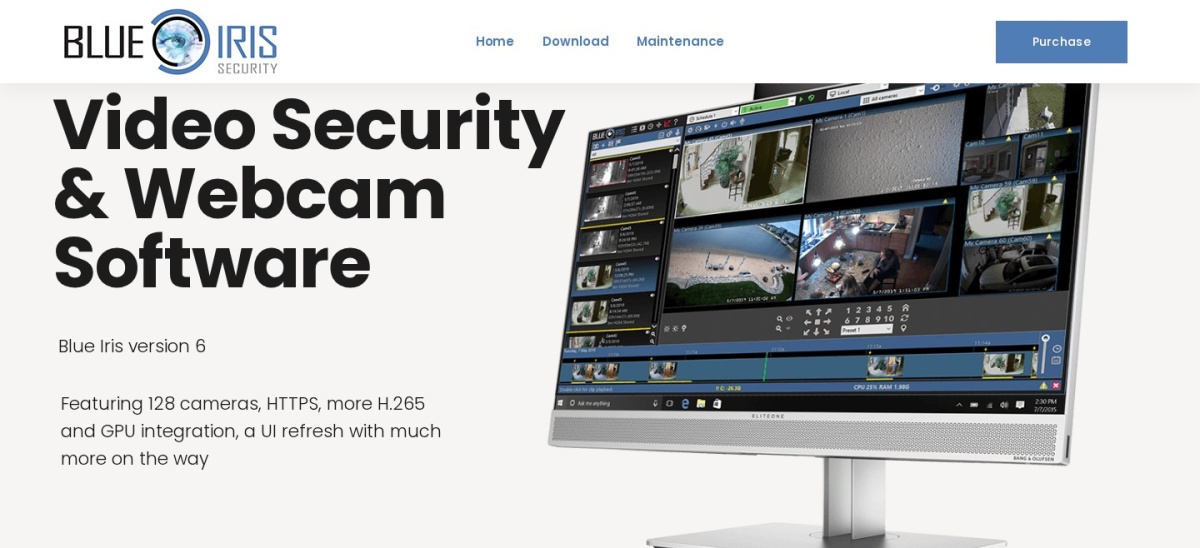
Blue Iris is a Windows video surveillance application that records IP, ONVIF and RTSP cameras locally. Its entry LE license costs $39.95 one-time for 1 camera, while the full license lists at $99.95 one-time and includes a year of updates before $44.95/yr renewals.
The trade off is Windows-only hosting and a steep configuration curve for alerts and object detection. It suits home and small business users comfortable tuning a Windows PC for local recording.
What we like
Low entry price at $39.95 one-time for one camera
Detailed motion triggers, alerts and camera rules
Works locally without mandatory cloud fees
Watch out for
Requires a Windows host and initial setup time
Annual renewal applies if you want ongoing updates
Agent DVR runs on Windows, macOS, Linux, Docker and Raspberry Pi with support for IP, ONVIF, RTSP and USB cameras. It is free for private local use, while paid plans start at $7.95/mo for Basic.
The trade off is that remote access, higher viewing resolutions and commercial use require a paid subscription. It suits multi-camera setups that want flat-rate pricing and broad OS support.
What we like
Free for personal local recording
Flat-rate pricing without per-camera charges
Runs across Windows, macOS, Linux and Raspberry Pi
Watch out for
Remote access and business licensing require paid plans
Many settings can feel busy at first
Paid plans add remote access, business use and higher resolution viewingVisit ispyconnect.com
03
Scrypted
4.4/5on G2 (18 reviews, checked Nov 2026)
Starts at$40/yr
Best for smart home camera ecosystems
DeploymentDocker, Linux, Desktop
Free tier2-day trial
Annual plan$40/yr billed yearly
Included cameras4 camera licenses
scrypted.app
Scrypted homepage, captured Nov 2026.
Scrypted pairs camera streaming and NVR recording with smart home integrations such as HomeKit, Google Home and Home Assistant. Its annual plan is $40/yr billed once a year and includes 4 camera licenses.
The trade off is per-camera add-ons at $10 each beyond the first four and a paid license requirement for NVR recording. It suits home users who want local recording tied to smart home automations.
What we like
Low $40/yr entry price with 4 camera licenses
Connects camera streams with smart home platforms
Clean interface for timeline playback
Watch out for
Extra camera licenses cost $10 each
NVR recording requires a paid license rather than a free tier
QNAP QVR Elite runs on QNAP NAS devices and includes 2 free monitoring channels before you pay for extra licenses. Paid channel subscriptions start at $1.99/mo per channel or $19.99/yr per channel.
The trade off is ongoing per-channel subscription cost and hardware lock-in to QNAP NAS storage. It suits small offices and homes already running a QNAP NAS.
What we like
Includes 2 free camera channels
Low entry rate at $19.99/yr per extra channel
Mobile app and timeline playback included
Watch out for
Requires compatible QNAP NAS hardware
Recurring per-channel fees scale with camera count
Paid licenses expand channel capacity up to 192 channelsVisit qnap.com
05
Synology Surveillance Station
4.3/5on G2 (12 reviews, checked Nov 2026)
Paid from$74.99 one-time
Best perpetual device licenses on Synology NAS
Hardware targetSynology NAS or NVR
Free tierBuilt-in starter licenses
Extra device license$74.99 one-time
Recurring feesNo recurring license fee
synology.com
Synology Surveillance Station homepage, captured Nov 2026.
Synology Surveillance Station turns Synology NAS and NVR units into a local recording system with built-in free starter licenses. Additional device licenses cost $74.99 each as a one-time purchase with no recurring license fee.
The trade off is high per-device add-on pricing and dependence on Synology hardware. It suits homes and small businesses already invested in Synology storage.
What we like
Perpetual device licenses with no recurring fees
Straightforward web and mobile management
Centralized monitoring across multiple cameras
Watch out for
$74.99 per extra device gets costly for large camera counts
Tied to Synology hardware
Extra device licenses unlock more cameras, I/O modules and controllersVisit synology.com
06
Xeoma
5/5on Capterra (2 reviews, checked Nov 2026)
Paid from$17.25 one-time
Best modular video chain builder
Operating systemWindows, Linux, macOS
Free tierLimited free mode
Lite tier priceFrom $17.25/channel
License modelPerpetual per-channel
felenasoft.com
Xeoma homepage, captured Nov 2026.
Xeoma is a cross-platform video surveillance program built around visual module chains for recording, alerts and analytics. It offers a free mode for light use, while paid Lite licensing starts from $17.25 per channel.
The trade off is per-channel pricing across tiers and a modular interface that takes time to map out. It suits buyers who want cross-platform support and custom module workflows.
What we like
Runs on Windows, Linux, macOS and mobile clients
Flexible module chains for custom rules
No recurring subscription required for base licenses
Watch out for
Costs scale per camera channel
Small review sample on major software directories
Higher editions and modules add analytics, face recognition and larger channel limitsVisit felenasoft.com
07
Milestone XProtect
4.5/5on G2 (92 reviews, checked Nov 2026)
PricingCustom (quote)
Best enterprise video management platform
Target scaleSMB to large enterprise
Free tierNo, partner quote
LicensingVariant + device licenses
Support planOptional Care plans
milestonesys.com
Milestone XProtect homepage, captured Nov 2026.
Milestone XProtect is a video management platform for businesses and large facilities that need multi-camera recording, central management and third-party integrations. Licenses are sold through authorized partners based on variant and device count rather than a flat public price.
The trade off is partner-quoted pricing and enterprise overhead that is more than most home users need. It suits businesses and organizations running multi-camera or multi-site security systems.
What we like
Strongest review count in this list with 92 G2 reviews
Scales from single sites to multi-server deployments
Integrates with third-party security hardware and extensions
Watch out for
No self-serve public price list
Heavier than simple home or small-office recorders
Higher tiers and Care plans add failover, multi-layered maps and supportVisit milestonesys.com
One-time licenses vs ongoing subscriptions
Some NVR software charges once for a camera or server license, while other tools charge monthly or annually for remote access, updates or extra channels.
A one-time license keeps software costs predictable if your camera count stays fixed and you do not need hosted cloud relay services.
Subscription plans make more sense when you want ongoing updates, hosted remote viewing or flexible channel scaling without buying large blocks of perpetual licenses upfront.
How we chose
We selected established standalone NVR software options for local camera recording, NAS surveillance and business video management.
We checked vendor pricing pages and review listings on 22 November 2026, using regular listed prices and noting where a vendor uses partner quotes.
We excluded discontinued products and tools without verifiable pricing or review data on opened pages. No vendor paid for a place, and we do not claim testing for this list.
How to choose NVR software
Match the software to your host hardware, camera count and remote viewing needs before buying licenses.
Check your host hardware first. Pick Windows-native software for a Windows PC, NAS software for an existing NAS, or cross-platform software for Linux or Docker.
Count cameras and planned growth. Compare flat-rate plans against per-channel or per-device licenses before adding more cameras.
Decide how you will view footage remotely. Check whether remote mobile and web viewing are built in, paid or handled through your own network.
Confirm camera protocol compatibility. Verify ONVIF or RTSP support for your camera models so you are not locked into one camera brand.
FAQ
What is the best NVR software overall?
Blue Iris is a strong overall choice for Windows local recording, starting at $39.95 one-time for one camera with a 4.4/5 rating on G2. Agent DVR is a solid alternative for free personal local use.
Do I need a subscription for NVR software?
Not always. Blue Iris, Synology Surveillance Station and Xeoma offer one-time license options, while tools like Agent DVR and QNAP QVR Elite use subscriptions for plans or extra channels.
Can I use NVR software with existing IP cameras?
Most standalone NVR tools support standard streams and protocols such as RTSP and ONVIF alongside specific camera models. Always check compatibility for your exact camera models before buying licenses.
Is NAS NVR software good for small businesses?
Yes, if you already run or plan to buy a compatible NAS from Synology or QNAP. It keeps storage local, though per-camera licenses and NAS CPU limits still apply.
When should a business pick Milestone XProtect?
Milestone XProtect fits businesses and multi-site deployments that need centralized management, third-party integrations and partner-backed licensing rather than a simple home recorder.
SaaS SEO and WordPress specialist with about 8 years of experience. Rakib compares WordPress plugins, themes, hosting and software using public pricing, documentation and user reviews. See how we rank.