Best Free WordPress Instagram Feed Plugins in 2026: 7 Tools Compared
WLWPLegible EditorsLast verified 22 Nov 2026How we rank6 min read
★ Short answer
Spotlight is the best free WordPress Instagram feed plugin for most sites, offering unlimited accounts and feeds, local thumbnail caching, and a popup lightbox on its free tier with a 4.7/5 rating. Smash Balloon is the top pick if you want the largest install base at 1M+ sites, while WPZOOM fits site owners who want a lightweight widget.
How we make this list: we compare pricing pages, product documentation and public user reviews, then re-check every price before each update. No product paid for a place. Disclosure.
Spotlight allows unlimited connected accounts and feeds in its free version, with paid plans starting at $59/yr.
Smash Balloon leads by scale with 1M+ active installs and 4,359 WordPress.org ratings, with paid plans starting at $49/yr (regularly $98/yr).
WPZOOM offers a lightweight widget with lazy loading, AJAX initial load, and free Instagram Stories, with Pro starting at $39/yr.
Social Feed Gallery includes free Gutenberg and Elementor blocks plus a lifetime license option alongside annual plans from $49/yr.
Intagrate Lite turns new Instagram photos into WordPress posts automatically, with paid licenses starting at $55/yr (currently discounted to $27.50).
What to look for in a free Instagram feed plugin
Meta's Instagram API changes require Business or Creator accounts for connected feeds rather than personal accounts. Before picking a plugin, check whether your free tier handles token refreshes and stays within your site's layout goals.
Image caching and lazy loading matter for page speed. Fetching full-size photos directly from Instagram on every page load can slow down pages or leave empty spaces when an API request fails.
Most free plugins cover standard grids and connected account feeds, while hashtag feeds, shoppable product links, and post moderation usually sit on paid tiers. Decide whether a basic gallery is enough or if you need filtering and eCommerce links.
Check how you embed content on your site. Native block editor blocks, Elementor widgets, and shortcodes let you place feeds cleanly without custom code.
4.7/5on WordPress.org (171 reviews, checked Nov 2026)
Paid from$59/yr
Best for free feed features and templates
Active installs60K+
Rating4.7/5 (171)
Free tierUnlimited feeds
Entry paid$59/yr
spotlightwp.com
Spotlight homepage, captured Nov 2026.
Spotlight is an Instagram feed plugin from RebelCode that lets you connect unlimited accounts and create unlimited feeds for free. Its free version includes 20+ design options, a popup lightbox for photos, local thumbnail caching, and block, widget, and shortcode embeds.
The trade off is that hashtag feeds, shoppable links, and post moderation require upgrading, with the cheapest paid plan starting at $59/yr. It suits site owners who want generous free feed customization and local caching before paying.
What we like
Unlimited accounts and feeds on the free version
Downloads and caches thumbnails locally to keep feeds visible during outages
Popup photo lightbox included for free
30-day money-back guarantee on paid plans
Watch out for
Hashtag feeds, tagged posts, and shoppable links require Pro
Higher entry paid price ($59/yr) than some rivals
Essentials ($59/yr) adds video/reel playback in the lightbox, Instagram Stories, and extra templates.Visit spotlightwp.com
02
Smash Balloon
4.9/5on WordPress.org (4,359 reviews, checked Nov 2026)
Paid from$98/yr
Best for wide adoption and backup caching
Active installs1M+
Rating4.9/5 (4,359)
Free tierMulti-feed & oEmbeds
Entry paid$98/yr
smashballoon.com
Smash Balloon homepage, captured Nov 2026.
Smash Balloon is a widely used WordPress Instagram feed plugin with 1M+ active installs and 4,359 ratings on WordPress.org. The free version supports multiple feeds, combined accounts, a block and widget, GDPR consent integration, and local WebP image support.
The trade off is that its Basic plan lists a regular renewal price of $98/yr (with a $49/yr introductory offer noted on its pricing page). It suits sites that prioritize an established plugin with large community adoption and oEmbed support.
What we like
1M+ active installations and 4.9/5 rating from 4,359 reviews
Supports multiple feeds, multiple accounts, and Instagram oEmbeds for free
Supports local WebP images and GDPR consent integrations
Watch out for
Regular Basic price is $98/yr after introductory pricing
Carousels, masonry layouts, and hashtag feeds require paid plans
Basic ($98/yr regular price) adds carousels, masonry and highlight layouts, Stories, and backup caching.Visit smashballoon.com
03
WPZOOM
4.3/5on WordPress.org (52 reviews, checked Nov 2026)
Paid from$39/yr
Best for lightweight loading and free Stories
Active installs50K+
Rating4.3/5 (52)
Free tierAJAX load & Stories
Entry paid$39/yr
wpzoom.com
WPZOOM homepage, captured Nov 2026.
WPZOOM is an Instagram feed plugin with 50K+ active installs and 52 ratings on WordPress.org. Its free version offers unlimited feeds, a Gutenberg block, shortcode support, image lazy loading, AJAX initial load, and Instagram Stories in the profile header.
The trade off is a lower 4.3/5 rating across 52 reviews, while its entry paid plan starts at $39/yr. It suits site owners who want asynchronous feed loading and an affordable annual Pro upgrade.
What we like
Low entry paid pricing starting at $39/yr for 1 site
Includes AJAX initial load, lazy loading, and free Instagram Stories
Offers optional WebP caching for feed images
Watch out for
4.3/5 rating across 52 WordPress.org reviews
Multi-account feeds, post moderation, and WooCommerce product tagging are Pro features
Starter ($39/yr) adds multi-account feeds, post moderation, WooCommerce product tagging, and Instagram Insights.Visit wpzoom.com
04
Social Feed Gallery
4.5/5on WordPress.org (303 reviews, checked Nov 2026)
Paid from$49/yr
Best for Elementor blocks and lifetime pricing
Active installs80K+
Rating4.5/5 (303)
Free tierGallery & carousel
Entry paid$49/yr
quadlayers.com
Social Feed Gallery homepage, captured Nov 2026.
Social Feed Gallery is a QuadLayers plugin with 80K+ active installs and 303 ratings on WordPress.org. The free version includes gallery and carousel layouts, native Gutenberg and Elementor blocks, and modal views with likes, comments, and descriptions.
The trade off is that the free version limits you to one Instagram account, with annual plans starting at $49/yr (a 20% first-license promotion is also shown on its product page). It suits Elementor and block users who want a carousel in the free tier or lifetime licensing options.
What we like
80K+ active installations and 303 reviews on WordPress.org
Includes native Gutenberg and Elementor blocks in the free version
Supports gallery and carousel layouts plus 6-hour media caching for free
Watch out for
Free version supports only one connected Instagram account
Masonry, highlight layouts, and load-more buttons require a paid license
Personal ($49/yr, or $99 lifetime) unlocks masonry and highlight layouts, a load-more button, and extra styling.Visit quadlayers.com
05
Feed Them Social
4.7/5on WordPress.org (639 reviews, checked Nov 2026)
Paid from$50/yr
Best for mixing multiple social channels
Active installs20K+
Rating4.7/5 (639)
Free tierMulti-network feeds
Entry paid$50/yr
slickremix.com
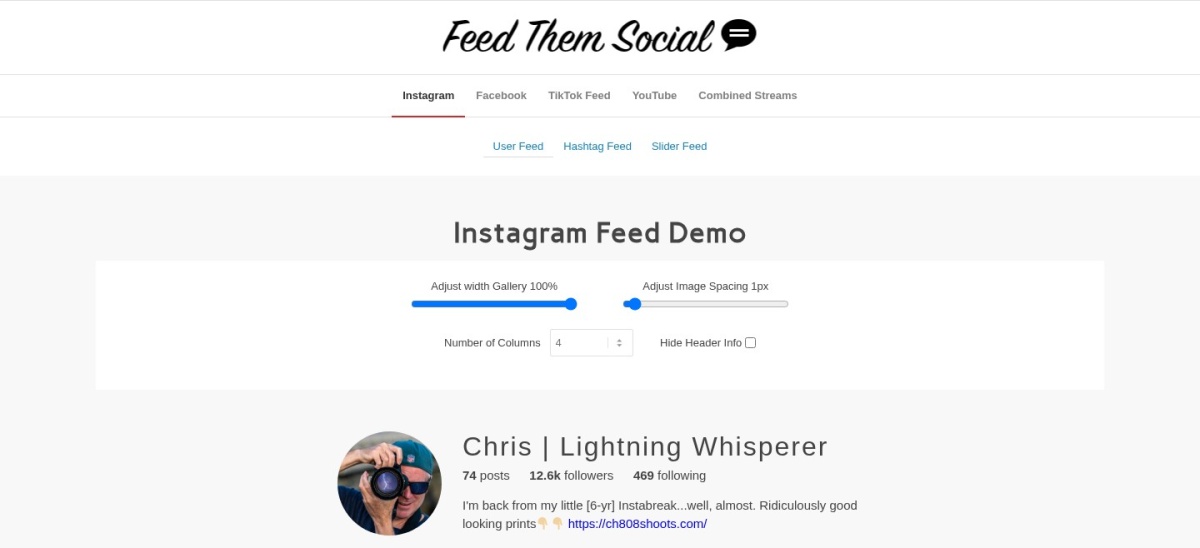
Feed Them Social homepage, captured Nov 2026.
Feed Them Social is a SlickRemix plugin with 20K+ active installs and 639 ratings on WordPress.org. It lets you create unlimited feeds across Instagram, Facebook, TikTok, and YouTube using Gutenberg blocks, shortcodes, or text widgets.
The trade off is that popups with descriptions, sliders, and combined streams sit behind paid extensions, with entry pricing around $50/yr. It suits sites that want one plugin for Instagram alongside other social feeds.
What we like
4.7/5 rating across 639 WordPress.org reviews
Supports Instagram, Facebook, TikTok, and YouTube feeds
Includes feed caching and follow or like buttons
Watch out for
Some popup descriptions and slider layouts require paid extensions
Requires a Business or Creator Instagram account for new API connections
Paid extensions and bundles add sliders, hashtag feeds, combined streams, and richer popups.Visit slickremix.com
06
Intagrate Lite
4.1/5on WordPress.org (27 reviews, checked Nov 2026)
Paid from$55/yr
Best for turning Instagram posts into WordPress posts
Active installs4K+
Rating4.1/5 (27)
Free tierAuto-post photos
Entry paid$55/yr
intagrate.io
Intagrate Lite homepage, captured Nov 2026.
Intagrate Lite is a Pole Vault Web plugin with 4K+ active installs and 27 ratings on WordPress.org. Instead of only embedding a widget, it automatically creates WordPress posts from new Instagram photos and can save images to your media library.
The trade off is a 4.1/5 rating and a narrower feature set than gallery plugins, with regular Bronze pricing at $55/yr (a 50% promotional discount to $27.50 is also shown). It suits photo blogs that want Instagram updates published as posts.
What we like
Publishes new Instagram photos directly as WordPress posts
Can save Instagram images to the WordPress media library
Uses an external login service so Instagram app credentials stay off your site
Watch out for
4.1/5 rating across 27 WordPress.org reviews
Free tier focuses on basic photo posting rather than full gallery layouts
Paid plans (regularly $55/yr for 1 site) add videos, multi-image posts, hashtag filtering, moderation, and custom post types.Visit intagrate.io
07
Widgets for Social Photo Feed
4.7/5on WordPress.org (28 reviews, checked Nov 2026)
PriceFree
Best for quick widget setup via Trustindex
Active installs10K+
Rating4.7/5 (28)
Free tier4 widget layouts
Entry paidVaries by plan
trustindex.io
Widgets for Social Photo Feed homepage, captured Nov 2026.
Widgets for Social Photo Feed is a Trustindex plugin with 10K+ active installs and 28 ratings on WordPress.org. Its free plugin offers grid, list, masonry, and slider layouts, shortcode embeds, widget lazy load, and daily updates.
The trade off is reliance on the external Trustindex service for feed management and processing, while standalone single-plugin pricing was not published on its main pricing page. It suits site owners who want multiple free layout styles and shortcode embedding.
What we like
4.7/5 rating from 28 WordPress.org reviews
Includes grid, list, masonry, and slider layouts in the free plugin
Supports shortcode embeds and widget lazy loading
Watch out for
Relies on the third-party Trustindex service for feed processing
Standalone single-plugin paid price is not listed on the general pricing page
Upgrading to a paid package unlocks additional social platforms, post moderation, and extended widget controls.Visit trustindex.io
Instagram API and account rules
Several plugins on WordPress.org note that Instagram's API supports Business and Creator accounts rather than personal accounts. Switching an Instagram profile to a Business or Creator account is free in the app, though you should check each plugin's connection steps before setting up.
Access tokens can also expire or need re-authentication if permissions change. Picking a plugin with clear token status notices and caching helps prevent blank spaces on your pages.
How we chose
This list starts from maintained Instagram feed plugins in the WordPress.org directory that offer a free version and active updates. We narrowed the field to established options with active installations and public user feedback.
All WordPress.org ratings, review counts, active install tiers, and official pricing pages were checked on 22 Nov 2026. Where a vendor displayed a promotional or introductory price alongside a standard rate, we recorded the regular price and noted the sale in the text.
We excluded plugins that were closed, unmaintained over the past year, below our adoption threshold, or lacked a verifiable official pricing page. No vendor paid for a place, and we do not claim practical testing for this list.
How to pick the right free Instagram plugin
Follow four quick checks before installing a feed plugin on your site.
Confirm your Instagram account type. Make sure your profile is set to a Business or Creator account if the plugin requires a connected professional account.
Check free layout and account limits. Compare how many feeds, connected accounts, and layouts (grid, carousel, slider, or lightbox) come free before upgrading.
Review caching and page speed options. Look for image caching, lazy loading, or AJAX loading so Instagram media does not slow down your pages.
Compare regular renewal prices early. If you expect to add hashtag feeds, moderation, or shoppable links later, check the regular annual cost rather than first-year promos.
FAQ
What is the best free WordPress Instagram feed plugin?
Spotlight is the best overall free choice for most sites because its free tier includes unlimited feeds, unlimited connected accounts, a popup lightbox, and local thumbnail caching. Smash Balloon is a strong alternative if you want 1M+ active installs and local WebP image support.
Do free WordPress Instagram plugins work with personal accounts?
Many plugins state that Instagram's current API supports Business and Creator accounts rather than personal accounts. You can usually switch a personal profile to a Creator or Business account in the Instagram app at no cost.
Can I display Instagram hashtags for free in WordPress?
Most plugins on this list keep hashtag feeds, tagged post feeds, and shoppable product links on paid plans. Check each plugin's feature list before installing if hashtag curation is a must-have.
Will an Instagram feed plugin slow down my WordPress site?
It can if it loads uncached external media on every visit. Plugins like Spotlight, Social Feed Gallery, and WPZOOM offer caching, lazy loading, or AJAX loading to reduce performance drag.
Can I add an Instagram feed in Gutenberg or Elementor for free?
Yes. Spotlight, Social Feed Gallery, WPZOOM, and Feed Them Social provide blocks, shortcodes, or Elementor options to place feeds on pages, posts, or sidebars.
Which plugin turns Instagram photos into WordPress posts instead of a widget?
Intagrate Lite is built to create WordPress posts automatically when you publish new Instagram photos, with an option to save images to your media library.