Best Chiropractic Software in 2026: 7 Tools Compared
WLWPLegible EditorsLast verified 22 Nov 2026How we rank13 min read
★ Short answer
Jane is the best chiropractic software for most small practices, with scheduling, clinical charting and online booking starting at $59 per month, although that plan limits appointments to 20 monthly. ChiroFusion is better for chiropractic-specific insurance billing, while Noterro offers a lower $33 monthly entry price for solo practitioners.
How we make this list: we compare pricing pages, product documentation and public user reviews, then re-check every price before each update. No product paid for a place. Disclosure.
Jane leads for general practice management with a 4.8/5 Capterra rating from 538 reviews. Its $59/month Balance plan is limited to 20 appointments.
ChiroFusion starts at $129/month with a 12-month commitment, plus a $299 setup fee, and includes electronic claims and ERA payment posting.
Noterro is the lowest-priced entry option here at $33/month, with scheduling, clinical notes and unlimited assistant seats.
Cliniko costs $45/month for one practitioner and includes unlimited patients, locations, file storage and administrative users.
ChiroSpring starts at $149/month, while Platinum starts at $299/month for a chiropractic-focused EHR and practice management system.
What matters when choosing chiropractic software?
Chiropractic practices need more than a basic appointment calendar. Software should connect patient records, treatment notes, scheduling, payments and follow-up communication without making daily tasks harder.
Start with SOAP notes and clinical documentation. Chiropractic-specific templates, treatment plans, examination records and reusable note structures can make documentation easier to manage. Check whether the entry plan includes the charting functions your practice actually uses.
Billing is another major difference. Some platforms include electronic claims, payment posting and clearinghouse connections, while others focus on invoices, direct payments and general practice administration. Ask about transaction fees and clearinghouse costs before signing a contract.
Pricing needs careful comparison. A lower monthly subscription may have appointment limits, additional provider charges, setup fees or optional modules. Compare the complete recurring cost rather than the advertised starting price alone.
Finally, consider migration and training. Moving patient records, appointment history and financial information requires planning. Look for accessible support, clear export options and a practical onboarding process.
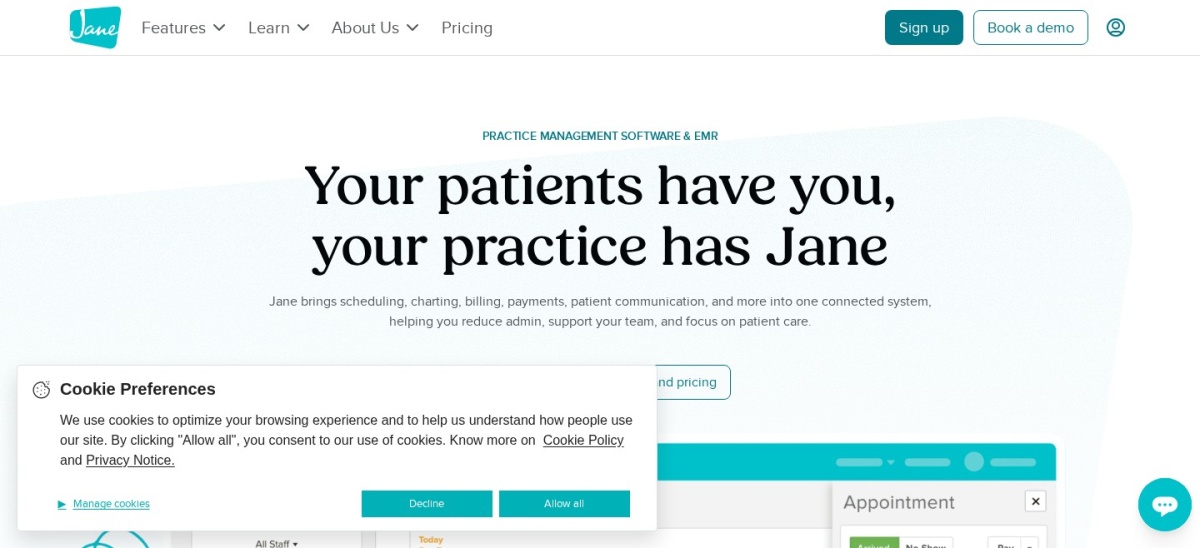
Jane is a cloud-based practice management platform for health and wellness clinics, including chiropractic practices. Its Balance plan costs $59 per month and includes core practice features for one practitioner, with a limit of 20 appointments monthly. Jane combines scheduling, online booking, clinical charting, patient records and payment workflows in one system.
The trade off is the strict appointment allowance on Balance. Practices exceeding 20 monthly appointments need the $79/month Practice plan, which includes unlimited appointments and staff profiles. It suits solo chiropractors and multidisciplinary clinics that want straightforward scheduling, documentation and patient administration.
What we like
Scheduling, charting and patient management in one platform
Practice adds unlimited appointments; higher tiers expand practice management featuresVisit jane.app
02
ChiroFusion
4.7/5on Capterra (590 reviews, checked Nov 2026)
Starts at$129/mo
Best for chiropractic insurance billing
Entry planEssentials, $129/mo
Commitment12 months
Setup fee$299
Extra providers$49/mo each
chirofusionsoftware.com
ChiroFusion homepage, captured Nov 2026.
ChiroFusion is chiropractic-focused EHR and practice management software combining scheduling, clinical notes, treatment plans and billing. Essentials costs $129 per month with a 12-month commitment. It includes unlimited electronic claims, ERA automatic payment posting, patient statements, reporting and integrated payment processing.
The trade off is the $299 setup fee and required commitment at the $129 monthly rate. A month-to-month Essentials subscription costs $149, and additional providers cost $49 per month each. It suits chiropractic offices prioritizing insurance claims, documentation and billing within the same system.
What we like
Chiropractic-specific documentation and care plans
Electronic claims included in Essentials
ERA automatic payment posting
Integrated patient billing and reporting
Watch out for
$299 setup fee at signup
Lowest monthly rate requires a 12-month commitment
Noterro is practice management software for allied health providers, including chiropractors. Core starts at $33 per month with one practitioner seat and unlimited assistant seats. The platform supports appointment scheduling, clinical notes, online booking, intake forms, invoicing, financial reports and appointment reminders.
The trade off is that Noterro is designed for multiple allied health disciplines rather than chiropractic practices exclusively. Extra practitioner seats cost more, and practices should verify advanced billing requirements before subscribing. It suits independent chiropractors seeking affordable scheduling, SOAP documentation and patient administration.
What we like
Lowest listed monthly entry price in this comparison
Unlimited assistant seats on Core
Online booking, charting and invoicing
14-day free trial
Watch out for
Not exclusively designed for chiropractic workflows
Higher plans expand automation, communication and clinic management optionsVisit noterro.com
04
Cliniko
4.7/5on Capterra (24 reviews, checked Nov 2026)
Starts at$45/mo
Best for multidisciplinary clinics
Entry price$45/mo
Practitioners1 included
LocationsUnlimited
Free trial30 days
cliniko.com
Cliniko homepage, captured Nov 2026.
Cliniko is allied health practice management software covering appointments, treatment records, online bookings and business administration. Its $45 monthly subscription supports one practitioner and includes unlimited patients, administrative users, locations and file storage. Every subscription includes the available Cliniko features rather than charging separately for feature tiers.
The trade off is that Cliniko uses general allied health workflows rather than a chiropractic-specific EHR design. Additional practitioners raise the monthly subscription, with the next published tier priced at $95 for two to five practitioners. It suits mixed-discipline clinics that value predictable pricing and shared patient administration.
What we like
Unlimited patients and locations
All features included in the subscription
Unlimited administrative and reception users
30-day free trial without upfront payment details
Watch out for
Not designed exclusively for chiropractors
Monthly price rises with practitioner count
SMS and third-party services may incur additional charges
Higher practitioner tiers increase team capacity without restricting core featuresVisit cliniko.com
05
Atlas Chirosys
4.7/5on Capterra (90 reviews, checked Nov 2026)
Starts at$99/mo
Best for chiropractic patient flow
Entry planEssential, $99/mo
Providers1 included
AppointmentsUnlimited
Higher planProfessional, $199/mo
atlaschirosys.com
Atlas Chirosys homepage, captured Nov 2026.
Atlas Chirosys is chiropractic practice management software centered on patient flow, scheduling, documentation and billing. Essential costs $99 per month for one provider, with unlimited appointments and administrative users. Features include patient self-check-in, SOAP notes, treatment plans, booking widgets, payment posting and insurance billing connections.
The trade off is that additional full licenses cost $15 per month on Essential, while more advanced forms and patient retention tools require Professional at $199 monthly. SMS credits also cost extra. It suits chiropractic clinics managing frequent visits, family appointments and structured patient check-in workflows.
What we like
Chiropractic-specific scheduling and documentation
Unlimited appointments and administrative users
Patient self-check-in and family booking
Insurance billing connections and payment posting
Watch out for
Additional full licenses cost extra
Advanced forms and retention campaigns require Professional
SMS usage is billed separately
Professional adds advanced forms, two-way texting and retention campaignsVisit atlaschirosys.com
06
ChiroSpring
4.9/5on Capterra (185 reviews, checked Nov 2026)
Starts at$149/mo
Best for chiropractic documentation workflows
Entry plan360, $149/mo
SOAP notesCustomizable
Patient appsIncluded
Pro Plus$299/mo
chirospring.com
ChiroSpring homepage, captured Nov 2026.
ChiroSpring is chiropractic practice management software with customizable SOAP notes, scheduling, treatment plans and reporting. Its 360 plan costs $149 per month and includes a virtual front desk, patient alerts, household management, integrated payments and patient and provider mobile apps.
The trade off is that advanced claim processing, clearinghouse services and additional practice automation can increase the subscription cost. The Pro Plus plan costs $299 per month, and the published clearinghouse option is another $149 monthly. It suits chiropractors who want configurable documentation and connected clinical workflows.
What we like
Customizable chiropractic SOAP notes
Treatment plans and household management
Patient and provider mobile apps
4.9/5 Capterra rating from 185 reviews
Watch out for
Higher entry price than general practice management options
Clearinghouse service has an additional fee
Advanced claims features require higher plans
Pro tiers expand claims tools, automation and patient engagement featuresVisit chirospring.com
07
Platinum
4.5/5on Capterra (177 reviews, checked Nov 2026)
Starts at$299/mo
Best for established chiropractic clinics
Entry planAlign, $299/mo
Clinical notesSOAP and EHR
BillingIncluded
OnboardingIncluded
platinumsystem.com
Platinum homepage, captured Nov 2026.
Platinum is a chiropractic-focused practice operating system combining EHR, charting, scheduling, billing and reporting. The Align tier starts at $299 per month and includes SOAP notes, payment workflows, analytics and AI-related clinical integrations. The vendor also lists onboarding and data migration among the included services.
The trade off is a considerably higher starting subscription than the budget alternatives in this guide. Patient engagement features such as two-way messaging, review requests and a patient app are positioned in the higher Strengthen tier. It suits established chiropractic practices that want clinical and business operations connected through one vendor.
What we like
Chiropractic-focused EHR and charting
Scheduling, billing and payments in one platform
Reporting and clinical integration features
Onboarding and migration included
Watch out for
$299 monthly entry price
Patient engagement tools require higher tiers
Broader functionality may be unnecessary for very small clinics
Strengthen adds a patient app, messaging, review requests and exercise plansVisit platinumsystem.com
Which chiropractic software is better for insurance billing?
Insurance billing deserves its own comparison because an inexpensive scheduler may not provide the claims functionality a chiropractic office needs.
ChiroFusion includes electronic claims, ERA payment posting and patient billing in Essentials at $129 per month with a contractual commitment. Atlas includes insurance billing connections, while ChiroSpring provides advanced claim tools through higher-tier plans and an optional clearinghouse service.
Before choosing, ask each vendor to demonstrate the exact claim submission, rejection correction, remittance posting and patient balance workflows your practice requires. Also confirm clearinghouse fees, provider charges and any transaction costs in writing.
What to check before moving chiropractic patient records
Changing practice software affects clinical documentation, staff schedules, billing history and patient communication. The subscription price should not be the only deciding factor.
Request a list of transferable data, including demographics, treatment notes, appointments, insurance information and outstanding balances. Ask whether historical records remain searchable after migration and whether attached files are transferred.
ChiroFusion lists a setup fee for its standard entry subscription, while Platinum advertises onboarding and migration within its platform offering. Cliniko says it can help migrate data from supported practice management systems without an additional migration charge.
Arrange staff training and verify record accuracy before fully switching systems. Keep access to the previous system until clinical and financial information has been checked.
How we chose
We shortlisted established chiropractic EHR and practice management platforms, alongside widely used allied health software suitable for chiropractic clinics. Selection considered clinical documentation, scheduling, payment workflows, insurance billing, patient communication and public review history.
Prices and ratings were checked against vendor pricing information and Capterra listings on 22 Nov 2026. The price ladder uses published entry subscription prices multiplied by 12, excluding setup charges, optional add-ons and usage fees. Review counts reflect the public listings available during verification.
We excluded vendors without a confirmable regular entry price, products lacking sufficient public review evidence and tools focused only on individual administrative tasks rather than broader practice management. No vendor paid for a place, and we do not claim testing for this list.
How to choose chiropractic software
Start by identifying the clinical and administrative work your practice needs to handle, then compare systems against those requirements rather than choosing solely by price.
List your essential clinical workflows. Check whether the software supports your preferred SOAP note format, initial evaluations, treatment plans, follow-up documentation and patient history. Ask for demonstrations using realistic chiropractic appointments instead of general product tours.
Match billing features to your payment model. If your clinic bills insurers, confirm claim creation, submission, rejection handling, electronic remittance and patient balance tracking. Cash-focused clinics may prioritize invoicing, packages, recurring payments and straightforward checkout instead.
Calculate your complete annual cost. Multiply the regular monthly subscription by 12, then account for setup fees, additional providers, payment processing, clearinghouse services, messaging and optional modules. Include contractual commitment requirements and cancellation terms.
Review migration, training and daily usability. Ask about transferring patient records, historical notes and financial information. Have clinical and front-desk staff review the scheduling, documentation and checkout workflows before making a final purchasing decision.
FAQ
What is the best chiropractic software in 2026?
Jane is our overall pick for many small chiropractic practices because it brings scheduling, charting, online booking and patient administration together. Its Balance plan starts at $59 per month, although the 20-appointment limit means busier clinics should evaluate the $79 Practice plan.
What is the cheapest chiropractic software in this comparison?
Noterro has the lowest published entry subscription here at $33 per month, followed by Cliniko at $45 and Jane at $59. These are general allied health practice management systems, so compare their chiropractic documentation and insurance billing features before choosing on price alone.
Does chiropractic software include SOAP notes?
Most platforms in this guide include clinical documentation, but the templates and customization options differ. ChiroSpring offers customizable SOAP notes, ChiroFusion includes chiropractic documentation, and Atlas provides SOAP and dot notes. Request an example of the documentation workflow before subscribing.
Which chiropractic software is good for insurance billing?
ChiroFusion is a strong starting point for insurance-focused offices because Essentials includes electronic claims and ERA automatic payment posting at $129 monthly with a 12-month commitment. Atlas and ChiroSpring also support billing workflows, but clearinghouse connections, added modules and fees should be verified.
Can I use chiropractic software for a multidisciplinary clinic?
Yes. Jane, Noterro and Cliniko serve multiple allied health disciplines, making them relevant when chiropractors share a practice with other therapists or practitioners. Compare how the software handles different appointment types, note templates, provider permissions, scheduling and billing across disciplines.
Is there free chiropractic practice management software?
The products in this comparison have paid subscriptions rather than permanent free plans. Noterro offers a 14-day trial, while Cliniko provides a 30-day trial. A trial can help evaluate workflows, but confirm whether patient data can be exported if you decide not to subscribe.
How much does chiropractic software cost per year?
Among the entry plans compared here, subscriptions range from $396 annually for Noterro to $3,588 for Platinum. These figures represent 12 months of the published subscription price. Setup fees, additional practitioners, billing services, messaging and other optional charges may increase the actual cost.
Is chiropractic-specific EHR software better than general clinic software?
It depends on the practice. Chiropractic-focused systems often emphasize treatment plans, visit documentation, patient flow and specialized billing. General clinic platforms may provide simpler scheduling, flexible practitioner management and lower entry prices. Choose based on the workflows your clinic requires rather than the software category alone.