Best Cheap Accounting Software for Small Business in 2026: 7 Tools Compared
WLWPLegible EditorsLast verified 22 Nov 2026How we rank12 min read
★ Short answer
Zoho Books is our top affordable accounting software pick because its free plan includes invoicing, bank reconciliation and financial reports, while Standard costs $20 monthly. Wave is a simpler free alternative with unlimited invoices, and ZipBooks offers an inexpensive $15 monthly upgrade for recurring invoices and multiple bank connections.
How we make this list: we compare pricing pages, product documentation and public user reviews, then re-check every price before each update. No product paid for a place. Disclosure.
Zoho Books has a free plan with 50+ reports, while Standard costs $20 monthly or $15 monthly when billed annually.
Wave Starter includes unlimited invoices and bookkeeping records for free; Pro costs $19 monthly or $190 annually.
ZipBooks Smarter costs $15 monthly and adds recurring invoices, multiple bank connections and 5 team members.
Patriot Accounting Basic costs $20 monthly and includes unlimited customers, invoices and automatic bank imports.
FreshBooks Lite costs $23 monthly at its regular price, while Xero Early costs $27 monthly with a 20-invoice limit.
QuickBooks Online Simple Start costs $38 monthly at its regular price, making its free plan worth considering first.
What cheap accounting software should include
Affordable accounting software should help a small business record income, track expenses, create invoices and understand cash flow without requiring an expensive subscription. Free plans can cover these basics, but their limitations vary.
Look for double-entry accounting, bank reconciliation and useful financial statements. A product that only creates invoices may not provide the bookkeeping records your accountant needs.
Bank feeds can save time by importing transactions automatically. However, some providers reserve automatic imports, transaction categorization or multiple bank connections for paid subscriptions.
Compare the regular price instead of introductory discounts. The cheapest plan may limit invoices, customers, users or financial reporting, so check whether upgrading later will fit your budget.
Consider how the software connects with your accountant, payment processor and existing business applications. Data exports, tax reports and reliable customer support can matter more than a small difference in monthly cost.
For accountant collaboration and established workflows
$38/mo
Free plan
4.3/5
Price ladder: cheapest paid plan per year
List prices, USD, checked Nov 2026
ZipBooksFREE$180
WaveFREE$228
Zoho BooksFREE$240
Patriot$240
FreshBooks$276
Xero$324
QuickBooksFREE$456
The 7 best cheap accounting software tools for small business
01
Zoho Books
4.4/5on Capterra (684 reviews, checked Nov 2026)
Paid from$20/mo
Best cheap accounting software overall
Free plan1 user + 1 accountant
Free reports50+
Paid entryStandard, $20/mo
Annual billing$15/mo
zoho.com
Zoho Books homepage, captured Nov 2026.
Zoho Books is cloud accounting software for small businesses that need invoicing, expense tracking and financial reporting. Its free plan includes bank reconciliation, recurring invoices, 50+ reports and access for 1 user plus an accountant. Standard costs $20 monthly and supports 3 users, connected bank feeds and custom reports.
The trade off is that automatic bank feeds, custom reports and several advanced accounting controls require Standard at $20 monthly, or $15 monthly with annual billing. Inventory and project profitability tools require higher plans. It suits cost-conscious businesses that want useful free bookkeeping and affordable room to grow.
What we like
Free invoicing and double-entry accounting
Bank reconciliation and extensive reporting
Affordable paid entry with multiple users
Integrates with other Zoho business applications
Watch out for
Automatic bank feeds require Standard
Advanced inventory features require Professional
Some reporting customization needs paid plans
Standard adds bank feeds, custom reports, recurring expenses and additional usersVisit zoho.com
02
Wave
4.4/5on Capterra (1,732 reviews, checked Nov 2026)
Paid from$19/mo
Best free accounting software for very small businesses
Free planStarter
Free invoicingUnlimited
Paid entryPro, $19/mo
Annual billing$190/yr
waveapps.com
Wave homepage, captured Nov 2026.
Wave is small business accounting and invoicing software with a free Starter plan. Starter supports unlimited estimates, invoices, bills and bookkeeping records, plus online payment acceptance. Pro costs $19 monthly or $190 annually and adds automatic bank imports, receipt capture, transaction categorization and payment reminders.
The trade off is that automatic bank connections and receipt scanning require Pro at $19 monthly, and payment processing carries separate transaction fees. The free version also provides less automation than paid alternatives. It suits freelancers and very small businesses that mainly need invoices, expense records and straightforward bookkeeping.
What we like
Unlimited invoices on the free plan
Free bookkeeping and financial records
Paid annual subscription available at $190
Receipt scanning and bank automation on Pro
Watch out for
Automatic bank imports are paid features
Payment processing adds transaction fees
Advanced accounting workflows are limited
Pro adds automatic bank imports, receipt capture, categorization and payment remindersVisit waveapps.com
03
ZipBooks
4.5/5on Capterra (115 reviews, checked Nov 2026)
Paid from$15/mo
Best low-cost upgrade for invoicing and bookkeeping
Free planStarter
Bank connections1 free
Paid entrySmarter, $15/mo
Team members5 on Smarter
zipbooks.com
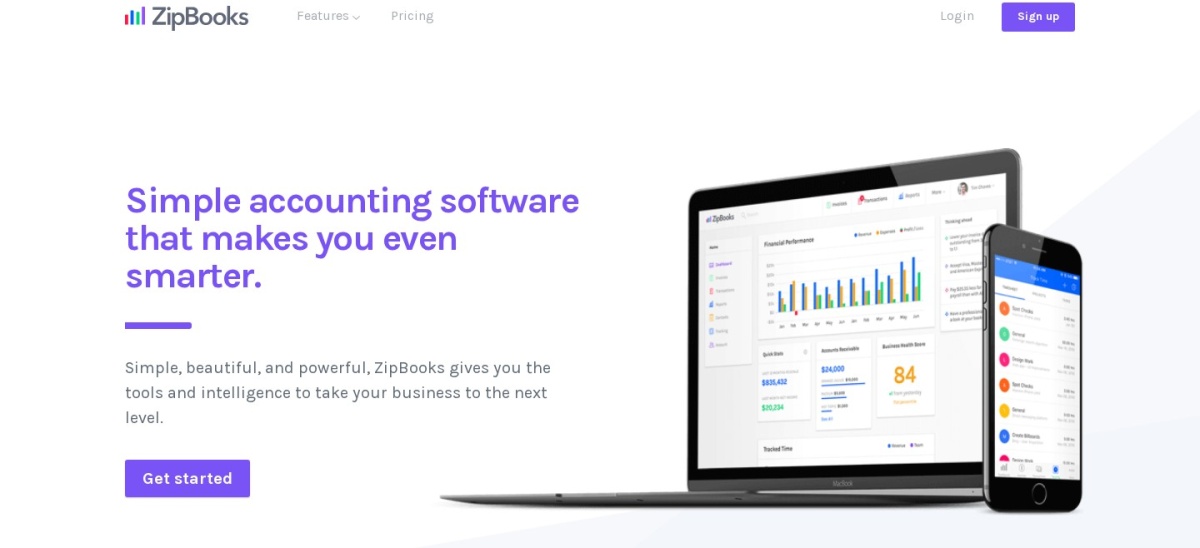
ZipBooks homepage, captured Nov 2026.
ZipBooks is accounting and invoicing software for small companies, freelancers and service providers. Its free Starter plan includes unlimited invoices, customers and vendors, basic reports and 1 bank connection. Smarter costs $15 monthly and adds recurring invoices, automated reminders, time tracking, multiple bank connections and 5 team members.
The trade off is that detailed bookkeeping controls, account reconciliation and unlimited users require Sophisticated at $35 monthly. The free plan also has limited reporting. It suits service businesses that want an inexpensive step beyond free invoicing without immediately buying a larger accounting platform.
What we like
Free unlimited customer invoicing
Lowest published paid entry price in this comparison
Recurring invoices and time tracking on Smarter
Multiple bank connections in the paid plan
Watch out for
Free plan provides basic reports only
Advanced reconciliation requires Sophisticated
Fewer advanced accounting features than larger platforms
Smarter adds recurring billing, multiple bank accounts, time tracking and team accessVisit zipbooks.com
04
Patriot Accounting
4.8/5on Capterra (3,967 reviews, checked Nov 2026)
Starts at$20/mo
Best for affordable accounting with optional payroll
Entry planAccounting Basic
Regular price$20/mo
InvoicingUnlimited
Free trial30 days
patriotsoftware.com
Patriot Accounting homepage, captured Nov 2026.
Patriot Accounting is small business bookkeeping software from Patriot Software, which also offers payroll products. Accounting Basic costs $20 monthly and includes unlimited customers, invoices, vendors and payments, automatic bank imports, income and expense tracking, financial reporting and account reconciliation.
The trade off is that recurring invoices, estimates, receipt management and user permissions require Accounting Premium at $30 monthly. Payroll is an additional subscription, and the Capterra rating shown here covers the wider Patriot Software product rather than accounting alone. It suits small businesses that want bookkeeping and optional payroll from one provider.
4.5/5on Capterra (4,534 reviews, checked Nov 2026)
Starts at$23/mo
Best affordable accounting for service businesses
Entry planLite
Regular price$23/mo
Client limit5 on Lite
Free trial30 days
freshbooks.com
FreshBooks homepage, captured Nov 2026.
FreshBooks is accounting and invoicing software for freelancers and service-based small businesses. Lite costs $23 monthly at its regular price and supports invoicing for 5 clients, real-time expense tracking, estimates, online payment acceptance and tax-time reporting. Its pricing page currently advertises a temporary 90% discount.
The trade off is the 5-client limit and restricted accounting features on Lite at $23 monthly. Plus costs $43 monthly and raises invoicing capacity to 50 clients while adding accounting reports, proposals and accountant access. It suits consultants and service businesses that value client billing more than advanced inventory management.
What we like
Designed around client invoicing
Expense tracking and estimates included
Multiple online payment options
Upgrade path to accounting reports and retainers
Watch out for
Lite limits invoicing to 5 clients
Accounting reports require Plus
Additional team members cost extra
Plus adds expanded client invoicing, accounting reports, proposals and accountant accessVisit freshbooks.com
06
Xero
4.4/5on Capterra (3,341 reviews, checked Nov 2026)
Starts at$27/mo
Best for inexpensive accounting with multiple users
Entry planEarly
Regular price$27/mo
Invoice allowance20
Bill allowance5
xero.com
Xero homepage, captured Nov 2026.
Xero is cloud accounting software for businesses that need invoicing, bank reconciliation and financial reporting. Early costs $27 monthly at its regular price and includes 20 invoices, 5 bills, transaction reconciliation, document capture and cash flow forecasting. Xero also advertises no per-user license fees and a temporary introductory discount.
The trade off is that Early limits invoice and bill volumes, making Growing at $59 monthly more suitable for busier businesses. Some advanced functions also require add-ons or higher plans. It suits small teams that want connected accounting records without paying separate software licenses for every user.
What we like
No per-user license fees
Bank reconciliation included
Document capture and financial reporting
Large accounting integration ecosystem
Watch out for
Early restricts invoices and bills
Higher plans become considerably more expensive
Some features require optional add-ons
Growing removes entry-level billing constraints and adds broader automation and reportingVisit xero.com
07
QuickBooks Online
4.3/5on Capterra (8,555 reviews, checked Nov 2026)
Paid from$38/mo
Best for accountant collaboration and established workflows
Free planAvailable
Paid entrySimple Start
Regular price$38/mo
Simple Start users1 + 2 accountants
quickbooks.intuit.com
QuickBooks Online homepage, captured Nov 2026.
QuickBooks Online is small business accounting software for income tracking, invoicing, expense management and financial reporting. Its free plan includes 1 user, 1 connected bank, 2 monthly invoices and basic reports. Simple Start costs $38 monthly and adds broader accounting features plus access for 2 accountants.
The trade off is that Simple Start costs more than several alternatives at $38 monthly, and advanced bill management or additional users require higher plans. The current promotional offer temporarily reduces the subscription cost. It suits businesses that prioritize accountant collaboration and compatibility with established accounting workflows.
What we like
Free entry option for basic accounting
Accountant collaboration on paid plans
Income and expense tracking
Extensive accounting and integration ecosystem
Watch out for
Paid entry is expensive compared with budget alternatives
When should a small business pay for accounting software?
Free accounting software can be sufficient when your business has straightforward income, limited expenses and simple invoicing requirements. Zoho Books, Wave and ZipBooks each offer free accounting-related functionality.
A paid subscription becomes more useful when manual bookkeeping takes too much time. Automatic bank imports, recurring invoices, receipt capture and additional users can reduce repetitive work.
Wave Pro adds bank automation, while Zoho Books Standard includes connected feeds and custom reports. ZipBooks Smarter adds recurring invoices and multiple bank connections.
The right upgrade depends on the work you need to automate. Choose the smallest plan that covers your essential accounting processes rather than paying for features you rarely use.
Accounting software vs invoicing software: what is the difference?
Invoicing software focuses on creating bills for customers, recording payments and sending reminders. Accounting software covers these tasks alongside financial records, account reconciliation and reporting.
For proper bookkeeping, look for a general ledger, income statement, balance sheet and the ability to reconcile bank transactions. These functions help maintain an organized financial record.
Freelancers with simple finances may find an invoicing-focused platform sufficient. Businesses with employees, inventory, regular expenses or more complicated reporting should compare complete accounting systems.
Before choosing a free plan, check whether it provides the financial statements and exports your accountant needs. A free invoice generator is not necessarily a complete accounting solution.
How we chose
We shortlisted established accounting software providers with public pricing, active product pages and substantial independent review histories. We compared free accounting capabilities, invoicing, expense tracking, bank reconciliation, reporting and paid upgrade costs. Products serving small businesses and freelancers received priority over enterprise accounting systems.
Official vendor pricing and Capterra review information were checked on 23 Nov 2026 for the 22 Nov 2026 editorial date. Annual comparisons use regular monthly subscription prices multiplied by 12, rather than temporary promotional prices. Discounted annual billing is explained separately where relevant.
We excluded products with unavailable official entry pricing, unclear subscription terms or insufficient review evidence. We also excluded discontinued accounting products and specialist tools that mainly provide invoicing without adequate bookkeeping functionality. No vendor paid for a place, and we do not claim testing for this list.
How to choose cheap accounting software for your small business
Start by identifying your monthly bookkeeping tasks, then compare free plans and paid subscriptions against the functions your business actually needs.
List your essential accounting tasks. Decide whether you need invoicing, bank reconciliation, expense tracking, receipt management, tax reports or inventory. Separate essential functions from optional conveniences before comparing subscription prices.
Compare free plans with regular paid prices. Review the limits on customers, invoices, connected bank accounts and users. Calculate the regular annual cost, including additional users and paid features, instead of relying on temporary promotional offers.
Check automation and accountant access. Look for automatic transaction imports, recurring invoices, useful financial reports and accountant collaboration. These functions can justify a paid subscription when they substantially reduce manual bookkeeping.
Review exports, support and upgrade options. Make sure you can export financial records and move your data if necessary. Compare support availability, integration options and higher-tier pricing before committing to a system.
FAQ
What is the best cheap accounting software for a small business?
Zoho Books is a strong overall choice because its free plan covers core bookkeeping, invoicing, bank reconciliation and financial reporting. Its Standard plan costs $20 monthly and adds connected bank feeds and additional users. Wave and ZipBooks are also worth considering for smaller budgets.
Is there completely free accounting software for small businesses?
Yes. Zoho Books, Wave and ZipBooks offer permanently free plans with accounting or bookkeeping functionality. Their capabilities differ, especially around bank automation, reporting and users. Payment processing and additional services may still carry charges even when the accounting subscription is free.
How much should a small business spend on accounting software?
A small business with basic bookkeeping requirements may not need a paid subscription. Entry-level plans in this comparison range from $15 monthly for ZipBooks Smarter to $38 monthly for QuickBooks Online Simple Start. Compare the regular annual cost and necessary add-ons before deciding.
Can I use free accounting software instead of QuickBooks?
Yes, if your bookkeeping requirements fit the free plan's capabilities. Zoho Books and Wave both provide free accounting-related functions. However, businesses that depend on particular accountant workflows, integrations or advanced reporting should confirm that an alternative supports those requirements before switching.
What is the cheapest paid accounting software in this comparison?
ZipBooks Smarter has the lowest regular paid entry price among these products at $15 monthly, equivalent to $180 annually. It adds recurring invoicing, time tracking and multiple bank connections. Wave and Zoho Books also offer free plans that may be sufficient without upgrading.
Do small businesses need double-entry accounting?
Double-entry accounting is useful for maintaining consistent financial records because transactions affect corresponding accounts. It supports financial statements and reconciliation. Many small businesses benefit from it, particularly when preparing accurate financial information for an accountant, lender or business decision.
Does cheap accounting software include payroll?
Payroll is often a separate paid service rather than part of an entry-level accounting subscription. Patriot Software offers accounting and payroll products that can work together, while QuickBooks and Xero offer payroll-related integrations or add-ons. Compare the full combined cost before selecting a provider.
Is cloud accounting software safe for financial records?
Established cloud accounting providers typically offer account security controls and managed online storage. However, you should review each vendor's security documentation, access permissions, authentication options and data export procedures. Use strong account protection and avoid sharing administrator credentials between employees.
When should I upgrade from free accounting software?
Consider upgrading when free-plan limits interfere with daily operations or manual work becomes costly. Automatic bank feeds, recurring invoices, receipt capture, additional users and detailed reports are common reasons to move to a paid subscription. Review your requirements before choosing a higher tier.