Todoist is the best app for personal task management for most people, with fast natural-language capture, 300 projects on Pro and a 4.5 out of 5 G2 rating. Pick Microsoft To Do for a free list with Outlook sync, or TickTick for the best value paid plan at $49.99 a year.
How we make this list: we compare pricing pages, product documentation and public user reviews, then re-check every price before each update. No product paid for a place. Disclosure.
Todoist is the best all-round pick: fast capture, 300 projects on Pro and a free plan with 5 projects.
TickTick is the best value paid plan at $49.99 a year, with a calendar, habit tracker and Pomodoro timer included.
Microsoft To Do is free with a Microsoft account and has no paid plan, so it costs nothing to run a simple daily list.
Things 3 is the only one-time purchase here: $9.99 for iPhone, $19.99 for iPad and $49.99 for Mac, with no subscription.
Asana Starter is the priciest entry plan at $131.88 a year, while 7 of the 9 tools cost under $100 a year.
What a personal task app should do
A personal task app should make capture fast and review easy. If adding a task takes more than a few seconds, the list goes stale and work slips.
Look for an inbox for quick capture, projects or lists for outcomes, due dates and reminders, and a Today view that shows only what matters now.
Free plans differ more than prices do. Some cap projects at 5, others cap lists at 9, and a few charge for reminders, so check the free limits before you commit.
Price is the last filter, not the first. Most tools here cost under $100 a year, so pick the one whose lists match how you work, then check the price. Our guide on creating a content calendar shows how a regular planning slot keeps any system current.
For personal projects that may grow into team work
$10.99/mo
Free plan
4.4/5
Price ladder: cheapest paid plan per year
List prices, USD, checked Nov 2026
MS To DoFree
Things 3$10
TickTickFREE$50
Any.doFREE$60
TodoistFREE$60
TrelloFREE$60
ClickUpFREE$84
NotionFREE$120
AsanaFREE$132
The 9 best apps for personal task management
01
Todoist
4.5/5on G2 (860 reviews, checked Nov 2026)
Paid from$5/mo
Best app for personal task management overall
Free plan5 personal projects
Entry paidPro, $60/yr
PlatformsWeb, Windows, Mac, iOS, Android
Key featureNatural-language input
todoist.com
Todoist homepage, captured Nov 2026.
Todoist is a task manager built around fast capture, with natural-language input that turns typed dates into due dates. The free Beginner plan includes 5 personal projects, 3 filter views, task reminders and 5 MB file uploads, and it runs on the web, Windows, Mac, iOS and Android.
The trade off is price. Pro costs $5 a month billed yearly, or $7 billed monthly, and the calendar layout, task durations and custom reminders all sit behind that paywall. It suits most people who run their whole day from one list and want it on every device.
What we like
Natural-language input turns typed dates into due dates
Free plan covers 5 projects, reminders and 3 filters
Syncs across web, desktop and mobile
Rated 4.5 out of 5 from 860 G2 reviews
Watch out for
Calendar layout and task durations need Pro
No start dates, only due dates
Pro price rose in December 2025
Pro adds 300 projects, calendar layout and custom remindersVisit todoist.com
02
TickTick
4.5/5on G2 (114 reviews, checked Nov 2026)
Paid from$49.99/yr
Best value paid plan
Free plan9 lists, 99 tasks per list
Entry paidPremium, $49.99/yr
PlatformsWeb, Windows, Mac, iOS, Android
Key featureCalendar, habits, Pomodoro timer
ticktick.com
TickTick homepage, captured Nov 2026.
TickTick is a task manager with a built-in calendar, habit tracker and Pomodoro timer, so one app can cover capture, planning and focus. The free plan allows 9 lists with 99 tasks each, plus list and board views and a basic calendar.
The trade off is polish. Premium lists at $49.99 a year, up from $35.99, and the free calendar shows one day at a time. It suits people who want tasks, habits and a focus timer in one cheap app.
What we like
Calendar, habits and Pomodoro timer included
Cheapest full paid plan in this list
Free plan covers 9 lists and 99 tasks per list
Rated 4.5 out of 5 from 114 G2 reviews
Watch out for
Premium price rose from $35.99 to $49.99 a year
Free calendar shows one day at a time
Support is email only
Premium adds 299 lists, multiple calendars and smart listsVisit ticktick.com
03
Microsoft To Do
4.4/5on G2 (99 reviews, checked Nov 2026)
PriceFree
Best free app for Microsoft users
Free planFull app, no paid plan
Entry paidNone, free with a Microsoft account
PlatformsWeb, Windows, Mac, iOS, Android
Key featureMy Day daily planning view
microsoft.com
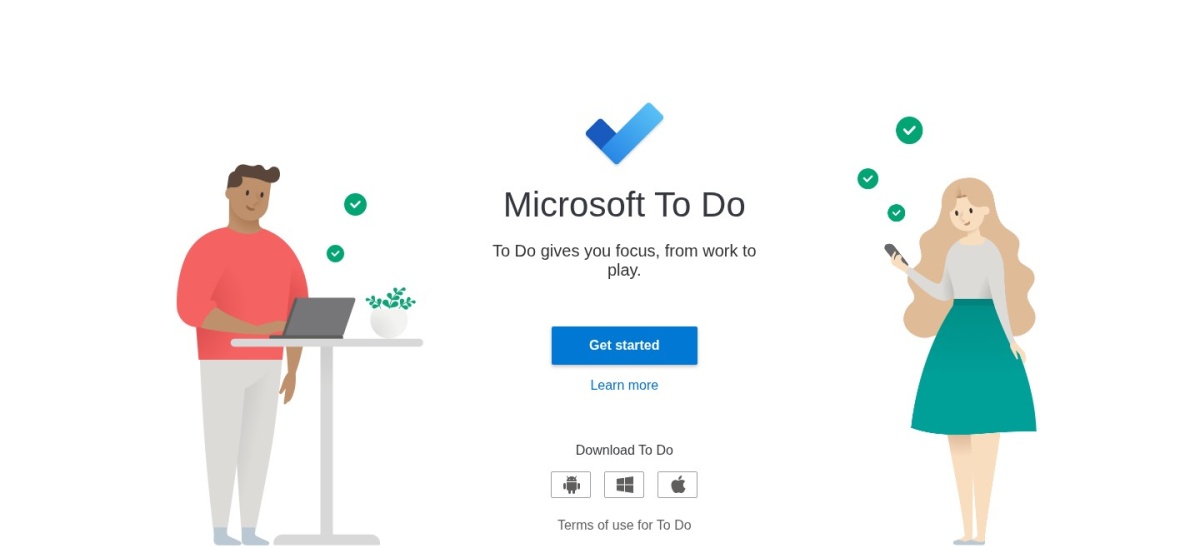
Microsoft To Do homepage, captured Nov 2026.
Microsoft To Do is a free task app from Microsoft, with lists, steps for subtasks, reminders and a My Day view for daily planning. It costs nothing with a Microsoft account, has no paid plan, and syncs with Outlook, so flagged emails appear as tasks.
The trade off is depth. To Do has no start dates, no built-in calendar view and no habit tracking, so complex projects need workarounds with lists. It suits people whose email and calendar already live in Outlook and who want a simple free daily list.
What we like
Free, with no paid plan or feature gates
My Day view turns a long list into a daily plan
Outlook and Teams sync included
Rated 4.4 out of 5 from 99 G2 reviews
Watch out for
No start dates or built-in calendar view
Needs a Microsoft account
No export button for your lists
No paid plan exists; some Microsoft 365 features are separateVisit microsoft.com
04
Things 3
4.8/5on App Store (28,106 reviews, checked Nov 2026)
Starts at$9.99/once
Best one-time purchase for Apple users
Free planNo, 15-day Mac trial
Entry paidiPhone app, $9.99 once
PlatformsMac, iPhone, iPad, Apple Watch
Key featureToday and Upcoming planning
culturedcode.com
Things 3 homepage, captured Nov 2026.
Things 3 is a personal task manager from Cultured Code for Apple devices, built around to-dos, projects, areas and a Today and Upcoming plan. Each app is a one-time purchase: $9.99 for iPhone, $19.99 for iPad and $49.99 for Mac, with Things Cloud sync included at no extra cost.
The trade off is platform. Things 3 is Apple-only, with no web or Windows version, and it has no Waiting For list or built-in weekly review. It suits Apple users who want a calm, simple list and would rather buy an app than rent one.
4.6/5on App Store (50,572 reviews, checked Nov 2026)
Paid from$4.99/mo
Best for tasks, calendar and reminders in one
Free planTasks, lists, reminders, calendar
Entry paidPremium, $59.88/yr
PlatformsWeb, Windows, Mac, iOS, Android
Key featureLocation and WhatsApp reminders
any.do
Any.do homepage, captured Nov 2026.
Any.do is a to-do list, calendar and daily planner that syncs across phone, desktop, browser and watch. The free Personal plan includes tasks and lists, reminders, a calendar, a daily planner and sync across devices.
The trade off is price. Premium costs $4.99 a month billed yearly, or $7.99 billed monthly, and recurring tasks, location reminders and color tags all sit behind that paywall. It suits people who want their list, calendar and reminders in one app.
What we like
List, calendar and daily planner in one app
Location reminders and a WhatsApp task bot on Premium
Syncs across phone, desktop and watch
Rated 4.6 out of 5 from 50,572 App Store ratings
Watch out for
Recurring tasks and location reminders need Premium
Premium is $7.99 a month on monthly billing
Free plan shows upgrade prompts often
Premium adds recurring tasks, location reminders and AI listsVisit any.do
06
ClickUp
4.7/5on G2 (10,956 reviews, checked Nov 2026)
Paid from$7/mo
Best all-in-one workspace for growing lists
Free planUnlimited tasks and members
Entry paidUnlimited, $84/yr
PlatformsWeb, Windows, Mac, iOS, Android
Key featureDocs, goals and time tracking
clickup.com
ClickUp homepage, captured Nov 2026.
ClickUp is a work management platform with tasks, docs, whiteboards, goals and native time tracking in one workspace. The free plan includes unlimited tasks and members with 100 MB of storage, and Unlimited adds unlimited storage, custom fields and Gantt charts.
The trade off is size. ClickUp is built for teams, so a solo setup needs more configuration than Todoist or TickTick, and the learning curve is steep. Unlimited costs $7 per user a month billed yearly, while Business lists at a regular $12. It suits people who run personal tasks beside team projects.
What we like
Free plan has unlimited tasks and members
Docs, goals and time tracking in one app
Largest review base in this list
Rated 4.7 out of 5 from 10,956 G2 reviews
Watch out for
Heavy for a solo task list
Steep learning curve in the first weeks
Most useful views sit behind paid plans
Business at $12 a month billed yearly adds dashboards and goalsVisit clickup.com
07
Trello
4.4/5on G2 (14,064 reviews, checked Nov 2026)
Paid from$5/mo
Best visual boards for simple personal lists
Free plan10 boards per Workspace
Entry paidStandard, $60/yr
PlatformsWeb, Windows, Mac, iOS, Android
Key featureKanban boards with checklists
trello.com
Trello homepage, captured Nov 2026.
Trello is a visual task app built on Kanban boards, where each task is a card you drag between columns. The free plan covers 10 boards per Workspace and 10 collaborators, with checklists, due dates and 250 automation runs a month.
The trade off is structure. Trello has no built-in dependencies, and Timeline, Table, Calendar and Dashboard views start on Premium at $10 per user a month billed yearly. Standard costs $5 a month billed yearly. It suits people whose work is a few columns of cards.
Notion is a flexible workspace where you can build a personal task system from pages, databases and templates. The free plan gives individual users unlimited pages and blocks, plus Notion Calendar, basic forms and databases with subtasks.
The trade off is setup. Notion is not a ready-made task app, so you build your lists and views yourself, and large workspaces can feel slow. Plus costs $10 per member a month billed yearly. It suits people who want notes, tasks and planning in one place.
What we like
Free plan covers unlimited pages for individuals
Databases, templates and Calendar in one app
Guests can view pages you invite them to
Rated 4.6 out of 5 from 13,767 G2 reviews
Watch out for
You build your task system yourself
Large workspaces can feel slow
Plus costs $120 a year for one member
Plus adds 30-day history, 5 GB uploads and custom formsVisit notion.com
09
Asana
4.4/5on G2 (13,867 reviews, checked Nov 2026)
Paid from$10.99/mo
Best for personal projects that may grow into team work
Free planPersonal, up to 2 users
Entry paidStarter, $131.88/yr
PlatformsWeb, Windows, Mac, iOS, Android
Key featureTimeline, dashboards and goals
asana.com
Asana homepage, captured Nov 2026.
Asana is a work management app with list, board and Timeline views, custom fields and goals for personal and team projects. The free Personal plan covers up to 2 users with unlimited tasks and projects, and Starter adds Timeline, dashboards and automations.
The trade off is price. Starter costs $10.99 per user a month billed yearly, or $13.49 billed monthly, which is the highest entry price in this list. It suits people whose personal projects will grow into shared team work.
What we like
Free Personal plan covers unlimited tasks
Timeline, dashboards and goals on Starter
Easy to grow from solo lists to team work
Rated 4.4 out of 5 from 13,867 G2 reviews
Watch out for
Highest entry price in this list
Free plan caps at 2 users
Portfolios and workload need Advanced
Advanced at $24.99 a month adds portfolios and workloadVisit asana.com
Free vs paid: what you give up
Free plans cover capture and basic lists well. Todoist, TickTick, Microsoft To Do, Any.do, ClickUp, Trello, Notion and Asana all have a usable free plan, and Microsoft To Do has no paid plan at all.
Paid plans mostly add room and views. You get more projects, more lists, calendar layouts, custom filters and longer history.
The one paid-only app here charges once instead of monthly. Things 3 costs $9.99 for iPhone, $19.99 for iPad and $49.99 for Mac, with no subscription to renew.
If you are new to task apps, start free for a month. Capture every task, plan each day and run one weekly review before you pay, so you learn whether the lists fit your work.
How we chose
We started from the task apps named most often in personal productivity guides, then kept only established tools with a public price and a public rating on G2 or the App Store.
Prices come from each vendor's pricing page, checked on 25 November 2026. Ratings come from G2 or the App Store on the same day. Where a vendor shows a sale price, the list shows the regular price.
We left out smaller apps with no public rating, so every tool here has a published score. No vendor paid for a place, and we do not claim to have used these tools ourselves.
How to choose a personal task management app
Start with the devices you use every day, then match the app to how much structure you need.
List the devices you use daily. Things 3 is Apple-only, so Windows or Android users should start with Todoist, TickTick or Microsoft To Do instead.
Decide how much structure you need. Pick ClickUp, Notion or Asana for projects with goals and timelines, or Todoist and TickTick if simple lists and due dates are enough.
Try the free plan for two weeks. Capture every task in the inbox and plan each day before you pay, so you learn whether the lists fit your work.
Check the yearly price, not the monthly one. Most paid plans here cost under $100 a year, but monthly billing can add $24 or more over a year on the same plan.
FAQ
What is the best app for personal task management?
Todoist is the best app for personal task management for most people. It has fast capture, projects, labels and filters on every device, Pro costs $60 a year, and it is rated 4.5 out of 5 on G2 from 860 reviews.
Is there a free app for personal task management?
Yes. Microsoft To Do is free with a Microsoft account and has no paid plan. Todoist, TickTick, Any.do, ClickUp, Trello, Notion and Asana also have free plans, with limits on projects, lists or storage.
What is the cheapest paid task app?
TickTick Premium is the cheapest full paid plan here at $49.99 a year. Things 3 is cheaper still as a one-time purchase at $9.99 for the iPhone app, though the Mac app costs $49.99 once.
Which task app is best for Apple users?
Things 3 is the best task app for Apple users who want a calm design and a one-time purchase instead of a subscription. Todoist and TickTick are the best cross-platform picks if you also use Windows or Android.
Do I need a paid plan to manage personal tasks?
No. A free plan covers capture, projects and lists, which is enough to start. Pay when you hit a limit that matters, such as more projects, calendar layouts or saved filters.
Can I use a task app with my calendar?
Yes. TickTick and Any.do have a calendar built in, and Todoist Pro adds a calendar layout. Microsoft To Do syncs with Outlook, and Notion includes Notion Calendar on its free plan.
SaaS SEO and WordPress specialist with about 8 years of experience. Rakib compares WordPress plugins, themes, hosting and software using public pricing, documentation and user reviews. See how we rank.