CapCut is the best software for dance video editing: its free plan cuts to the beat automatically and adds captions in one tap. Filmora is the easiest desktop pick at $49.99 a year, and DaVinci Resolve is the strongest free professional option.
How we make this list: we compare pricing pages, product documentation and public user reviews, then re-check every price before each update. No product paid for a place. Disclosure.
CapCut is the only free pick with automatic beat sync, dance templates and one-tap captions.
Filmora adds auto beat detection on desktop for $49.99 a year, the cheapest paid plan after LumaFusion.
DaVinci Resolve is the strongest free professional editor, but beat-matched cuts need manual markers.
Premiere Pro and Final Cut Pro are the pro picks; Premiere is $22.99 a month, Final Cut is $299.99 once.
LumaFusion at $29.99 once and KineMaster at $59.99 a year cover phone and tablet editing.
What dance video editing needs most
Dance videos live or die on the cut. A step that lands half a beat late looks wrong, so the editor matters as much as the choreography. The best tools for dance either sync cuts to the music for you or make manual beat marking fast.
Look for beat sync first, then templates and captions. Automatic beat detection and dance templates save the most time on short clips for TikTok, Reels and Shorts. Captions matter because many viewers watch with the sound off, and vertical export matters because dance is watched on phones.
Free plans are genuinely useful here. CapCut and DaVinci Resolve both edit and export without payment, though CapCut's best templates and 4K need Pro. Our guide on embedding a video in WordPress shows how to publish the finished clip on your own site once it is cut.
Price spreads are wide. The nine tools here run from free to $299.99 once, with subscriptions from $49.99 to $275.88 a year. Pick the cheapest tool that covers your format: short social clips need little more than CapCut, while client work needs a pro timeline.
CapCut is the free editor most dance creators reach for first. It cuts clips to the beat automatically, adds captions in one tap, and ships dance and trend templates that are already timed to popular sounds. The free version covers the full timeline, multi-track editing and 1080p export, with 4K on Pro.
The trade off is price creep and trust. Pro costs $19.99 a month, or $179.99 a year, and features keep moving from free to paid. Its Trustpilot score sits at 1.3 out of 5, driven by billing complaints, and US availability has been uncertain. It suits creators who publish short dance clips every week.
What we like
Automatic beat sync lines cuts up with the music
Huge library of dance and trend templates
Auto captions and background removal built in
Free on mobile, desktop and web
Watch out for
Pro is $179.99 a year after the 2026 repricing
Trustpilot score of 1.3 reflects billing complaints
Weak for projects longer than 15 minutes
Pro adds 4K export, premium templates and 100GB cloud storageVisit capcut.com
02
Wondershare Filmora
4.4/5on G2 (613 reviews, checked Nov 2026)
Paid from$49.99/yr
Best beginner desktop editor for dance
Beat syncAuto beat detection
AI credits200 a month, Basic
4K exportYes, paid plans
Perpetual licence$79.99 one-time
filmora.wondershare.com
Wondershare Filmora homepage, captured Nov 2026.
Wondershare Filmora is a desktop editor built for beginners who want polished dance videos without learning a pro tool. Its auto beat detection lines up cuts with the music, and the template and effects library covers transitions, titles and filters made for social video. The free version includes the full editor, with a watermark on exports.
The trade off is the paywall. Removing the watermark needs Basic at $49.99 a year, which includes 200 AI credits a month, and the $79.99 perpetual licence covers one version only. It suits dancers and teachers who edit on a computer and want quick, clean results.
DaVinci Resolve is the strongest free editor in this list, with professional colour grading, Fairlight audio and Fusion effects in one program. The free version has no watermark and no export limit, and it handles 4K dance footage with ease. Version 21 adds AI tools for transcription and clip search.
The trade off is the learning curve. Beat-matched cuts need manual markers, since there is no one-click beat sync, and the full toolset takes weeks to learn. Studio costs $295 once for noise reduction, stereoscopic tools and extra AI features. It suits dancers who want pro polish for free.
Adobe Premiere Pro is the professional standard for video editing, with a precise multi-track timeline, Lumetri colour tools and Enhance Speech for cleaning up voiceovers. Speech to Text writes captions automatically, and projects move easily into After Effects and Audition. It runs on Windows, Mac and iPhone.
The trade off is cost and commitment. The single-app plan is $22.99 a month on an annual plan billed monthly, marked first year only for new subscribers, and there is no free tier beyond a 7-day trial. It suits dance studios and creators who already work in Adobe apps.
What we like
Precise timeline and pro colour tools
Speech to Text captions built in
Works with After Effects and Audition
Frame.io review included
Watch out for
No free tier, only a 7-day trial
$22.99 a month is first-year pricing
Heavy on modest computers
Plan includes desktop and mobile apps plus Express PremiumVisit adobe.com
05
Final Cut Pro
4.7/5on Capterra (144 reviews, checked Nov 2026)
Starts at$299.99/one-time
Best one-time purchase for Mac
TimelineMagnetic, trackless
Beat syncManual, with markers
PlatformMac only
RAM needed8GB, 16GB recommended
apple.com
Final Cut Pro homepage, captured Nov 2026.
Final Cut Pro is Apple's pro editor for Mac, with a magnetic timeline that keeps clips from colliding and very fast 4K export on Apple silicon. It handles multicam dance shoots well, and the $299.99 one-time purchase means no monthly bill. A 90-day free trial is available.
The trade off is the platform lock-in. It runs on Mac only, needs macOS 15.6 or later, and there is no automatic beat sync, so cuts to the music need manual markers. It suits Mac owners who want pro speed without a subscription.
What we like
One-time $299.99 purchase, no subscription
Very fast export on Apple silicon
Magnetic timeline keeps edits tidy
90-day free trial
Watch out for
Mac only, no Windows version
No automatic beat sync
Needs macOS 15.6 or later
No subscription: the $299.99 purchase is the whole priceVisit apple.com
06
Movavi Video Editor
4.6/5on G2 (419 reviews, checked Nov 2026)
Paid from$79.95/yr
Best simple desktop editor
Beat syncNo, manual cuts
TemplatesBuilt-in, drag and drop
AI toolsCaptions, background removal
Free versionWatermark, 60-second cap
movavi.com
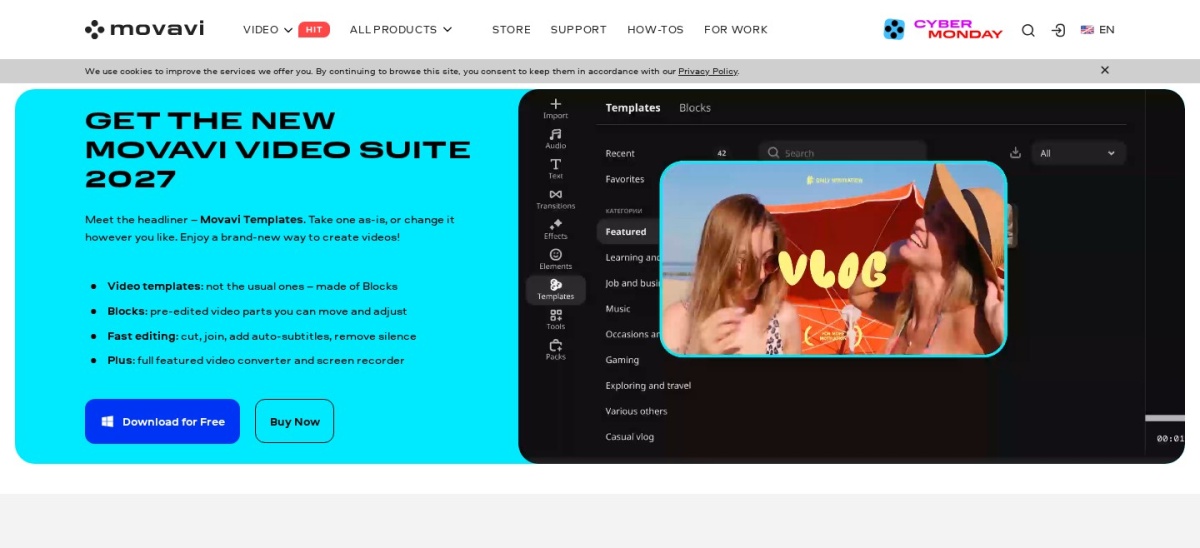
Movavi Video Editor homepage, captured Nov 2026.
Movavi Video Editor is a plain desktop editor for Windows and Mac that keeps dance edits simple. It has drag-and-drop templates, one-click captions, auto crop for vertical video and silence removal, so a rehearsal clip becomes a shareable cut in minutes. The interface stays readable for first-time editors.
The trade off is depth and price. There is no automatic beat sync, and the free version watermarks exports and caps them at 60 seconds. The regular price is $79.95 a year, though the store has shown it at $54.95. It suits beginners who want quick edits without a pro learning curve.
What we like
Very easy first-time interface
Auto crop turns landscape clips vertical
One-click captions and silence removal
Templates for fast social cuts
Watch out for
No automatic beat sync
Free exports are watermarked and capped at 60 seconds
Regular $79.95 a year is often shown on sale
Paid removes the watermark, the 60-second cap and the 4K limitVisit movavi.com
07
CyberLink PowerDirector
4.4/5on G2 (57 reviews, checked Nov 2026)
Paid from$79.99/yr
Best template and stock library
Beat syncNo, manual cuts
AI credits100 a month, 365 plan
Cloud storage50GB, 365 plan
Free tierEssential, watermarked
cyberlink.com
CyberLink PowerDirector homepage, captured Nov 2026.
CyberLink PowerDirector is CyberLink's all-round editor for desktop and mobile, with motion tracking, multicam editing and a stock library of effects, music and clips. The 365 plan adds AI tools, monthly updates and 50GB of cloud storage, and the mobile app edits the same projects on a phone.
The trade off is price and polish. The regular price is $79.99 a year, though sales have shown it near $51.99, and reviewers report occasional lag and crashes on heavy projects. There is no automatic beat sync. It suits creators who want templates and stock in one place.
What we like
Large effects and stock media library
Desktop and mobile apps share projects
Motion tracking and multicam included
Monthly updates on the 365 plan
Watch out for
No automatic beat sync
Regular $79.99 a year is often discounted
Reviewers report lag on heavy projects
365 adds AI tools, 100 credits a month and 50GB cloud storageVisit cyberlink.com
08
LumaFusion
3.9/5on G2 (11 reviews, checked Nov 2026)
Starts at$29.99/one-time
Best pro editor for iPad and iPhone
Tracks6 video and audio
ColourLUT and LOG support
ExportUp to 4K
PlatformiOS and iPadOS only
luma-touch.com
LumaFusion homepage, captured Nov 2026.
LumaFusion is the closest thing to a professional editor that lives on an iPhone or iPad. It offers six video and audio tracks, colour correction with LUT support, multicam and 4K export, all for a $29.99 one-time purchase with no subscription. FCPXML export hands projects to Final Cut Pro.
The trade off is the add-ons. Speed ramping, Multicam Studio and FCPXML export each cost $19.99 extra, and there is no free tier or Android version. The G2 sample is small, at 11 reviews. It suits dancers who shoot and edit entirely on an iPad.
KineMaster is a mobile editor for Android and iOS with a real multi-layer timeline, keyframe animation, chroma key and 4K export at 60 frames a second. It suits dance creators who film on a phone and want frame-level control over cuts, text and effects without opening a computer.
The trade off is the watermark and the price spread. Free exports carry a watermark, and Premium is $59.99 a year on the vendor's own price list, though app stores have shown $49.99 to $59.99 a year. It suits phone-first creators who edit every day.
Beat-matched cuts are the signature move in dance video. The cut lands on the drum hit, the step lands on the cut, and the clip feels faster than it is.
Only CapCut and Filmora do this automatically in this list. CapCut's beat sync is built for short social clips, while Filmora's auto beat detection works on longer desktop timelines.
Every other tool here needs manual markers. Drop a marker on each beat, then snap your cuts to the markers. It takes longer, but it gives exact control over which step lands on which hit.
Whichever route you take, cut on the beat and export vertical. Most dance audiences watch on phones, so a 9:16 export with captions reaches further than a landscape cut.
Free vs paid: what you give up
Free plans cover the basics well. CapCut edits and exports free, DaVinci Resolve is free with no watermark, and Filmora, Movavi, PowerDirector and KineMaster all let you edit before paying.
Paid plans mostly add exports and AI. You pay to remove watermarks, unlock 4K, and get premium templates, AI captions and cloud storage.
One-time purchases suit dancers who hate subscriptions. DaVinci Resolve Studio is $295 once, Final Cut Pro is $299.99 once, and LumaFusion is $29.99 once.
Subscriptions suit creators who publish weekly. Filmora at $49.99 a year and KineMaster at $59.99 a year cost less than one studio session, and both include new features as they arrive.
How we chose
We started from the editors dance creators actually use for TikTok, Reels and Shorts, then kept the nine with a real free plan or trial and a published price.
Prices come from each vendor's pricing page and price trackers that read them, checked on 26 November 2026. Ratings come from G2 and Capterra on the same day. Where a vendor shows a sale, the list shows the regular price.
We left out editors with no public rating and no published price. No vendor paid for a place, and we do not claim to have used these tools ourselves.
How to choose dance video editing software
Start with where you film, then match the editor to your clip length.
Decide phone or computer first. If you film and post from a phone, CapCut, KineMaster or LumaFusion fit best. If you edit rehearsal footage on a computer, start with Filmora or DaVinci Resolve.
Check the beat sync. Short social clips benefit most from automatic beat sync, which only CapCut and Filmora offer here. For longer pieces, manual markers in any pro editor work fine.
Test the free plan before paying. Edit one full dance clip end to end, then export it. If the watermark or the export limit blocks you, that tells you which paid plan you need.
Weigh subscription against one-time. Weekly publishers get value from Filmora at $49.99 a year. Occasional editors save money with a one-time purchase such as LumaFusion at $29.99 or Final Cut Pro at $299.99.
FAQ
What is the best software for dance video editing?
CapCut is the best pick for most dance creators. Its free plan cuts to the beat automatically, adds captions in one tap and includes dance templates timed to popular sounds. Filmora is the easiest desktop alternative, and DaVinci Resolve is the strongest free professional option.
Can I edit dance videos for free?
Yes. CapCut and DaVinci Resolve both edit and export without payment, and CapCut adds automatic beat sync on its free plan. Filmora, Movavi, PowerDirector and KineMaster also have free versions, though exports carry a watermark until you pay.
What is beat sync in video editing?
Beat sync lines up your cuts with the beat of the music, so each step lands on a cut. CapCut and Filmora detect the beat automatically. Other editors need you to drop markers on the beats by hand and snap cuts to them.
Which dance video editor is best on a phone?
CapCut is the best phone editor for dance, with beat sync, templates and captions built in. KineMaster adds a multi-layer timeline with keyframes, and LumaFusion is the pro pick for iPhone and iPad at $29.99 once.
Is Premiere Pro or Final Cut Pro better for dance videos?
Final Cut Pro suits Mac owners who want a $299.99 one-time purchase and fast export on Apple silicon. Premiere Pro suits editors who already use Adobe apps, at $22.99 a month. Neither has automatic beat sync.
Do I need 4K export for dance videos?
Not for TikTok, Reels or Shorts, where 1080p is enough and most viewers watch on phones. 4K matters for client work, class recordings and anything shown on a big screen. CapCut, Filmora and LumaFusion all offer 4K on paid plans.
SaaS SEO and WordPress specialist with about 8 years of experience. Rakib compares WordPress plugins, themes, hosting and software using public pricing, documentation and user reviews. See how we rank.