Canva is the best software for creating logos for most people, with a free plan and Pro at $120 a year, rated 4.7 out of 5 on G2. Pick Looka for a dedicated AI logo maker with downloads from $20, and Affinity Designer for free professional vector editing.
How we make this list: we compare pricing pages, product documentation and public user reviews, then re-check every price before each update. No product paid for a place. Disclosure.
Canva is the top pick: G2 4.7 out of 5 from 7,660 reviews, with a free plan and Pro at $120 a year.
Looka is the best dedicated logo maker: Trustpilot 4.5 out of 5 from 14,426 reviews, with downloads from $20 one-time.
Affinity Designer and GIMP are both free, and Affinity is the only free tool here with full vector editing.
Adobe Illustrator is the priciest at $275.88 a year, with CorelDRAW close behind at $269 a year.
Kittl's G2 rating rests on only 37 reviews, the thinnest review base in this list.
What to look for in logo software
A logo has two jobs: it must read at 16 pixels in a browser tab and still look sharp on a shop sign. That is why file format matters more than the editor you pick.
Vector files such as SVG, EPS and PDF scale without going blurry, while PNG and JPG are fixed pixels. If a tool only exports PNG, budget for a redraw when you need print.
Most tools here let you design for free and charge for the download. Our guide on adding a logo in WordPress shows where the finished file goes once you have it.
Prices below are regular prices checked on 26 November 2026. Where a vendor shows a sale, the list shows the regular price.
Canva is a browser-based design platform where you build a logo from templates, fonts and icons, or start from a blank canvas. The free plan covers the core editor and a large template library, and Pro adds a brand kit, a background remover and one-click resize.
The trade off is control. Canva has no true vector pen tool, so a logo built in Canva does not scale like one drawn in Illustrator, and the best templates and the brand kit sit behind Pro at $120 a year. It suits small businesses that need a logo plus social posts, slides and flyers in one place.
What we like
Free plan covers the core logo editor
Brand kit keeps colours and fonts consistent
Huge template library for every format
Rated 4.7 out of 5 from 7,660 G2 reviews
Watch out for
No true vector pen tool
Best templates and brand kit need Pro
Pro adds the brand kit, background remover and resizeVisit canva.com
02
Looka
4.5/5on Trustpilot (14,426 reviews, checked Nov 2026)
Starts at$20/yr
Best dedicated AI logo maker
Free planDesign free, no download
Cheapest download$20, one-time
Vector filesPremium, $65
Brand kit$96/yr
looka.com
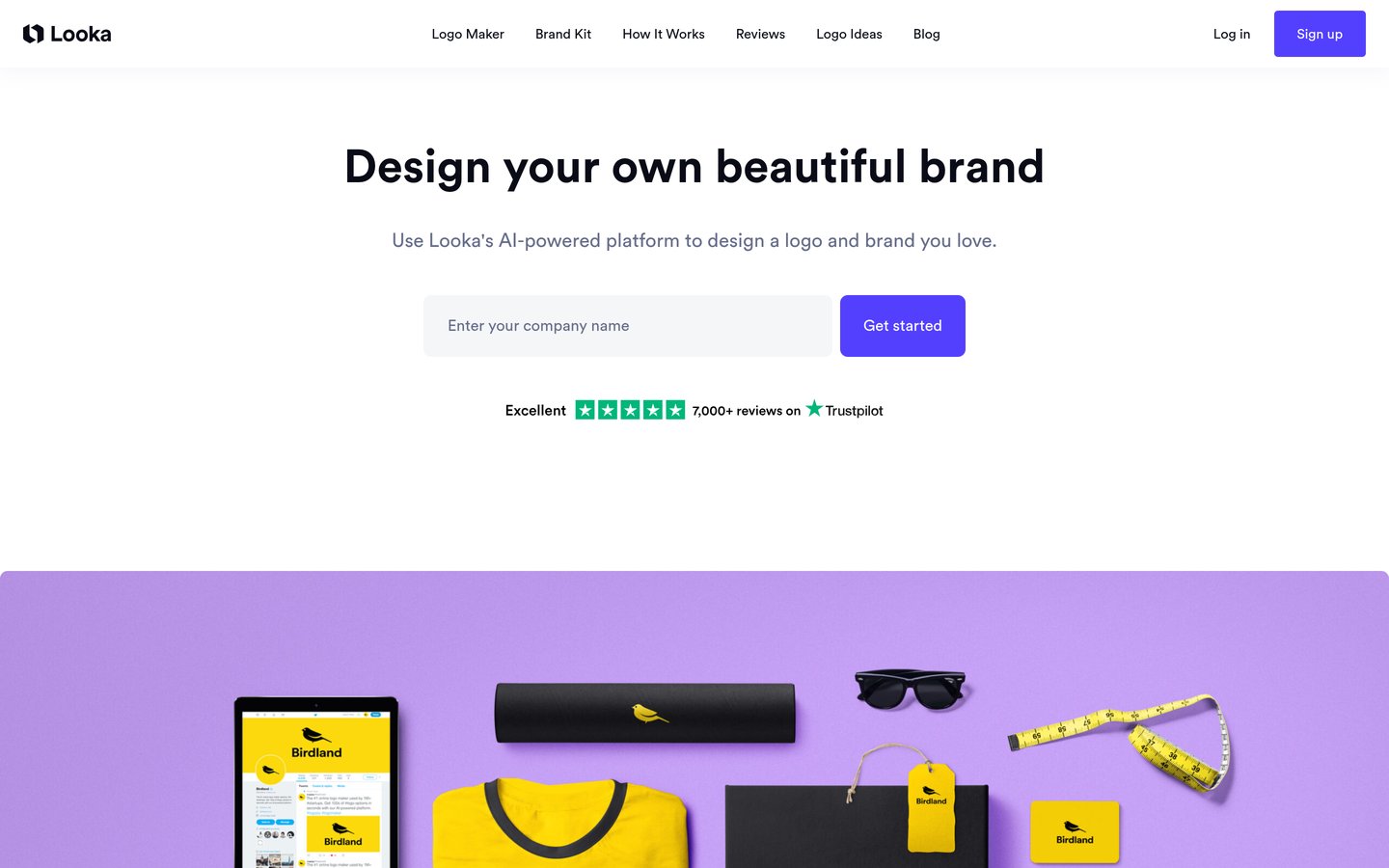
Looka homepage, captured Nov 2026.
Looka is an AI logo maker that turns a business name and a few style choices into hundreds of logo concepts in minutes. Designing is free, and more than 20 million businesses have used it, according to Looka. Paid downloads start with a $20 one-time Basic package.
The trade off is the Basic package. It buys a single low-resolution PNG with no transparent background and no vector files, so the realistic minimum is the $65 Premium package with SVG, EPS and PDF files. It suits founders who want a finished logo and a matching brand kit without hiring a designer.
What we like
Hundreds of concepts in minutes
Full logo ownership on paid plans
Brand kit adds 300+ matching templates
Trustpilot 4.5 from 14,426 reviews
Watch out for
No free download at all
Basic $20 package is a low-resolution PNG only
Designs can look generic
Premium at $65 one-time adds vector files and transparencyVisit looka.com
03
Adobe Express
4.5/5on G2 (848 reviews, checked Nov 2026)
Paid from$99.99/yr
Best for quick on-brand social logos
Free planYes
Premium price$99.99/yr
Stock assets200M+ on Premium
AI credits250/mo on Premium
adobe.com
Adobe Express homepage, captured Nov 2026.
Adobe Express is Adobe's browser-based design app for quick graphics, including logos built from templates or generated with Firefly AI. The free plan covers templates, fonts and basic editing, while Premium at $99.99 a year adds 200 million stock assets, brand kits and more AI credits.
The trade off is depth. Express is a template-led editor, not a vector drawing tool, so fine control over letterforms and paths is limited, and premium assets carry a watermark on the free plan. It suits Adobe users and small teams that need on-brand social graphics alongside their logo.
What we like
Free plan with templates and fonts
Firefly AI generation built in
Brand kits on Premium
Works with Adobe Stock and Fonts
Watch out for
No real vector drawing tools
Premium assets watermarked on the free plan
Premium adds stock assets, brand kits and AI creditsVisit adobe.com
04
Adobe Illustrator
4.6/5on G2 (6,208 reviews, checked Nov 2026)
Starts at$22.99/mo
Best professional vector logo tool
Free planNo, free trial
Vector editingFull pen tools
File exportsSVG, EPS, PDF
Paid plan$22.99/mo
adobe.com
Adobe Illustrator homepage, captured Nov 2026.
Adobe Illustrator is the industry-standard vector editor for logos, icons and brand graphics. It gives full control over paths, letterforms and colour, and exports clean SVG, EPS and PDF files that scale to any size. A free trial is included, then the single-app plan costs $22.99 a month.
The trade off is price and learning curve. At $275.88 a year it is the most expensive tool here, and beginners face a steep climb before they draw anything polished. It suits designers and businesses that need a precise, scalable logo and already work inside Adobe's apps.
What we like
Full vector control for any logo
Clean SVG, EPS and PDF exports
Industry standard, so files open anywhere
AI-assisted vector workflows
Watch out for
Most expensive tool in this list
Steep learning curve for beginners
No free plan, only a trial
Single-app plan is $22.99 a month after the trialVisit adobe.com
05
Affinity Designer
4.5/5on G2 (454 reviews, checked Nov 2026)
PriceFree
Best free professional vector editor
Free planYes, full app
Vector toolsFull pen + nodes
AI featuresCanva plan needed
Paid planNone for core app
affinity.studio
Affinity Designer homepage, captured Nov 2026.
Affinity Designer is a desktop vector editor for macOS, Windows and iPad, now free for individuals after Canva relaunched Affinity as one free app in October 2025. It includes vector, pixel and layout studios with full export options and no subscription.
The trade off is AI and onboarding. The AI studio tools need a Canva premium plan, and you need a free Canva account to download and activate the app. It suits solo designers who want professional vector tools at no cost and do not need AI generation.
Kittl is a browser-based design platform built around typography, templates and mockups, with AI generation for logos, merch and packaging. The free plan covers five projects and personal use, while Pro at $168 a year adds vector exports, custom fonts and a commercial licence.
The trade off is the thin review base and the price move. G2 shows only 37 reviews, and Pro's annual price was listed at $144 a year in late October before the $168 figure seen in November. It suits print-on-demand sellers and brands where distinctive lettering carries the logo.
CorelDRAW is a professional vector and layout suite for Windows, macOS and the web, with photo editing and font management included. The 2026 release adds AI vector tools, and subscribers get 2,000 AI credits a month. The annual plan lists at $269 a year.
The trade off is cost and focus. At $269 a year it is built for print shops and sign makers, not for a one-off logo, and the site currently shows a Black Friday sale price well below the regular rate. It suits businesses that also need page layout and print production in one suite.
GIMP is a free, open-source raster image editor for Windows, macOS and Linux, and version 3.2.8 shipped in November 2026. It handles photo-style logo work, text effects and high-resolution exports, and there is no paid tier at all.
The trade off is that GIMP is not a vector editor. Logos drawn in GIMP are pixels, so they do not scale cleanly to signage or print, and the interface takes time to learn. It suits anyone on a zero budget who needs a raster logo for web use and is comfortable editing pixels.
4.8/5on Trustpilot (17,815 reviews, checked Nov 2026)
Starts at$47.88/yr
Best logo plus business launch bundle
Free planDesign free
Cheapest paid$47.88/yr
Vector filesHigher tier
LLC formationBundled on Elite
tailorbrands.com
Tailor Brands homepage, captured Nov 2026.
Tailor Brands is an AI logo maker bundled into a small-business platform with LLC formation, a website builder and business cards. You design for free, and downloads need a subscription starting at $47.88 a year on the annual Basic plan.
The trade off is the subscription and the confusion. There is no one-time purchase, vector files need a higher tier, and the logo plans overlap with the LLC plans under similar names. It suits founders launching a business who will actually use the formation and website tools too.
One-time purchase vs subscription: what costs less
Looka and CorelDRAW still sell one-time options: Looka's Premium logo package is $65 once, and CorelDRAW's 2026 suite is $549 once.
Most tools here are subscriptions, and the total keeps growing while you pay. Tailor Brands has no one-time option at all, so a logo that costs $47.88 in year one costs the same again in year two.
A one-time purchase wins if you only need one logo. A subscription wins if you also need the extras, such as Canva's brand kit or Looka's $96-a-year brand kit with 300+ templates.
How we chose
We started from the logo tools with the largest public review bases on G2 and Trustpilot, then kept nine that cover AI makers, template editors and professional vector apps.
Prices come from each vendor's pricing page and review data, checked on 26 November 2026. Ratings and review counts come from G2 or Trustpilot on the same day. Where a vendor shows a sale, the list shows the regular price.
We left out tools with no public rating we could verify. No vendor paid for a place, and we do not claim to have used these tools ourselves.
How to choose logo software
Start with where the logo will live, then check what the free plan lets you take home.
Decide where the logo will appear. Web-only logos can be PNG, but print, signage and merch need vector files, so pick a tool that exports SVG or EPS.
Check what the free plan actually lets you download. Several tools let you design for free and charge at download, and the cheapest tier may only include a low-resolution PNG.
Match the tool to your skill level. AI makers and Canva suit beginners, while Illustrator, Affinity and CorelDRAW suit people comfortable with vector drawing.
Read the ownership terms before you pay. Make sure the plan you buy includes full commercial rights and the file formats you need, with no renewal surprise.
FAQ
What is the best software for creating logos?
Canva is the best pick for most people. Its free plan covers the core logo editor, Pro costs $120 a year, and it is rated 4.7 out of 5 from 7,660 G2 reviews. It also covers social posts, slides and flyers in the same account.
Can I create a logo for free?
Yes. Canva, Adobe Express, Affinity Designer and GIMP all have free plans that let you design and export a logo at no cost. Looka and Tailor Brands let you design for free but charge for the download, starting at $20 and $47.88 a year.
What file format should a logo be?
Use a vector format such as SVG, EPS or PDF for anything that must scale, including print, signage and merch. PNG works for websites and social profiles, but it goes blurry when enlarged. Check the export list before you pay.
Is an AI logo maker good enough for a business?
For a small business it usually is. AI makers such as Looka produce clean, usable marks quickly and include full ownership on paid plans. For a distinctive mark that must stand out, a designer or a vector tool gives more control.
Do I need vector software to make a logo?
Not for web use only. A PNG logo from Canva or Looka is fine on a website or social profile. You need vector software such as Illustrator or Affinity Designer when the logo must also work in print, on signs or on merchandise.
Which logo software is best for beginners?
Canva and Looka are the easiest starting points. Canva guides you with templates, while Looka builds hundreds of concepts from a short questionnaire. Both let you start free, so you can compare results before paying anything.
How much does logo software cost?
From nothing to $275.88 a year. Affinity Designer and GIMP are free, Looka downloads start at $20 one-time, and Canva Pro is $120 a year. Adobe Illustrator is the priciest here at $22.99 a month, with CorelDRAW close behind at $269 a year.
SaaS SEO and WordPress specialist with about 8 years of experience. Rakib compares WordPress plugins, themes, hosting and software using public pricing, documentation and user reviews. See how we rank.