ClickUp is the best project management tool for most freelancers. Its free plan covers unlimited tasks and members, and paid plans start at $12 per user a month, with native time tracking and Gantt charts included. Pick monday.com for visual client boards and Paymo if you need time tracking and invoicing in one place.
How we make this list: we compare pricing pages, product documentation and public user reviews, then re-check every price before each update. No product paid for a place. Disclosure.
ClickUp leads with the most generous free plan: unlimited tasks and members, plus native time tracking.
monday.com has the highest G2 rating here at 4.7 out of 5 from 17,182 reviews, with Basic at $9 per seat a month.
Trello and Todoist are the cheapest paid options at $60 a year, and both have usable free plans.
Only Paymo and Teamwork.com combine project tracking with invoicing, so freelancers who bill by the hour can skip a second app.
Asana and monday.com both charge per seat with minimums, so a solo freelancer pays for seats they do not use.
What freelancers should look for
Freelancers buy project tools differently from teams. There is usually one seat, several clients at once, and a need to turn tracked hours into an invoice without a second app.
A free plan matters more here than in team tools. Seven of the nine tools in this list have a free plan, but the limits differ: ClickUp allows unlimited members, Trello allows 10 collaborators, and Asana allows only 2 users.
Time tracking and invoicing decide the shortlist for many freelancers. Our guide on whether WordPress is good for freelancing covers the wider setup, but the tool itself should at least track time against each client project.
Per-seat pricing can punish solo buyers. monday.com requires at least 3 seats on paid plans and Asana Starter has a 2-seat minimum, so check the minimum bill, not just the headline price.
The 9 best project management tools for freelancers
01
ClickUp
4.6/5on G2 (13,731 reviews, checked Nov 2026)
Paid from$12/mo
Best project management tool for freelancers overall
Free planUnlimited tasks and members
Time trackingNative, on all plans
Gantt chartsUnlimited plan and up
Paid planBusiness, $12/user/mo
clickup.com
ClickUp homepage, captured Nov 2026.
ClickUp is an all-in-one work platform that bundles tasks, docs, chat, goals and time tracking into one workspace. The free plan covers unlimited tasks and unlimited members with 100 MB of storage, Kanban boards, native time tracking and sprint management, which is more than most rivals give away.
The trade off is price clarity. Unlimited costs $7 per user a month billed annually, while Business costs $12 billed annually and adds workload views, advanced automations and Google SSO. It suits freelancers who want one app for tasks, docs and time tracking instead of three subscriptions.
What we like
Most generous free plan in this list
Native time tracking with no add-on
Gantt charts, docs and goals in one place
Watch out for
Two plan lines on the pricing page confuse buyers
Wide feature set takes time to set up
AI features cost extra on top of paid plans
Business adds workload views and 5,000 automations a monthVisit clickup.com
02
monday.com
4.7/5on G2 (17,182 reviews, checked Nov 2026)
Paid from$9/mo
Best for visual client boards
Free planUp to 2 seats, 3 boards
Paid seat minimum3 seats on paid plans
AutomationsNone on Basic
Paid planBasic, $9/seat/mo
monday.com
monday.com homepage, captured Nov 2026.
monday.com is a board-based work platform where each client project gets colour-coded statuses, timelines and calendars in one view. The free plan covers up to 2 seats with 3 boards and more than 200 templates, and Basic costs $9 per seat a month billed annually for unlimited boards and items.
The trade off is the seat minimum and the thin entry plan. Paid plans need at least 3 seats, so a solo freelancer pays $27 a month, and Basic has no automations or Gantt view. It suits freelancers who share visual boards with clients and want status to be obvious at a glance.
What we like
Highest G2 rating in this list at 4.7 out of 5
Boards are easy for clients to read
More than 200 templates to start from
Watch out for
3-seat minimum makes solo use costly
No automations on the Basic plan
No Gantt view until Standard at $12 a seat
Standard adds the Gantt view and 250 automations a monthVisit monday.com
03
Trello
4.4/5on G2 (14,078 reviews, checked Nov 2026)
Paid from$5/mo
Best value for simple client work
Free plan10 collaborators, 10 boards
Automations1,000 runs/mo on Standard
ViewsTimeline and Calendar on Premium
Paid planStandard, $5/user/mo
trello.com
Trello homepage, captured Nov 2026.
Trello is the Kanban original: boards, lists and cards that anyone can learn in minutes. The free plan covers up to 10 collaborators and 10 boards per Workspace, and Standard costs $5 per user a month billed annually for unlimited boards and collaborators, custom fields and 1,000 automation runs a month.
The trade off is depth. Trello has no built-in dependency management and no native time tracking, so freelancers who bill by the hour need a separate timer. It suits freelancers whose client work is a few columns of cards and who want the cheapest paid plan in this list.
What we like
Joint-cheapest paid plan at $60 a year
Easiest board to learn in this list
Free plan fits small client rosters
Watch out for
No native time tracking or invoicing
No built-in dependency management
Timeline and Calendar views need Premium at $10
Premium adds Timeline, Calendar and unlimited automationsVisit trello.com
04
Notion
4.6/5on G2 (13,876 reviews, checked Nov 2026)
Paid from$10/mo
Best for docs beside tasks
Free planYes, limited for teams
Project viewsBoards, timelines, calendars
File uploadsUnlimited on Plus
Paid planPlus, $10/member/mo
notion.com
Notion homepage, captured Nov 2026.
Notion is a flexible workspace that combines docs, wikis, databases and project tracking in one place. Pages can hold tables, boards, timelines and calendars, and Plus costs $10 per member a month billed annually for unlimited blocks, unlimited file uploads, custom forms and sites, and 30-day page history.
The trade off is that it is a workspace first and a project tool second. There is no native time tracking or invoicing, and Plus includes only a trial of Notion AI. It suits freelancers who keep client notes, briefs and task lists together and like building their own setup.
What we like
Docs, wiki and tasks share one workspace
Very flexible databases and templates
Free plan works well for one person
Watch out for
No native time tracking or invoicing
Full AI features need Business at $20
Takes setup time before it feels like a project tool
Business adds full AI, 90-day history and private teamspacesVisit notion.com
05
Todoist
4.5/5on G2 (869 reviews, checked Nov 2026)
Paid from$5/mo
Best for fast daily task capture
Free planBeginner, 5 projects
Projects on Pro300 personal projects
Calendar layoutPro only
Paid planPro, $5/mo
todoist.com
Todoist homepage, captured Nov 2026.
Todoist is a task manager built around fast capture: type a task in plain words and it sets the date, priority and project for you. The free Beginner plan includes 5 personal projects, list and board views and 3 filter views, and Pro costs $5 a month billed annually for 300 projects, calendar layouts, reminders and full activity history.
The trade off is scope. Todoist is a to-do list, not a full project platform, with no Gantt view, no native time tracking and no invoicing. It suits freelancers who live in a daily task list and run client projects elsewhere or keep them deliberately simple.
What we like
Joint-cheapest paid plan at $60 a year
Fastest task entry in this list
Syncs well across phone and desktop
Watch out for
No Gantt, time tracking or invoicing
Free plan caps at 5 projects
Pro price rose from $48 to $60 a year in December 2025
Business adds team workspaces and admin controls at $8 per userVisit todoist.com
06
Asana
4.4/5on G2 (14,143 reviews, checked Nov 2026)
Paid from$10.99/mo
Best for structured client projects
Free planPersonal, up to 2 users
Paid seat minimum2 seats on Starter
Timeline and GanttStarter and up
Paid planStarter, $10.99/user/mo
asana.com
Asana homepage, captured Nov 2026.
Asana is a work management platform focused on clear task ownership, project milestones and cross-team coordination. Its Personal plan is free for up to 2 users, while Starter costs $10.99 per user a month billed annually for Timeline and Gantt views, reporting dashboards, unlimited automations, forms and unlimited free guests.
The trade off is cost for one person. Starter has a 2-seat minimum, so the smallest bill is about $22 a month billed annually, and native time tracking needs the Advanced plan at $24.99. It suits freelancers who run structured projects with clients and need milestones and approvals tracked properly.
What we like
Clear task ownership and milestones
Timeline, Gantt and dashboards on Starter
Unlimited free guests for clients
Watch out for
2-seat minimum doubles the solo bill
No native time tracking until Advanced
Free plan now covers only 2 users
Advanced adds portfolios, workload and time tracking at $24.99Visit asana.com
07
Paymo
4.6/5on G2 (594 reviews, checked Nov 2026)
Paid from$9.90/mo
Best for tracking hours and invoicing clients
Free planYes, for single users
Time trackingAutomatic, built in
InvoicingBuilt in, from tracked time
Paid planStarter, $9.90/user/mo
paymoapp.com
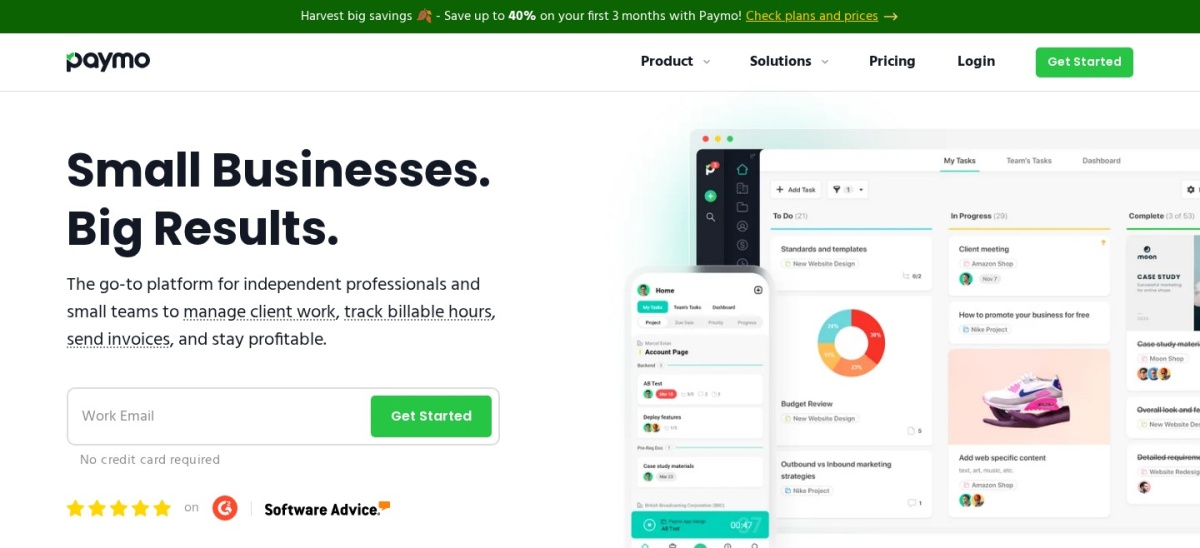
Paymo homepage, captured Nov 2026.
Paymo is built for independent professionals and small teams who bill clients by the hour or by project. It combines task planning, automatic time tracking and invoicing in one tool, so tracked hours can turn into an invoice without a second app. Starter costs $9.90 per user a month and adds expanded project and task features for single users.
The trade off is breadth. Paymo is smaller and less flexible than ClickUp or monday.com, and advanced features such as full resource planning sit on higher plans. It suits freelancers who charge by the hour and want the path from tracked time to paid invoice in one place.
What we like
Time tracking and invoicing built in
Free tier aimed at single users
Rated 4.6 out of 5 on G2
Watch out for
Less flexible than the big all-in-one tools
Smaller template and integration library
Advanced reporting needs higher plans
Small Office adds more users and features at $15.90 per userVisit paymoapp.com
08
Teamwork.com
4.4/5on G2 (1,215 reviews, checked Nov 2026)
Paid from$9.99/mo
Best for client work with budgets
Free planUp to 5 users, 5 projects
Paid seat minimum3 seats on Basics
Time trackingBuilt in, with billable rates
Paid planBasics, $9.99/user/mo
teamwork.com
Teamwork.com homepage, captured Nov 2026.
Teamwork.com is a project platform built for client work, pairing task tracking with time, budgets and client access in one place. The free plan covers up to 5 users and 5 projects, and Basics costs $9.99 per user a month billed annually with time tracking, invoicing and a client portal.
The trade off is the seat minimum and the higher tiers. Basics needs at least 3 seats, and workload planning, profitability views and quotes need the Accelerate or Optimize plans. It suits freelancers with a small roster of retainer clients who want to see whether each project makes money.
Wrike is a work management platform with task and project views, request forms, proofing and approvals, time tracking and resource planning. The free plan allows unlimited users with 200 active tasks and 2 GB of storage, and Team costs $10 per user a month billed annually for Gantt charts, custom fields, shareable dashboards and AI Essentials.
The trade off is the jump past Team. The plan caps at 15 users, and growing past that moves the whole team to Business at $25 per user a month, while proofing and request forms also need Business. It suits freelancers who handle complex client work with formal approvals and review steps.
What we like
Proofing and approvals built in
Gantt charts and dashboards on Team
Free plan allows unlimited users
Watch out for
Lowest G2 rating in this list at 4.2 out of 5
Price jumps to $25 a user past 15 users
Proofing and forms need Business
Business adds proofing, forms and time tracking at $25 per userVisit wrike.com
Free vs paid: what freelancers give up
Free plans cover the basics well. Most include task lists, boards and some kind of time tracking or client sharing.
Paid plans mostly add views and billing. Gantt charts, calendar views, automations and invoicing usually sit behind the first paid tier.
If you bill by the hour, the paid tier often pays for itself. Paymo and Teamwork.com turn tracked hours into invoices, which is hard to do cleanly on a free plan.
For a solo freelancer, the cheapest paid plan is not always the cheapest bill. Check seat minimums first: monday.com needs 3 seats and Asana needs 2, while Trello and Todoist charge for one.
How we chose
We started from the project tools freelancers most often compare, then kept those with a free plan or a low entry price and a public G2 rating.
Prices come from each vendor's pricing page, checked on 26 November 2026. Ratings and review counts come from G2 on the same day. Where a vendor shows a sale, the list shows the regular price.
We left out tools with no public rating and tools priced only by quote. No vendor paid for a place, and we do not claim to have used these tools ourselves.
How to choose a project management tool as a freelancer
Start with how you charge clients, then pick the tool that fits that workflow.
Decide how you bill. Hourly billing needs built-in time tracking and invoicing, which points to Paymo or Teamwork.com. Fixed-price work can use any tool here.
Count the real monthly bill. Check seat minimums before comparing headline prices. monday.com needs 3 seats and Asana needs 2, so a solo freelancer pays more than the listed rate.
Try the free plan with one real client. Run a single live project through it for two weeks. Check whether clients can follow progress without asking for status updates.
Check the exit before you commit. Confirm you can export tasks and time logs. A cheap plan is costly if your client history is locked inside it.
FAQ
What is the best project management tool for freelancers?
ClickUp is the best pick for most freelancers. Its free plan covers unlimited tasks and members with native time tracking, and it is rated 4.6 out of 5 on G2 from 13,731 reviews.
Which project management tool is cheapest for freelancers?
Trello Standard and Todoist Pro are the cheapest paid plans here, both at $60 a year. Trello costs $5 per user a month and Todoist Pro costs $5 a month, both billed annually.
Do freelancers need time tracking in a project tool?
It helps if you bill by the hour. Paymo and Teamwork.com track time and turn it into invoices, while ClickUp tracks time natively. Trello, Notion and Todoist have no built-in time tracking.
Can I use a free project management tool as a freelancer?
Yes, for most solo work. ClickUp, Trello, Notion and Todoist all have free plans, though limits differ: ClickUp allows unlimited members while Asana allows only 2 users.
Is monday.com good for freelancers?
It is strong for visual client boards and holds the highest G2 rating here at 4.7 out of 5. The catch is the 3-seat minimum on paid plans, so a solo freelancer pays $27 a month on Basic.
Which tool is best for invoicing clients?
Paymo is the best fit for invoicing. It combines project tracking, automatic time tracking and invoicing in one app, so tracked hours become an invoice without a second tool.
SaaS SEO and WordPress specialist with about 8 years of experience. Rakib compares WordPress plugins, themes, hosting and software using public pricing, documentation and user reviews. See how we rank.