HeyGen is the best generative AI video tool for most creators, rated 4.8 out of 5 on G2 from 1,951 reviews, with 700-plus avatars in 175-plus languages. Pick Runway for pure text-to-video clips and Synthesia for training videos in many languages.
How we make this list: we compare pricing pages, product documentation and public user reviews, then re-check every price before each update. No product paid for a place. Disclosure.
HeyGen leads at 4.8 out of 5 on G2 from 1,951 reviews, with 700-plus avatars and 175-plus languages.
Runway is the strongest pure text-to-video pick, with Standard at $15 a month for 625 credits.
Synthesia Starter costs $19 a month and covers about 10 minutes of avatar video a month.
Eight of the 9 tools have a free plan; Pictory offers only a 14-day trial.
Cheapest paid plans run from $15 to $59 a month, and most charge by credits or video minutes.
What to look for in a generative AI video tool
Generative AI video tools fall into two groups. Some create new footage from a text prompt or an image, while others turn a script into a presenter video with an AI avatar and voice.
Most tools in this list charge by credits or video minutes, not by video. A short clip can cost more than its running time if you retry prompts or re-render edits, so check the monthly allowance before you pay.
Free plans are useful for a first look, but most add a watermark, cap exports at 720p or limit you to a few minutes a month. Our guide on embedding a video in WordPress shows how to publish a finished clip once it is ready.
Avatar realism varies a lot between tools, and the most lifelike models often cost more credits per minute. Short test videos in your own voice and style tell you more than a feature list.
HeyGen is an AI video platform that turns a typed script into a presenter-led video with a realistic avatar, voice and captions. The free plan includes 1 to 3 watermarked videos a month at 720p, and the Creator plan adds 600 credits a month, 1080p export, videos up to 30 minutes and no watermark.
The trade off is credits. Avatar videos use credits per minute, so long videos or many retakes can use up the monthly allowance fast, and the most lifelike avatar models cost more per minute. It suits marketers and trainers who publish presenter videos in more than one language.
What we like
Highest G2 rating in this list at 4.8 out of 5
700-plus avatars and 175-plus languages
Video translation with voice cloning built in
Free plan for short test videos
Watch out for
Credits run out fast on long videos
Most lifelike avatars cost more per minute
Editing tools are light compared with a full editor
Creator at $24 a month billed yearly adds more creditsVisit heygen.com
02
Runway
4.1/5on G2 (106 reviews, checked Nov 2026)
Paid from$15/mo
Best for pure text-to-video generation
Text-to-videoGen models
Free planYes, credits
Monthly credits625 on Standard
Paid planStandard, $15/mo
runwayml.com
Runway homepage, captured Nov 2026.
Runway is a text-to-video and image-to-video studio built around its Gen models, plus editing tools such as background removal and upscaling. The free plan gives a small monthly credit allowance with watermarks, and Standard adds 625 credits a month, no watermarks, 4K upscaling and 20GB of storage.
The trade off is that credits run out quickly. Each generation costs credits whether the result is usable or not, so prompt retries add up, and unused Standard credits do not roll over. It suits creators who want short, cinematic clips from a prompt or an image.
Synthesia is an AI avatar video platform for training, onboarding and internal communication videos. The free Basic plan includes 500 credits a month, and Starter adds 1,250 credits a month, a large avatar library, voices in 140-plus languages and one-click translation of finished videos.
The trade off is the credit meter. Starter covers about 10 minutes of finished video a month, and every edit re-renders the scene, so revisions use more credits. It suits teams that make training videos in several languages without filming.
What we like
Largest review base in this list at 2,863 G2 reviews
One-click translation into 140-plus languages
Strong fit for training and onboarding
Flat cost per minute whatever avatar you pick
Watch out for
Starter covers only about 10 minutes a month
Edits re-render and use more credits
First-month $9 offer is a promo, not the regular price
VEED is a browser-based video editor with AI tools for subtitles, voiceovers, avatars and text-to-video clips. The free plan covers basic editing with a watermark and limited subtitle minutes, and Creator removes the watermark, adds unlimited subtitle minutes, the full stock library and more than 15 AI tools.
The trade off is that the best AI features sit on higher plans. Clean audio, eye-contact correction and some AI tools need Pro or Studio, so Creator can feel thin for heavy AI use. It suits social creators who want fast editing, captions and short AI clips in one place.
What we like
Easy browser editor with no install
Strong subtitle and caption tools
2,195 G2 reviews at 4.6 out of 5
Free plan for basic edits
Watch out for
Top AI features need Pro or Studio
Free exports carry a watermark
Monthly price feels steep for casual use
Pro adds AI voice, translations and brand kitsVisit veed.io
05
Pictory
4.6/5on G2 (82 reviews, checked Nov 2026)
Starts at$29/mo
Best for turning articles into video
Script to videoYes
Free planTrial only
Video minutes30/mo on Starter
Paid planStarter, $29/mo
pictory.ai
Pictory homepage, captured Nov 2026.
Pictory is an AI video maker that turns scripts, blog posts, webinars and long recordings into short videos with stock footage, captions and AI voices. There is no permanent free plan, only a 14-day trial, and Starter adds 30 video minutes a month, one brand kit and Getty Images and Storyblocks footage.
The trade off is the monthly minute cap. Starter covers 30 minutes a month, so longer videos or frequent publishing push you to Professional at $35 a month billed yearly. It suits marketers who turn written content into short social videos every week.
What we like
Fastest route from a blog post to a video
Stock footage from Getty Images and Storyblocks
Auto captions and AI voices included
Good for repurposing webinars and recordings
Watch out for
No permanent free plan, trial only
30-minute monthly cap is tight for frequent publishers
Auto-matched visuals are not always on message
Professional adds 90 minutes a month and more brand kitsVisit pictory.ai
06
Descript
4.6/5on G2 (938 reviews, checked Nov 2026)
Paid from$24/mo
Best for editing video from a transcript
Transcript editingYes
Free plan1 media hour/mo
AI credits400/mo on Hobbyist
Paid planHobbyist, $24/mo
descript.com
Descript homepage, captured Nov 2026.
Descript is an AI video and audio editor that lets you edit a video by editing its transcript, with Studio Sound, filler-word removal and captions. The free plan includes 1 media hour a month and watermarked 720p exports, and Hobbyist adds 10 media hours, 400 AI credits a month and watermark-free 1080p exports.
The trade off is that AI video generation needs a higher plan. Hobbyist covers editing and clean-up, while the deeper AI toolkit and 4K export sit on Creator and above. It suits podcasters and YouTubers who cut talking-head videos and clips from transcripts.
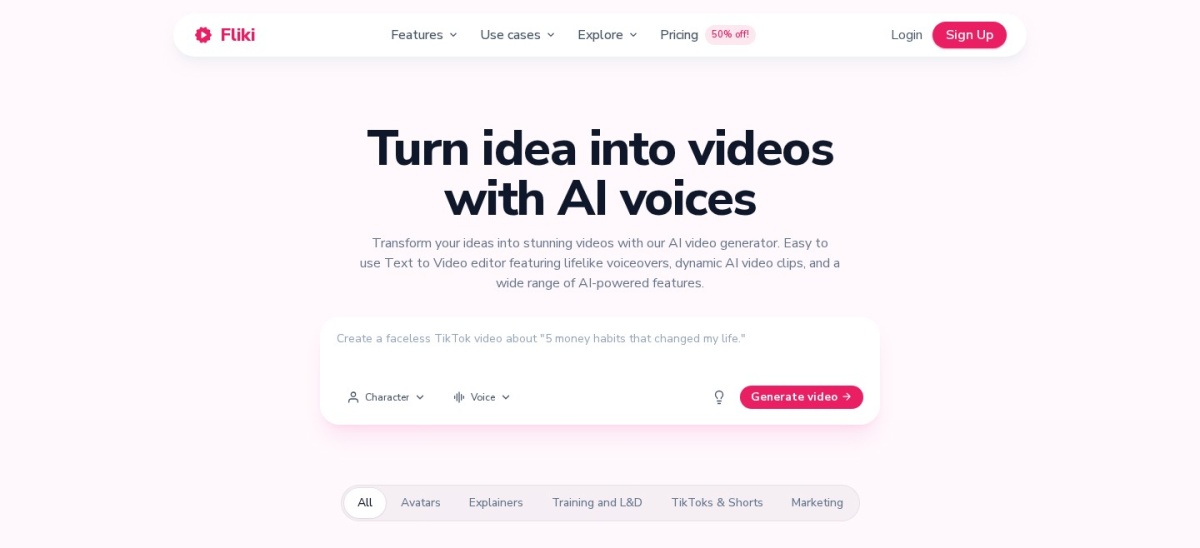
Fliki is a text-to-video tool that turns a script or prompt into a finished video with AI voices, stock media and captions. The free plan includes 3 minutes of video a month at 720p with a watermark, and Standard adds 180 credits a month, 1080p export, videos up to 15 minutes and commercial use rights.
The trade off is the credit system. A short video can use more credits than its running time suggests, and generative video clips and AI avatars need Premium at $88 a month. It suits creators who make faceless explainer and social videos from scripts.
What we like
Second-highest G2 rating here at 4.7 out of 5
1,000-plus AI voices in 80-plus languages
Commercial use rights on Standard
Fast script-to-video workflow
Watch out for
Credits can drain faster than the running time
Generative clips and avatars need Premium
Free plan covers only 3 minutes a month
Premium adds voice cloning, avatars and 4K exportVisit fliki.ai
08
Colossyan
4.6/5on G2 (502 reviews, checked Nov 2026)
Paid from$59/mo
Best for corporate training with SCORM
AI avatars300+ stock
Free plan20 min/mo
SCORM export5/mo on Pro
Paid planProfessional, $59/mo
colossyan.com
Colossyan homepage, captured Nov 2026.
Colossyan is an AI avatar video platform built for corporate training, with interactive videos and SCORM export for learning systems. The free Starter plan includes 20 video minutes a month with NEO avatars, and Professional adds 30 minutes a month, unlimited MP4 downloads, watermark removal and 5 SCORM exports a month.
The trade off is price. Professional costs $59 a month billed yearly, the highest entry price in this list, and unused minutes do not roll over. It suits learning teams that publish training videos and need SCORM and auto-translation.
Lumen5 is an AI video maker that turns blog posts and scripts into social videos with stock photos, video clips and AI voices. The free plan includes 5 videos a month up to 2 minutes each with a branded outro, and Basic adds unlimited videos, 720p export, no Lumen5 branding and custom colors.
The trade off is polish. Reviewers note the auto-matched visuals are not always on message, and 1080p export and the full stock library need Starter at $59 a month billed yearly. It suits small teams that turn written posts into quick social videos.
What we like
Quickest blog-to-video workflow here
Free plan allows 5 videos a month
Easy for non-editors to use
50M-plus stock photos and videos on Starter
Watch out for
Auto-matched visuals miss the message at times
1080p export needs the Starter plan
Smallest G2 review base here at 69 reviews
Starter adds 1080p export and the full stock libraryVisit lumen5.com
Free vs paid: what you give up
Free plans cover a first look well. Most include a few minutes or credits a month, a watermark and 720p export.
Paid plans mostly add minutes and quality. You get more credits, no watermark, 1080p or 4K export and the better avatar models.
Credits are the catch to watch. Unused credits usually expire at the end of the month, and re-renders count again, so a tool that looks cheap can cost more than a flat monthly plan.
If you publish every week, start on the cheapest paid plan of the tool that fits your format, and keep the free plan of a second tool for quick drafts.
How we chose
We started from the best-known generative AI video tools with a public G2 rating, then kept 9 that cover text-to-video, AI avatars and script-to-video.
Prices come from each vendor's pricing page or its G2 pricing listing, checked on 25 November 2026. Ratings and review counts come from G2 on the same day. Where a vendor shows a sale or a first-month offer, the list shows the regular monthly price.
We left out tools with no public rating and tools that only sell custom-priced plans. No vendor paid for a place, and we do not claim hands-on testing for this list.
How to choose a generative AI video tool
Start with the kind of video you make most, then check the meter before you pay.
Decide between generated footage and an avatar. Pick Runway or Fliki for new footage from a prompt, and HeyGen, Synthesia or Colossyan for a presenter who reads your script.
Count your minutes for a normal month. Add up the finished minutes you publish, then check the plan allowance, because credits and re-renders use the meter faster than the headline suggests.
Make one short video on the free plan. Use your own script and images to see how the avatars, voices and captions look before you pay.
Check export quality and rights. Confirm the plan removes the watermark, exports at the resolution you need and includes commercial use for client work.
FAQ
What is the best generative AI video tool?
HeyGen is the best overall pick in this list. It is rated 4.8 out of 5 on G2 from 1,951 reviews, and its Creator plan covers avatar videos in 175-plus languages with 600 credits a month.
Can I make AI videos for free?
Yes, 8 of the 9 tools here have a free plan, but most add a watermark, limit exports to 720p or cap you at a few minutes a month. Pictory is the exception, with a 14-day trial and no permanent free plan.
How much does a generative AI video tool cost?
Cheapest paid plans in this list run from $15 to $59 a month at regular monthly prices. Most charge by credits or video minutes, so the real cost depends on how much you generate and how often you re-render.
Is Runway or HeyGen better for AI video?
It depends on the video. Runway is better for generating new footage from a text prompt or image, while HeyGen is better for presenter-led videos with a realistic avatar, voice and captions.
Do AI video tools need filming or actors?
No. Avatar tools such as HeyGen, Synthesia and Colossyan read your script with a digital presenter, and text-to-video tools such as Runway create footage from a prompt, so you can publish without a camera or a studio.
What should I check before paying for an AI video tool?
Check the monthly credit or minute allowance, whether unused credits roll over, the export resolution, watermark removal and commercial use rights. Make one short video on the free plan first to check avatar and voice quality.
SaaS SEO and WordPress specialist with about 8 years of experience. Rakib compares WordPress plugins, themes, hosting and software using public pricing, documentation and user reviews. See how we rank.